Lesson 10.1: TLS and PKI Certificate Chains
This lesson answers a question that looks simple and turns out to be deep: when you type https://, how does your machine know it is talking to the right server and not to someone in the middle? After this lesson you can read an X.509 certificate with openssl, build your own root, intermediate, leaf trust chain, and recognize four TLS errors that show up often in real systems and in CTFs.
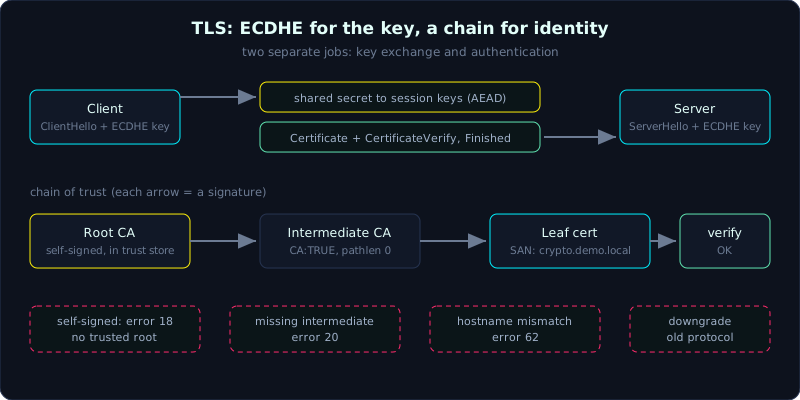 ECDHE gives the session key, the certificate chain gives the server identity, and each chain failure maps to an openssl error code.
| Part 10 (Crypto in Practice) | Time: about 50 minutes | Difficulty: medium |
Prerequisites: Lesson 8.1 (ECC, ECDH, ECDSA) for the key exchange part, Lesson 5.3 (MAC, HMAC) and Lesson 4.2 (GCM) for session encryption. Not required, but reading them first makes this smoother.
Tools: openssl (1.1.1 or newer, this lesson ran on OpenSSL 3.0). With network access you can also run s_client against a real host. Without network you can still do the whole local chain building part.
Goals
By the end of this lesson you can describe a shortened TLS handshake: key exchange with ECDHE, identity authentication with a certificate, then session encryption with AEAD. You understand what PKI is and how the root, intermediate, leaf chain works. You can read an X.509 certificate with openssl x509 and build a three-level chain that openssl verify accepts. You can recognize four real-world problems: self-signed certificates, hostname mismatch, a missing intermediate, and downgrade, and you know why they are dangerous.
1. Theory
1.1. The problem: exchanging a key over a public line
The whole Internet is a public channel that anyone can listen to. Two endpoints that have never met need two things at once. One is a shared key to encrypt the session (so nobody can eavesdrop), and the other is proof that the other end really is the server it claims to be. The first is confidentiality, the second is authentication. TLS solves both. The key point is that key exchange alone is not enough. You must authenticate, otherwise you exchange keys with the attacker.
1.2. A shortened handshake (TLS 1.3)
Here is a real TLS 1.3 handshake with the details removed and only the outline kept:
- ClientHello: the client sends the list of cipher suites it supports, the curve groups, and right away its ephemeral ECDHE public key.
- ServerHello: the server picks a cipher suite and sends its own ephemeral ECDHE public key. At this point both sides can compute a shared secret with ECDH (Lesson 8.1), and session keys are derived from it.
- The server sends Certificate (the certificate chain) and CertificateVerify, an ECDSA or RSA signature over the whole handshake transcript. This signature proves the server holds the private key matching the public key in the leaf certificate.
- Both sides exchange Finished (a MAC over the transcript) to confirm nobody changed packets in between. After that the session is encrypted with AEAD (usually AES-GCM or ChaCha20-Poly1305).
The final E in ECDHE (ephemeral) matters. The ECDH key is generated fresh for each session and then discarded. So even if the server’s private key leaks later, an attacker still cannot decrypt sessions recorded earlier. This property is called forward secrecy.
A common confusion is mixing up the two. ECDHE handles key exchange, and the certificate handles authentication. They are separate jobs. The public key in the certificate (RSA or ECDSA) is used to SIGN, not to exchange the session key. The session key comes from the ephemeral ECDHE.
1.3. PKI and the chain of trust
Back to the original question. The server’s leaf certificate says “I am example.com”, but can we trust it? The answer from PKI (Public Key Infrastructure) is transitive trust.
- Leaf certificate: the server’s own certificate, binding a domain name to a public key. It is signed by an intermediate CA.
- Intermediate CA: a middle organization whose certificate is signed by the root CA.
- Root CA: the anchor. The root certificate is self-signed and comes preinstalled in the trust store of the operating system and browser.
The browser trusts the leaf because it can check the chain. The leaf was signed by the intermediate, the intermediate was signed by the root, and the root is already in the trust store. Each link is a digital signature, since the lower certificate carries a signature from the one above, and anyone can verify it with the upper certificate’s public key. Trust here is a chain of signatures that ends at a root we chose to trust beforehand.
Why bother with an intermediate level? The root’s private key is extremely valuable, since a leak would take down the whole ecosystem, so it is kept offline in a safe. The intermediate does the daily signing. If it leaks, only one intermediate has to be revoked, instead of replacing a root on billions of devices.
1.4. X.509, the certificate format
An X.509 certificate is an ASN.1 structure (a binary serialization format), usually wrapped in PEM (base64 with a -----BEGIN CERTIFICATE----- header). The fields most worth reading:
- Subject: the owner, containing the CN (Common Name) and, more importantly, the SAN (Subject Alternative Name, the list of valid domain names). Modern browsers trust only the SAN and ignore the CN.
- Issuer: who signed this certificate. For a leaf this is the intermediate’s name.
- Validity: Not Before and Not After, the period in which the certificate is valid.
- Public Key: the subject’s public key.
- Extensions:
basicConstraints(CA or not),keyUsage,extendedKeyUsage(for example serverAuth), and the SAN. - Signature: the issuer’s signature over everything above.
2. Demo
We build our own three-level chain and make openssl verify accept it, then break it in different places to see the real errors. Everything runs locally, no network needed.
2.1. Building the root, intermediate and leaf chain
1
2
3
4
5
6
7
8
9
10
11
12
13
14
15
16
17
18
19
20
21
22
23
24
25
26
# 1) Self-signed root CA (ECC P-256)
openssl ecparam -name prime256v1 -genkey -noout -out root.key
openssl req -x509 -new -key root.key -sha256 -days 3650 -out root.crt \
  -subj "/C=VN/O=DemoCA/CN=Demo Root CA"

# 2) Intermediate CA, signed by the root
openssl ecparam -name prime256v1 -genkey -noout -out inter.key
openssl req -new -key inter.key -out inter.csr -subj "/C=VN/O=DemoCA/CN=Demo Intermediate CA"
cat > inter_ext.cnf <<'EOF'
basicConstraints=critical,CA:TRUE,pathlen:0
keyUsage=critical,keyCertSign,cRLSign
EOF
openssl x509 -req -in inter.csr -CA root.crt -CAkey root.key -CAcreateserial \
  -sha256 -days 1825 -extfile inter_ext.cnf -out inter.crt

# 3) Leaf for crypto.demo.local, signed by the intermediate
openssl ecparam -name prime256v1 -genkey -noout -out leaf.key
openssl req -new -key leaf.key -out leaf.csr -subj "/C=VN/O=DemoSite/CN=crypto.demo.local"
cat > leaf_ext.cnf <<'EOF'
basicConstraints=critical,CA:FALSE
keyUsage=critical,digitalSignature,keyEncipherment
extendedKeyUsage=serverAuth
subjectAltName=DNS:crypto.demo.local,DNS:www.crypto.demo.local
EOF
openssl x509 -req -in leaf.csr -CA inter.crt -CAkey inter.key -CAcreateserial \
  -sha256 -days 365 -extfile leaf_ext.cnf -out leaf.crt
2.2. Reading the leaf certificate
1
2
openssl x509 -in leaf.crt -noout -text | \
  grep -E "Issuer:|Subject:|Signature Algorithm:|Public Key Algorithm:|ASN1 OID:|Not Before|Not After|DNS:|CA:|TLS Web"
The main lines of the output:
1
2
3
4
5
6
7
8
9
10
Signature Algorithm: ecdsa-with-SHA256
Issuer: C = VN, O = DemoCA, CN = Demo Intermediate CA
Not Before: Oct  7 18:50:34 2026 GMT
Not After : Oct  7 18:50:34 2027 GMT
Subject: C = VN, O = DemoSite, CN = crypto.demo.local
Public Key Algorithm: id-ecPublicKey
ASN1 OID: prime256v1
CA:FALSE
TLS Web Server Authentication
DNS:crypto.demo.local, DNS:www.crypto.demo.local
This tells us the leaf was signed by Demo Intermediate CA (Issuer), is meant for crypto.demo.local and www.crypto.demo.local (DNS in the SAN), is not a CA (CA:FALSE), is for a TLS server (serverAuth), and uses an ECC P-256 key.
2.3. Verifying the chain, then breaking each part
The full chain, with the root as the trust anchor and the intermediate passed along:
1
openssl verify -CAfile root.crt -untrusted inter.crt leaf.crt
1
leaf.crt: OK
Now remove the intermediate, which simulates a server that forgot to send the intermediate certificate (a very common web server misconfiguration):
1
openssl verify -CAfile root.crt leaf.crt
1
2
3
C = VN, O = DemoSite, CN = crypto.demo.local
error 20 at 0 depth lookup: unable to get local issuer certificate
error leaf.crt: verification failed
Check the hostname. The right name passes and the wrong name is blocked:
1
2
openssl verify -CAfile root.crt -untrusted inter.crt -verify_hostname crypto.demo.local leaf.crt
openssl verify -CAfile root.crt -untrusted inter.crt -verify_hostname wrong.example.com leaf.crt
1
2
3
4
leaf.crt: OK
...
error 62 at 0 depth lookup: hostname mismatch
error leaf.crt: verification failed
And a self-signed certificate that is not in the trust store is rejected:
1
2
3
openssl ecparam -name prime256v1 -genkey -noout -out ss.key
openssl req -x509 -new -key ss.key -sha256 -days 365 -out ss.crt -subj "/CN=crypto.demo.local"
openssl verify -CAfile root.crt ss.crt
1
2
3
CN = crypto.demo.local
error 18 at 0 depth lookup: self-signed certificate
error ss.crt: verification failed
These error messages (20, 62, 18, and a broken chain) are what the browser reports behind its red warning page. Now you know what each one means.
2.4. Looking at a real handshake with s_client (needs network)
1
2
echo | openssl s_client -connect example.com:443 -servername example.com 2>/dev/null | \
  grep -E "s:|i:|New,|Server Temp Key|Verify return code|Peer signature type"
The real result:
1
2
3
4
5
6
7
8
9
10
0 s:CN = example.com
   i:C = US, O = SSL Corporation, CN = Cloudflare TLS Issuing ECC CA 3
1 s:C = US, O = SSL Corporation, CN = Cloudflare TLS Issuing ECC CA 3
   i:C = US, O = SSL Corporation, CN = SSL.com TLS Transit ECC CA R2
2 s:C = US, O = SSL Corporation, CN = SSL.com TLS Transit ECC CA R2
   i:C = US, O = SSL Corporation, CN = SSL.com TLS ECC Root CA 2022
New, TLSv1.3, Cipher is TLS_AES_256_GCM_SHA384
Peer signature type: ECDSA
Server Temp Key: X25519, 253 bits
Verify return code: 0 (ok)
Reading it line by line, the chain goes from the leaf s: (subject) up through each i: (issuer), and each certificate points to the one above, as in the theory. The session runs TLS 1.3 and the AEAD is AES-256-GCM. The line Server Temp Key: X25519 is the ephemeral ECDHE key, which is the evidence of forward secrecy. Peer signature type: ECDSA is the CertificateVerify signature. And Verify return code: 0 (ok) means the chain of trust verified cleanly.
3. Lab
- Task: using the chain you built in section 2, write a bash script (or use
openssl verifystep by step) that checks: (1) the leaf was signed by the right intermediate, (2) the intermediate was signed by the right root, (3) the validity period is current, (4) the SAN matches the domaincrypto.demo.local. Print PASS/FAIL for each criterion. - Try to break it: create a second leaf signed by a different root (an impersonator), then try
verifywith the realroot.crt. Observe the error. This simulates an attacker presenting a certificate signed by an unknown CA. - Files: there is no separate lab script for this lesson. Everything is in the openssl commands of section 2. Copy them and run them.
- Hints: (1)
openssl x509 -noout -datesfor validity; (2)openssl x509 -noout -ext subjectAltNameto get the SAN; (3)openssl verify -verify_hostnamedoes the name matching step for you; (4) to see which certificate signed which, compare the-subject_hashof the issuer with the-hashof the subject. - Done when: the script prints OK for the real chain and reports the right error for the impersonator chain.
4. Key takeaways
- ECDHE handles the session key exchange (and gives forward secrecy), and the certificate handles identity authentication. They are different jobs.
- TLS trust is a chain of signatures leaf, intermediate, root, ending at a root already in the trust store.
- Modern browsers match the domain name against the SAN, not the CN.
- The server must send the intermediate along. Without it you get “unable to get local issuer certificate”.
- A self-signed certificate is rejected because no trusted root vouches for it.
- Only
Verify return code: 0 (ok)means the chain is clean. Seeing a certificate is not enough.
5. Common pitfalls
- Thinking HTTPS means absolute safety. HTTPS guarantees only that the channel is encrypted and that identity was authenticated up to a CA. If you ignore certificate warnings, or trust a rogue CA installed on your machine, you are still exposed.
- Confusing CN with SAN. A certificate with a CN but no SAN matching the domain is rejected by new browsers, even if
openssl x509prints a neat CN. - Thinking the signature on a certificate protects its content. It does not. Certificates are public and anyone can read them. The signature only prevents modification and proves the issuer approved it.
- Trusting self-signed certificates in code. Many home-made clients turn off certificate verification (
verify=False) to avoid trouble, which opens the door to a man-in-the-middle. In a CTF, an endpoint with verification turned off is often an intended vulnerability. - Downgrade attacks. If a client agrees to fall back to TLS 1.0 or weak export ciphers when pushed, a man-in-the-middle can downgrade the session and then break it. TLS 1.3 blocks most of this by signing the whole transcript, but a server configured to allow old protocols is still exposed.
- Forgetting expiry. An expired certificate is a classic operational error that takes services down. Always check
Not After.
6. Further reading
- RFC 8446 (TLS 1.3). At least read the handshake description, which is written very clearly.
- “Bulletproof SSL and TLS” by Ivan Ristic, the standard book on practical TLS and server configuration.
- badssl.com: a site with many broken certificates ready for you (self-signed, expired, wrong-host, weak cipher), so you can point
s_clientat them and watch each error. - Lesson 8.1 (ECC) and Lesson 8.2 (ECDSA nonce reuse): a deeper look at the signing and key exchange that TLS relies on.
- Lesson 11.2 in this series: a CTF writeup that exploits ECDSA nonce reuse, a close relative of the signatures in TLS.