Lesson 2.1: Encoding Is Not Encryption
This lesson separates encoding (changing how data is represented) from encryption (which needs a key). It shows how to recognize Base64, Base32, Base85, hex and URL encoding by eye, and how to peel an unknown string quickly with CyberChef. After it you will stop spending time brute-forcing something that only needs a one-line decode.
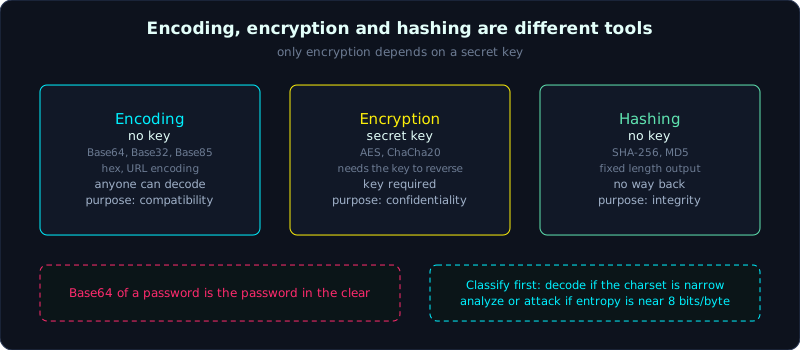 Encoding has no key and is reversible by anyone, encryption needs a key, and hashing has no way back.
| Part: 2 (Encoding and classical ciphers) | Time: about 25 minutes | Difficulty: easy |
Prerequisites: none. Calling Python functions is enough.
Tools: Python 3 (standard library, nothing to install), CyberChef (web version, or download it and run offline).
Goals
By the end of this lesson you can say clearly why encoding is not encryption and why confusing them is dangerous in security work. You can recognize Base64, Base32, Base85, hex and URL encoding by their character set and length. You can encode and decode all five in Python. You can use CyberChef with Magic to peel a multi-layer string without guessing.
1. Theory
Encoding changes the format, it does not lock anything
A classic misunderstanding is to see a messy string like aGVsbG8gd29ybGQ= and think “it is encrypted”. It is not. It is encoding, specifically Base64, and it is just another way to write the string hello world.
Three concepts are often mixed up:
- Encoding: change data into another character set so it can be transmitted or stored safely over some channel. There is no key. Anyone can decode it, and the rules are public.
- Encryption: turn plaintext into ciphertext using a secret key. Without the key it cannot be read, in principle.
- Hashing: turn data into a fixed-length string, one way, with no path back.
To remember it, encoding is for compatibility, encryption is for confidentiality, and hashing is for integrity checks. Base64 protects nothing. If a system “hides” a password with Base64, the password is stored in the clear.
Why do people encode? Many channels only accept printable ASCII text. Email (the MIME standard), URLs, JSON and tokens in HTTP headers all dislike raw bytes (byte 0x00, control bytes, non-ASCII characters). Encoding wraps raw bytes in a safe character set so they pass through those channels intact.
Base64: 3 bytes become 4 characters
Base64 takes binary data and cuts it into groups of 6 bits. Each 6-bit group (value 0 to 63) maps to a character in the table A-Z a-z 0-9 + /. Since 3 bytes = 24 bits = 4 groups of 6 bits, every 3 input bytes become 4 output characters. The data grows by about 33 percent.
When the number of bytes is not divisible by 3, Base64 appends the padding character = at the end to reach a multiple of 4. That is why you often see = or == at the tail.
How to recognize Base64 by eye:
- Only
A-Z a-z 0-9 + /, possibly ending with=or==. - The length is a multiple of 4 (with standard padding).
- Uppercase and lowercase letters are mixed evenly.
There is a variant, Base64url, used in URLs and JWT (JSON Web Token). It replaces + with -, replaces / with _, and often drops the =. If a string looks like Base64 but has - and _, think of JWT.
Base32: sparser, all uppercase
Base32 cuts into groups of 5 bits, with a table of A-Z and 2-7. Every 5 input bytes become 8 output characters. It grows more than Base64 (about 60 percent), but in exchange it is case-insensitive to read and has fewer confusing characters (no 0, 1, 8, 9).
To recognize it, look for all UPPERCASE letters and the digits 2 to 7, never any lowercase letter, and often a long run of = at the end. Many = signs and all uppercase letters strongly suggest Base32. It is common in TOTP secrets and Tor .onion addresses.
Base85 (Ascii85): denser still
Base85 packs 4 bytes into 5 characters using 85 printable characters, so it is denser than Base64 (only about 25 percent growth). There are several variants. The original Adobe Ascii85 is often wrapped between <~ and ~>, while Z85 (used in ZeroMQ) has its own character table.
To recognize it, look for “odd” characters that Base64 does not have, such as !, #, $, %, *, ?, @. If you see these mixed into a block that looks like garbage, think of Base85.
Hex: 1 byte becomes 2 characters
Hex (base 16) writes each byte as exactly two characters from 0-9 a-f. It is simple and the easiest to recognize. The length is always even.
To recognize it, look for only 0-9 a-f (or A-F), even length, and no letter beyond a to f. If you see g, h or z, it is definitely not hex.
URL encoding (percent-encoding)
URL encoding replaces each byte that is “not safe for a URL” with % plus two hex characters. For example a space becomes %20 and & becomes %26. In a query string a space is sometimes written as +.
To recognize it, look for % followed by two hex characters scattered through a string where the rest is still readable. It hides nothing. It only keeps the URL syntax from breaking.
Why the distinction matters in CTFs
At the start of each challenge, the first job is to classify it. Is it encoding (decode and done), a classical cipher (needs analysis), or real encryption (needs an attack)? Mistaking encoding for encryption wastes your time, since you write a brute-forcer for something CyberChef peels in two seconds. The reverse is also useless. If you treat an AES ciphertext as “probably just Base64” and keep trying to decode it, you get nowhere.
Three questions to ask about an unknown string:
- What is the character set? (only hex? any lowercase? a trailing
=? any%?) - Does the length follow a pattern? (a multiple of 4 suggests Base64, even suggests hex)
- Does the decoded result make sense, or is it another layer of encoding?
2. Demo
Everything uses the Python standard library, nothing to install.
1
2
3
4
5
6
7
8
9
10
11
12
13
14
15
16
17
18
19
20
21
22
23
24
25
26
27
28
29
30
31
32
33
34
35
36
# encoding_demo.py: encode and decode five common formats, all with the standard library
import base64
import binascii
import urllib.parse

data = b"hello world"  # 11 bytes, not divisible by 3, so Base64 will have padding

# --- Base64 ---
b64 = base64.b64encode(data)
print("Base64      :", b64.decode())            # aGVsbG8gd29ybGQ=  <- has '=' padding
print("  decoded    :", base64.b64decode(b64))

# Base64url: replaces +/ with -_ and drops padding. Used in JWT
b64url = base64.urlsafe_b64encode(b"\xfb\xff\xbf").rstrip(b"=")
print("Base64url   :", b64url.decode(), "(note the '-' and '_')")

# --- Base32 ---
b32 = base64.b32encode(data)
print("Base32      :", b32.decode())            # all uppercase + digits 2-7, many '='
print("  decoded    :", base64.b32decode(b32))

# --- Base85 (Ascii85) ---
b85 = base64.a85encode(data)
print("Base85      :", b85.decode())
print("  decoded    :", base64.a85decode(b85))

# --- Hex ---
h = binascii.hexlify(data)
print("Hex         :", h.decode())              # length is always even
print("  decoded    :", binascii.unhexlify(h))

# --- URL encoding ---
raw = "a b&c=d/e"
enc = urllib.parse.quote(raw)
print("URL encode  :", enc)                      # note: quote() leaves '/' unchanged by default
print("  decoded    :", urllib.parse.unquote(enc))
Output:
1
2
3
4
5
6
7
8
9
10
11
Base64      : aGVsbG8gd29ybGQ=
  decoded    : b'hello world'
Base64url   : -_-_ (note the '-' and '_')
Base32      : NBSWY3DPEB3W64TMMQ======
  decoded    : b'hello world'
Base85      : BOu!rD]j7BEbo7
  decoded    : b'hello world'
Hex         : 68656c6c6f20776f726c64
  decoded    : b'hello world'
URL encode  : a%20b%26c%3Dd/e
  decoded    : a b&c=d/e
A small note: quote() treats / as safe by default and does not encode it. To encode / as well, pass safe="". The first three lines already show the differences. Base64 mixes cases, Base32 is all uppercase with a long = tail, and hex has only 0-9 a-f and is twice as long. These are the three signs you will use to recognize them by eye.
Peeling a multi-layer string
CTF authors often stack several encoding layers to intimidate players. Peel one layer at a time by its character set, and inspect each result again.
1
2
3
4
5
6
7
8
9
10
11
12
13
14
15
16
# multilayer.py: build a 3-layer string, then peel it back
import base64

secret = b"FLAG{encoding_is_not_encryption}"

# Packing: hex -> base32 -> base64 (the outermost layer is base64)
layer1 = secret.hex().encode()          # becomes hex text
layer2 = base64.b32encode(layer1)       # wrap in base32
layer3 = base64.b64encode(layer2)       # wrap in the outer base64
print("String received:", layer3.decode())

# Peeling back: look at the character set to know what to decode with
step = base64.b64decode(layer3)         # has lowercase + '=' -> base64
step = base64.b32decode(step)           # all uppercase + '=' -> base32
step = bytes.fromhex(step.decode())     # only 0-9 a-f, even length -> hex
print("Final result   :", step.decode())
Output:
1
2
String received: R1EzRElZWlVHRTJE...  (one long base64 block)
Final result   : FLAG{encoding_is_not_encryption}
The key point is not to guess. Look at the character set of each layer to decide what to decode with. Mixed lowercase and uppercase with = means Base64. If the decoded result is all uppercase with =, it is Base32 next. If that decodes to only 0-9 a-f, it is hex.
Using CyberChef for speed
CyberChef is a general-purpose tool for working with data, and it runs entirely in the browser. There are two ways to use it:
- Manually: drag operations such as “From Base64”, “From Hex” and “URL Decode” into the Recipe, in the order that peels each layer. The result shows immediately in the Output box, and any change to the recipe updates it at once.
- Automatically with Magic: drag in the operation named “Magic” and turn on the “Intensive mode” option. Magic tries many decodings, scores how much each result looks like meaningful text, and suggests the most likely chain of operations. When you are stuck and do not know the encoding, throw the string into Magic first.
A practical tip is to paste the string into Input and look at the “entropy” bar and the character set. Low entropy and a narrow character set usually mean encoding. Entropy near the maximum (close to 8 bits per byte) means the data is probably compressed or really encrypted, and any decoding gives garbage.
3. Lab
Task: peel all the layers of the string below to get the flag.
1
SVpIVkVUS0JLUjVYU01EVkw1WURHTTNNR05TRjZORE1OUlBYSTJCVEw1V0RJNkpUT0paWDI9PT0=
- Hints, in steps:
- Hint 1: it has a
=tail and both uppercase and lowercase letters, so start with Base64. - Hint 2: decoding the first layer gives a block of all UPPERCASE letters and a few digits with a trailing
=. That is the sign of Base32. If it is not readable text yet, keep peeling. - Hint 3: the flag has the form
FORMAT{...}. After two layers you can read it directly.
- Hint 1: it has a
- Done when: you read out a flag string of the form
FORMAT{...}.
For a second exercise, write the encoder yourself. Write a Python function that takes a string and encodes it through hex, then Base32, then Base85, and prints it. Then write a function that peels it back using only the character set of each layer (do not hardcode the order, infer it: if the string has only 0-9a-f then unhex, if it is all uppercase and 2-7 then un-Base32, and so on). This builds the reflex of recognizing encodings.
4. Key takeaways
- Encoding has no key and anyone can reverse it. It exists for channel compatibility, not for security.
- Base64: uppercase + lowercase + digits +
+/, possibly=at the end, length a multiple of 4. Base64url swaps+/for-_. - Base32: all UPPERCASE letters + digits 2-7, long
=tail. - Hex: only 0-9 a-f, always even length.
- URL encoding:
%plus two hex characters scattered in a string that is still readable. - The first step for an unknown string is to classify it as encoding or encryption. Do not brute-force something that only needs decoding.
5. Common pitfalls
- Believing Base64 is “already encrypted”. This is the most harmful misunderstanding. A password stored as Base64 is a password stored in the clear.
- Mistaking Base64 for hex when the string is short and happens to contain only a-f and 0-9. Check whether any letter falls outside a to f and whether the length is a multiple of 4 or only even.
- Forgetting the Base64url variant. If you see
-and_and standard Base64 decoding gives garbage, switch to urlsafe. - Forgetting padding. Many tokens have their
=stripped. If decoding fails for missing padding, add it back to a multiple of 4 and decode again. - Decoding a high-entropy string anyway. If the string looks fully random, it is not an encoding of text, so do not waste effort.
- Decoding to raw bytes and assuming it failed. The inner layer may be binary data (an image, a compressed file) and not text. Look at the magic bytes at the start (for example
PKis zip,\x89PNGis a PNG image).
6. Further reading
- RFC 4648 (The Base16, Base32, and Base64 Data Encodings): the original document defining the three tables and the padding rules.
- The CyberChef documentation and operation list: look up “Magic”, “From Base64” and “From Hex” to understand their options.
- CryptoHack, Introduction / General: warm-up challenges on encoding and data conversion.
- Continue with Lesson 3.1 on XOR to see the real difference between an operation with a key and one that only changes representation.