Lesson 7.5: Nuitka, Cython and PyArmor
The last few lessons made Python look easy. You could drag a .pyc into pycdc and almost have the source back. That’s true only when the author leaves the bytecode as is. Once they use Nuitka, Cython or PyArmor, it stops working. pycdc returns nothing, uncompyle6 throws errors, and you’re no longer reversing Python.
It’s the same turning point as NativeAOT on the .NET side (Lesson 5.6), because the language-specific tools are useless, so you fall back to native reversing with IDA/Ghidra, or attack the runtime instead. This lesson shows how to tell which kind you’re facing, because picking the wrong direction can cost a whole session.
Three tools, three different natures
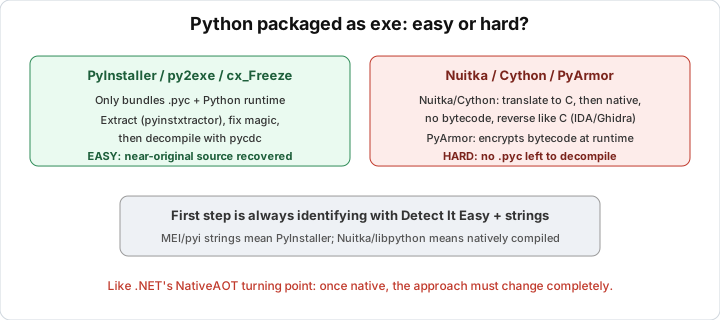
These three work differently, so the handling is different too. Nuitka compiles Python to C and then to native machine code, so the Python bytecode disappears completely. Cython also translates Python (or Cython syntax) to C and then to a C extension (.pyd on Windows, .so on Linux), so it’s native too. PyArmor still runs Python bytecode, but encrypts and wraps it, and only decrypts in memory at runtime. It’s still Python, just locked.
So Nuitka and Cython push you into the native world, while PyArmor keeps you in the Python world with the code hidden.
Nuitka
Nuitka takes your Python program, generates C code calling into the CPython API, then compiles it to an exe (or a folder holding an exe and DLLs). The result is a real native binary, no co_code, no PYZ archive, and pycdc has nothing to work on.
Nuitka still leaves traces. The binary is full of calls to the CPython runtime, with names like PyObject_, PyTuple_New, Py_INCREF, PyImport_. Nuitka also embeds a module table along with lots of strings that leak the original Python function, variable and module names. So even though you have to read assembly, you have more anchors than when reversing a pure C program.
With Nuitka I treat it like a C/C++ binary. Open it in IDA/Ghidra, and use the CPython API calls to understand which Python object is being manipulated at each step. For example, PyObject_RichCompare right after loading the input means a comparison, much like the familiar password check logic. Everything you learned in Parts 3 and 4 applies.
Cython
Cython usually doesn’t produce a whole exe but a compiled module (.pyd/.so) imported from a thin Python script. The sensitive code lives in that native module, and the rest may still be readable .pyc.
You recognize Cython by symbols in the module like __pyx_, __Pyx_, and wrapper function names like __pyx_pf_.... It’s also full of CPython API calls like Nuitka. The strategy is the same, so open the .pyd/.so in Ghidra/IDA, and follow __pyx_ and the CPython API. Don’t look for a Python decompiler, there isn’t one.
PyArmor
PyArmor takes a different road. It doesn’t compile to native. It encrypts the bytecode and adds a runtime layer (an accompanying C module, usually named pytransform in old versions or pyarmor_runtime in new ones) to decrypt and load the code in memory right before running. On disk you only see junk, and the real code only exists in RAM during execution.
You recognize PyArmor by a script line like from pytransform import pyarmor or from pyarmor_runtime..., along with encrypted data blobs and a native runtime library. pycdc can’t do anything with it.
The approach with PyArmor is to let it decrypt itself and then grab the code from memory. CPython ultimately needs a code object to run, so you can intervene at that layer. For old versions (PyArmor 5/6), the community had unpack scripts that hook into pytransform to intercept the code object after decryption, so look for the exact version. New versions (PyArmor 7/8+) are much tougher, with RFT mode and multiple layers. The general direction there is to hook CPython’s code-loading functions (for example intercepting PyEval_EvalCodeEx/PyEval_EvalFrame or using a patched CPython to dump every executed code object), then marshal the collected code objects out to .pyc to decompile. This requires understanding the runtime and usually running the sample, so do it in an isolated VM if the origin is suspicious (Lesson 0.3).
Recognizing the kind in a minute
Before digging, triage to know what you’re holding. Drag the file into Detect It Easy and run strings, then look for these signs. If you see python3x.dll/libpython, the strings PyInstaller, MEI, or a PYZ archive, it’s plain PyInstaller (Lesson 7.4), which you extract then decompile, the easiest case. Lots of Py_, PyObject_, with a table of Python module name strings but no PYZ, suggests Nuitka. __pyx_, __Pyx_ in a .pyd/.so means Cython. pytransform, pyarmor_runtime, encrypted blobs mean PyArmor. Then pick a direction using the table in the lab below.
A common mix-up is thinking a Nuitka binary is PyInstaller and then looking for a PYZ that isn’t there. To tell them apart, note that PyInstaller has an archive attached at the end of the file and the bootloader leaves characteristic strings, while Nuitka has no archive, only native code with the CPython API scattered throughout.
Why this is a turning point
Everything in Part 7 so far taught one narrow skill, reading and decompiling Python bytecode. Nuitka and Cython make that skill useless and send you back to the native basics of Parts 1 to 4. That’s why the course puts assembly and C/C++ first, because when the high-level language is stripped away, you always fall back to native. PyArmor is a different case. When the code only exists in memory at runtime, you need dynamic analysis, not static.
Lab
Before you pick a tool, you have to know which kind of packaged Python you have. This lab trains the triage habit and choosing the right approach. You need Detect It Easy, strings (Linux) or FLOSS, IDA Free or Ghidra for the native part, and a few Python executables to practice on. If you have no samples, make your own. A plain PyInstaller build is pip install pyinstaller && pyinstaller -F hello.py. For Nuitka use pip install nuitka && python -m nuitka --onefile hello.py, for Cython pip install cython && cythonize -i module.pyx, and for PyArmor pip install pyarmor && pyarmor gen hello.py.
Start with a blind triage. Take a Python exe (yours or a sample), run DIE and strings | sort | uniq, and without reading the file name, guess from the signs alone whether it is PyInstaller, Nuitka, Cython or PyArmor. Then look for the fingerprint strings of each sample. PyInstaller shows MEI, PyInstaller, pyi-, a PYZ archive at the end of the file and pythonXY.dll. Nuitka is dense with Py_, PyObject_ and PyImport_ and has a module name table but no PYZ. Cython has __pyx_, __Pyx_ and function names like __pyx_pf_... inside a .pyd or .so. PyArmor has pytransform, pyarmor_runtime and an encrypted data blob.
After that, choose a direction. Fill in a table that lists, for the kind you just identified, which tools work, which are useless, and what the first step is. Finally, try one native step. With a Nuitka or Cython sample, open it in Ghidra, find a CPython API call (for example PyObject_RichCompare or PyUnicode_...), and explain what it is doing to which Python object.
Two questions to think about. Why is pycdc useless against all three kinds, but for three different reasons? And with PyArmor, why is static analysis stuck while dynamic analysis has a way in? Try it yourself before opening the solution.
Show solution
Here is the quick identification table:
| Sign in DIE/strings | Kind | Does pycdc work? | First step |
|---|---|---|---|
MEI, PyInstaller, PYZ archive at the end, pythonXY.dll | Plain PyInstaller | Yes (after extraction) | pyinstxtractor, then pycdc (Lesson 7.4) |
Many Py_/PyObject_/PyImport_, a module name table, NO PYZ | Nuitka | No | Open IDA/Ghidra, reverse it like C, follow the CPython API |
__pyx_, __Pyx_, __pyx_pf_..., inside a .pyd/.so | Cython | No | Open the .pyd/.so in Ghidra, follow __pyx_ and the CPython API |
pytransform, pyarmor_runtime, an encrypted blob | PyArmor | No (directly) | Dump the code objects from memory at runtime |
pycdc is useless for three different reasons. With Nuitka there is no Python bytecode left at all, it has become machine code, and pycdc only understands .pyc, so it has nothing to work on. Cython is similar, since the code lives in a C extension compiled to native. PyArmor is still Python bytecode, but encrypted. On disk pycdc only sees garbage, and the real code doesn’t exist until the runtime decrypts it in RAM. What they share is that static analysis on disk fails. With Nuitka and Cython the code has left the Python world for good, while with PyArmor it is still Python, just temporarily locked.
For Nuitka, treat it as a C/C++ binary. In Ghidra or IDA, follow the CPython API calls to understand the semantics. PyObject_RichCompare is a comparison, PyUnicode_FromString creates a string, and PyObject_Call calls a Python function. Nuitka embeds a string table that exposes the original Python module and function names, which you can use as anchors for naming. For example, if you see user input loaded, then PyObject_RichCompare against a constant string, then a branch, that is the familiar password check, just written in CPython API calls.
Cython is like Nuitka but is usually a .pyd/.so module imported from a thin Python script. The wrapper script is sometimes still a readable .pyc, so read it first to learn what functions the native module provides. Then open the native module and follow the __pyx_pf_<module>_<func> symbols to find the right function, and read it like C.
For PyArmor, let it decrypt itself and take the result from memory. On old versions (5/6), look for a community unpack script matching the version and hook pytransform to intercept the code objects after decryption. On new versions (7/8+), hook the CPython execution layer (for example intercept PyEval_EvalFrame/PyEval_EvalCodeEx, or run under a patched CPython that dumps every evaluated code object), collect the code objects and marshal.dump them to .pyc so pycdc/uncompyle6 can decompile them. Run the sample in an isolated VM if the source is suspicious (Lesson 0.3).
Static analysis is stuck on PyArmor because it only sees encrypted bytecode and has no key. But to run at all, PyArmor has to decrypt the code object and hand it to CPython for execution, and at that moment the real code sits unprotected in memory. Dynamic analysis can catch it there, so there is always a way in, the only question is how much effort it takes.
Two common traps. One is confusing Nuitka with PyInstaller and then looking for a PYZ that isn’t there, because PyInstaller has an archive attached at the end of the file and a bootloader that leaves characteristic strings, while Nuitka has no archive. The other is assuming that any Python exe can be solved with pycdc. Always triage first.
Key takeaways
Nuitka and Cython compile Python to native, so there’s no more bytecode and you have to use IDA/Ghidra like with C. The traces to hold onto are the CPython API (Py_, PyObject_) with Nuitka and __pyx_/__Pyx_ with Cython. PyArmor is still Python but encrypts the bytecode and decrypts it in RAM at runtime, so the approach is dumping code objects from memory. Always triage with DIE and strings first to know which kind you’re facing, and don’t look for a PYZ on a Nuitka binary. When the language layer is stripped away, you fall back to native, and the foundation from Parts 1 to 4 is what you use.