Lesson 0.3: Building a safe lab with Ollama
Before you send the first payload, you need a place where you can break things without harming anyone and without paying for it. Unlike classic red teaming, which needs Windows VMs for malware, an LLM lab is light. You only need a model running locally and a few small Python apps.
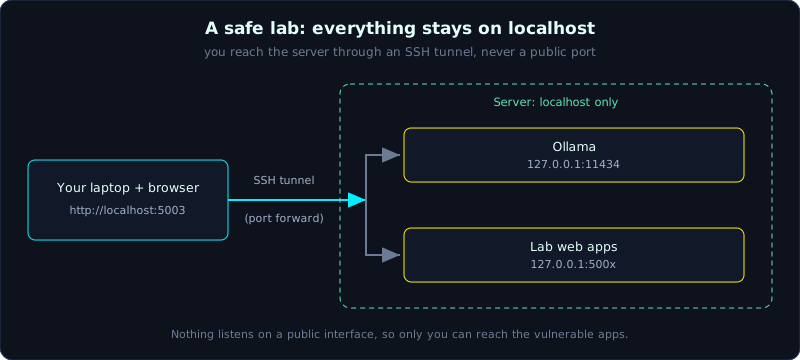 Ollama and the lab apps listen on localhost only, and the browser reaches them through an SSH tunnel.
Why run the model locally
- Free and unlimited. You will send hundreds of payloads, and many of them are deliberately harmful content. Doing that against a paid API from a large provider costs money and can get your account suspended for policy violations.
- More deterministic and controllable. You can change the temperature, the seed and the system prompt. You can even edit the Modelfile to simulate a backdoor (Lesson 7).
- No leakage. Your attack payloads never leave your machine for a third-party server.
The lab set is standardized around Ollama with the small model qwen2.5:3b. A 3B model is small on purpose. It is weak, so it is easier to jailbreak, which suits learning. It is also unstable: the same payload works sometimes and fails other times. That is the probabilistic behavior you need to get used to.
Setup (summary)
Build the lab on your own machine. The full instructions are in the labs README.
1
2
3
4
5
6
7
8
9
10
11
12
# 1. Install Ollama (Linux/macOS)
curl -fsSL https://ollama.com/install.sh | sh

# 2. Pull the model
ollama pull qwen2.5:3b
ollama list            # check that the model is present

# 3. Build the Python environment for the labs
cd labs
python3 -m venv .venv
source .venv/bin/activate
pip install -r requirements.txt
Ollama listens on 127.0.0.1:11434. The lab apps share common/llm.py to call it.
Network isolation
Three principles:
- Ollama listens on localhost only. Do not set
OLLAMA_HOST=0.0.0.0on a machine with a public IP. You would open a free inference endpoint to the whole Internet by accident. - The lab web apps listen on
127.0.0.1only. The Lesson 3 lab (output handling) serves its web app at127.0.0.1:5003. - Do not attach real tools to the agent labs. The Lesson 4 lab (excessive agency) uses mock tools that are not connected to real mail or a real shell. Keep it that way while you learn.
Open the lab in your own browser through an SSH tunnel
The apps listen on localhost on the server. To open them in the browser on your own machine, forward the port over SSH:
1
2
3
# the web lab (Lesson 3) listens on 127.0.0.1:5003 on the server
ssh -L 5003:127.0.0.1:5003 root@<ip>
# then open http://localhost:5003 on your machine
This is much safer than opening a port to the outside. The traffic goes through the SSH tunnel, and nobody except you can reach the vulnerable lab apps.
Run a lab
1
2
3
4
cd labs
source .venv/bin/activate
python lab01-prompt-injection/app.py   # terminal lab
python lab03-output-handling/app.py    # web lab, 127.0.0.1:5003
Change the model if you want to compare a large and a small one:
1
export LAB_MODEL=qwen2.5:3b     # default; list models with: ollama list
Workflow for each lesson
This repeats the lab routine.
- Read the matching OWASP entry and the lab README.
- Read the code and look for the bug before you run it.
- Break it. Write the payload and its success rate in
notes/lessonX.md. - Fix it. Copy
app.pytoapp_fixed.py, add the defenses, and run the old payloads again. - Reflect. Answer the question at the end of the README.
Key takeaways
- A local model (Ollama with qwen2.5:3b) is free, controllable and does not leak your payloads.
- Ollama and the lab apps listen on localhost only, and the agent labs connect only to mock tools.
- Open the lab on your own machine with an SSH tunnel. Do not open a port to the Internet.
- Try each payload 3 to 5 times and record the success rate.