Lesson 0.3: Setting Up a Crypto Lab
This lesson installs the toolset for the rest of the series, namely Python and PyCryptodome for most work, SageMath for heavy algebra, plus pwntools, gmpy2, sympy, z3 and Jupyter. It is written from the point of view of someone who has fought with these installs and wants to save you an evening lost to installing Sage.
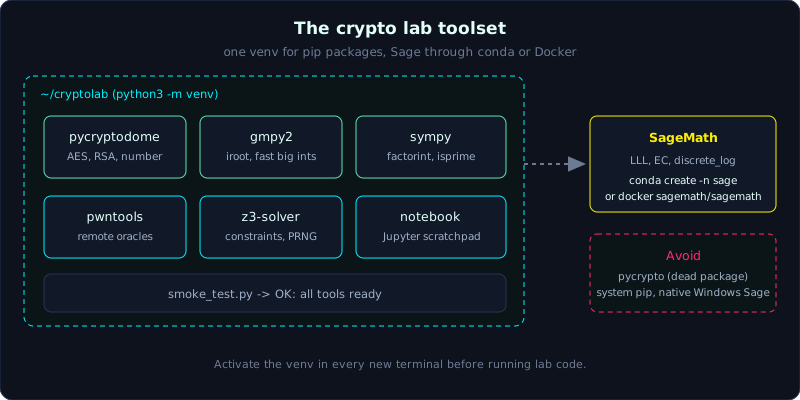 One isolated Python environment holds the libraries, and Sage runs through conda or Docker.
| Part: 0 (Getting Started) | Time: about 30 minutes | Difficulty: easy |
Prerequisites: Lesson 0.1 (what cryptography is).
Tools: this lesson installs them. You need a Linux or macOS machine, or Windows with WSL2 (Windows Subsystem for Linux).
Goals
After this lesson you have an isolated Python environment (venv or conda) with PyCryptodome, pwntools, gmpy2, sympy, z3 and Jupyter installed. You can run SageMath through conda or Docker without breaking the system environment. You know what each tool is used for, so you know which one to reach for when a challenge comes up. You can also run a smoke test that prints OK, confirming the whole set is ready.
1. Theory
In this lesson “theory” is only a map of what each tool does and why it is in the toolbox. Read it once, then go to section 2 to install for real.
Python 3
Python is the main language of CTF crypto, not because it is fast (it is slow) but for two reasons. Big integers are native, so adding, multiplying and dividing 2048-bit numbers needs no library. And the crypto ecosystem is very strong. The first rule, worth memorizing, is to never install packages at random into the system Python. Use an isolated environment, a venv (virtual environment) or conda, so each project has its own box. If one breaks, you delete it and start again without damaging the whole machine.
PyCryptodome
This is the main crypto library: AES, RSA, hash functions, signatures, and, important for CTFs, the module Crypto.Util.number with functions you will use until your fingers are worn out: bytes_to_long / long_to_bytes (convert between byte strings and integers, because RSA works on numbers), getPrime (generate a prime), inverse (modular inverse), and GCD.
Note a historical trap with an old library called pycrypto (without “dome”) that has been dead for a long time, is no longer maintained, and has security bugs. What you install is pycryptodome. It is a full replacement and you still import Crypto as before. Install it with pip install pycryptodome.
SageMath
SageMath is a large CAS (computer algebra system) that bundles hundreds of math libraries. For crypto it is the heavy tool: factoring large numbers, discrete_log, LLL (a lattice reduction algorithm, used for advanced RSA attacks such as Coppersmith), full elliptic curve support, and finite field arithmetic in one line. By the time you reach advanced RSA and ECC you will hardly be able to do without it.
The difficulty is that Sage is heavy and often painful to install. There are three ways, so pick the one that hurts least on your machine:
- Conda (recommended for most people):
conda create -n sage -c conda-forge sage pythonthenconda activate sage. Clean, and it does not touch the system. - Docker (the fastest way out when conda also misbehaves):
docker run -it --rm sagemath/sagemath sage. Pull the image and run, with nothing installed on your machine. - OS package: Debian/Ubuntu has
apt install sagemath, but the version in the repository is usually much older than the latest. It is acceptable as a stopgap.
On native Windows, installing Sage is nearly hopeless, so do not try. Use WSL2 and follow the Linux steps, or use Docker. Docker is the path with the fewest problems.
pwntools
pwntools is a library for talking to a service over the network. It was built for pwn (binary exploitation), but crypto uses it a lot too. Many crypto challenges do not give a static file but a server. You connect, it asks, you answer, and it repeats. That is how padding oracle and Diffie-Hellman man-in-the-middle challenges work. Use remote(host, port) to connect, process(...) to run a binary locally, and recvline / sendline to read and send. Install it with pip install pwntools.
gmpy2
gmpy2 wraps the fast big-number library GMP. Its mpz type is significantly faster than Python’s int when you loop millions of times. The two most useful functions for CTFs are iroot(x, n), which returns the integer n-th root (and a flag saying whether it was an exact power), used for the cube root attack on RSA with small e; and invert, gcd, is_prime. Install it with pip install gmpy2. If the build fails it is usually a missing system library, see section 2.
sympy
sympy is pure Python symbolic algebra, with no Sage needed. When you do not have Sage at hand and need to factor a moderate number, test primality, find the next prime, or solve a small discrete log, sympy can do it: factorint, isprime, nextprime, discrete_log, solve. It is light and installs quickly with pip install sympy. Think of it as a pocket Sage for light jobs.
z3
z3 is an SMT solver (a satisfiability solver made by Microsoft Research). You describe constraints (equations, inequalities, bit operations) and it finds a solution that satisfies them, or tells you there is none. It suits challenges that mix logic with arithmetic, or recovering the state of a PRNG (pseudo-random number generator) by constraining each bit. Install it with pip install z3-solver (note that the package name has the -solver suffix, but the import is import z3).
Jupyter notebook
Jupyter is an interactive environment that runs one code cell at a time and keeps variables between cells. Working on a crypto challenge is a constant trial and error process: load data, try an operation, look at the result, try another. A notebook fits this much better than rerunning a whole script each time. Install it with pip install notebook and run jupyter notebook. If you use Sage there is sage -n jupyter for a notebook with a Sage kernel. A good habit is to open a separate scratch notebook for each challenge.
2. Hands-on (demo)
Create the environment and install everything at once
On Linux, macOS or WSL2:
1
2
3
4
5
6
# Create a dedicated virtual environment for the crypto lab
python3 -m venv ~/cryptolab
source ~/cryptolab/bin/activate

# Install the whole set (except Sage) in one command
pip install pycryptodome pwntools gmpy2 sympy z3-solver notebook
If gmpy2 reports a build error (missing headers), on Ubuntu/Debian install the system libraries and try again:
1
2
sudo apt install libgmp-dev libmpfr-dev libmpc-dev
pip install gmpy2
Every time you open a new terminal for the lab, remember to run source ~/cryptolab/bin/activate again. Otherwise you will wonder why nothing seems to be installed.
Run Sage with Docker
The quickest way to get Sage without installing anything on your machine. It also mounts the current directory into the container so you can read challenge files:
1
docker run -it --rm -v "$PWD":/home/sage/work sagemath/sagemath sage
The first image pull is fairly large, and afterwards it starts right away.
Smoke test: check the whole set
Save this as smoke_test.py and run it inside the venv. It imports each tool and runs a small operation to confirm everything works:
1
2
3
4
5
6
7
8
9
10
11
12
13
14
15
16
17
18
19
20
21
22
23
24
25
26
# smoke_test.py: check that every installed tool works
from Crypto.Util.number import getPrime, inverse
import gmpy2
import sympy
import z3

# PyCryptodome: generate a 16-bit prime and compute a modular inverse
p = getPrime(16)
print("[PyCryptodome] prime 16-bit:", p, "| inverse(3, p) =", inverse(3, p))

# gmpy2: primality test and integer cube root
print("[gmpy2] is_prime(1000003):", gmpy2.is_prime(1000003),
      "| iroot(27, 3):", gmpy2.iroot(27, 3))

# sympy: factorization
print("[sympy] factorint(360):", sympy.factorint(360))

# z3: solve the system x + y = 10, x - y = 2  =>  x = 6, y = 4
x, y = z3.Ints("x y")
s = z3.Solver()
s.add(x + y == 10, x - y == 2)
assert s.check() == z3.sat
m = s.model()
print("[z3] solution:", "x =", m[x], "y =", m[y])

print("OK: every tool is ready.")
Expected output (the prime changes every run because it is random):
1
2
3
4
5
[PyCryptodome] prime 16-bit: 50263 | inverse(3, p) = ...
[gmpy2] is_prime(1000003): True | iroot(27, 3): (mpz(3), True)
[sympy] factorint(360): {2: 3, 3: 2, 5: 1}
[z3] solution: x = 6 y = 4
OK: every tool is ready.
factorint(360) returns {2: 3, 3: 2, 5: 1}, meaning 360 = 2^3 * 3^2 * 5, which matches the factorization (Lesson 1.2 uses this a lot). iroot(27, 3) gives (3, True), meaning the integer cube root of 27 is exactly 3. z3 finds x = 6, y = 4 by itself. When you see the final OK line, the whole set is working.
Try Sage in one line
In sage (the sage: prompt), type these to see how much it can do:
1
2
3
4
5
6
7
sage: factor(2024)
2^3 * 11 * 23
sage: F = GF(7); F                      # finite field GF(7)
Finite Field of size 7
sage: E = EllipticCurve(GF(23), [1, 1]) # an elliptic curve over GF(23)
sage: E.order()                         # count the points, done in one line
28
Counting the points on an elliptic curve would take you a session of coding in plain Python, and Sage does it in one line. That is why you will be glad you installed it when you reach advanced RSA and ECC.
3. Lab
- Task: write your own smoke test, and add one small check that PyCryptodome encrypts and decrypts correctly: encrypt an arbitrary string with AES in ECB mode (16-byte key, padded to full blocks), decrypt it again, and assert that you get the original string.
- Files: none, build it yourself.
- Hints, step by step:
- Hint 1:
from Crypto.Cipher import AES, create the cipher withAES.new(key, AES.MODE_ECB). The data must be a multiple of 16 bytes (pad withb"\x00"for now, proper padding comes in part 4). - Hint 2: if some
importfails, check that you activated the right venv and that the package is installed in that venv (pip list). - Hint 3: if Sage refuses to install no matter what you do, do not get stuck. Use sympy and gmpy2 for now. Lessons that specifically need Sage will say so.
- Hint 1:
- Done when: every
importruns without errors, the smoke test prints OK, and the AES encrypt then decrypt round trip returns the exact plaintext.
4. Key takeaways
- Always work inside a venv or conda, never in the system Python.
- Install
pycryptodome, notpycrypto(the old package is dead). - Install Sage through conda or run it through Docker. On Windows use WSL2 or Docker.
- pwntools for server oracle challenges; gmpy2.iroot for cube roots; z3 for constraints and PRNG recovery.
- sympy is a pocket Sage for light work; use a notebook to explore step by step.
- When something is unexpectedly “not installed”, check that you activated the right environment.
5. Common pitfalls
- Installing
pycryptoinstead ofpycryptodome. The old package is abandoned and has security bugs, so avoid it. - Mixing the system
pipwith a project, which breaks the shared environment. Use a venv to avoid cleaning up afterwards. gmpy2failing to build becauselibgmp-dev/libmpfr-dev/libmpc-devare missing. Install those packages and try again.- Trying to install Sage on native Windows. It almost always fails, so use WSL2 or Docker.
- Forgetting to
activatethe venv and then debugging “why is it not installed”. Check whether your shell prompt shows the environment name. - Calling
pythonand getting Python 2 on an old machine. Usepython3to be safe.
6. Further reading
- PyCryptodome documentation (pycryptodome.readthedocs.io), especially the
Crypto.Util.numberpage. - SageMath installation guide (doc.sagemath.org), the sections on conda and Docker.
- pwntools documentation (docs.pwntools.com), the Tubes section for recv/send.
- gmpy2 documentation (gmpy2.readthedocs.io), see
irootandinvert. - z3 Python tutorial (the Z3Prover GitHub page), the Z3Py section.