PTIT CTF 2024: writeups
These are my writeups for the qualifying round of PTIT CTF 2024, a Vietnamese university CTF hosted by PTIT. I solved five Reverse Engineering challenges (rev1 to rev5) and five Forensics challenges (BabyShark, PcapDump, 7Z, In front of Image, Mem Search). The challenge files are not in this repo, so the screenshots below carry most of the tool output.
Rev - rev1
An easy ELF challenge. The password for the archive was ptitctf2024.
Among the strings of the binary there is This is your flag: . I jumped to the code that references it.

The function calls puts on a flag that is stored XOR-encoded, so the only work is to take the stored bytes and XOR them with the key reverse.
1
2
3
4
5
6
7
8
9
flag = [34, 49, 63, 49, 49, 39, 35, 9, 33, 70, 11, 85, 7, 58, 0, 48, 24, 58, 65, 11, 86, 45, 85, 0, 85, 15]


x = [0] * len(flag)
a = "reverse"
for i in range(len(flag)):
    x[i] = flag[i]  ^ ord(a[i%len(a)])

print("".join(chr(i) for i in x))
Flag: PTITCTF{D0n't_rUn_3x3_0v0}
Rev - rev2
Described as “Math equations Grade 3”. The program asks for 100 values of an array v5, and if they satisfy a set of equations it gives the flag.
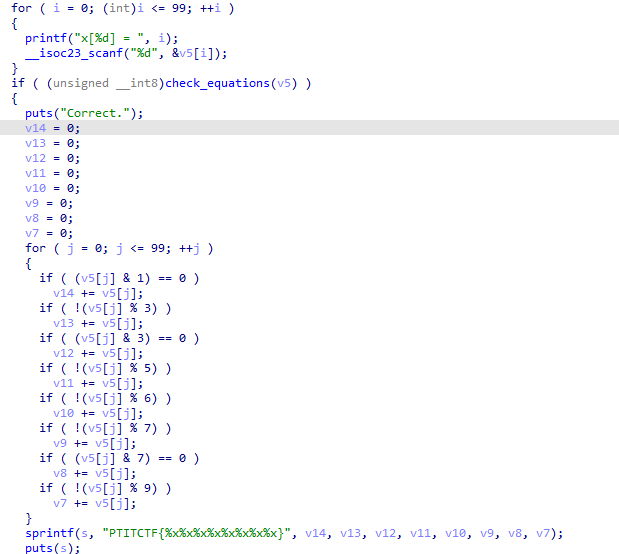
These are the equations that have to hold:
1
2
3
4
5
6
7
8
9
10
11
12
13
14
15
16
17
18
19
20
21
22
23
24
25
26
27
28
29
30
31
32
33
34
35
36
37
38
39
40
41
42
43
44
45
46
47
48
49
50
51
52
53
54
55
56
57
58
59
60
61
62
63
64
65
66
67
68
69
70
71
72
73
74
75
76
77
78
79
80
81
82
83
84
85
86
87
88
89
90
91
92
93
94
95
96
97
98
99
100
101
102
103
_BOOL8 __fastcall check_equations(int *a1)
{
return *a1 + a1[1] == 4
    && a1[1] + a1[2] == 6
    && a1[2] + a1[3] == 8
    && a1[3] + a1[4] == 10
    && a1[4] + a1[5] == 12
    && a1[5] + a1[6] == 14
    && a1[6] + a1[7] == 16
    && a1[7] + a1[8] == 18
    && a1[8] + a1[9] == 20
    && a1[9] + a1[10] == 22
    && a1[10] + a1[11] == 24
    && a1[11] + a1[12] == 26
    && a1[12] + a1[13] == 28
    && a1[13] + a1[14] == 30
    && a1[14] + a1[15] == 32
    && a1[15] + a1[16] == 34
    && a1[16] + a1[17] == 36
    && a1[17] + a1[18] == 38
    && a1[18] + a1[19] == 40
    && a1[19] + a1[20] == 42
    && a1[20] + a1[21] == 44
    && a1[21] + a1[22] == 46
    && a1[22] + a1[23] == 48
    && a1[23] + a1[24] == 50
    && a1[24] + a1[25] == 52
    && a1[25] + a1[26] == 54
    && a1[26] + a1[27] == 56
    && a1[27] + a1[28] == 58
    && a1[28] + a1[29] == 60
    && a1[29] + a1[30] == 62
    && a1[30] + a1[31] == 64
    && a1[31] + a1[32] == 66
    && a1[32] + a1[33] == 68
    && a1[33] + a1[34] == 70
    && a1[34] + a1[35] == 72
    && a1[35] + a1[36] == 74
    && a1[36] + a1[37] == 76
    && a1[37] + a1[38] == 78
    && a1[38] + a1[39] == 80
    && a1[39] + a1[40] == 82
    && a1[40] + a1[41] == 84
    && a1[41] + a1[42] == 86
    && a1[42] + a1[43] == 88
    && a1[43] + a1[44] == 90
    && a1[44] + a1[45] == 92
    && a1[45] + a1[46] == 94
    && a1[46] + a1[47] == 96
    && a1[47] + a1[48] == 98
    && a1[48] + a1[49] == 100
    && a1[49] + a1[50] == 102
    && a1[50] - a1[51] == 104
    && a1[51] + a1[52] == 106
    && a1[52] + a1[53] == 108
    && a1[53] + a1[54] == 110
    && a1[54] + a1[55] == 112
    && a1[55] + a1[56] == 114
    && a1[56] + a1[57] == 116
    && a1[57] + a1[58] == 118
    && a1[58] + a1[59] == 120
    && a1[59] + a1[60] == 122
    && a1[60] + a1[61] == 124
    && a1[61] + a1[62] == 126
    && a1[62] + a1[63] == 128
    && a1[63] + a1[64] == 130
    && a1[64] + a1[65] == 132
    && a1[65] + a1[66] == 134
    && a1[66] + a1[67] == 136
    && a1[67] + a1[68] == 138
    && a1[68] + a1[69] == 140
    && a1[69] + a1[70] == 142
    && a1[70] + a1[71] == 144
    && a1[71] + a1[72] == 146
    && a1[72] + a1[73] == 148
    && a1[73] + a1[74] == 150
    && a1[74] + a1[75] == 152
    && a1[75] + a1[76] == 154
    && a1[76] + a1[77] == 156
    && a1[77] + a1[78] == 158
    && a1[78] + a1[79] == 160
    && a1[79] + a1[80] == 162
    && a1[80] + a1[81] == 164
    && a1[81] + a1[82] == 166
    && a1[82] + a1[83] == 168
    && a1[83] + a1[84] == 170
    && a1[84] + a1[85] == 172
    && a1[85] + a1[86] == 174
    && a1[86] + a1[87] == 176
    && a1[87] + a1[88] == 178
    && a1[88] + a1[89] == 180
    && a1[89] + a1[90] == 182
    && a1[90] + a1[91] == 184
    && a1[91] + a1[92] == 186
    && a1[92] + a1[93] == 188
    && a1[93] + a1[94] == 190
    && a1[94] + a1[95] == 192
    && a1[95] + a1[96] == 194
    && a1[96] + a1[97] == 196
    && a1[97] + a1[98] == 198
    && a1[98] + a1[99] == 200
    && a1[99] + *a1 == 202;
}
Note that one equation uses a subtraction (a1[50] - a1[51] == 104). I gave all of them to z3 and solved for the 100 values. The script also computes the flag, which is built from the sums of the values divisible by 2, 3, 4, 5, 6, 7, 8 and 9, printed in hex. The commented lines at the end show how I would have sent the values to the Math binary with pwntools.
1
2
3
4
5
6
7
8
9
10
11
12
13
14
15
16
17
18
19
20
21
22
23
24
25
26
27
28
29
30
31
32
33
34
35
36
37
38
39
40
41
42
43
44
45
46
47
48
49
50
51
52
53
54
55
56
57
58
59
60
61
62
63
64
65
66
67
68
69
70
71
72
73
74
75
76
77
78
79
80
81
82
83
84
85
86
87
88
89
90
91
92
93
94
95
96
97
98
99
100
101
102
103
104
105
106
107
108
109
110
111
112
113
114
115
116
117
118
119
120
121
122
123
124
125
126
127
128
129
130
131
132
133
134
135
136
from z3 import *
solver = Solver()
x = [Int(f'x{i}') for i in range(100)]

solver.add(x[0] + x[1] == 4)
solver.add(x[1] + x[2] == 6)
solver.add(x[2] + x[3] == 8)
solver.add(x[3] + x[4] == 10)
solver.add(x[4] + x[5] == 12)
solver.add(x[5] + x[6] == 14)
solver.add(x[6] + x[7] == 16)
solver.add(x[7] + x[8] == 18)
solver.add(x[8] + x[9] == 20)
solver.add(x[9] + x[10] == 22)
solver.add(x[10] + x[11] == 24)
solver.add(x[11] + x[12] == 26)
solver.add(x[12] + x[13] == 28)
solver.add(x[13] + x[14] == 30)
solver.add(x[14] + x[15] == 32)
solver.add(x[15] + x[16] == 34)
solver.add(x[16] + x[17] == 36)
solver.add(x[17] + x[18] == 38)
solver.add(x[18] + x[19] == 40)
solver.add(x[19] + x[20] == 42)
solver.add(x[20] + x[21] == 44)
solver.add(x[21] + x[22] == 46)
solver.add(x[22] + x[23] == 48)
solver.add(x[23] + x[24] == 50)
solver.add(x[24] + x[25] == 52)
solver.add(x[25] + x[26] == 54)
solver.add(x[26] + x[27] == 56)
solver.add(x[27] + x[28] == 58)
solver.add(x[28] + x[29] == 60)
solver.add(x[29] + x[30] == 62)
solver.add(x[30] + x[31] == 64)
solver.add(x[31] + x[32] == 66)
solver.add(x[32] + x[33] == 68)
solver.add(x[33] + x[34] == 70)
solver.add(x[34] + x[35] == 72)
solver.add(x[35] + x[36] == 74)
solver.add(x[36] + x[37] == 76)
solver.add(x[37] + x[38] == 78)
solver.add(x[38] + x[39] == 80)
solver.add(x[39] + x[40] == 82)
solver.add(x[40] + x[41] == 84)
solver.add(x[41] + x[42] == 86)
solver.add(x[42] + x[43] == 88)
solver.add(x[43] + x[44] == 90)
solver.add(x[44] + x[45] == 92)
solver.add(x[45] + x[46] == 94)
solver.add(x[46] + x[47] == 96)
solver.add(x[47] + x[48] == 98)
solver.add(x[48] + x[49] == 100)
solver.add(x[49] + x[50] == 102)
solver.add(x[50] - x[51] == 104)
solver.add(x[51] + x[52] == 106)
solver.add(x[52] + x[53] == 108)
solver.add(x[53] + x[54] == 110)
solver.add(x[54] + x[55] == 112)
solver.add(x[55] + x[56] == 114)
solver.add(x[56] + x[57] == 116)
solver.add(x[57] + x[58] == 118)
solver.add(x[58] + x[59] == 120)
solver.add(x[59] + x[60] == 122)
solver.add(x[60] + x[61] == 124)
solver.add(x[61] + x[62] == 126)
solver.add(x[62] + x[63] == 128)
solver.add(x[63] + x[64] == 130)
solver.add(x[64] + x[65] == 132)
solver.add(x[65] + x[66] == 134)
solver.add(x[66] + x[67] == 136)
solver.add(x[67] + x[68] == 138)
solver.add(x[68] + x[69] == 140)
solver.add(x[69] + x[70] == 142)
solver.add(x[70] + x[71] == 144)
solver.add(x[71] + x[72] == 146)
solver.add(x[72] + x[73] == 148)
solver.add(x[73] + x[74] == 150)
solver.add(x[74] + x[75] == 152)
solver.add(x[75] + x[76] == 154)
solver.add(x[76] + x[77] == 156)
solver.add(x[77] + x[78] == 158)
solver.add(x[78] + x[79] == 160)
solver.add(x[79] + x[80] == 162)
solver.add(x[80] + x[81] == 164)
solver.add(x[81] + x[82] == 166)
solver.add(x[82] + x[83] == 168)
solver.add(x[83] + x[84] == 170)
solver.add(x[84] + x[85] == 172)
solver.add(x[85] + x[86] == 174)
solver.add(x[86] + x[87] == 176)
solver.add(x[87] + x[88] == 178)
solver.add(x[88] + x[89] == 180)
solver.add(x[89] + x[90] == 182)
solver.add(x[90] + x[91] == 184)
solver.add(x[91] + x[92] == 186)
solver.add(x[92] + x[93] == 188)
solver.add(x[93] + x[94] == 190)
solver.add(x[94] + x[95] == 192)
solver.add(x[95] + x[96] == 194)
solver.add(x[96] + x[97] == 196)
solver.add(x[97] + x[98] == 198)
solver.add(x[98] + x[99] == 200)
solver.add(x[99] + x[0] == 202)


if solver.check() == sat:
    model = solver.model()
    solution = [model[x[i]].as_long() for i in range(100)]
    a = b = c = d = e = f = g = h = 0
    for i in range(100):
        value = model[x[i]].as_long()
        if value % 2 == 0: a += value
        if value % 3 == 0: b += value
        if value % 4 == 0: c += value
        if value % 5 == 0: d += value
        if value % 6 == 0: e += value
        if value % 7 == 0: f += value
        if value % 8 == 0: g += value
        if value % 9 == 0: h += value
    print(a)
    buf = "PTITCTF{{{:x}{:x}{:x}{:x}{:x}{:x}{:x}{:x}}}".format(a, b, c, d, e, f, g, h)
    print(buf)
    print(solution)
    # from pwn import *

    # p = process("./Math")

    # for i in range(6):
    #     print(p.recvline().decode(), end = "")

    # for i in range(100):
    #     payload = str(model[x[i]].as_long())
    #     print(payload)
    #     p.sendline(payload)
    # p.interactive()
Flag: PTITCTF{14506909c43e869034854821c}
Rev - rev3
A medium challenge. I got a Windows exe compiled from Python. I used pyinstxtractor (https://github.com/extremecoders-re/pyinstxtractor) to extract the pyc files and the libraries the program uses.
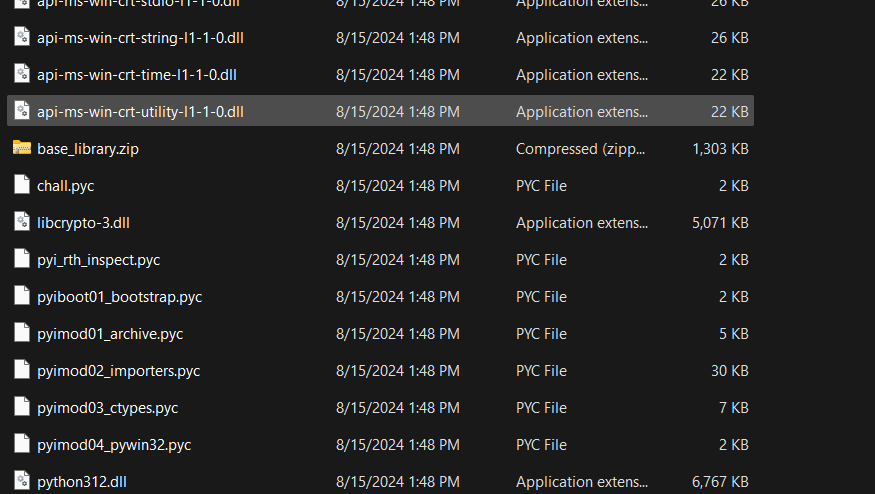
The file to analyze is chall.pyc. I decompiled it with PyLingual.
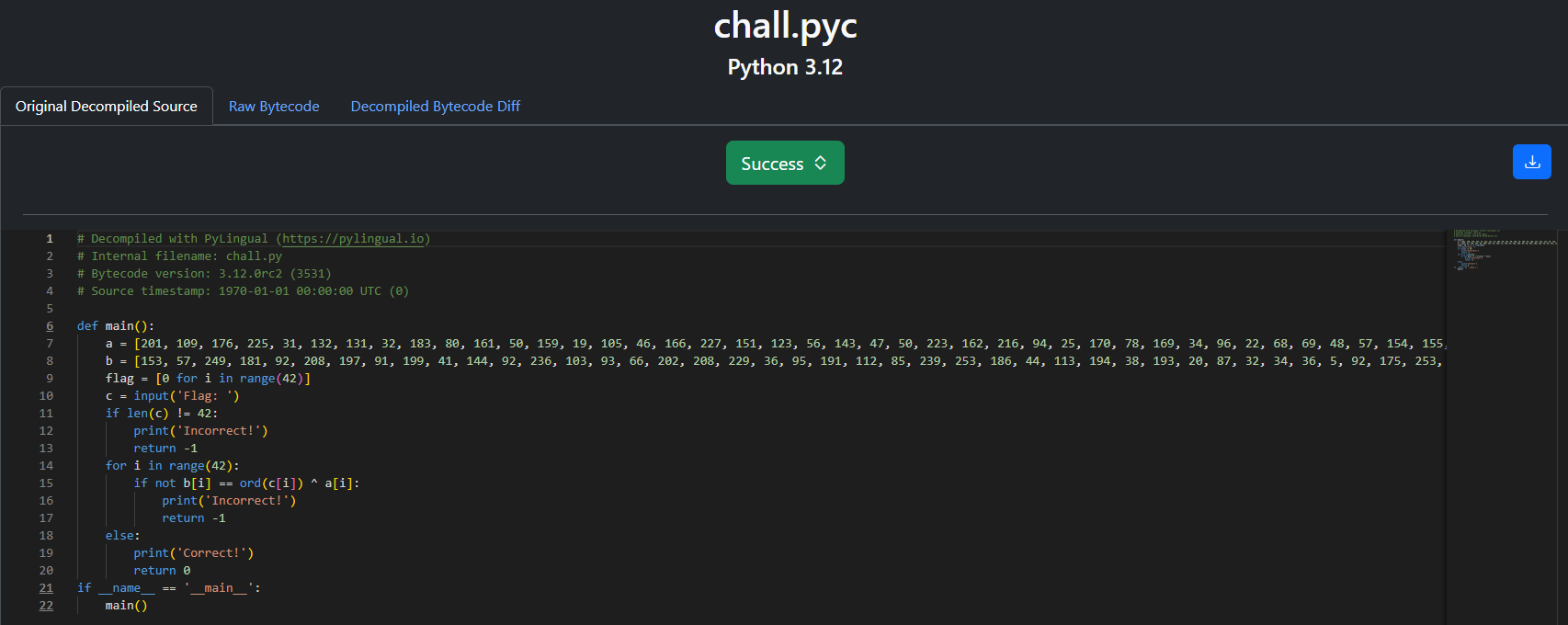
This is the source of the exe:
1
2
3
4
5
6
7
8
9
10
11
12
13
14
15
16
17
18
19
20
21
22
# Decompiled with PyLingual (https://pylingual.io)
# Internal filename: chall.py
# Bytecode version: 3.12.0rc2 (3531)
# Source timestamp: 1970-01-01 00:00:00 UTC (0)

def main():
    a = [201, 109, 176, 225, 31, 132, 131, 32, 183, 80, 161, 50, 159, 19, 105, 46, 166, 227, 151, 123, 56, 143, 47, 50, 223, 162, 216, 94, 25, 170, 78, 169, 34, 96, 22, 68, 69, 48, 57, 154, 155, 64]
    b = [153, 57, 249, 181, 92, 208, 197, 91, 199, 41, 144, 92, 236, 103, 93, 66, 202, 208, 229, 36, 95, 191, 112, 85, 239, 253, 186, 44, 113, 194, 38, 193, 20, 87, 32, 34, 36, 5, 92, 175, 253, 61]
    flag = [0 for i in range(42)]
    c = input('Flag: ')
    if len(c) != 42:
        print('Incorrect!')
        return -1
    for i in range(42):
        if not b[i] == ord(c[i]) ^ a[i]:
            print('Incorrect!')
            return -1
    else:
        print('Correct!')
        return 0
if __name__ == '__main__':
    main()
The check is b[i] == ord(c[i]) ^ a[i], so the input is a[i] ^ b[i]. I rewrote it to compute the input.
1
2
3
4
a = [201, 109, 176, 225, 31, 132, 131, 32, 183, 80, 161, 50, 159, 19, 105, 46, 166, 227, 151, 123, 56, 143, 47, 50, 223, 162, 216, 94, 25, 170, 78, 169, 34, 96, 22, 68, 69, 48, 57, 154, 155, 64]
b = [153, 57, 249, 181, 92, 208, 197, 91, 199, 41, 144, 92, 236, 103, 93, 66, 202, 208, 229, 36, 95, 191, 112, 85, 239, 253, 186, 44, 113, 194, 38, 193, 20, 87, 32, 34, 36, 5, 92, 175, 253, 61]
c = [x ^ y for x, y in zip(a, b)]
print("".join(chr(i) for i in c))
Flag: PTITCTF{py1nst4ll3r_g0_g0_brhhhh676fa5e5f}
Rev - rev4
A medium challenge written in Go. The main function reads the input and splits it into two parts of 18 characters each.
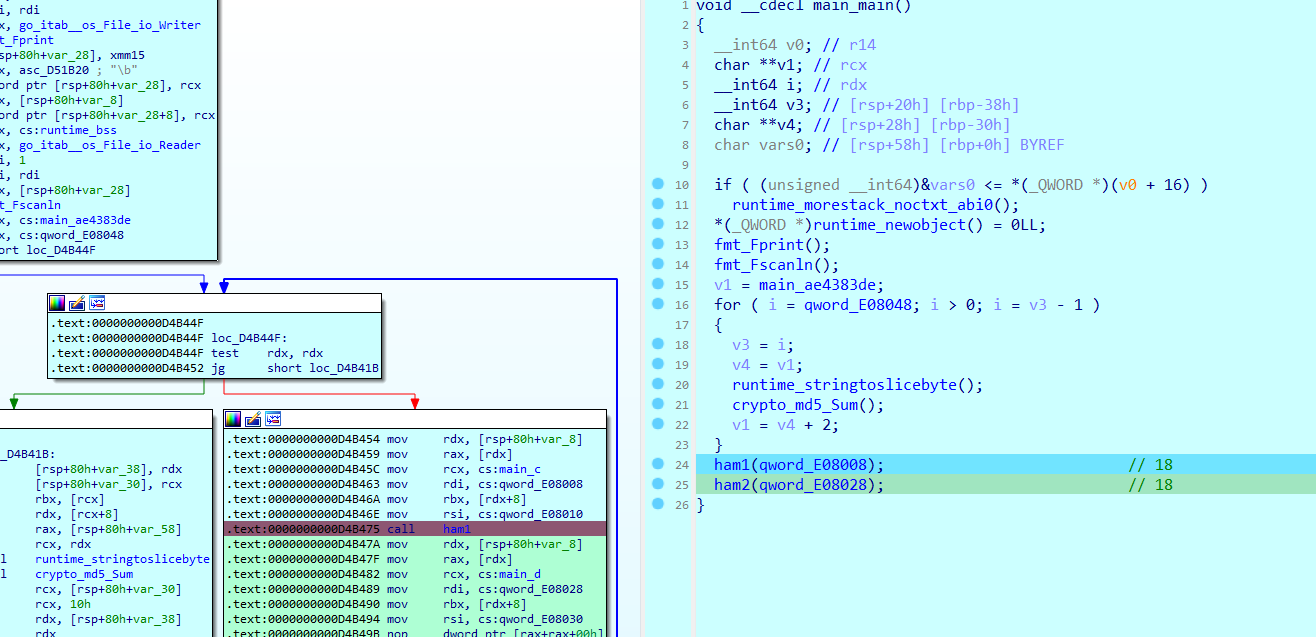
I went through the functions one by one.
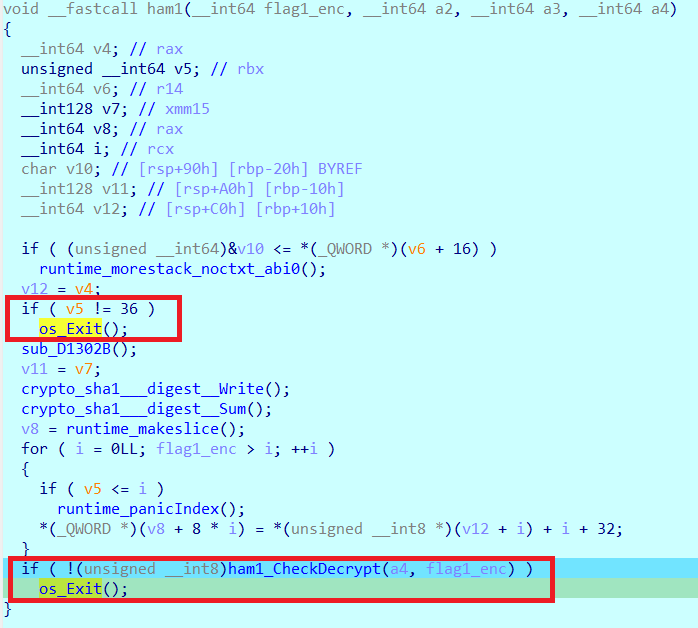
This confirms the input must be 36 characters long, and then each half goes to checkDecrypt. The variable a1 holds the encrypted flag.
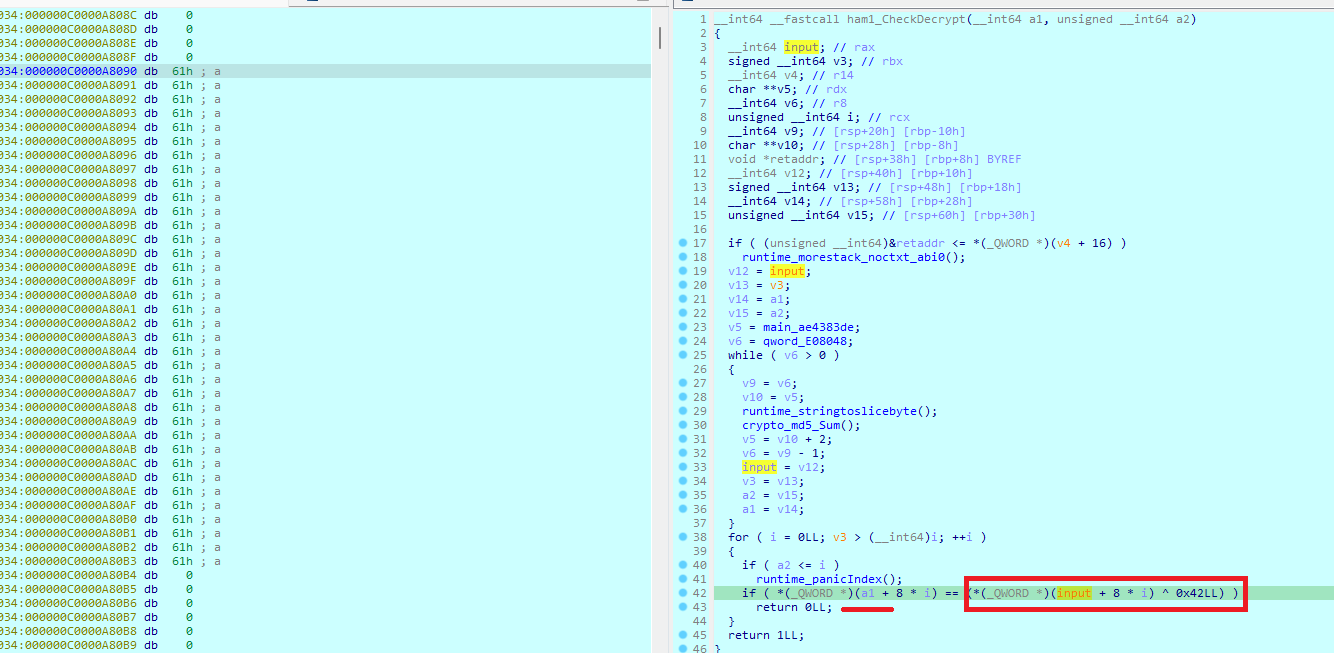
Basically it XORs our input with a value and compares the result with the encrypted part of the flag.

Before the XOR, the input is also modified.

Going back to the calling function, the input variable is reassigned with a new value by the following algorithm.

So I wrote a script to undo this for the first half, using the encrypted data.
1
2
3
4
5
6
7
8
9
10
flag1 = [
    0x32, 0x37, 0x29, 0x35, 0x25, 0x3B, 0x2E,
    0xE0, 0xCD, 0x1B, 0xD4, 0x1D, 0xD8, 0xD6,
    0xCF, 0x22, 0xE1, 0xD2
]
print(len(flag1))
for i in range(len(flag1)):
    flag1[i] = (flag1[i] ^ 0x42) - 32 - i
print(flag1)
print("".join(chr(i) for i in flag1))
The first half of the flag:

The second function works the same way, so I did the same for it.
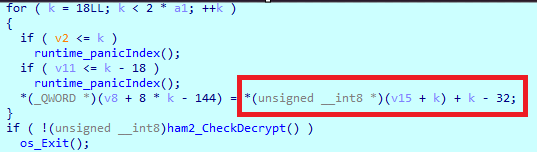

Full script:
1
2
3
4
5
6
7
8
9
10
11
12
13
14
15
16
17
18
19
20
21
flag1 = [
    0x32, 0x37, 0x29, 0x35, 0x25, 0x3B, 0x2E,
    0xE0, 0xCD, 0x1B, 0xD4, 0x1D, 0xD8, 0xD6,
    0xCF, 0x22, 0xE1, 0xD2
]
print(len(flag1))
for i in range(len(flag1)):
    flag1[i] = (flag1[i] ^ 0x42) - 32 - i
print(flag1)
print("".join(chr(i) for i in flag1))

flag2 = [
    0x3E, 0x70, 0x30, 0x38, 0x03, 0x0B, 0x3B,
    0x31, 0x3E, 0x22, 0x0D, 0x39, 0x79, 0x30,
    0x3E, 0x23, 0x17, 0xD6
]
print(len(flag2))
for i in range(18, len(flag2)*2):
    flag2[i-18] = (flag2[i-18] ^ 0x56) + 32 - i
print(flag2)
print("".join(chr(i) for i in flag2))
The second half of the flag:


Flag: PTITCTF{g0l4ng_1s_v3ry_funny_r1ght?}
Rev - rev5
A hard challenge. It is a PHP script that asks for the flag and checks it.
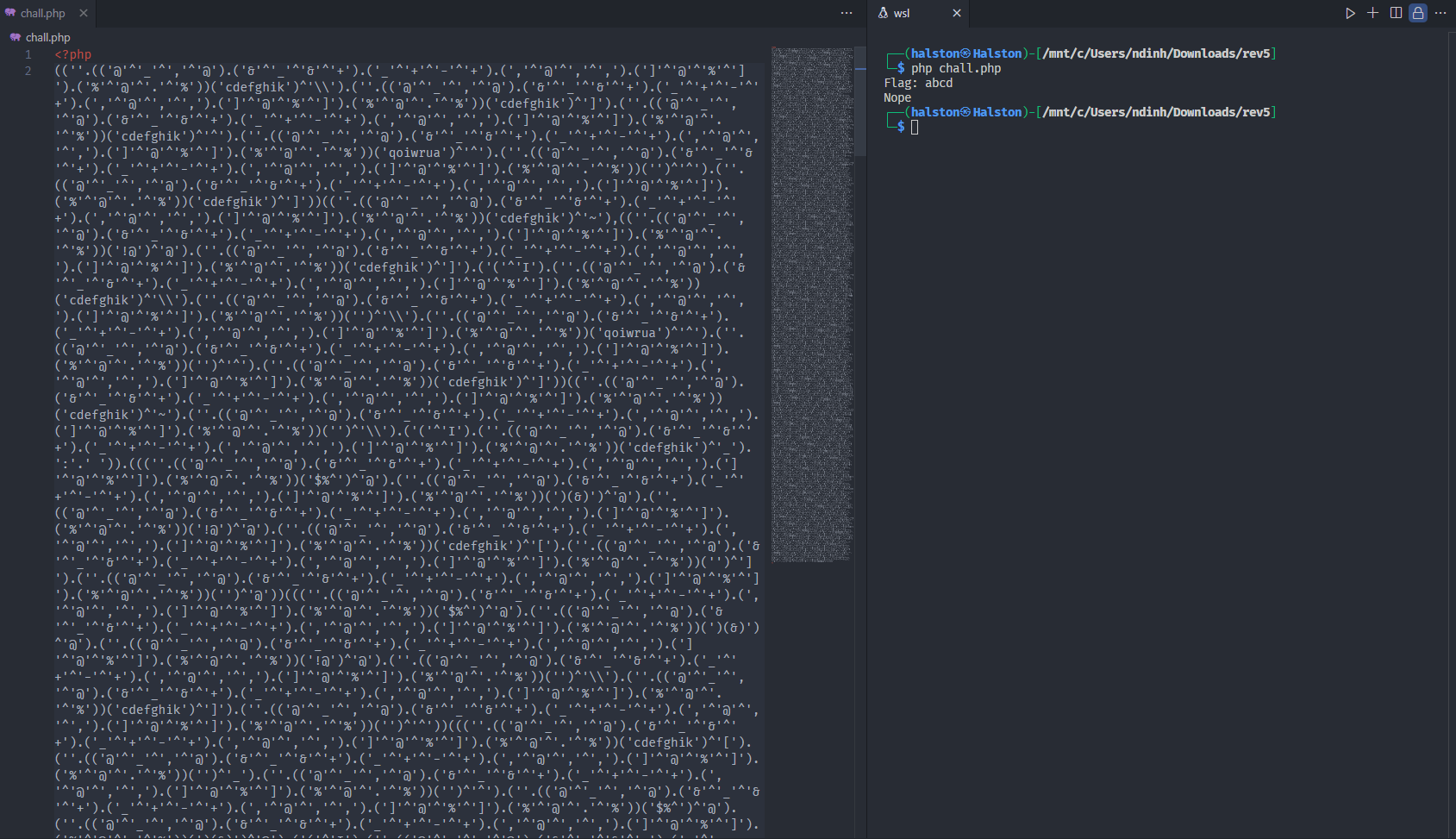
The source is heavily obfuscated, with every string built from XORs of single characters. After trying XOR on some of the characters I found they spell function names:
1
2
3
4
5
6
('@'^'_'^','^'@') = s
('&'^'_'^'&'^'+') = t
('_'^'+'^'-'^'+') = r
(','^'@'^','^',') = l
(']'^'@'^'%'^']') = e
('%'^'@'^'.'^'%') = n
So I wrote a regex script that finds each parenthesized XOR expression, evaluates it with php, and replaces it with the result.
1
2
3
4
5
6
7
8
9
10
11
12
13
14
15
16
17
18
19
20
21
22
23
24
25
26
import re
import string
import subprocess

printable = string.printable[:-7]

s = ""
with open("chall.php", "r") as f:
    s = f.read()

pattern = r"\(([^()]+)\)"
matches = re.findall(pattern, s)
matches = set(matches)
for i in matches:
    match = ""
    if ('\'^\'' in i):
        match = i
        php_code = "<?php\n" + "echo " + match +";\n?>"
        with open("temp.php", "w") as r:
            r.write(php_code)
        result = subprocess.run(['php',  'temp.php'], stdout=subprocess.PIPE, stderr=subprocess.PIPE, text=True)
        if ('s' in result.stdout or 't' in result.stdout or 'r' in result.stdout or 'l' in result.stdout or 'e' in result.stdout or 'n' in result.stdout):
            s = s.replace(match, "\'"+ result.stdout + "\'")
s = s.replace("(('s').('t').('r').('l').('e').('n'))", "('strlen')")
with open("out.php", "w") as f:
    f.write(s)
After the regex I got a new source:
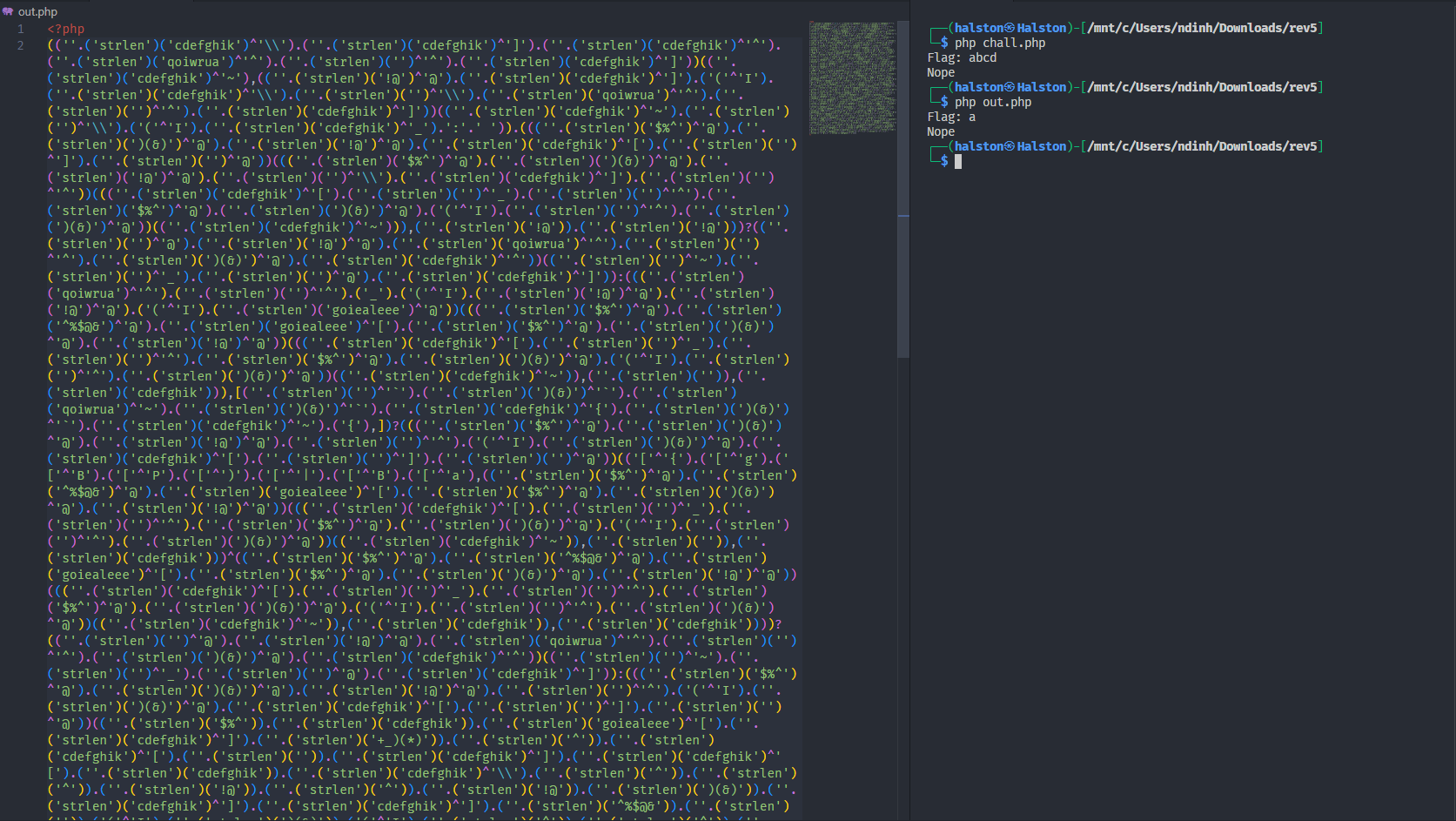
Next I resolved the strlen(_) style calls, where a function name string is called with a string argument, to shorten the code.
1
2
3
4
5
6
7
8
9
10
11
12
13
14
15
16
17
18
19
20
21
22
23
24
25
26
27
28
29
30
31
32
33
34
35
36
37
38
39
40
41
42
import re
import string
import subprocess

printable = string.printable[:-7]


s = ""
with open("chall.php", "r") as f:
    s = f.read()


pattern = r"\(([^()]+)\)"
matches = re.findall(pattern, s)
matches = set(matches)
for i in matches:
    match = ""
    if ('\'^\'' in i):
        match = i
        php_code = "<?php\n" + "echo " + match +";\n?>"
        with open("temp.php", "w") as r:
            r.write(php_code)
        result = subprocess.run(['php',  'temp.php'], stdout=subprocess.PIPE, stderr=subprocess.PIPE, text=True)
        if ('s' in result.stdout or 't' in result.stdout or 'r' in result.stdout or 'l' in result.stdout or 'e' in result.stdout or 'n' in result.stdout):
            s = s.replace(match, "\'"+ result.stdout + "\'")
s = s.replace("(('s').('t').('r').('l').('e').('n'))", "('strlen')")
with open("out.php", "w") as f:
    f.write(s)
pattern = r"\('(\w*)'\)\('([^']*)'\)"
matches = re.findall(pattern, s)
matches = set(matches)

for i in matches:
    match = list(i)
    php_code = "<?php\n" + "echo " + match[0] + '(\'' + match[1] + '\')' +";\n?>"
    rep = '(\''+match[0]+'\')' + '(\'' + match[1] + '\')'
    with open("temp.php", "w") as r:
        r.write(php_code)
    result = subprocess.run(['php',  'temp.php'], stdout=subprocess.PIPE, stderr=subprocess.PIPE, text=True)
    s = s.replace(rep, "\'"+ result.stdout + "\'")
with open("out2.php", "w") as f:
    f.write(s)
After converting all the strlen style calls back to strings I had a new source:
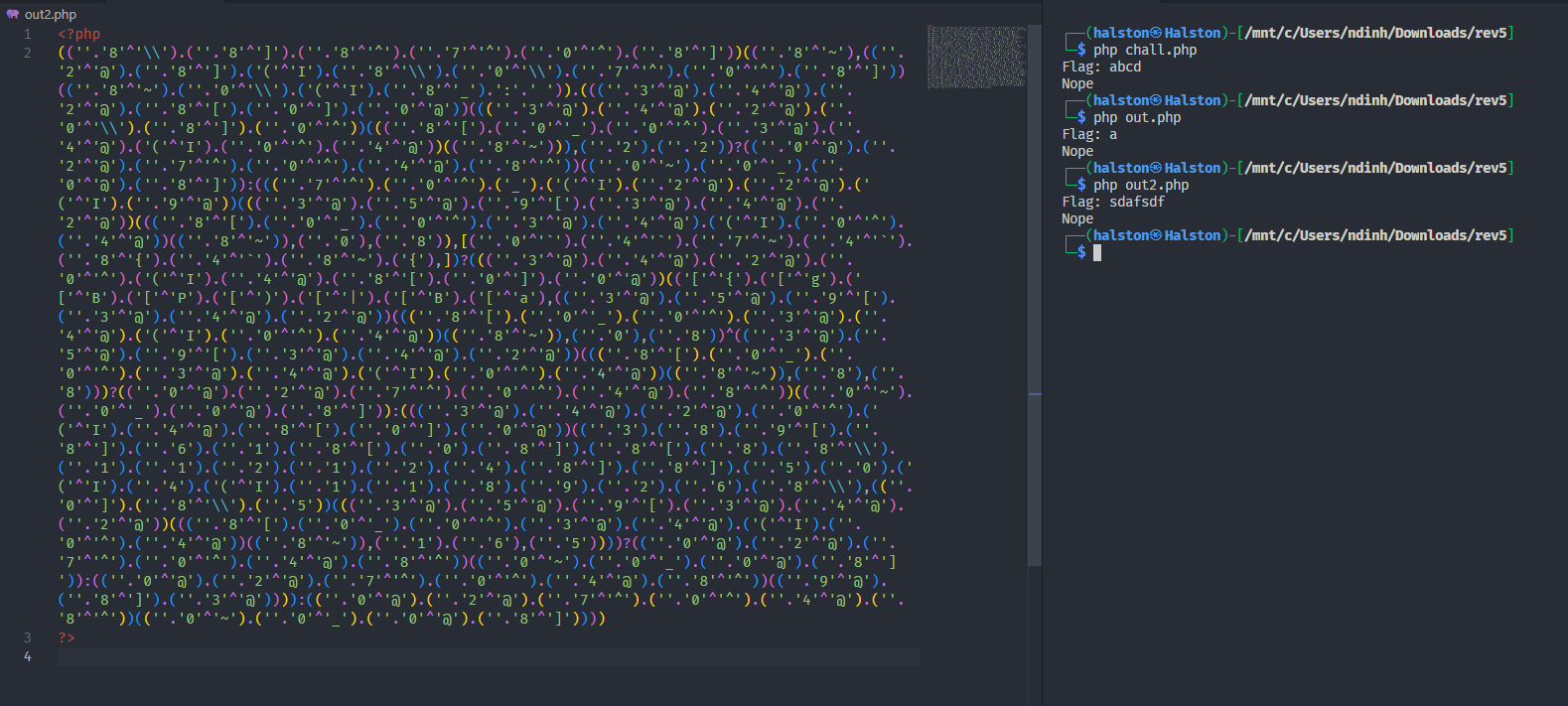
Then I had to clean up the ., ( and ) characters left over from string concatenation.
1
2
3
4
5
6
7
8
9
10
11
12
13
14
15
16
17
18
19
20
21
22
23
24
25
26

a = s.replace('(', '.')
a = a.replace(')', '.')
a = a.replace('...', '.')
a = a.replace('..', '.')

b = list(set(a[6:-3].split('.')))
s = s.replace('\'(\'^\'I\'', '\'a\'')
for i in b:
    if ('^' in i and len(i) >1):
        php_code = "<?php\n" + "echo " + i  +";\n?>"
        with open("temp.php", "w") as r:
            r.write(php_code)
        result = subprocess.run(['php',  'temp.php'], stdout=subprocess.PIPE, stderr=subprocess.PIPE, text=True)
        if (result.stdout == '\''):
            s = s.replace(i, "\'\\"+ result.stdout + "\'")
        elif (result.stdout not in printable):
            continue
        else:
            s = s.replace(i, "\'"+ result.stdout + "\'")
s = s.replace('\'\'.', '')
s = s.replace('\'\'', '\'')
s = s.replace('\').(\'', '')

with open("out3.php", "w") as f:
    f.write(s)
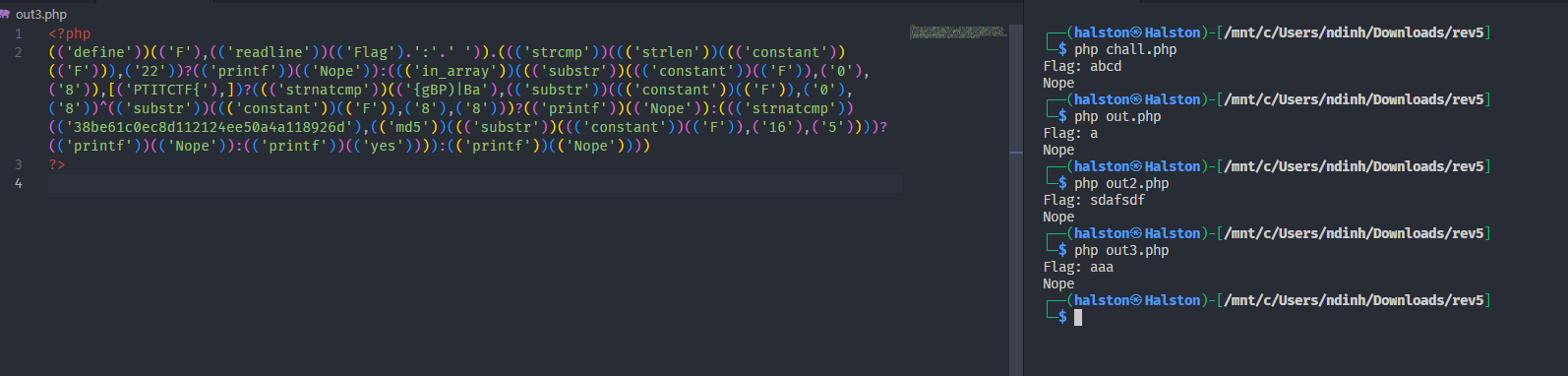
The new source file is much easier to read.
1
2
3
4
5
6
7
8
9
10
11
12
13
14
15
16
17
18
19
20
21
<?php
define('F', readline('Flag: '));

if (strcmp(strlen(constant('F')), '22')) {
    printf('Nope');
} else {
    if (in_array(substr(constant('F'), 0, 8), ['PTITCTF{'])) {
        if (strnatcmp('{gBP)|Ba', substr(constant('F'), 0, 8) ^ substr(constant('F'), 8, 8))) {
            printf('Nope');
        } else {
            if (strnatcmp('38be61c0ec8d112124ee50a4a118926d', md5(substr(constant('F'), 16, 5)))) {
                printf('Nope');
            } else {
                printf('yes');
            }
        }
    } else {
        printf('Nope');
    }
}
?>
The flag is 22 characters long and the first 8 are PTITCTF{. The second check XORs the first 8 characters with characters 8 to 15 and compares the result, so the bytes in the array s below, XORed with the known prefix PTITCTF{, give characters 8 to 15 of the flag. The third check takes the MD5 of the 5 characters starting at index 16, which is the remaining _hehe before the closing brace. The script below recovers the middle part.
1
2
3
4
5
6
7
s = [0x20, 0x3c, 0x19, 0xb, 0x72, 0x27, 0x19, 0x3a]
s2 = "PTITCTF{"
import string
a = string.printable[:-7]
print(a)
for i in range(len(s)):
    print(chr(ord(s2[i])^s[i]),end='')
Flag: PTITCTF{phP_1s_A_hehe}
Forensics - BabyShark
An easy challenge. The description says we captured network packets and need to analyze them to collect important information.
This is the challenge file:
Analyzing the packets with Wireshark, one packet from the Ethernet network looked odd.
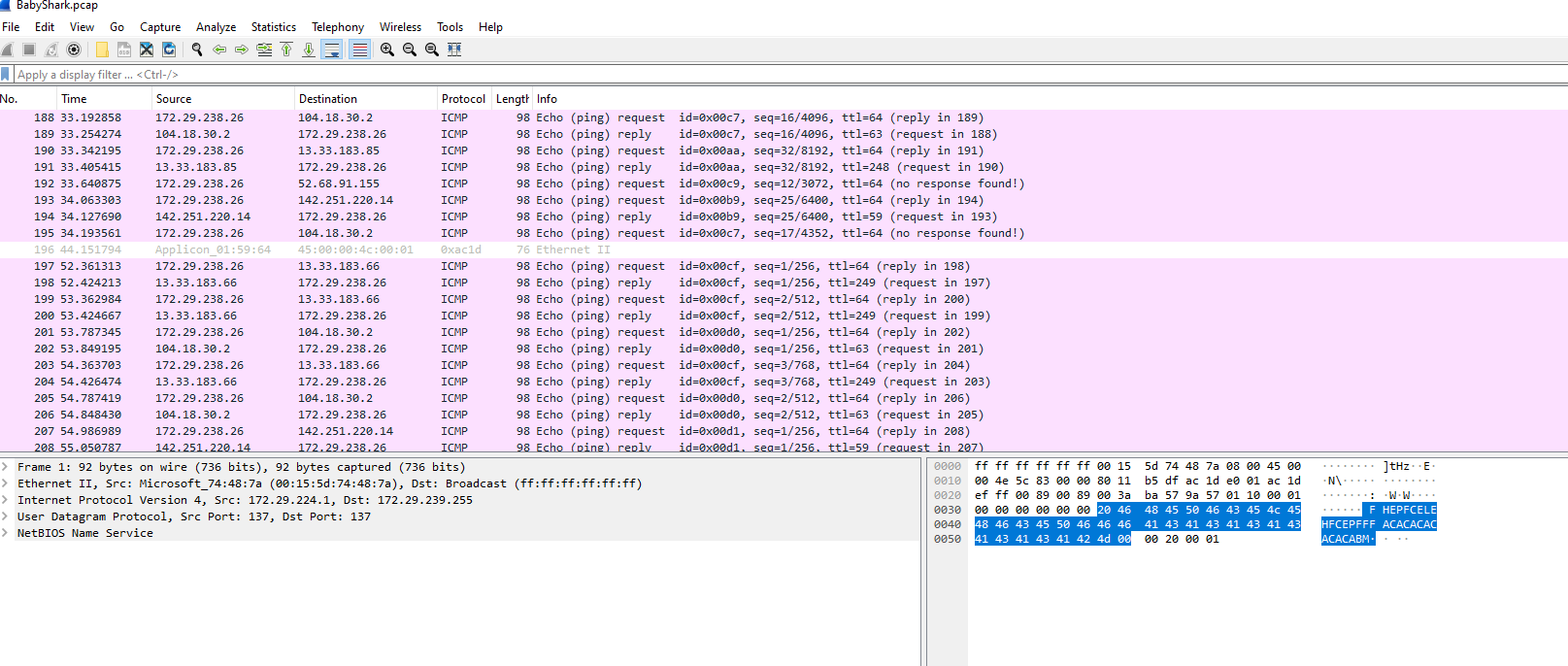
I looked at the content of the packet.
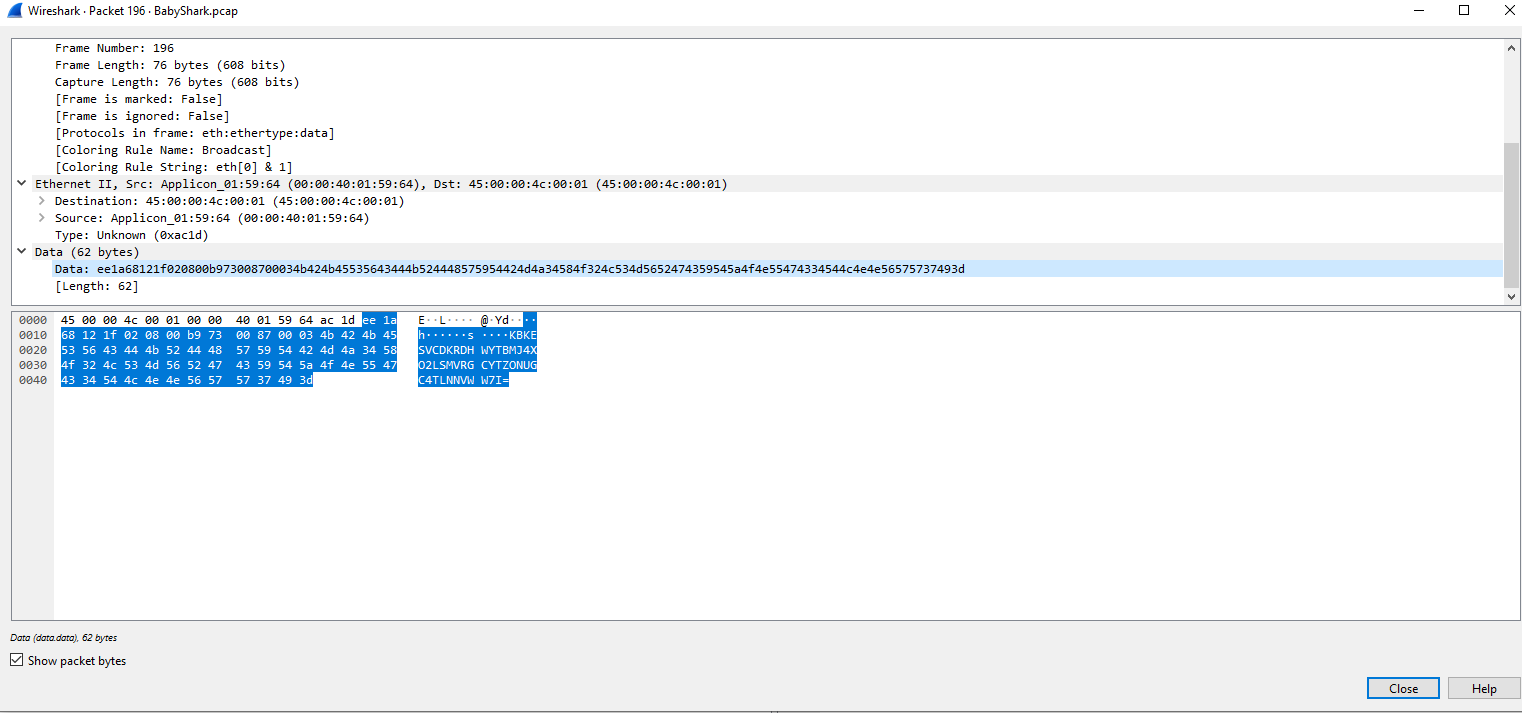
I took the value and tried to decode it as base32.
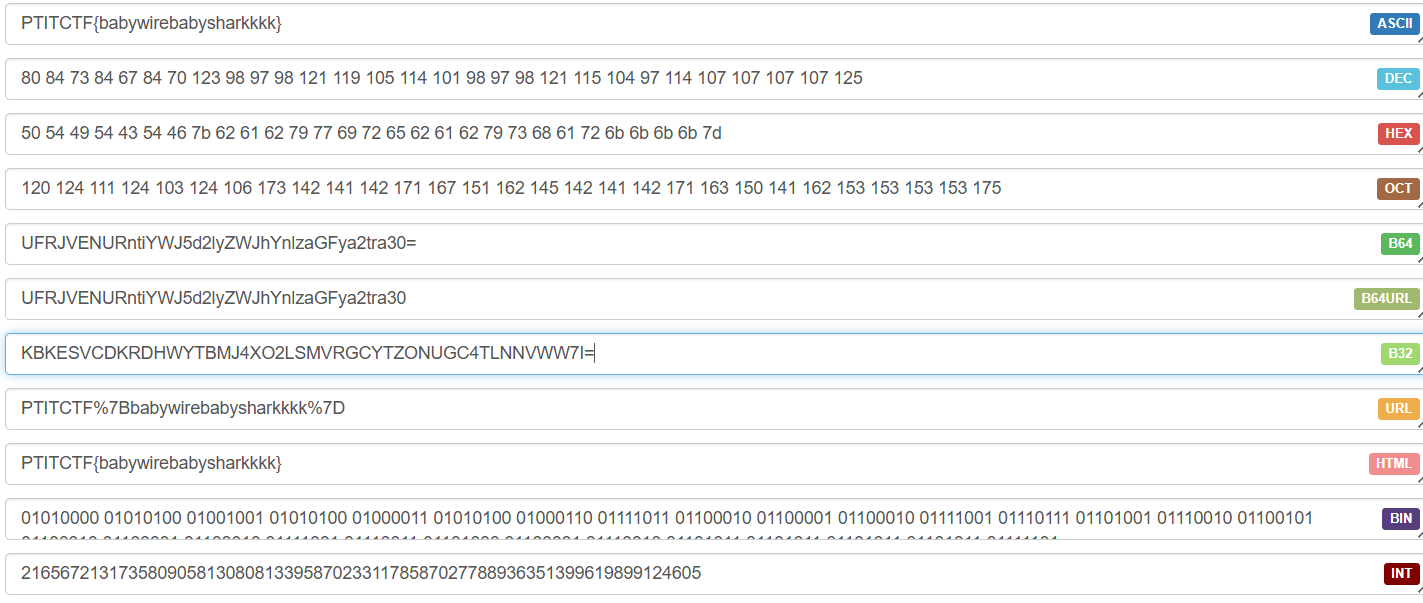
Flag: PTITCTF{babywirebabysharkkkk}
Forensics - PcapDump
An easy challenge. The description asks what they did to the machine, and to check the packets and evaluate.
This is the challenge file:
In Wireshark, the object list shows files that were fetched with curl. There is a flag.txt and a pcap.exe, both fetched from the unknown IP 103.197.185.145:1234.
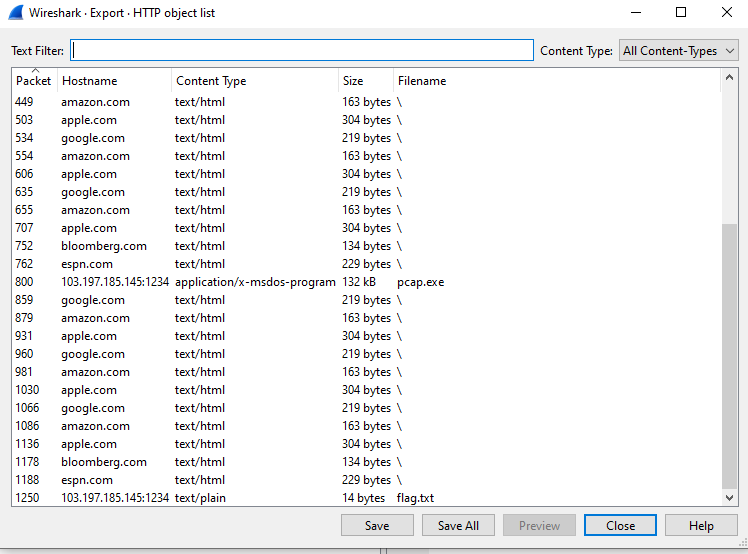
I dumped both files and read them. This is the content of flag.txt, and then I analyzed pcap.exe.

The program asks for a string and checks whether it is correct, so I reversed the exe.
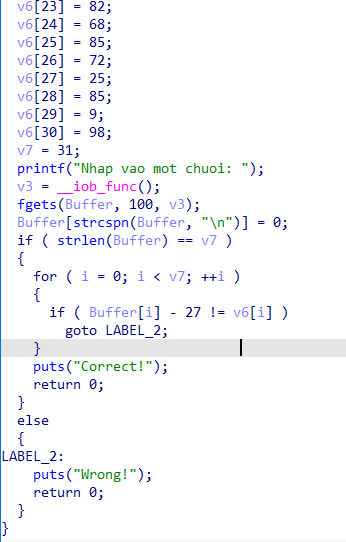
The input is stored in Buffer. Each character has 27 subtracted and the result is compared with the array v6. So I add 27 to every element of v6 to get the string to enter.
1
2
3
4
5
6
7
8
9
10
11
12
13
14
15
16
17
18
19
20
21
22
23
24
25
26
27
28
29
30
31
32
33
34
35
36
37
v6 = [0] * 31
v6[0] = 53
v6[1] = 57
v6[2] = 46
v6[3] = 57
v6[4] = 40
v6[5] = 57
v6[6] = 43
v6[7] = 96
v6[8] = 24
v6[9] = 93
v6[10] = 85
v6[11] = 21
v6[12] = 87
v6[13] = 89
v6[14] = 68
v6[15] = 43
v6[16] = 22
v6[17] = 81
v6[18] = 24
v6[19] = 68
v6[20] = 43
v6[21] = 87
v6[22] = 21
v6[23] = 82
v6[24] = 68
v6[25] = 85
v6[26] = 72
v6[27] = 25
v6[28] = 85
v6[29] = 9
v6[30] = 98
for i in range(len(v6)):
    v6[i] = v6[i] +27
    print(chr(v6[i]), end="")

#PTITCTF{3xp0rt_F1l3_Fr0m_pc4p$}

Flag: PTITCTF{3xp0rt_F1l3_Fr0m_pc4p$}
Forensics - 7Z
A medium challenge. The description asks whether a zip file is really safe. We get a Zip file with no password.
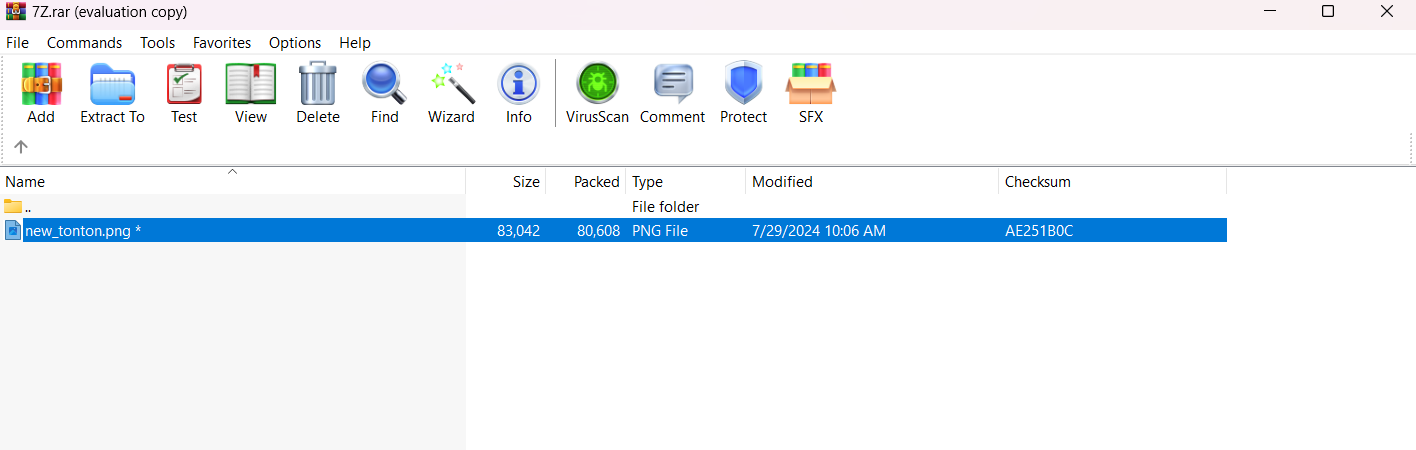
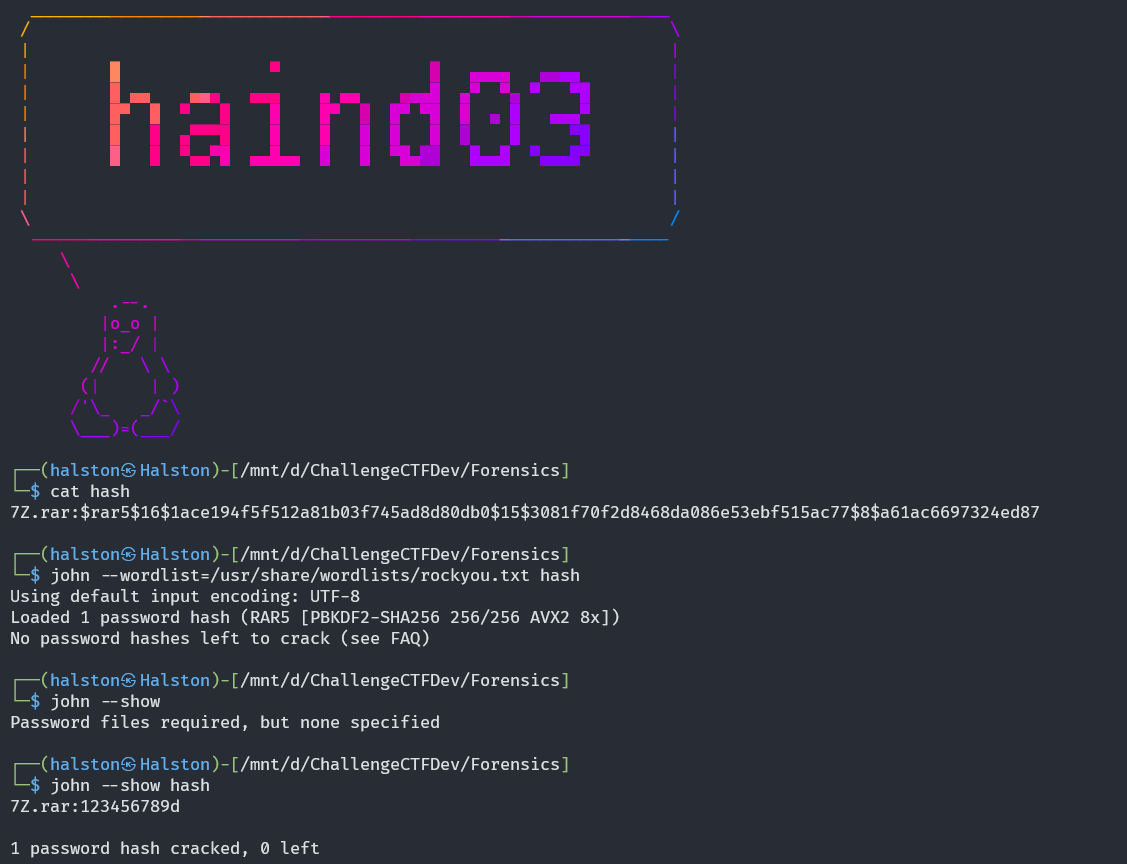
Since the archive is password protected and we do not have the password, I used zip2john to extract the hash and crack the password with John.

The password of the zip is 123456789d.
After extracting, the image file does not open, and its bytes do not match the image signature.
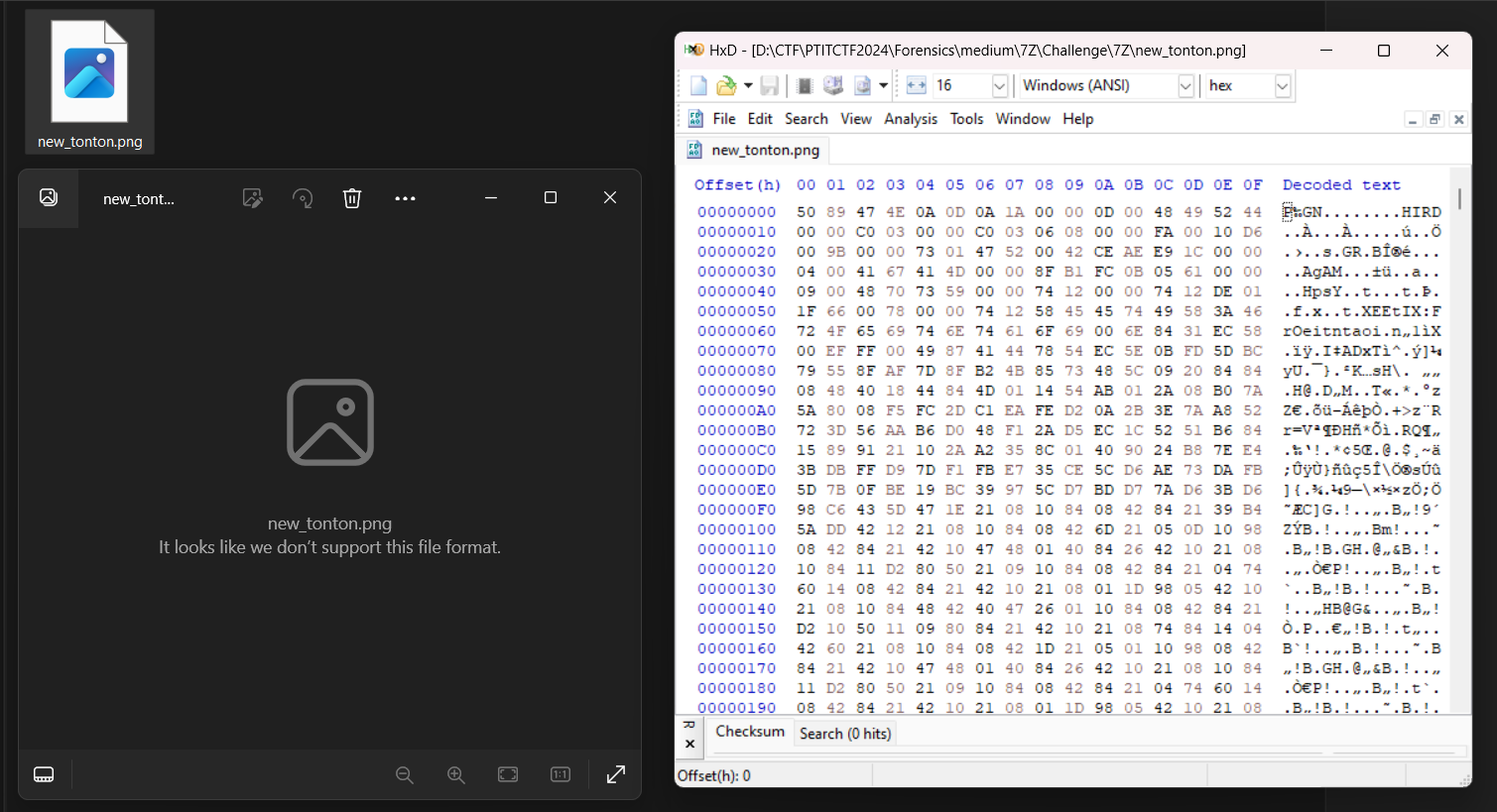
The PNG signature should read %PNG, but here it reads P followed by ‰GN, and IHDR has become HIRD. From this the encryption is visible: every pair of bytes is swapped, odd positions with even positions. I wrote a script to undo it.
1
2
3
4
5
6
7
8
9
with open('new_tonton.png', 'rb') as image_file:
    hex_data = image_file.read()

reversed_hex_data = bytearray(hex_data)
for i in range(0, len(hex_data) - 1, 2):
    reversed_hex_data[i], reversed_hex_data[i + 1] = hex_data[i + 1], hex_data[i]

with open('decrypted_tonton.png', 'wb') as new_file:
    new_file.write(reversed_hex_data)
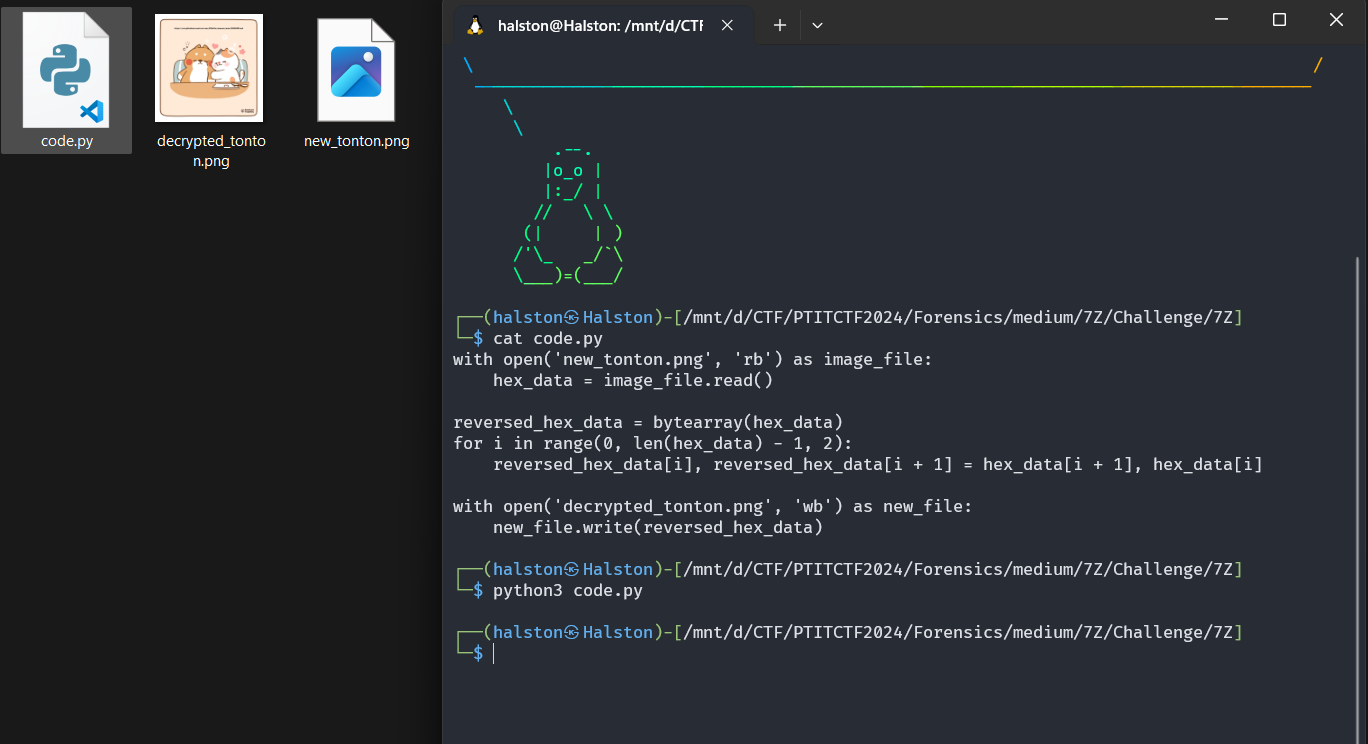
After decrypting I had a complete image. It contains the URL https://raw.githubusercontent.com/H4lst0n/naunau/main/README.md.

That URL gives the next encoded file to analyze.
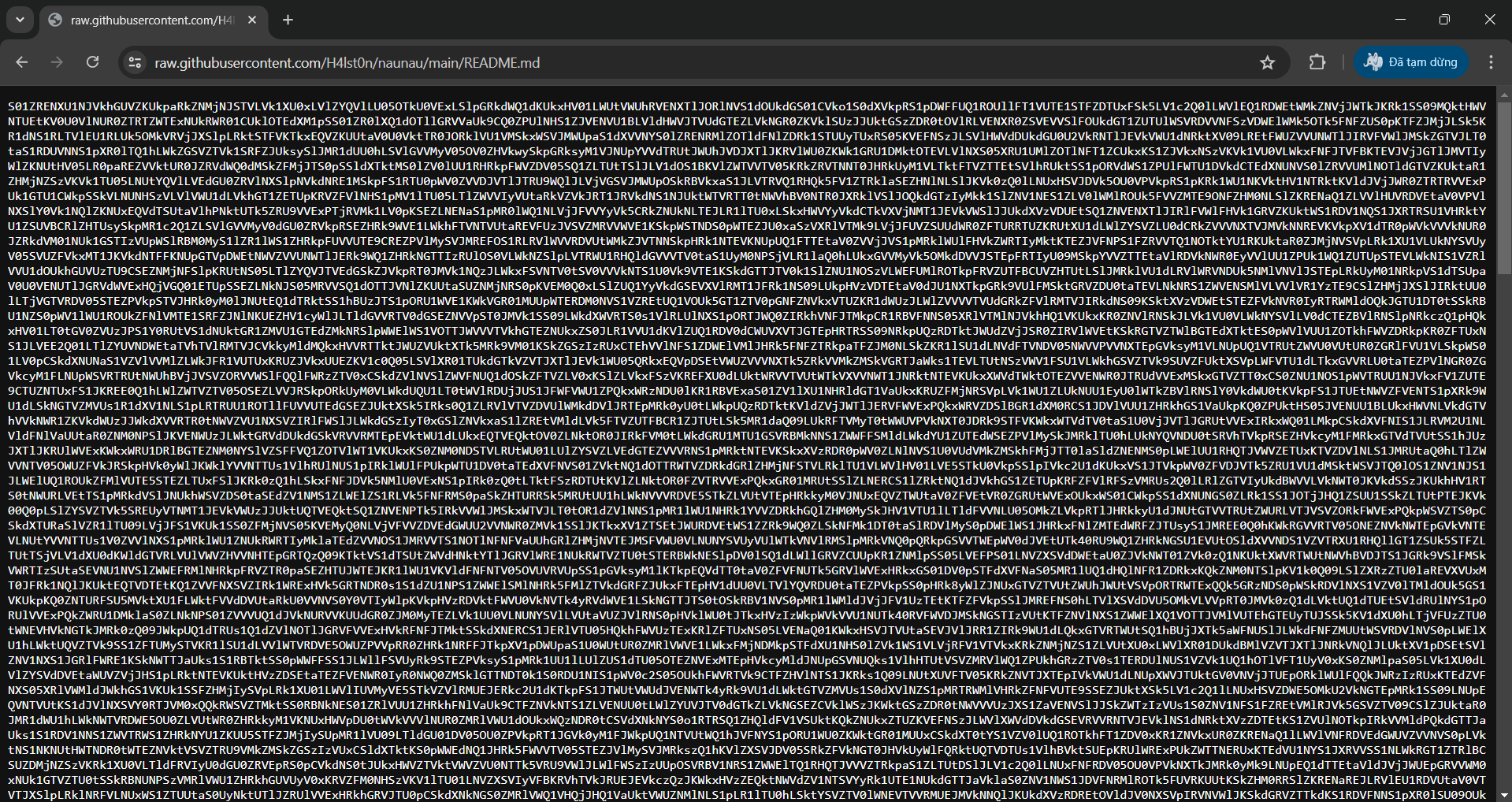
I first tried decoding it with base64. The second base64 decode failed, and after checking the error I saw that the output of the first decode is base32. Decoding that as base32 gave another base64 layer, then base32 again. So the data is encoded as base64, base32, base64, base32, and so on. I wrote a loop that keeps decoding until the text PTITCTF{ appears, then breaks.
1
2
3
4
5
6
7
8
9
10
11
12
13
14
15
16
17
18
import base64

def decode_base64(data):
    return base64.b64decode(data).decode('utf-8')

def decode_base32(data):
    return base64.b32decode(data).decode('utf-8')

with open('mahoa.txt', 'r') as file:
    encoded_flag = file.read().strip()

while True:
    encoded_flag = decode_base64(encoded_flag)
    encoded_flag = decode_base32(encoded_flag)
    if "PTITCTF{" in encoded_flag:
        break

print(f"Decoded flag: {encoded_flag}")
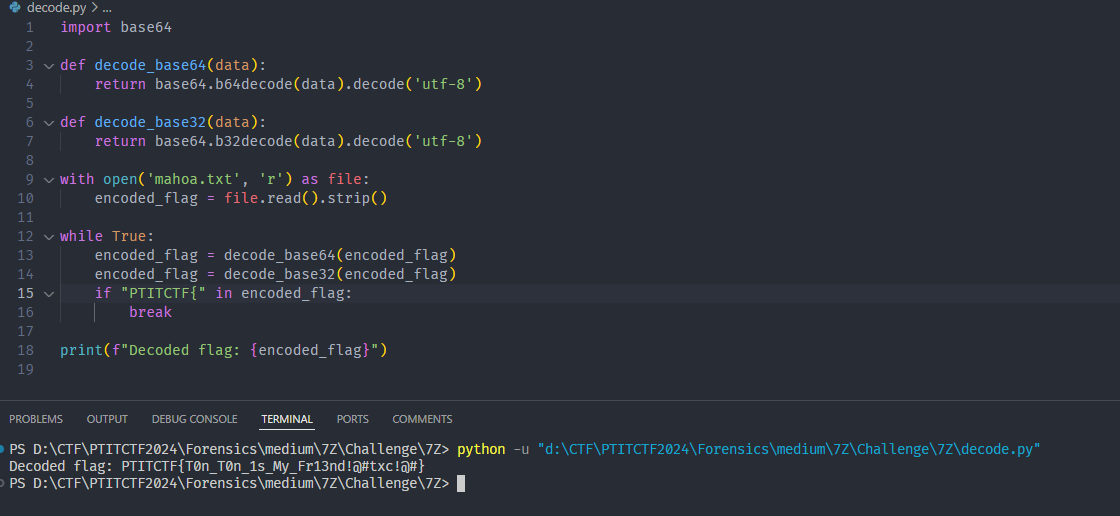
Flag: PTITCTF{T0n_T0n_1s_My_Fr13nd!@#txc!@#}
Forensics - In front of Image
A medium challenge. The description says there is a secret behind the picture. We get one image.
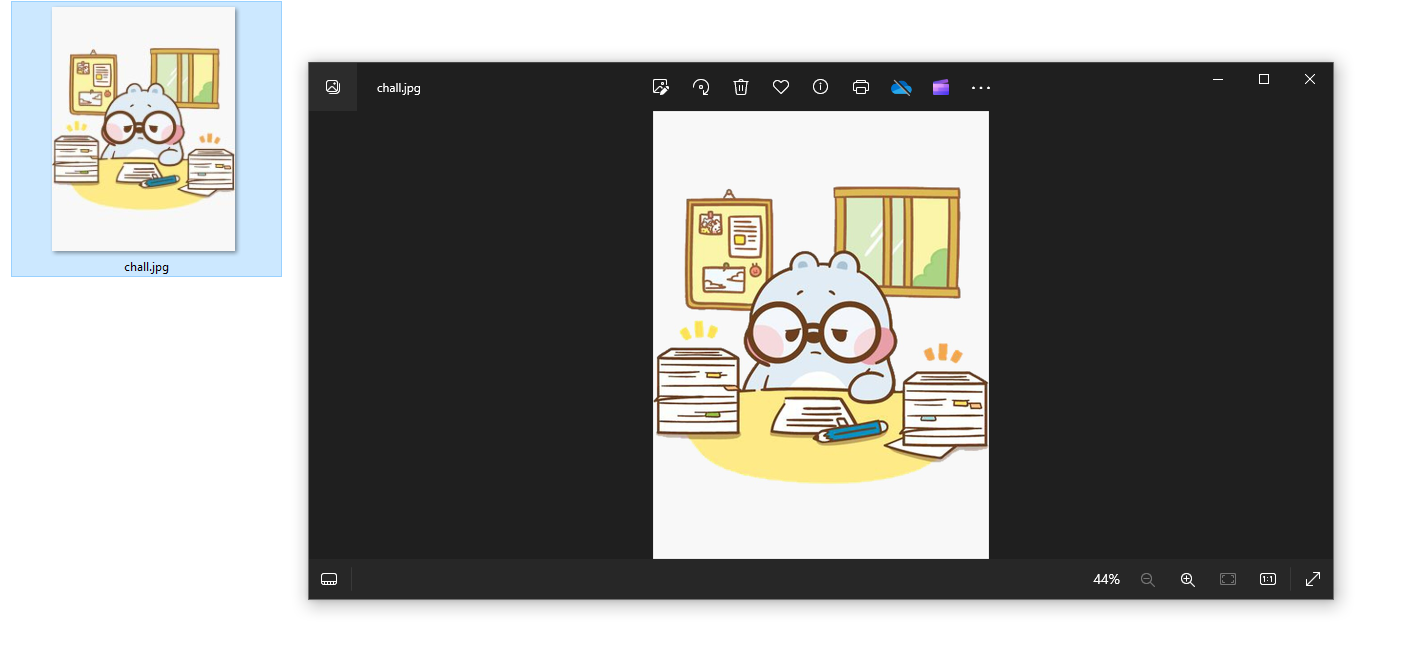
I analyzed the image in HxD. At first glance the image looks complete and there is nothing unusual.
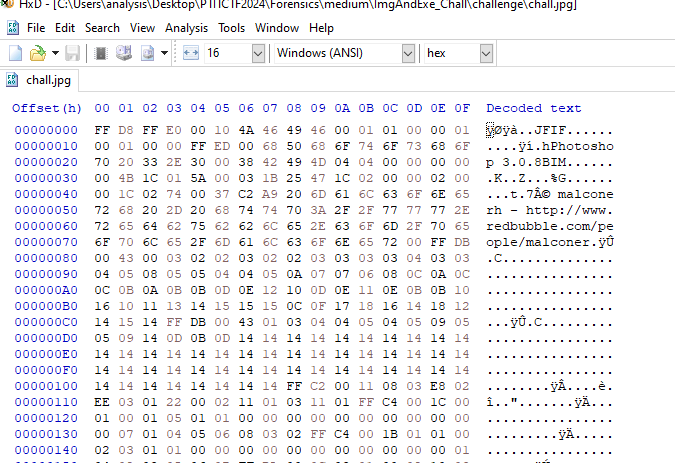
At the end of the image data there is an extra section. Read backwards it starts with MZ, which is the signature of an exe. So I had to reverse the whole byte string and rebuild it as an exe.
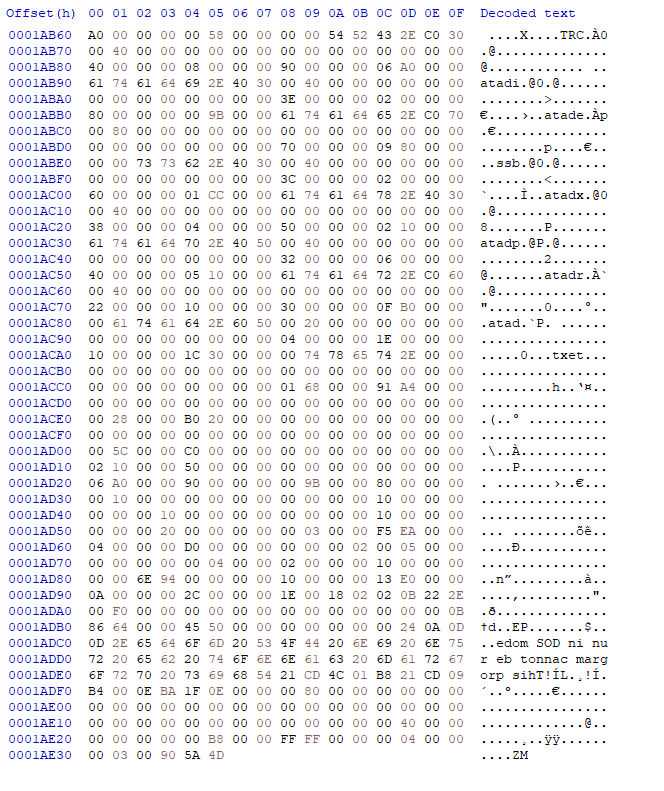
I used this code to reverse the file.
1
2
3
4
5
with open('chall.jpg', 'rb') as image_file:
    hex_data = image_file.read()
reversed_hex_data = hex_data[::-1]
with open('new.exe', 'wb') as new_file:
    new_file.write(reversed_hex_data)
Checking with Detect It Easy, the result is a dll.
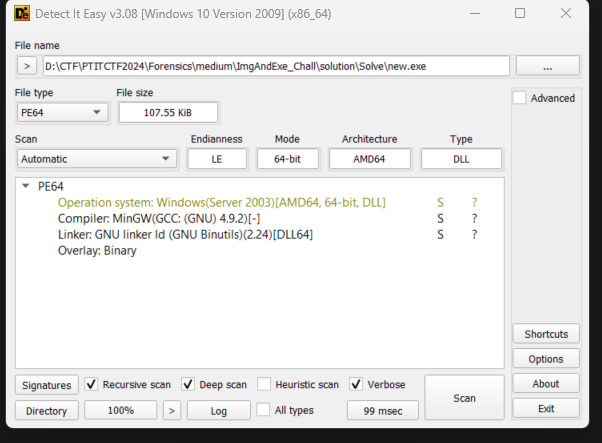
Debugging and analyzing the dll, it uses rc4 to encrypt the key and the cipher. I could either write a script to decrypt, or debug the program to get the flag.
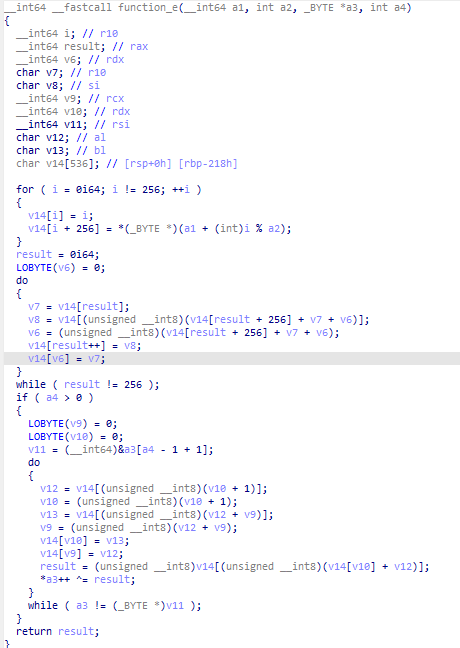
function_e is called by function_d to do the rc4 decryption and then print each character. One approach is to write a program that loads the dll so it runs and prints the flag after patching the anti-debug checks. I debugged it instead.
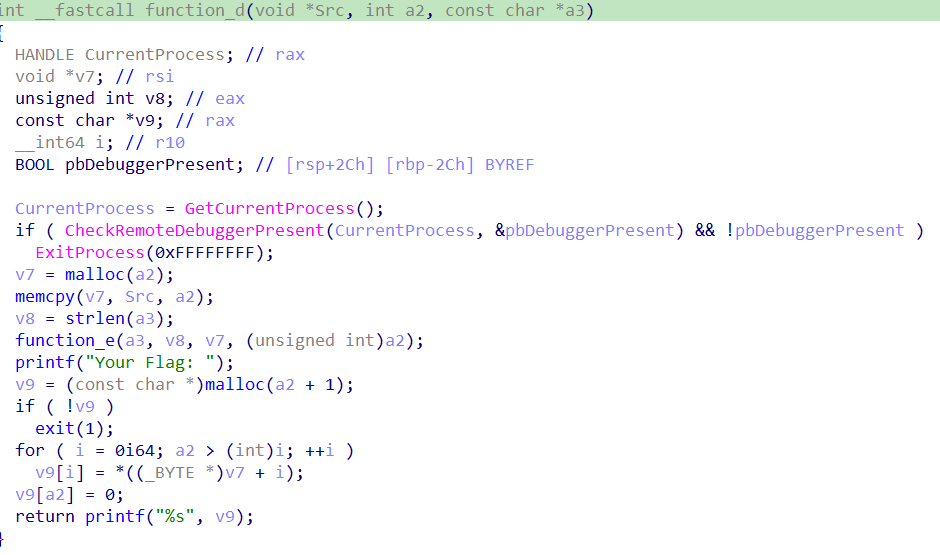
function_d is called by function_c, and that is the first function called after function_a runs.
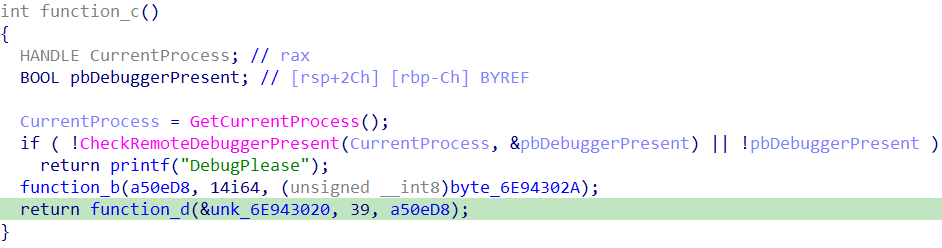
After patching all the anti-debug checks and following the flow of the program, I found the key and then the flag.
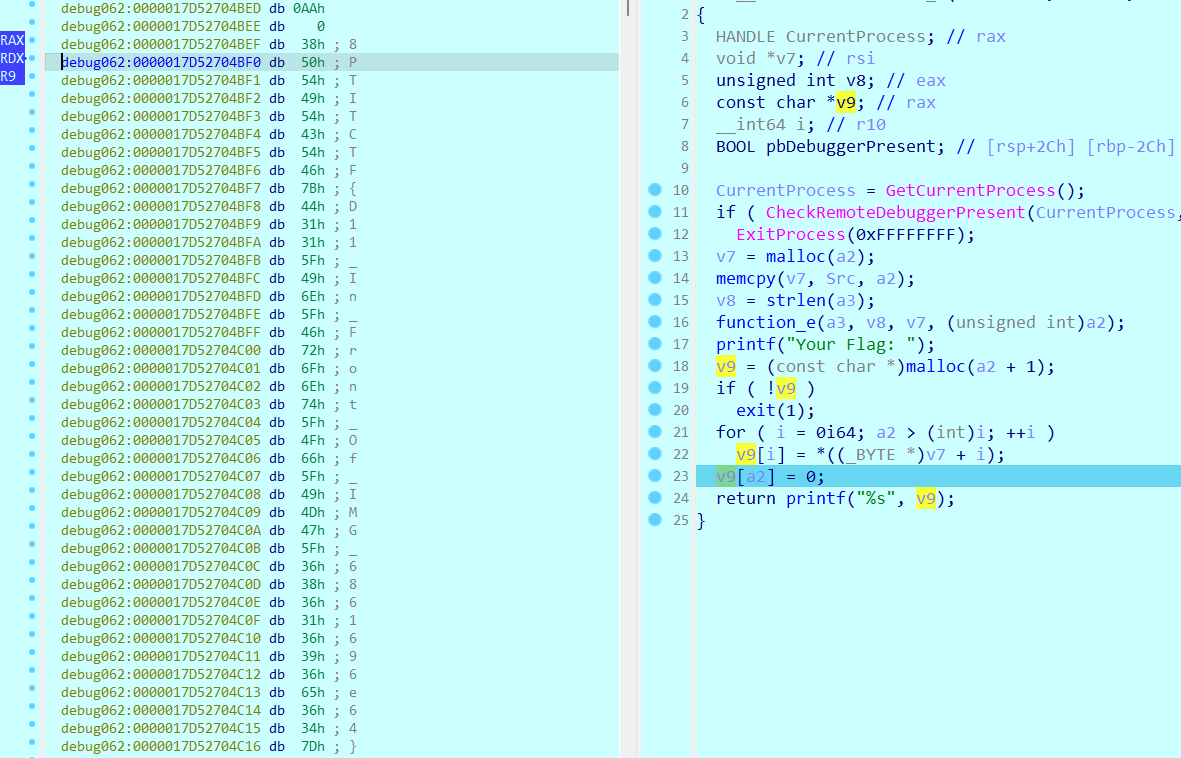

Flag: PTITCTF{D11_In_Front_Of_IMG_6861696e64}
Forensics - Mem Search
A hard challenge. The description says the author installed some security study software, something went wrong and some things were stolen. The machine may have malware, it boots slower than usual, and the author got a mem file from the machine to be analyzed.
We get a file analysis.mem, so I used volatility to analyze it. The description says the author downloaded installers to practice, which can only be .exe files, so I listed only the exe files on the system.
1
python3 volatility3/vol.py -f analysis.mem windows.filescan.FileScan | grep -E ".exe" > checkfile.txt
This gives checkfile.txt, which contains suspicious entries that match the description.
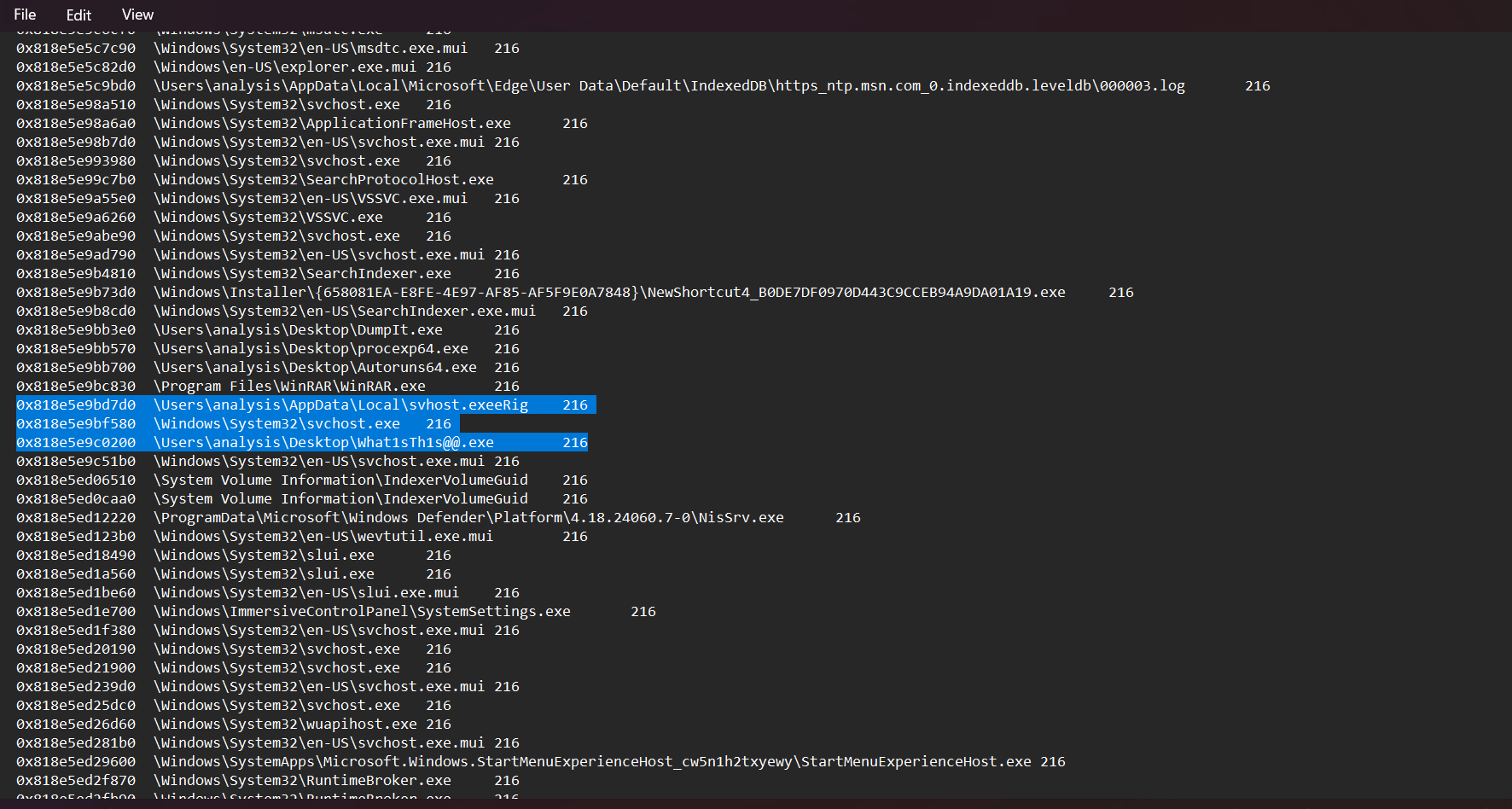
These are the two files I suspected most:
1
2
0x818e5e9bd7d0	\Users\analysis\AppData\Local\svhost.exeeRig	216
0x818e5e9c0200	\Users\analysis\Desktop\What1sTh1s@@.exe	216
The first is svhost.exe. Its name imitates the Windows svchost.exe, and it sits in \Users\analysis\AppData\Local, so it is clearly a target.
The second has a strange name and sits directly on the Desktop. I dumped it as well.
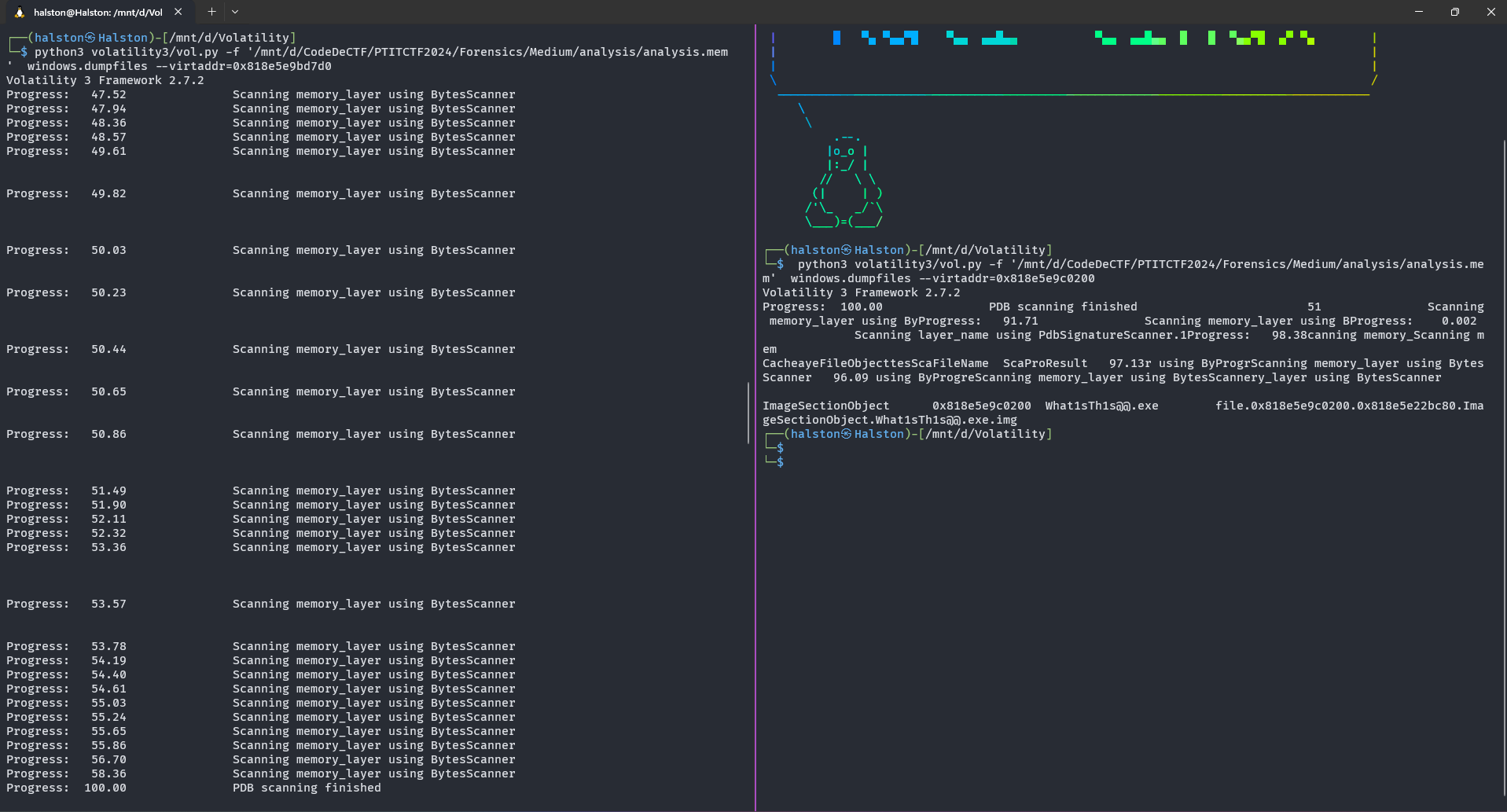
These are the two files I dumped.

The content of svhost.exe:
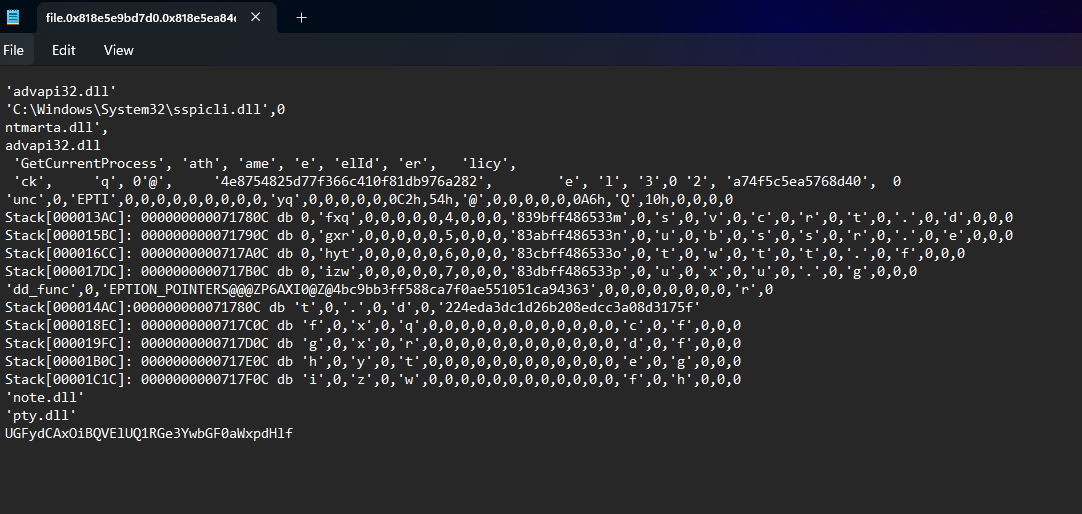
There is a base64 string at the bottom, which I decoded.
1
UGFydCAxOiBQVElUQ1RGe3YwbGF0aWxpdHlf
This is the first part of the flag.
1
Part 1: PTITCTF{v0latility_
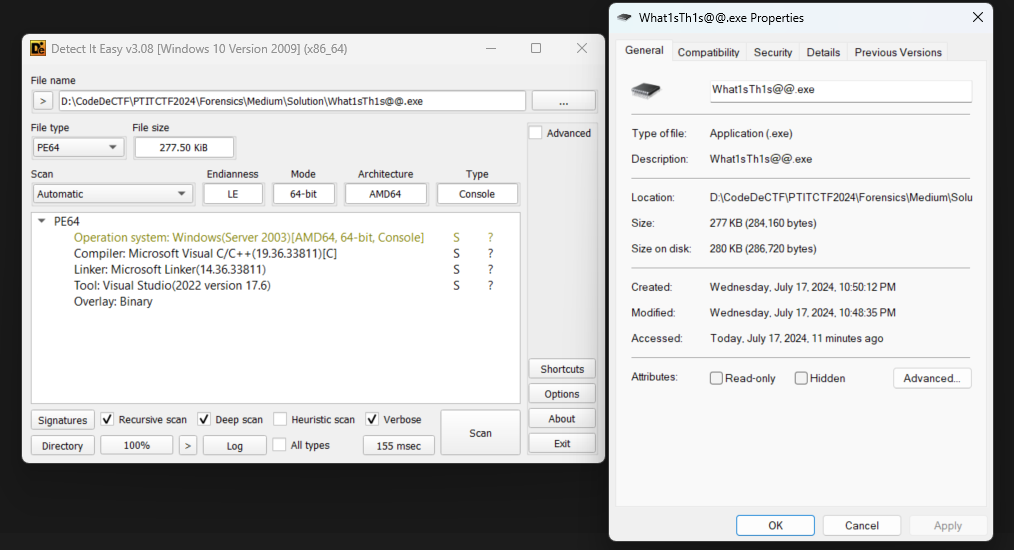
The second file is a 64-bit exe that applies some anti-reversing techniques, which I checked with a few tools.
Opening it in Resource Hacker, there is a string in the String Table.
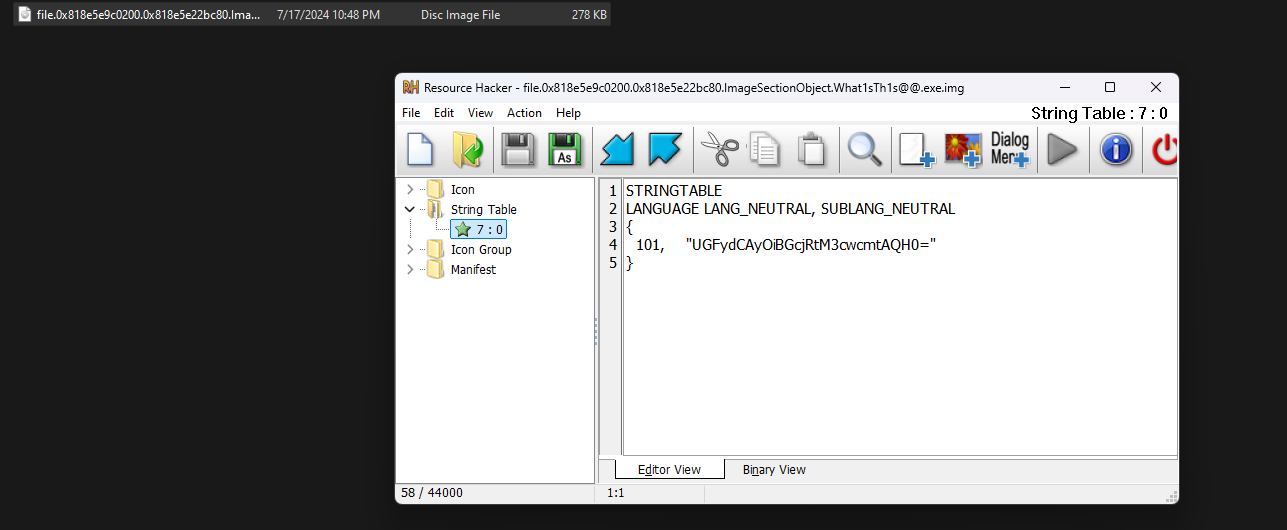
Its content:
1
2
3
4
5
6
STRINGTABLE
LANGUAGE LANG_NEUTRAL, SUBLANG_NEUTRAL
{
  101, 	"UGFydCAyOiBGcjRtM3cwcmtAQH0="
}
Decoding it gives part 2 of the flag.
1
Part 2: Fr4m3w0rk@@}
Flag: PTITCTF{v0latility_Fr4m3w0rk@@}