Lesson 5.1: Overview of mitigations, NX, ASLR, PIE, canary, RELRO
Before learning how to get past each layer of defense, you need a map: what exactly each mitigation blocks, what it does not touch, and how to read checksec output to know what you are up against.
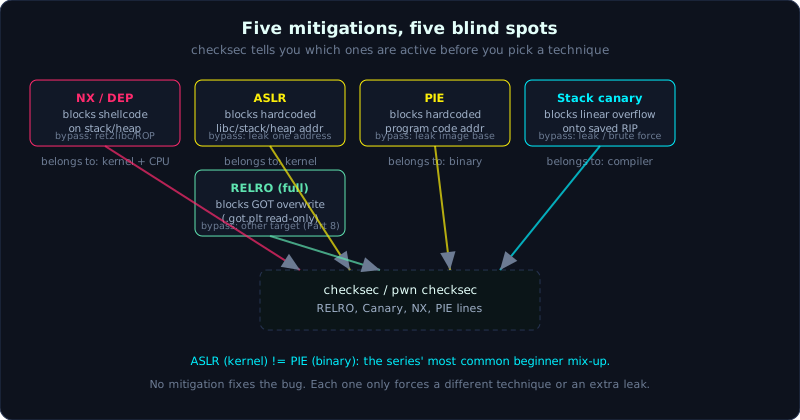 Each mitigation closes one path and leaves another open; checksec tells you which ones are active.
| Part: 5 (Mitigations) | Time: about 45 minutes reading | Difficulty: medium |
Prerequisites: Lesson 1.2 (stack frame, saved RIP), Lesson 1.3 (ELF, GOT/PLT), Lesson 3.2 (ret2win), Lesson 2.3 (checksec).
Tools: checksec, readelf, gdb + pwndbg.
Goals
By the end of this lesson you can name the 5 common mitigations and state exactly what each one blocks and does not block. You can read checksec output line by line instead of guessing. You can clearly tell ASLR (a kernel feature) apart from PIE (a binary property). You know how to rebuild the same program with different combinations of mitigations to practice.
1. Theory
Mitigations are defensive layers that the compiler, linker, and kernel add so that a bug does not automatically turn into code execution. The key point to remember from the start: no layer fixes the bug. They only make exploitation harder, forcing you to leak more information or switch techniques. Each layer has a blind spot, and this entire series is essentially about learning how to find that blind spot.
We go through them one at a time. For each one, the question always has three parts: what it blocks, what it does not block, how to get past it.
NX / DEP
NX (No-eXecute), called DEP (Data Execution Prevention) on Windows, marks data pages (stack, heap, .data) as unable to execute. The CPU uses the NX bit in the page table, so pointing the instruction pointer (RIP) into a page without execute permission causes an immediate SIGSEGV.
What it blocks: the classic attack of “put shellcode in a stack buffer, then jump into it.” This is why Part 4 (shellcode on the stack) only works when you deliberately build with -z execstack.
What it does not block: NX does not stop you from running code that is already in an executable region, meaning the program’s own .text and all of libc. This is the gap that gives rise to the whole code-reuse family: ret2libc, ROP (Return Oriented Programming, chaining existing code fragments). You do not write new code, you reuse old code.
Getting past it: Part 6. NX is almost always on, treat it as the default on every modern binary.
ASLR
ASLR (Address Space Layout Randomization) is a kernel feature. Every time a process loads, the kernel places the base (starting address) of the stack, heap, and the mmap region (where libc and other .so files get mapped) at a random location.
The first commonly misunderstood point is that ASLR does not live in the binary. It is a system-wide switch, read from /proc/sys/kernel/randomize_va_space, with three possible values.
0: fully off, addresses are fixed on every run (handy for debugging).1: partially on (stack, mmap, vDSO random; heap is not).2: fully on (the default on every distro today).
What it blocks: hardcoding addresses. You cannot write “the address of system is 0x7ffff7e3d2b0” into an exploit, because next run it will be different.
What it does not block: ASLR randomizes the base, not the layout inside one object. So if you leak (get hold of) exactly one runtime address inside libc, you can derive the rest of libc. One critical detail: ASLR randomizes in units of a page (0x1000), so the lowest 12 bits (last 3 hex digits, the offset within the page) of every address always stay the same. This is both the way to check whether a leak is correct, and sometimes a spot where you can brute force just one byte.
PIE
PIE (Position Independent Executable) is a property of the binary itself, chosen by you at compile time. When a binary is PIE, it is built as ET_DYN (like a shared library), so even the program’s own code, meaning .text, .data, the GOT, and every function you wrote, gets loaded by the kernel at a random base when ASLR is on.
This is the second commonly confused point, worth pinning down with a small mental table:
- No-PIE (ET_EXEC): the main image always sits at a fixed 0x400000, regardless of ASLR. ret2win, or jumping into an internal gadget, can hardcode the address.
- PIE (ET_DYN): the main image is also randomized. To use an internal function or gadget, you must leak the image base first.
In short, ASLR covers libc, stack, heap. PIE extends that randomization to the program body as well. ASLR on with a no-PIE binary still leaves the program’s code standing still. You need both together before the program’s own code moves around.
Tell them apart on disk with readelf.
1
2
3
readelf -h vuln | grep Type
#   Type:  EXEC (Executable file)        -> no-PIE
#   Type:  DYN (Position-Independent...) -> PIE
Stack canary
A stack canary (also called a stack cookie) is a random value the compiler inserts between local buffers and saved RIP. The function prologue loads the canary from TLS (fs:0x28) onto the stack; the epilogue compares it again right before ret. If the value changed, the program calls __stack_chk_fail and aborts with the familiar “stack smashing detected” message.
What it blocks: a linear overflow that overwrites saved RIP. To reach saved RIP with one continuous write, you are forced to go through the canary, and getting it wrong kills the process right at the epilogue.
What it does not block: the canary is useless if you leak it and then write the exact same value back, or if you write non-linearly (writing straight to a far-off position without touching the canary). One detail of glibc on x86-64: the lowest byte of the canary is always 0x00 (null), deliberately, to block string functions from leaking it.
Getting past it: Lesson 5.2.
RELRO
RELRO (RELocation Read-Only) targets the GOT (Global Offset Table, the table holding the runtime addresses of libc functions). It has two levels:
- Partial RELRO: some sections (like .init_array, .got) become read-only, but .got.plt (the part lazy binding writes into) stays writable. Lazy binding means a libc function’s real address is only resolved on its first call and then cached in the GOT, so the GOT has to be writable at runtime.
- Full RELRO (enabled with
-z now): the linker resolves every symbol at load time, then maps the whole GOT as read-only. Writing to the GOT at runtime gets a SIGSEGV.
What it blocks: Full RELRO blocks the GOT overwrite technique (overwriting a GOT entry to redirect a function call, covered in Part 8).
What it does not block: RELRO only concerns the GOT. It does not stop an overflow, does not stop ROP, does not stop ret2libc.
Summary table
| Mitigation | Belongs to | Blocks | Blind spot / way past |
|---|---|---|---|
| NX / DEP | kernel + CPU | running shellcode on stack/heap | code-reuse: ret2libc, ROP (Part 6) |
| ASLR | kernel | hardcoding libc/stack/heap addresses | leak 1 address then compute the base (Lessons 5.3, 6.2) |
| PIE | binary | hardcoding the program’s own code addresses | leak the image base (Lesson 5.3) |
| Stack canary | compiler | linear overflow onto saved RIP | leak the canary / brute force under fork (Lesson 5.2) |
| RELRO (full) | linker | GOT overwrite | write a different target, or a technique that does not touch the GOT (Part 8) |
2. Demo
Test environment: Ubuntu 24.04, glibc 2.39 (2.39-0ubuntu8.9), gcc 13.3.0. Every output below is real, captured on this machine with pwntools’ pwn checksec. Source, a build.sh that compiles all 8 combinations, and the full checksec transcript are in the Lab section below.
Take any vuln.c (it only needs a main), and build a few variants to compare.
1
2
3
4
5
6
7
8
# NX on, no-PIE, no canary (a binary for practicing classic overflows)
gcc -fno-stack-protector -no-pie -o vuln_nopie vuln.c

# NX off for comparison (stack is executable)
gcc -fno-stack-protector -no-pie -z execstack -o vuln_exec vuln.c

# gcc's default build on Ubuntu 24.04: the full set of mitigations
gcc -o vuln_all vuln.c
Read checksec on the default build.
1
2
3
4
5
6
7
8
9
10
$ pwn checksec vuln_all
[*] '/.../vuln_all'
    Arch:       amd64-64-little
    RELRO:      Full RELRO
    Stack:      Canary found
    NX:         NX enabled
    PIE:        PIE enabled
    SHSTK:      Enabled
    IBT:        Enabled
    Stripped:   No
And the no-PIE, no-canary build.
1
2
3
4
5
6
7
8
9
10
$ pwn checksec vuln_nopie
[*] '/.../vuln_nopie'
    Arch:       amd64-64-little
    RELRO:      Partial RELRO
    Stack:      No canary found
    NX:         NX enabled
    PIE:        No PIE (0x400000)
    SHSTK:      Enabled
    IBT:        Enabled
    Stripped:   No
One surprise on Ubuntu 24.04: even the build with -fno-stack-protector -no-pie still shows SHSTK: Enabled and IBT: Enabled, because gcc 13.3 enables -fcf-protection by default (inserting CET markers). To make those two lines disappear you have to add -fcf-protection=none. And the build with NX off (-z execstack) shows NX: NX unknown - GNU_STACK missing, along with Stack: Executable and RWX: Has RWX segments. The real checksec table for all 8 combinations (including Partial/No RELRO and the CET-disabled build) is in the Lab section below.
Each line reads as follows.
Arch: amd64-64-little: x86-64, little-endian. Decides whether you usep64orp32in pwntools.RELRO: Full, Partial, or No. Full means forget about GOT overwrite.Stack: Canary found/No canary found: whether you need to worry about leaking a canary.NX: NX enabled: almost always true, so prepare for a code-reuse mindset.PIE: PIE enabled/No PIE (0x400000): this line matters most for strategy. No PIE comes with a fixed base address, you can hardcode freely. PIE means you must leak.SHSTKandIBT: this is CET (Intel’s Control-flow Enforcement Technology): SHSTK is the shadow stack (stops overwriting a return address), IBT is indirect branch tracking (forces indirect jumps to land on anendbrinstruction). Newer checksec versions show these two lines. Note that they are only actually enforced when both the CPU and the kernel support them, and most basic CTF environments do not enforce them yet, so at this level we set them aside for now, but it is worth knowing they exist.Stripped: whether symbols remain, affecting how easily you can look up function names.
One practical point that trips up beginners: on Ubuntu 24.04, gcc’s default output is Full RELRO, not Partial as older documentation often says. To create a Partial RELRO binary for practicing GOT overwrite, you have to force the linker.
1
2
gcc -fno-stack-protector -no-pie -Wl,-z,relro,-z,lazy -o vuln_partial vuln.c   # Partial RELRO
gcc -fno-stack-protector -no-pie -Wl,-z,norelro       -o vuln_norelro vuln.c   # No RELRO
Check the system’s ASLR and how to turn it off for debugging.
1
2
3
4
5
cat /proc/sys/kernel/randomize_va_space        # 2 means fully on
# turn it off temporarily for one process (no root needed), handy when running under gdb:
setarch $(uname -m) -R ./vuln
# or turn it off system-wide (needs root, remember to turn it back on):
echo 0 | sudo tee /proc/sys/kernel/randomize_va_space
In gdb + pwndbg, the vmmap command shows the real base of each region, very handy for checking whether your leak is correct. pwntools also reads checksec straight in a script.
1
2
3
from pwn import *
elf = ELF('./vuln_all')
print(elf.pie, elf.canary, elf.nx, elf.relro)   # True/False/... read directly in code
3. Lab
- Task: take a simple vuln.c of your own (it only needs a
maincallinggetsorread), compile it into at least four variants: no mitigations (as much as possible), NX only, NX + PIE, and full (default). - Goal: run
checksecon each variant, build a table of which mitigation is on in which build, and check it against the flags you passed. - Hints, in steps:
- Hint 1: the flags to remember are
-fno-stack-protector(canary off),-no-pie(PIE off),-z execstack(NX off),-Wl,-z,norelro(RELRO off). - Hint 2: to turn the canary on at its strongest, use
-fstack-protector-all. - Hint 3: use
readelf -hto confirm EXEC vs DYN matches checksec’s PIE line.
- Hint 1: the flags to remember are
- Check yourself: can you explain why the No PIE build prints
0x400000? And why the lowest byte of the canary is 00 (hint: think about string-handling functions stopping at null)?
Real checksec table, ran with pwn checksec on the 8 builds from the Lab section below (Ubuntu 24.04, glibc 2.39, gcc 13.3).
1
2
3
4
5
6
7
8
9
binary         RELRO     Canary  NX            PIE              CET(SHSTK/IBT)
vuln_all       Full      Yes     enabled       PIE              Enabled
vuln_nopie     Partial   No      enabled       No PIE(0x400000) Enabled
vuln_exec      Partial   No      OFF (RWX)     No PIE(0x400000) Enabled
vuln_canary    Partial   Yes     enabled       No PIE(0x400000) Enabled
vuln_pie       Full      No      enabled       PIE              Enabled
vuln_partial   Partial   No      enabled       No PIE(0x400000) Enabled
vuln_norelro   No RELRO  No      enabled       No PIE(0x400000) Enabled
vuln_nocet     Full      Yes     enabled       PIE              (off, due to -fcf-protection=none)
The build commands for each binary and the raw checksec output are included with the Lab section below.
4. Key takeaways
- The first thing to do with an unfamiliar binary is run checksec and read all 5 mitigation lines.
- NX on means switching to a code-reuse mindset, not shellcode on the stack anymore.
- PIE on means every internal address must be leaked; No PIE lets you hardcode from 0x400000.
- ASLR belongs to the kernel, PIE belongs to the binary, they are two different things.
- Full RELRO means drop the idea of a GOT overwrite.
- Canary found means you need a leak path or a fork scenario to brute force.
5. Common pitfalls
- Confusing ASLR with PIE. Seeing ASLR on and assuming every address is random, then getting stuck trying to leak the image base of a no-PIE binary (which always sits at 0x400000). Check the PIE line of checksec to be sure.
- Thinking NX blocks everything. NX only blocks running new code on data, it does not stop you from reusing libc’s
system(). Many beginners see NX enabled and give up, while ret2libc is still wide open. - Debugging while used to ASLR being off. gdb disables randomization by default, so addresses stay stable and you can accidentally hardcode them. When ASLR is really on, addresses change, and the exploit fails. Always test by running multiple times.
- Assuming the default is Partial RELRO. Reading older documentation and assuming gcc gives Partial, then being surprised when writing to the GOT fails because it is actually Full. Always let checksec tell you, do not guess from the distro.
6. Further reading
- Ubuntu Security Features documentation (Compiler and Kernel hardening sections).
- The checksec.sh homepage and pwntools’
ELF.checksec()options. - Lesson 5.2 (stack canary) and Lesson 5.3 (ASLR/PIE leak) to get past each layer.
- Part 6 (ret2libc, ROP) for NX, Part 8 (GOT/PLT) for RELRO.