Lesson 2.3: checksec, ROPgadget, ropper, and one_gadget
This lesson covers the three things you do in the first five minutes with an unfamiliar binary: read which mitigations are turned on (checksec), find small reusable snippets of code (ROPgadget/ropper), and look up precomputed libc addresses that pop a shell in one jump (one_gadget). Each tool answers a different question, and this lesson is clear about which one.
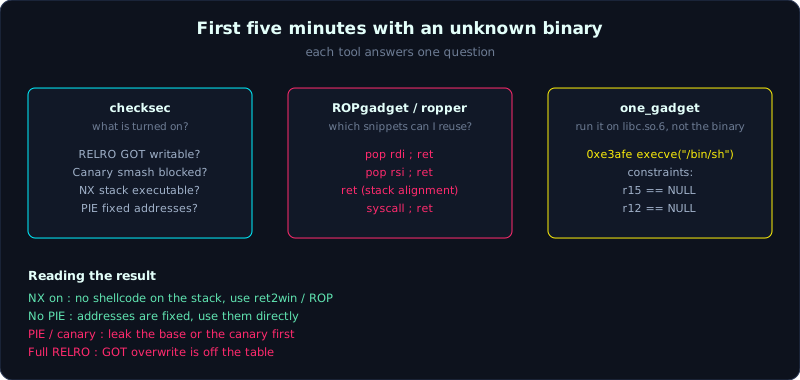 checksec tells you what is turned on, ROPgadget and ropper tell you what you can reuse, one_gadget tells you where a single jump pops a shell.
Prerequisites: Lesson 1.3 (ELF, GOT/PLT), Lesson 2.2 (gdb basics). A rough idea of what a mitigation is helps (covered in depth in part 5; here you only need to recognize the names).
Tools: checksec (from pwntools or a standalone package), ROPgadget, ropper, one_gadget.
Goals
After this lesson you can run checksec and read every line correctly: what RELRO, Canary, NX, and PIE mean for an exploit developer. You can use ROPgadget and ropper to find gadgets, filtering for pop rdi ; ret, ret, and syscall. You understand what one_gadget produces and under what conditions it works. You know how each mitigation being on or off changes the direction of the exploit.
1. Theory
checksec: reading the fence before you climb it
Every binary is compiled with a set of protections (mitigations). Knowing which ones are on or off decides which direction you take. checksec reads the ELF header and prints a table. Four lines matter most:
- NX (No-eXecute): data regions (stack, heap) are not executable. When on, you cannot jump into shellcode placed on the stack, and must switch to code reuse (ret2libc, ROP). Almost always on.
- PIE (Position Independent Executable): the binary is loaded at a randomized address each run. When on, you do not know function/gadget addresses ahead of time and must leak a base first. Off (No PIE) means every address is fixed, which is much easier.
- Stack Canary: a random value placed between the buffer and saved RIP; before
ret, the program checks it is unchanged. When on, overflowing straight to saved RIP hits the canary first and the program aborts, so you must leak the canary or avoid touching it. - RELRO (RELocation Read-Only): Partial means the GOT is still writable (GOT overwrite is viable). Full means the GOT is locked read-only after loading, which kills GOT overwrite.
You may also see SHSTK and IBT (Control-flow Enforcement, newer hardware features) and the Stripped status. For this basic series, focus on the four lines above.
ROPgadget and ropper: finding snippets to reuse
When NX is on, you do not inject new code, you chain together existing pieces of code. Each piece ending in ret is called a gadget. A chain of several gadgets linked together is a ROP chain (covered in depth in Lesson 6.3).
ROPgadget and ropper both scan a binary and list every gadget. The two tools are roughly equivalent; ROPgadget is more common among newcomers, ropper has slightly more convenient pattern search syntax. At the basic level your job is filtering for a few core gadgets:
pop rdi ; ret: loads the next value on the stack into RDI (the first argument, per System V). The most important gadget for passing an argument.pop rsi ; ret,pop rdx ; ret: for the second and third arguments.ret: a gadget consisting only ofret, used to align the stack to 16 bytes before calling a libc function (Lesson 3.3 explains why, through movaps).syscallorsyscall ; ret: to invoke a syscall directly (ret2syscall).
one_gadget: one address, one shell
Inside libc there are spots that, if you jump straight to them (with a few register conditions satisfied), call execve("/bin/sh", NULL, NULL) for you. These are called one-gadgets. The one_gadget tool scans a specific libc file and prints these addresses along with their conditions.
Newcomers often forget that a one-gadget comes with a constraint, for example [rsp+0x40] == NULL or rdx == NULL. If, at the moment you jump there, the condition is not satisfied, it does not give you a shell, it crashes. A one-gadget is an offset inside libc, so you still need to leak the libc base first and add it in.
2. Demo
Reading checksec on two opposite binaries
One binary with full protection (the gcc defaults on Ubuntu 22.04), versus one deliberately weakened for learning (-fno-stack-protector -no-pie).
Default binary:
1
2
3
4
5
6
$ checksec --file=./hardened
    Arch:       amd64-64-little
    RELRO:      Full RELRO
    Stack:      Canary found
    NX:         NX enabled
    PIE:        PIE enabled
Reading this: Full RELRO (GOT locked), has a canary, NX on, PIE on. This is the hard configuration, since exploitation needs to leak something (a canary, an address) first, and GOT overwrite is unusable.
Learning binary:
1
2
3
4
5
6
$ checksec --file=./ret2win
    Arch:       amd64-64-little
    RELRO:      Partial RELRO
    Stack:      No canary found
    NX:         NX enabled
    PIE:        No PIE (0x400000)
Reading this: No canary (you can overflow straight to saved RIP), No PIE (fixed address 0x400000, usable directly, no leak needed), but NX is still on (no shellcode on the stack, so you need ret2win or ROP instead). This is exactly the setup used in the part 3 challenges.
checksec can also be called from Python so the script can decide for itself:
1
2
3
from pwn import *
e = ELF('./ret2win')
print(e.pie, e.canary, e.nx, e.relro)   # False False True 'Partial'
ROPgadget: count, then filter
Count the total number of gadgets, then filter for what you need:
1
2
3
4
5
6
7
8
$ ROPgadget --binary ./callme | tail -1
Unique gadgets found: 57

$ ROPgadget --binary ./callme | grep "pop rdi"
0x00000000004011b6 : pop rdi ; ret

$ ROPgadget --binary ./callme | grep -E ": ret$"
0x000000000040101a : ret
These two addresses (pop rdi ; ret at 0x4011b6, ret at 0x40101a) are exactly what you plug into the Lesson 3.3 exploit.
A practical note for newer glibc: on Ubuntu 22.04, the __libc_csu_init function (where pop rdi ; ret and pop rsi ; pop r15 ; ret used to always live) has been removed. So many modern No PIE binaries no longer have a pop rdi gadget of their own. In that case you either look for gadgets inside libc (which requires a leak), or the challenge has deliberately inserted a gadget for you (the lab binaries in this series do this). Do not be surprised when grep pop rdi comes back empty on a real modern binary.
Finding the string /bin/sh in a binary (often needed for ret2libc):
1
$ ROPgadget --binary ./libc.so.6 --string "/bin/sh"
ropper: same job, different syntax
1
2
3
4
$ ropper --file ./callme --search "pop rdi"
0x00000000004011b6: pop rdi; ret;

$ ropper --file ./callme --search "pop rsi"
ropper supports wildcards in --search (for example "pop r?i"), which is occasionally more convenient. Either tool works, as long as you get the right address.
one_gadget on libc
1
2
3
4
5
6
7
8
9
$ one_gadget ./libc.so.6
0xe3afe execve("/bin/sh", r15, r12)
constraints:
  [r15] == NULL || r15 == NULL
  [r12] == NULL || r12 == NULL

0xe3b01 execve("/bin/sh", r15, rdx)
constraints:
  ...
The leading number (0xe3afe) is the offset inside libc. During exploitation you leak the libc base, add this offset and jump there, but it only works if the constraint (for example r15 == NULL) is satisfied at that moment. If one one-gadget does not work, try another in the list, each with a different condition.
3. Lab
- Task: compile the two variants below of the same program, run checksec on both, and explain in words how the difference changes the exploit approach.
1
2
3
// probe.c
#include <stdio.h>
int main(void){ char b[64]; printf("hi "); fgets(b, sizeof b, stdin); return 0; }
1
2
3
4
# variant 1: protections off (challenge style)
gcc -fno-stack-protector -no-pie -O0 -o probe_easy probe.c
# variant 2: system defaults (fully protected)
gcc -O0 -o probe_hard probe.c
- Goal: fill in a table for each binary: RELRO, Canary, NX, PIE. Then answer, for
probe_hard, what blocks a ret2win attempt, and what you need to leak first.
Also, with the callme binary (source in Lesson 3.3):
1
ROPgadget --binary ./callme | grep -E "pop rdi|pop rsi|: ret$"
Write down the addresses of those three gadgets, you will need them in a later lesson.
Hints, in steps:
- Hint 1:
probe_hardwill show Canary found and PIE enabled. The canary blocks a direct overflow to saved RIP, and PIE makes function addresses unpredictable. - Hint 2: with PIE, a ret2win attempt requires leaking a code address of the binary first to compute the base, then adding the offset of the target function.
- Hint 3: Full RELRO on
probe_hardmeans dropping the idea of GOT overwrite entirely.
Self-check: looking at checksec output for an unfamiliar binary, can you immediately name three viable exploit directions and three that are blocked?
4. Key takeaways
- The first thing to do with an unfamiliar binary:
checksec --file=./bin. - NX on means forgetting shellcode on the stack, and switching to ret2win/ret2libc/ROP.
- PIE on means leaking a base first; No PIE means using addresses directly.
- Canary on means you cannot overflow straight to saved RIP, you must leak the canary or avoid it.
- Full RELRO means dropping GOT overwrite; Partial RELRO leaves it on the table.
- ROPgadget/ropper to filter for
pop rdi ; ret,ret,syscall. - one_gadget gives a libc offset to a shell, but it only works if the constraint is satisfied and you need the libc base first.
5. Common pitfalls
- Misreading No PIE as safer: No PIE is actually easier for the attacker (fixed addresses). “Safer” is PIE enabled.
- Running one_gadget on the binary instead of on libc: a one-gadget lives inside libc, so run it on the libc.so.6 file (matching the exact libc of the target), not on the main binary.
- Forgetting the constraint of a one-gadget: jumping to a one-gadget whose register condition is not satisfied crashes instead of giving a shell. Always read the constraints section, and try each gadget in order.
- Searching for
pop rdion a modern glibc binary, getting nothing, and concluding exploitation is impossible: remember__libc_csu_initwas removed, so look inside libc instead, or check whether the challenge already planted a gadget. - Using a gadget taken from one libc build against a target running a different libc build: gadget offsets inside libc change between versions. It must match the exact libc running on the server.
- checksec reporting slightly different wording between the pwntools version and the original Ubuntu script: both read the same header, only the presentation differs. Trust the content, not the formatting.
6. Further reading
- ROPgadget: https://github.com/JonathanSalwan/ROPgadget
- ropper: https://github.com/sashs/Ropper
- one_gadget: https://github.com/david942j/one_gadget
- The tool reference in the repository: resources/tools.md.
- The technique map (each technique with its required mitigation state): resources/techniques.md.