Lesson 0.1: What is reverse engineering
The first time you open an .exe in IDA you get a long listing of assembly, thousands of mov, push, call lines with no beginning and no end. I wanted to close the laptop and go to sleep. Everyone feels that. But reverse engineering (RE) doesn’t mean reading all of it. You learn which parts are worth reading and skip the other 95%.
RE means taking a finished product and working out how it works when you don’t have the source code. People take an engine apart to see how it runs. Here we take a program apart.
Why people reverse
Not everyone learns RE to crack software. Malware analysis is one use. A ransomware sample lands on a company’s network and you have to find out what it does, how it spreads and which server it talks to, and nobody gives you the attacker’s source. Vulnerability research is another. The software is closed, but you still want to know what bugs it has so you can report them to the vendor or protect your own systems.
There’s also compatibility and recovery, like an old file format nobody supports anymore or hardware that lost its driver, where you reverse it to write a new one. You can test your own product’s security before an attacker does. And there’s CTF and academic work, which is a good place to practice and what this series uses most.
Two paths: static and dynamic
Every RE technique falls into one of two groups, or a mix of both.
Static analysis means you pick the file apart without running it. Open it in a disassembler/decompiler, read the code, look at strings, check the imports. It’s safe because the program never executes. The weakness is that the code can be encrypted or packed, and what’s on disk isn’t necessarily what runs.
Dynamic analysis means you run it in a controlled environment and watch. You use a debugger to set breakpoints, look at variable values at runtime, and track which files it touches and which APIs it calls. You see what really happens, but it’s riskier (especially with malware) and the program may detect that you’re watching (anti-debug).
Good reversers use both. I use static to narrow down where the interesting part is, then dynamic to see that part run.
Layers of abstraction
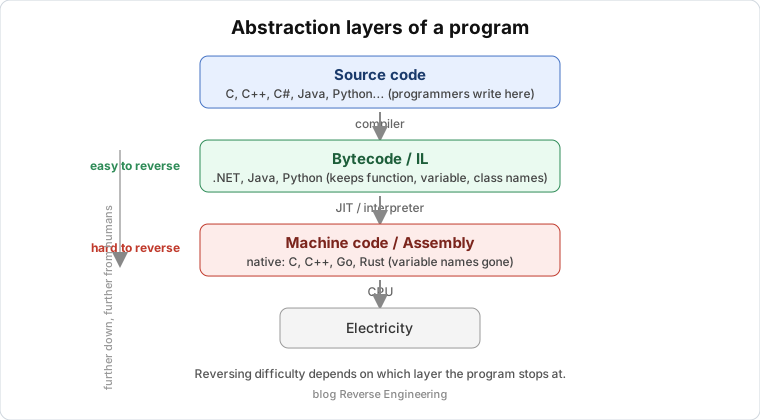
This is the most important idea in the lesson, and the rest of the series is laid out around it.
A program exists at several layers, and the lower you go, the further from humans:
1
2
3
4
5
6
7
8
9
10
Source code (C, C#, Java, Python...)   <- the programmer writes here
        |  compiler
        v
Bytecode / IL  (only for .NET, Java, Python...)
        |  JIT or interpreter
        v
Machine code / Assembly  (native: C, C++, Go, Rust...)
        |  CPU
        v
Electricity
How hard a reverse is depends on which layer the program stops at.
Managed languages (C#/.NET, Java, Python) compile to bytecode that keeps almost all the information, such as function names, variable names and class structure. Decompiling a .NET file with dnSpy often gives code nearly identical to the original. That’s why the series starts with the .NET and Java parts. Native languages (C, C++, Go, Rust) compile straight to machine code. Variable names are gone, and the compiler chops up and optimizes the structure. This is the “real” reversing, and it’s why we have to learn assembly.
So the course orders languages from easiest to hardest to recover, not from most common to least common.
The minimum toolkit
Don’t install anything yet, lesson 0.3 sets up a proper lab. For now, here are the 5 kinds of tool almost everyone doing RE has, namely something to identify files (Detect It Easy), a disassembler/decompiler (IDA Free or Ghidra), a debugger (x64dbg on Windows, GDB on Linux), a hex editor (HxD, ImHex), and language-specific tools (dnSpy for .NET, JADX for Android, pycdc for Python, all three are already in this repo).
The fuller list of 200+ tools is in the tool repository. Don’t install them all at once, install one when a lesson needs it.
What learning is like
There will be evenings when you sit for hours to understand what one function does, and it turns out it only checks the string length. That’s normal. RE builds up slowly. About 80% of the early time goes to getting used to the tools and learning to read assembly, and the “aha” comes later. Anyone who says they got good at RE in two weeks is lying, or just hit “decompile” and copied the output.
This series doesn’t try to cram theory. Every lesson has you do one concrete thing. The next lesson covers the legal and ethical limits. It’s boring, but skipping it can cost you one day.
Key takeaways
RE means understanding how a program works when you don’t have the source code. There are two branches, static (don’t run it) and dynamic (run it and observe), and they’re usually used together.
Difficulty depends on which layer the program stops at, since managed is easy and native is hard. Don’t try to read all the assembly, learn to find the parts worth reading.