Lesson 0.4: The reverse engineering workflow
Beginners open a file and start reading code from the top. Two hours later they’re still inside the C runtime’s init function, haven’t touched a single line the author wrote, and give up. Experienced people spend the first ten minutes not reading code at all. They ask what the thing is and where the interesting part is.
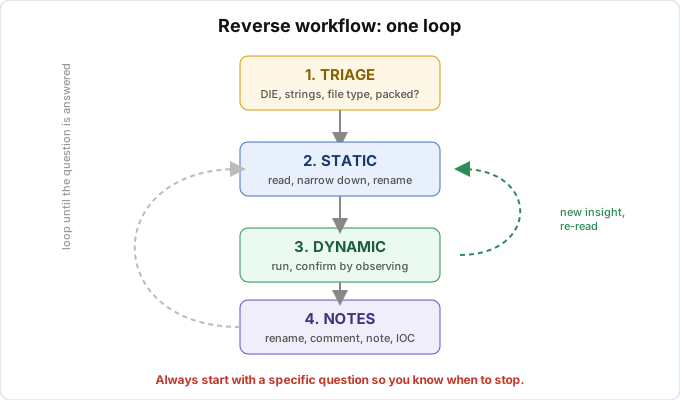
This lesson is the routine I apply to every target, from a tiny crackme to complex malware. The four steps are triage, static, dynamic and notes. It’s not a straight line and you’ll jump back and forth a lot, but I always start with triage.
Step 1: Triage
Triage is a quick checkup. You haven’t opened a disassembler yet, you just want to know what you’re holding. A few minutes here saves hours later.
First question is the file type, whether PE (Windows), ELF (Linux), Mach-O (macOS), APK, .pyc, .NET, or something else. Drop it into Detect It Easy (DIE) and most of this is done. DIE usually shows the compiler too, and that decides your direction. If it says “.NET”, open dnSpy. If it says “Go”, expect a long session.
Next, check whether it’s packed. Look at the entropy in DIE. Entropy close to 8.0 plus a poor import table points to a packer, and then the first job is unpacking, because reading packed code is pointless. Also note whether it’s 32-bit or 64-bit, so you pick the right x32dbg or x64dbg and the right mode in IDA.
Last, see what leaks in the strings. Run strings or FLOSS and look for URLs, file paths, error messages, function names, registry keys. Sometimes the answer is right there and you don’t need to disassemble anything.
At the end of triage I want a one-line summary like “64-bit PE, written in C++ with MSVC, not packed, has strings that mention checking a serial”. Then I know where to go.
Step 2: Static analysis
Open a disassembler/decompiler (Ghidra, IDA) and read, but not from top to bottom.
The best way to narrow things down is to work backwards from strings. See a string like “Wrong password”? Click it and look at the cross-references (xrefs) to see where it’s used. That place is almost certainly the password check. It’s the number one beginner technique and it works very well. You can also start from imports. CreateFileW, RegSetValueEx and InternetOpen each tell part of the story (files, registry, network), so put xrefs on the suspicious ones.
The entry point of a native binary is the runtime’s startup code, not the author’s main, so you have to find the real main. Lesson 3.1 shows how to spot it. Once you’re in the code, read the decompiler output first and assembly second. The C pseudocode from Hex-Rays or Ghidra is much easier for a beginner. Drop to assembly only when the decompiler gets it wrong or you need instruction-level accuracy.
Rename and comment as soon as you understand something. Found out sub_401000 hashes a string? Rename it to hash_string right away. Every name makes the next function easier to read. This is the main difference between someone slow but steady and someone drowning in sub_xxx.
Static analysis shows you the structure, but some parts stay unclear, such as encrypted code, values only known at runtime, loops that are hard to trace by eye. For those you switch to dynamic.
Step 3: Dynamic analysis
Open a debugger (x64dbg, GDB), set breakpoints where static analysis narrowed things down, run to there and look around.
Dynamic is the right tool when you want real values, like the arguments passed to a check function, strings after decryption, or comparison results. It also fits when the code decrypts or unpacks itself at runtime and looks like nothing on disk, when you need to follow one specific branch (enter a wrong serial and see where it goes), or when the logic is so tangled that reading it statically costs more than running it.
A basic tip is to set breakpoints on important APIs (strcmp, GetWindowTextW) to catch the exact moment. When you reach the serial comparison, look at both operands. One is what you typed, and the other is often the correct serial sitting in a register. With malware, remember you’re really running it, so work in an isolated VM as in Lesson 0.3.
Static and dynamic go together all the time. Read statically, spot something suspicious, confirm by running it, then go back to reading with the new understanding. That loop is the normal rhythm of RE work.
Step 4: Notes
Reversing a medium-sized program can take days. Today you understand a function well, three days later you’ve forgotten it. Without notes you start over.
Inside the tool, rename functions and variables and add comments in IDA/Ghidra. These are the most useful notes because they sit next to the code. Outside the tool, keep a separate file with the question you’re chasing, your hypotheses, important addresses, and what you tried that failed. Markdown is enough. For malware, also record the IOCs (hashes, IPs, domains, mutexes, registry keys), the behavior, and a YARA or capa rule if you need to recognize it again.
One small habit that works for me is to write the question first and the answer later. “What does the function at 0x401500 do?” Then when you figure it out, write the answer right below. It keeps you focused.
Putting it together as a loop
1
2
3
4
5
6
7
8
9
10
11
12
13
   TRIAGE  (DIE, strings, file type)
      |  know what you're holding
      v
   STATIC  <--------------------+
      |  read, narrow down      |
      v                         |  new understanding -> read again
   DYNAMIC -----------------------+
      |  confirm with your eyes
      v
   NOTES  (rename, comment, note, IOC)
      |
      v
   repeat until the original question is answered
Don’t bother memorizing the diagram. Just always start with a question. What’s the correct serial? Where does this malware connect to? What algorithm does this function encrypt with? With a clear question you know when to stop. Without one you’ll read assembly until morning for nothing.
Key takeaways
Always triage first, checking file type, language, packed or not, bitness and strings. Use static to understand the structure, working backwards from strings and imports and renaming as soon as you understand something. Use dynamic to see the real values at runtime. It complements static, it doesn’t replace it.
Take notes inside the tool and in a separate file, otherwise you’ll start from scratch. Start each session with a specific question so you know when you’re done.