Lesson 1.7: The PE format
Every .exe, .dll, .sys on Windows follows the same format called PE (Portable Executable). Knowing it explains a lot, including why DIE can tell what a file was written in, why packers can hide code, where the entry point is so you can place your first breakpoint, and why your program can call a function from kernel32.dll. This lesson goes through a PE from the top of the file down, just enough for you to poke around in PE-bear by hand.
The big picture
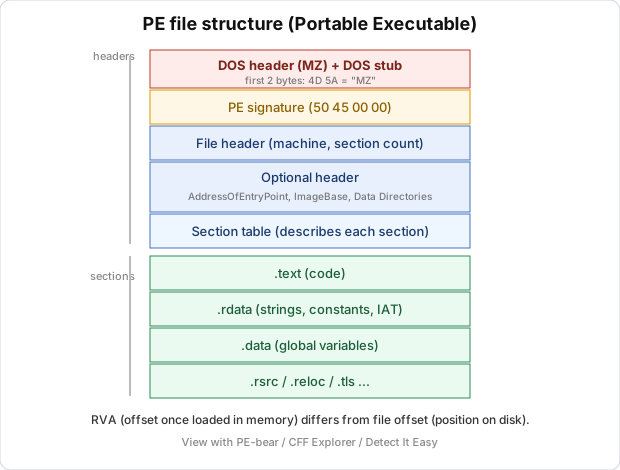
A PE file is laid out sequentially like this, from offset 0 down:
1
2
3
4
5
6
7
8
9
10
11
12
13
14
15
16
+-----------------------------+  offset 0
|  DOS header  (starts "MZ")   |
|  DOS stub                    |
+-----------------------------+
|  PE signature  ("PE\0\0")    |
|  File header                 |   <- NT headers
|  Optional header             |
+-----------------------------+
|  Section table               |  describes each section
+-----------------------------+
|  .text   (code)              |
|  .rdata  (constants, strings,IAT)|
|  .data   (globals)           |
|  .rsrc   (resources)         |
|  ...                         |
+-----------------------------+
The headers at the start describe the file. The rest is the actual content. The Windows loader reads the headers to know what to load where.
The DOS header and “MZ”
Open any exe in a hex editor and the first two bytes are always 4D 5A, the ASCII characters “MZ”. This is the magic number that identifies a PE file. “MZ” stands for Mark Zbikowski, a Microsoft engineer from the DOS days. 4D 5A at offset 0 means you’re holding a Windows executable.
The DOS header has only one field that matters to us, which is e_lfanew at offset 0x3C. It points to where the NT headers start. Read 4 bytes at offset 0x3C, jump there, and you’re at the real PE part.
Right after the DOS header is the DOS stub, a tiny DOS program that prints the familiar “This program cannot be run in DOS mode.” if someone runs the file on DOS. It’s harmless for RE, skip it.
NT headers
At the position e_lfanew points to, you find the PE signature first, which is 4 bytes 50 45 00 00, i.e. “PE\0\0”. It confirms the PE part starts here.
Next is the file header (also called the COFF header), with a few notable fields. Machine is the architecture, where 0x14C is x86 (32-bit) and 0x8664 is x64, which tells you whether to use x32dbg or x64dbg. NumberOfSections is how many sections the file has, and Characteristics holds descriptive flags, for example whether this is an EXE or a DLL.
Then comes the optional header (the name is misleading, it’s mandatory for executables). This part has a lot of information. Magic is 0x10B for PE32 (32-bit) and 0x20B for PE32+ (64-bit). AddressOfEntryPoint is the entry point, where code starts running. It’s an RVA (explained below), and your first breakpoint when debugging usually goes here. ImageBase is the virtual address the file wants to be loaded at. The classic is 0x400000 for 32-bit exes. With ASLR on, the loader puts it somewhere else, but ImageBase is the reference point for calculations. SectionAlignment and FileAlignment are the alignment of sections in memory and on disk, and these two numbers are why RVAs and file offsets don’t line up. Finally DataDirectory is an array of pointers to the important tables (Import, Export, Relocation, TLS, Resource…). You’ll keep coming back here.
RVA and file offset
This confuses beginners the most, so read slowly.
A file offset (also called raw offset) is the position in bytes from the start of the file, while the file is on disk. Hex editors use this. An RVA (Relative Virtual Address) is the position counted from ImageBase, once the file is loaded into memory. IDA, debuggers, and the fields in the PE header use this.
The two numbers differ because the alignment on disk (FileAlignment, usually 0x200) is different from the alignment in memory (SectionAlignment, usually 0x1000). The same code byte has one file offset but a different RVA.
For the conversion, first find the section containing that RVA, meaning which section’s [VirtualAddress, VirtualAddress + VirtualSize) range the RVA falls in. Then compute the offset within the section as delta = RVA - VirtualAddress (of that section). The file offset is then PointerToRawData (of that section) + delta.
Put together, file_offset = RVA - section.VirtualAddress + section.PointerToRawData.
To get the real virtual address (VA), use VA = ImageBase + RVA. When IDA gives you a VA like 0x401500 and you want to find that byte on disk, work backwards. VA minus ImageBase gives the RVA, then apply the formula above to get the file offset.
PE-bear and CFF Explorer do all of this math for you, with a button to convert RVA to offset. Still, learn the formula so you don’t panic when the two numbers don’t match.
Section table
Right after the NT headers is an array, each element describing one section. Each entry gives the name (.text, .data…), VirtualAddress (RVA when loaded), VirtualSize (size in memory), PointerToRawData (file offset on disk), SizeOfRawData (size on disk), and Characteristics (R/W/X permissions).
The usual sections are .text for code (flags are usually readable + executable), .rdata for read-only data such as constants, strings, and the IAT, .data for writable globals, .rsrc for resources (icons, dialogs, version info, sometimes a payload hidden in here), and .reloc for relocation info.
As a triage tip, an odd section named something like .UPX0 or .vmp0, or a .text with a huge VirtualSize but SizeOfRawData near zero, means the file is probably packed. The real code gets unpacked into the virtual region at runtime.
Import Directory and IAT
Your program calls MessageBoxW, but the code of MessageBoxW lives in user32.dll, not in your file. How does it get connected?
PE handles this with the Import Directory. For each DLL it needs (kernel32.dll, user32.dll…), it lists which functions are imported from that DLL. When the loader loads the program, it also loads these DLLs, finds the real address of each function (through that DLL’s Export Directory, see below), and writes those addresses into a table called the IAT (Import Address Table).
In assembly, a call to an imported function looks like call [IAT_entry], an indirect call through a slot in the IAT. If you see a call to an address in .rdata, it’s almost certainly an API call, and PE-bear/IDA will show the function name for you.
The import table is a free summary of what the program does. CreateFileW and WriteFile mean the program touches files. socket, send, WSAStartup mean networking. VirtualAllocEx, WriteProcessMemory, CreateRemoteThread make me suspect injection right away. And when unpacking a file, rebuilding the IAT is the last step (Scylla does this, see Lesson 14.3), because a file dumped from memory usually has the IAT wrong.
Export Directory
The opposite of import. A DLL exports functions for others to use, and the Export Directory lists them along with the RVA to each function’s code. A function can be exported by name or only by ordinal (sequence number). When reversing a DLL, the Export Directory gives you the list of public entry points, a good place to start reading.
Relocation
ImageBase is only a preference. When that address is already taken (or ASLR moves it), the loader has to load the file at a different base, and every absolute address hard-coded in the code has to be fixed. The .reloc table lists the places that need fixing. You rarely read this table by hand, but it explains why the same file runs at a different address every time.
TLS directory and TLS callbacks
TLS (Thread Local Storage) gives each thread its own copy of data. What matters for RE is the TLS callback, meaning functions registered in the TLS directory, which the loader calls even before the entry point (before main).
Malware and protectors love this. They put the debugger check in a TLS callback, so it runs before you can set a breakpoint at the entry point, and the sample detects you before you see anything. If you set a breakpoint at the entry point but the program already knows there’s a debugger and exits, check the TLS directory. x64dbg has an option to break at TLS callbacks, turn it on. Details in Lesson 15.4.
Seeing it in PE-bear
Open PE-bear (or CFF Explorer), drag an exe in, and each part I described shows up as a tree, including the DOS header, the NT headers with the Optional header’s full fields, the section table with each section’s permissions, the Import table with the list of DLLs and functions. DIE is less detailed but gives a quick picture, with the compiler, entropy, and packed or not. My usual workflow is DIE for quick triage, then PE-bear for a closer look.
Lab
In this lab you open a real PE file, find the important fields yourself, and do one RVA to file offset conversion by hand. You need PE-bear or CFF Explorer, Detect It Easy, and a small unpacked exe to dissect. C:\Windows\System32\notepad.exe works well, or you can build your own tiny one.
Start with a quick triage in DIE. Drag the file in and write down the architecture (x86 or x64), the compiler and linker if DIE recognizes them, and the overall entropy. Decide whether the file is packed and say what you based that on.
Next, open the file in PE-bear and read the headers. Confirm the first two bytes are 4D 5A. Read the e_lfanew field at offset 0x3C and work out where it points. In the Optional header, note AddressOfEntryPoint, ImageBase, SectionAlignment and FileAlignment, then compute the entry point’s virtual address with VA = ImageBase + AddressOfEntryPoint.
Then go through the section table and list every section with its name, VirtualAddress, VirtualSize, PointerToRawData, SizeOfRawData and permissions (R/W/X). Say which section holds the code and which permission tells you so. After that, open the Import table, list the imported DLLs, and pick three API functions from which you can guess what the program does, explaining why.
The last part matters most. Take the AddressOfEntryPoint you noted (an RVA) and, with the section that contains it (usually .text), compute the file offset:
1
file_offset = RVA - section.VirtualAddress + section.PointerToRawData
Open the file in a hex editor, jump to that offset, and compare with the byte PE-bear shows at the entry point. If your hand calculation lands on exactly the right byte on disk, you understand RVA versus file offset.
If you have a compiler and want something smaller and easier to read than a system file, build a tiny exe and dissect that instead:
1
2
3
4
5
6
// hello.c
#include <stdio.h>
int main(void) {
    printf("Hello PE\n");
    return 0;
}
Build it with cl hello.c (MSVC) or gcc hello.c -o hello.exe (MinGW). Try it yourself before opening the solution.
Show solution
The numbers below come from one concrete example to show the reasoning. Your file will give different values, but the method is identical.
For the DIE triage, the architecture is on the first line, where “PE32+” means x64 and “PE32” means x86. DIE usually names the compiler and linker too, for example “Microsoft Visual C/C++” or “MinGW”, with the linker version. To judge packing, look at the entropy. An overall entropy around 6.x or lower together with the standard section names (.text, .rdata, .data) is normal and means not packed. An entropy close to 7.8 to 8.0 with strange section names points to packing. Notepad and a self-built exe will not be packed.
For the headers, the first two bytes are always 4D 5A, and if they are not, the file is not a PE. To read e_lfanew, take the 4 little-endian bytes at offset 0x3C. If you see F8 00 00 00, then e_lfanew = 0xF8, and jumping to offset 0xF8 you find 50 45 00 00 (“PE\0\0”), which confirms that the NT headers start there. As an example for the entry point, an x64 exe might have ImageBase = 0x140000000 and AddressOfEntryPoint = 0x1200, so the entry point VA is 0x140000000 + 0x1200 = 0x140001200. A classic 32-bit exe has ImageBase = 0x400000.
PE-bear shows the full section table. For instance, .text might have VirtualAddress = 0x1000, VirtualSize = 0x5000, PointerToRawData = 0x400 and SizeOfRawData = 0x5000. The code section is the one with the MEM_EXECUTE flag (shown as “X” or “executable” in PE-bear), almost always .text, and the entry point RVA must fall inside its virtual address range.
For imports, notepad pulls from many DLLs such as kernel32.dll, user32.dll, gdi32.dll, comdlg32.dll and advapi32.dll. Here are three examples of reasoning from API names. CreateFileW (kernel32) means the program reads and writes files, which makes sense since notepad opens files. GetOpenFileNameW (comdlg32) shows a file picker dialog. RegGetValueW or RegOpenKeyExW (advapi32) reads the registry, here for notepad’s settings and font. An API name usually sums up what it does. In general, kernel32 is file, process and memory, user32 is the UI, advapi32 is registry, services and crypto, and ws2_32 is networking.
The RVA to file offset conversion is the most important part. Suppose AddressOfEntryPoint = 0x1200 (an RVA) and the section containing it is .text with VirtualAddress = 0x1000 and PointerToRawData = 0x400. Applying the formula:
1
2
3
4
file_offset = RVA - VirtualAddress + PointerToRawData
            = 0x1200 - 0x1000 + 0x400
            = 0x200 + 0x400
            = 0x600
So the first byte of the entry point code sits at file offset 0x600 on disk. To verify, open the file in a hex editor and jump to offset 0x600. The bytes there must match what PE-bear shows at the entry point (PE-bear has a disassembly pane at the entry point). If they match, your calculation is right.
The two differ (0x1000 in memory but 0x400 on disk) because SectionAlignment (0x1000) differs from FileAlignment (0x200). In memory sections are aligned to 0x1000 pages, while on disk they are aligned to 0x200 to keep the file compact. That gap produces the formula.
A few common mistakes. Forgetting that file offset and RVA are two different coordinate systems, so searching for the RVA directly on disk finds nothing. Picking the wrong section for the conversion, since you must use the section the RVA falls into, which is not always .text. Forgetting little-endian when reading e_lfanew by hand, since F8 00 00 00 is 0xF8, not 0xF8000000. And confusing VA with RVA, since a VA already includes ImageBase and an RVA does not.
Key takeaways
A PE file starts with “MZ” (4D 5A), and e_lfanew at offset 0x3C points to the NT headers, which start with “PE\0\0”. Machine tells x86 (0x14C) from x64 (0x8664), AddressOfEntryPoint is where code starts, and ImageBase is the preferred base.
RVA is counted from ImageBase (used in memory/IDA) while file offset is counted from the start of the file (on disk). The conversion is offset = RVA - VirtualAddress + PointerToRawData of the section containing it. The IAT is the table of imported function addresses, and also a summary of what the program does.
An odd section, or a large VirtualSize with a small SizeOfRawData, is a sign of packing. TLS callbacks run before the entry point, a common place to hide anti-debug.