Lesson 6.4: Smali and apktool, patching and repacking an Android app
JADX lets you read Android code as Java, but only for reading. If you want to change the app’s behavior and reinstall it, you can’t edit that Java, because there’s no clean path from decompiled Java back to DEX. What you can edit and repack is smali. This lesson is the standard patching workflow that almost every Android crackme ends up using.
What smali is
Android doesn’t run JVM bytecode, it runs DEX bytecode (Dalvik/ART). Smali is the assembly language for DEX, and each smali instruction maps to one bytecode instruction. It’s the lowest level a human can still read and edit comfortably.
The difference from the x86 assembly in earlier lessons is that DEX is register-based, not stack-based. There’s no push/pop. Each method has a numbered set of virtual registers and instructions work on them directly.
There are two groups of registers. p0, p1, p2... are the parameters passed into the method, and in a non-static method p0 is this. v0, v1, v2... are local registers for computation. At the start of each method it declares how many local registers it needs, for example .registers 4 or .locals 2.
Basic smali syntax
You don’t need to memorize all of it, just recognize the common groups:
.method public check(Ljava/lang/String;)Z   # takes a String, returns boolean (Z)
    .registers 3                              # p0=this, p1=parameter, v0=local

    const-string v0, "secret123"              # v0 = "secret123"
    invoke-virtual {p1, v0}, Ljava/lang/String;->equals(Ljava/lang/Object;)Z
    move-result v0                            # put the result of equals() into v0
    return v0                                 # return v0
.end method
Compare with Java:
1
2
3
public boolean check(String input) {
    return input.equals("secret123");
}
Abbreviations like Z and Ljava/lang/String; are DEX type descriptors, where Z=boolean, I=int, V=void, Ljava/lang/String;=class String. You get used to reading them quickly.
These are the instructions you touch most when patching. const/4 v0, 0x1 loads a small constant (here 1) into v0, and const/4 v0, 0x0 loads 0. invoke-virtual {...}, ... calls a method, and move-result v0 puts the return value of the last call into v0 (like “rax is the return value” in x86). if-eqz v0, :label jumps to the label if v0 equals 0, and if-nez jumps if it’s not zero. return v0 and return-void return.
The sequence invoke, move-result, if-eqz is an if statement on a function’s result, the same as the cmp/je pair in x86.
The patching workflow
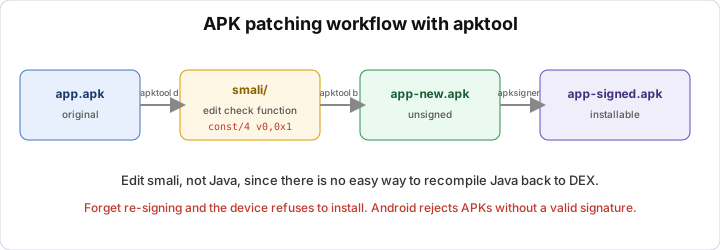
Say the app has a license check function that returns a boolean, and false blocks you. The goal is to make it always return true. There are four steps.
First, unpack the APK into smali:
1
apktool d target.apk -o target_out
apktool translates classes.dex into a tree of .smali folders and also decodes AndroidManifest into a readable form.
Second, find the check function. I read the Java in JADX first to get the class and method names, then open the matching smali file in target_out/smali/.... Grepping the method name is quick.
Third, edit the smali so the function always returns true. The cleanest way is to replace the whole function body with a return of 1:
.method public isLicensed()Z
    .registers 2
    const/4 v0, 0x1      # force v0 = true
    return v0            # just return true
.end method
Or if you only want to flip one branch, find the if-eqz/if-nez and swap them, or change const/4 v0, 0x0 to const/4 v0, 0x1 right before the return. Keep the declared register count large enough or the build fails.
Fourth, rebuild and sign. Beginners often forget this part:
1
apktool b target_out -o patched.apk
The APK you just built is not signed, and Android refuses to install an unsigned app. Sign it:
1
apksigner sign --ks my.keystore patched.apk
You can also use uber-apk-signer -a patched.apk, which is quicker (it creates a debug key itself). After signing you can adb install patched.apk.
The biggest problem in this workflow is the signature, not the smali. If you forget to sign, it won’t install. If the app checks its own signature (anti-tamper), re-signing with a different key gets detected. Getting past anti-tamper is covered in the obfuscation lesson 6.8 and the Frida part.
Smali patching vs Frida
Patching smali gives you a permanently modified APK. Install it and it runs, with no tools needed at runtime. The downside is you have to rebuild and re-sign, and you run into anti-tamper.
Frida (lesson 6.6) hooks at runtime and needs no file edits. It’s much more flexible for experiments, but you need the Frida server running on the device. I use Frida for quick research and smali patching when I want a modified build that stands on its own.
Lab
In this lab you use apktool to unpack an APK into smali, patch a check function so it always passes, rebuild, sign and test. You need apktool (from the official site, needs Java), apksigner from the Android SDK build-tools or uber-apk-signer, adb if you want to install onto a real device or emulator, and JADX to read the Java first so the target is easier to find. For the target, use a public Android crackme made for learning, for example OWASP UnCrackable Level 1 (Lesson 6.9 reuses it), or a debug app you built yourself. Don’t use a commercial app.
Open the APK in JADX and find the function that decides right or wrong, typically named like verify, check or isCorrect and returning a boolean. Write down the class and method names. Then unpack the APK into smali:
1
apktool d target.apk -o target_out
Open the matching smali file under target_out/smali*/... and find that method. Patch it to always return true:
const/4 v0, 0x1
return v0
Make sure the .registers or .locals declaration still covers the registers you use. Rebuild:
1
apktool b target_out -o patched.apk
You have to sign again, otherwise the APK will not install:
1
uber-apk-signer -a patched.apk
or apksigner sign --ks my.keystore patched.apk. Then install and test:
1
adb install -r patched-aligned-debugSigned.apk
Enter anything and the app should report success.
Some questions to think about. Why not edit the Java that JADX shows directly? If the app checks its own signature, what problem does re-signing cause and how could you get past it? And compared with hooking that function using Frida, what are the pros and cons of patching smali?
Show solution
This is the full workflow on a hypothetical check function. Your class and method names will differ, but the steps are the same.
First, locate the target with JADX. Open the APK in jadx-gui, use Search (see the shortcuts in the cheatsheet) to look for a message string like “Correct” or “Wrong”, and follow the xref back to the function that uses it. Suppose you find:
1
2
3
4
// com.example.app.LoginActivity
public boolean verify(String input) {
    return input.equals(this.secret);
}
Note the class com/example/app/LoginActivity and the method verify. Next, unpack to smali with apktool d target.apk -o target_out. The result is target_out/smali/com/example/app/LoginActivity.smali, though with multidex it may sit in smali_classes2/..., so grep to be sure:
1
grep -rl "verify" target_out/smali*
Open the file and find the verify method. It looks roughly like this:
.method public verify(Ljava/lang/String;)Z
    .registers 3

    iget-object v0, p0, Lcom/example/app/LoginActivity;->secret:Ljava/lang/String;
    invoke-virtual {p1, v0}, Ljava/lang/String;->equals(Ljava/lang/Object;)Z
    move-result v0
    return v0
.end method
It loads the secret field into v0, compares with input.equals(secret), puts the result in v0 and returns it. To patch it to always return true, replace the body with a return of 1:
.method public verify(Ljava/lang/String;)Z
    .registers 3

    const/4 v0, 0x1
    return v0
.end method
Keeping .registers 3 is safe, since we use fewer than declared. Save the file. If you’d rather keep the logic but flip the outcome, insert const/4 v0, 0x1 right before return v0 to overwrite the equals result, or, if the caller uses if-eqz, change it to if-nez to flip the branch. For this lab, forcing true is the tidiest.
Rebuild with apktool b target_out -o patched.apk. If it reports a resource error, try apktool b target_out -o patched.apk --use-aapt2. An unsigned APK can’t be installed. The quickest fix is uber-apk-signer -a patched.apk, which produces a file like patched-aligned-debugSigned.apk, or you can sign it yourself:
1
apksigner sign --ks my.keystore --out patched-signed.apk patched.apk
Install with adb install -r patched-aligned-debugSigned.apk, open the app and enter any string. verify now always returns true and the app reports success.
On the questions. You don’t edit the Java because there’s no reliable way to recompile decompiled Java back into DEX, while smali maps one to one onto DEX, which is why apktool can rebuild it. If the app checks its own signature, re-signing with your key makes the signature differ from the original, so the app detects the modification and refuses to run. To get past that, patch the signature check in smali as well, or use a Frida hook to return the value you want without touching the file (see Lesson 6.6). Patching smali gives a standalone modified build that installs and runs, but costs effort to build and sign and runs into anti-tamper. Frida needs no file changes and is flexible for experiments, but needs the Frida server at runtime.
The example above uses a hypothetical function. On a real APK the commands and the smali structure are the same, and only the class and method names differ.
Key takeaways
Android runs DEX (register-based), not JVM bytecode, and smali is the assembly for DEX. Edit smali, not the decompiled Java, because there’s no clean path from Java back to DEX. For registers, p0 is this (non-static method), p1... are parameters, and v0... are locals. move-result takes the return value of the last call, like rax in x86.
To patch “always return true”, use const/4 v0, 0x1 then return v0. The workflow is apktool d, edit smali, apktool b, then re-sign (apksigner or uber-apk-signer).