Lesson 6.7: Native .so libraries and JNI
You open the APK in JADX, look for the license check function, and it’s one line, public native boolean checkLicense(String s);. No function body to read. The real logic is in a native library, lib/arm64-v8a/libcheck.so, and JADX can’t help there because that’s ARM64 machine code, not Java bytecode. It’s a very common way to make an Android app harder to reverse, since whatever matters gets written in C/C++.
You already learned ARM64 in Lesson 1.9. What’s left is bridging from the Java method to the right function in the .so file.
JNI connects Java and native
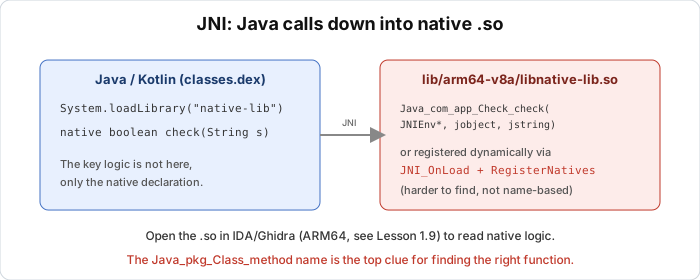
JNI (Java Native Interface) is the mechanism that lets Java call C/C++ code. A Java class loads the library with System.loadLibrary("check"), which loads libcheck.so. The method is then declared native with no body, as in public native boolean checkLicense(String s);. Inside libcheck.so there’s a C function that implements that method.
When Java calls checkLicense, the runtime finds the matching native function and jumps in. Your job is to find that function in the .so file.
Two ways Java finds the native function
App authors like to play tricks here.
Way 1: naming by convention (static linking)
By default, JNI looks for the C function by a long name made from package + class + method:
1
Java_<package>_<class>_<method>
For example the method checkLicense in the class com.example.app.Native corresponds to a C function named:
1
Java_com_example_app_Native_checkLicense
Dots in the package become underscores. You open the .so in Ghidra, go to the export/symbol list, search for Java_, and all the native functions show up with full names saying which Java method each belongs to. Easy.
Way 2: dynamic registration through RegisterNatives (harder)
An author who wants to hide doesn’t use the conventional name. Instead, in the special function JNI_OnLoad (which runs as soon as the library is loaded), they call RegisterNatives to map the Java method name to an arbitrary function pointer by hand:
1
2
3
4
5
6
7
8
JNIEXPORT jint JNI_OnLoad(JavaVM *vm, void *reserved) {
    // ... get JNIEnv ...
    JNINativeMethod methods[] = {
        { "checkLicense", "(Ljava/lang/String;)Z", (void*)sub_1234 }
    };
    (*env)->RegisterNatives(env, clazz, methods, 1);
    return JNI_VERSION_1_6;
}
Now the real function can have any name (for example sub_1234), and there’s no Java_ to search for. Find JNI_OnLoad in the .so (it’s always an export if the app uses this approach), read the code in it, and find the RegisterNatives call. RegisterNatives takes an array of JNINativeMethod structs, each made of a pointer to the method name, a pointer to the signature string, and a pointer to the implementing function. Reading that array tells you which function the checkLicense method maps to.
To read JNI signatures, (Ljava/lang/String;)Z means takes a String, returns boolean (Z). The type table is Z=boolean, I=int, J=long, [=array, L...;=object.
The first two parameters belong to JNI
However you found it, every JNI function has two hidden parameters ahead of your own:
1
jboolean checkLicense(JNIEnv *env, jobject thiz, jstring s)
The first, env (in x0 on ARM64), is a pointer to the JNI function table, used to call back into Java (get strings, call methods…). The second, thiz (x1), is the Java object that called the method, like this. Your real parameters start at x2.
So when you open the function in Ghidra, don’t be confused that the first two parameters have nothing to do with the logic. The string parameter s is in x2. To read that string, the native code calls env->GetStringUTFChars, and you’ll see an indirect call through the env table (an ldr from x0 then blr), which means it’s pulling the string out to process it.
Getting the .so into Ghidra
An APK is a ZIP file, so extract it and take lib/arm64-v8a/lib<name>.so (prefer arm64-v8a, the most common ABI today). Drag the .so into Ghidra and run auto-analysis. Ghidra recognizes the ARM64 ELF (see Lesson 1.8 and 1.9). Open the Symbol Tree and filter for Java_ to find conventionally named functions, and if there are none, look for JNI_OnLoad. Then read the decompiler output, remembering to skip the first two JNI parameters.
Key takeaways
A Java method declared native means the logic lives in a .so file, which JADX can’t read. JNI functions follow the naming convention Java_package_Class_method, so search for the string Java_ in the .so. If you don’t see it, look for JNI_OnLoad and read RegisterNatives to see which function the method maps to.
Every JNI function has two hidden leading parameters, JNIEnv* env (x0) and jobject thiz (x1), and real parameters start at x2. Read JNI signatures with the type table, Z boolean, I int, L...; object, [ array. Analyzing the .so is ordinary ARM64 reversing, so see Lesson 1.9 again.
Lab
The goal is to practice bridging from a native method in Java to the exact function in the .so library, using both naming schemes (the convention and dynamic registration). You need an APK that has a native library (most games and banking apps do), either your own app or a legal practice APK, plus Ghidra (or IDA) and JADX.
Open the APK in JADX and find a class with a method declared native. Write down the package, the class name, the method name and the parameter and return types. Unpack the APK (rename it to .zip or use unzip), go to lib/arm64-v8a/ and take the .so whose name matches the string in System.loadLibrary. Drag that .so into Ghidra and run auto-analysis.
For the first way, in the Symbol Tree or the Functions list, filter on the string Java_. Find the function matching the method from the first step and confirm the name follows the convention Java_<package>_<class>_<method>. If you don’t see a Java_ function for that method, switch to the second way. Find the export JNI_OnLoad, read the code, find the call to RegisterNatives, and read the JNINativeMethod array to learn which function the method maps to.
Then open the native function you found in the decompiler. Work out which register your string parameter is in (remember to skip the first two JNI parameters), and find the call to GetStringUTFChars to see where it starts processing the input. To compare, native-lib.c is a small JNI example in C that shows both naming schemes, with build instructions for the Android NDK in its header comment. Read it to see what pattern the original code produces before you go looking in someone else’s .so.
Two questions to think about. Why is RegisterNatives harder to trace than the conventional name, yet it always leaves a trail in JNI_OnLoad? And if an app uses Java but pushes the core check down into a .so, should you start from Java or from native, and why?
Show solution
Try it before reading. In JADX a native method looks like this:
1
public native boolean checkLicense(String str);
An empty body means the logic lives in native code. The class usually has a static block that loads the library:
1
2
3
static {
    System.loadLibrary("check");   // -> lib/<abi>/libcheck.so
}
The name in loadLibrary is check, so the file to find is libcheck.so (the system adds the lib prefix and the .so suffix). Unpack the APK:
1
2
3
cp app.apk app.zip
unzip app.zip -d app_extracted
ls app_extracted/lib/arm64-v8a/
Prefer arm64-v8a, since almost every device today is ARM64. If there’s only armeabi-v7a, that’s 32-bit ARM, which you can analyze too, but the registers are r0 to r12 instead of x0 to x30.
For the first way, drag libcheck.so into Ghidra and let auto-analysis run. Open the Symbol Tree and type Java_ into the filter. With the example in native-lib.c you’ll see:
1
Java_com_example_app_Native_checkLicense
The name gives it away, with package com.example.app, class Native, method checkLicense. Open the function and the decompiler shows roughly this:
1
2
3
4
5
6
jboolean Java_com_example_app_Native_checkLicense(JNIEnv *env, jobject thiz, jstring s) {
    char *in = GetStringUTFChars(env, s, 0);   // through the env pointer
    jboolean ok = strcmp(in, "JNI-DEMO-2024") == 0;
    ...
    return ok;
}
The compared string JNI-DEMO-2024 is the valid license, sitting right in the native code. Remember that s is in x2, because the first two parameters are env in x0 and thiz in x1.
For the second way, the method secretAdd in the example has no Java_..._secretAdd function in the .so, so filtering on Java_ finds nothing. Switch to the export JNI_OnLoad, open it and read down to the call to RegisterNatives. Its third parameter is a pointer to the JNINativeMethod array. Follow that pointer and you see three fields, a pointer to the string "secretAdd", a pointer to the signature string "(II)I" (takes two ints, returns an int), and a function pointer that points to sub_secret (a name Ghidra assigns itself, for example FUN_00001234). Rename FUN_00001234 to secretAdd_impl for convenience and open it. The logic is (a ^ 0x5A) + (b ^ 0x5A), and the two int parameters a and b are in x2 and x3 (after env and thiz).
If Ghidra hasn’t assigned the right types inside the native function, apply the prototype (JNIEnv*, jobject, ...) yourself so the first two parameters disappear from the logic. The call to GetStringUTFChars shows up as loading a function pointer from the env table (an ldr from an offset in the JNINativeInterface struct pointed to by x0) followed by blr. That’s where the input string is turned into a char* for processing, so it’s a good reference point to start reading the algorithm from.
On the questions, RegisterNatives is hard to trace because the real function name no longer hints at anything, but the app has to call it from somewhere, and the most natural place is JNI_OnLoad, which is always a fixed export. So even if the function names are hidden, the starting point for tracing the mapping stays put. As for where to start, begin from Java to understand the overall picture and learn which method is worth caring about, then jump down into native for exactly that function. Reading native blindly from the start is a lot of work because a .so can hold thousands of functions.
To try it yourself, build native-lib.c into a .so with the command in its header, then open the result in Ghidra and follow each step above. The code uses the standard JNI patterns (conventional name, JNI_OnLoad plus RegisterNatives, the two env and thiz parameters).