Lesson 8.1: What Go binaries look like

The first time you open a Go binary in IDA, it’s confusing because there are tens of thousands of functions, most named runtime.*, and a tiny hello world that weighs almost 2 MB. But Go is much easier than a stripped C++ binary, because Go puts a table of function names into the binary. This lesson shows how to recognize a Go binary and use that table.
All the numbers and asm below come from a binary built with Go 1.22.0 on Linux x64, and if you redo it in the lab you’ll get something similar.
Why Go binaries are so big
Build a Go hello world and compare it with C:
1
2
hello world C   (gcc, dynamic):   ~16 KB
hello world Go  (go build):       ~1.9 MB
That’s more than a hundred times bigger. Go statically links by default, and it also puts the whole runtime into every binary. The runtime includes the goroutine scheduler, the garbage collector, memory management and reflection. So you see many runtime.*, fmt.*, sync.* functions even though your program only prints one line.
For a reverser this means don’t try to read it all. 95% of the functions are runtime and the standard library. The author’s code is in the functions named main.* and their own packages. The first job is always to carve out the main.* part and ignore the rest. It’s the “find the real main” idea from Lesson 3.1 at a larger scale.
pclntab
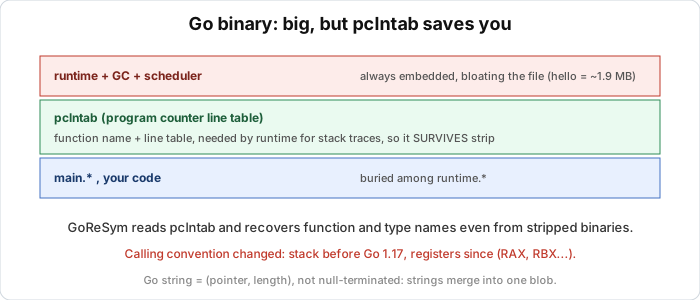
This is the most important point of the lesson. Go embeds a structure called pclntab (program counter line table) into every binary. It exists so the runtime can print a stack trace with function names and line numbers on panic. For a reverser, it’s an address-to-function-name table that’s already in the file.
pclntab survives stripping. A real test:
1
2
go build            -> 1.9 MB, has symbol table
go build -ldflags="-s -w"  -> 1.2 MB, "stripped"
The -s -w build makes nm stop listing the normal symbols. But pclntab is still there intact (in the experiment, its magic was at the same offset 0x4030b before and after stripping). So specialized tools can still recover function names from a “stripped” Go binary. That’s why people joke that Go binaries are never really stripped.
The pclntab magic number by Go version (the first 4 bytes of the table). If you find it, it’s Go:
| Magic | Go version |
|---|---|
fb ff ff ff | Go 1.2 to 1.15 |
fa ff ff ff | Go 1.16, 1.17 |
f0 ff ff ff | Go 1.18 to 1.19 |
f1 ff ff ff | Go 1.20 and up |
Lesson 8.2 uses GoReSym and the IDA/Ghidra plugins to read pclntab and rename thousands of functions in a single run.
Recognizing a Go binary
Before working on it, make sure it’s Go. A few signs are checkable in seconds. One is size, since a small CLI that weighs 1 to 5 MB is suspicious. Another is the build info string. Go embeds a version line, and you can run the official command:
1
2
go version hello        ->  hello: go1.22.0
go version -m hello     ->  with GOARCH, GOOS, build flags, module path
Without the Go toolchain, strings also shows a string like go1.22.0. You can also look for strings such as runtime., runtime.gopanic, fmt. and package names, with strings hello | grep '^go1\.' or grep 'runtime\.'. DIE (see Lesson 2.1) often recognizes “Go build ID” right away.
Calling convention
This is where people used to C often trip. Go changed how arguments are passed between versions. Before Go 1.17, all arguments and return values go through the stack, not registers like C. In old Go code you’ll see arguments pushed onto the stack and the callee reading them from the stack, very different from the rcx/rdx habit of Win64. From Go 1.17 on (ABIInternal), arguments go through registers, but the register order is different from C. Go uses RAX, RBX, RCX, RDI, RSI, R8, R9, R10, R11 for arguments (the first 9 registers), not System V’s RDI, RSI, RDX....
A real add(a, b int) int function, built with Go 1.22 (register ABI):
TEXT main.add(SB)
    PUSHQ BP
    MOVQ  SP, BP
    SUBQ  $0x8, SP
    MOVQ  AX, 0x18(SP)     ; a comes in from AX  (not RDI)
    MOVQ  BX, 0x20(SP)     ; b comes in from BX  (not RSI)
    ADDQ  BX, AX           ; AX = a + b
    MOVQ  AX, 0(SP)
    ...
    RET                    ; returned in AX
a arrives in AX (that is RAX), b in BX (RBX), and the result is also returned in AX. If you apply the System V rule (a in RDI) you’ll misread everything. Always check which Go version the binary was built with, then apply the right ABI. Newer IDA and Ghidra recognize the Go ABI, but with older versions you have to know it yourself.
A syntax note is that go tool objdump uses the Plan 9 form (AX, MOVQ), while IDA/Ghidra show Intel (rax, mov). Same thing, different names.
What Go leaves in the code
A few patterns show up a lot and are covered in detail in Lesson 8.3. I list them here so they don’t surprise you. Strings aren’t null-terminated. A Go string is a (pointer, length) pair, so strings often sit packed together in one big blob and are cut out by length. A huge block of text glued together is typical of Go. Go also inserts bounds checks on array indexes everywhere, so the code has lots of compare instructions followed by a jump to runtime.panicIndex. A go f() call turns into runtime.newproc, and Go functions return multiple values, which in the register ABI means returning through several registers.
Lab
In this lab you recognize and dissect a Go binary yourself, and check the points from this lesson, which are size, build info, pclntab and the register ABI. You need the Go toolchain (check with go version). The source is main.go, which defines a small non-inlined add function and prints a greeting.
Start by building hello from main.go, then build a C hello world with gcc and compare the two sizes. Explain why the Go binary is hundreds of times bigger. Next read the build info with go version hello and go version -m hello, and note the Go version, GOARCH and GOOS. Try again with strings hello | grep '^go1\.' to see how you would do it without a toolchain.
Then find the pclntab by searching the file for its magic number (4 bytes, for example f1 ff ff ff for Go 1.20 and later) and write down the offset. To prove that pclntab survives stripping, rebuild with -ldflags="-s -w" into hello_s, compare its size with the normal build, check whether go tool nm hello_s still lists main.*, and search for the pclntab magic again in hello_s. Draw your conclusion.
Finally look at the register ABI. Build a version with inlining disabled (-gcflags="-N -l") into hello2, and run go tool objdump -s '^main\.add$' hello2. Work out which registers the parameters a and b arrive in and where the result is returned, and compare with System V in C (RDI, RSI). The build commands are these.
1
2
3
go build -o hello main.go
go build -ldflags="-s -w" -o hello_s main.go
go build -gcflags="-N -l" -o hello2 main.go
Two questions to think about. Why is a “stripped” Go binary still easier to reverse than a stripped C binary? And if you meet a Go binary without the usual symbols, how else can you get the function names back? Try it yourself before opening the solution.
Show solution
The numbers below come from a real build with Go 1.22.0 on Linux x64. Yours may differ slightly depending on the version.
For size:
1
2
hello (Go)          1,911,953 bytes  (~1.9 MB)
hc (C, gcc dynamic)    15,960 bytes  (~16 KB)
Go is about 120 times larger. Go links statically and embeds the whole runtime (the goroutine scheduler, the garbage collector, reflection) into every binary, while a C hello world only links dynamically to the libc already on the machine.
For build info:
1
2
3
4
5
6
7
8
9
10
11
12
$ go version hello
hello: go1.22.0

$ go version -m hello
hello: go1.22.0
    path    command-line-arguments
    build   -buildmode=exe
    build   -compiler=gc
    build   GOARCH=amd64
    build   GOOS=linux
    build   GOAMD64=v1
    ...
Without a toolchain, strings hello | grep '^go1\.' still shows the string go1.22.0.
For pclntab, search for the 4-byte magic. For Go 1.22 (in the 1.20+ group) the magic is f1 ff ff ff.
1
pclntab magic f1ffffff at offset 0x4030b
To check that pclntab survives stripping, compare the sizes.
1
2
hello (normal)          1,911,953 bytes
hello_s (-s -w)         1,245,336 bytes
Stripping saves about 35% (it drops the DWARF debug info and the regular symbol table). Check the symbols.
1
2
$ go tool nm hello_s | grep -c 'main\.'
0
nm no longer sees the regular symbols. But searching again for the pclntab magic shows f1ffffff still at offset 0x4030b. The pclntab is intact. So a “stripped” Go binary still keeps the function name table in pclntab, and tools like GoReSym can still recover thousands of function names. That’s why Go binaries are almost never truly stripped.
For the register ABI:
1
2
3
4
5
6
7
8
9
10
11
12
$ go tool objdump -s '^main\.add$' hello2
TEXT main.add(SB)
    PUSHQ BP
    MOVQ  SP, BP
    SUBQ  $0x8, SP
    MOVQ  AX, 0x18(SP)     ; parameter a arrives in AX
    MOVQ  BX, 0x20(SP)     ; parameter b arrives in BX
    ADDQ  BX, AX           ; AX = a + b
    MOVQ  AX, 0(SP)
    ADDQ  $0x8, SP
    POPQ  BP
    RET                    ; returned in AX
So a arrives in AX (RAX), b in BX (RBX), and the result goes back in AX. That’s quite different from System V in C, where the first parameter is in RDI and the second in RSI. Go 1.17 and later use their own register order, RAX, RBX, RCX, RDI, RSI, R8, R9, R10, R11.
A stripped Go binary is easier than a stripped C one because pclntab is a function name table embedded for printing stack traces, and -s -w doesn’t remove it. A stripped C binary loses all its names. To get the names back, use GoReSym or an IDA or Ghidra plugin that reads pclntab, and they rename thousands of functions automatically. That’s the subject of Lesson 8.2.
Key takeaways
Go binaries are big because of static linking plus the bundled runtime and GC, so don’t read the runtime.* functions and focus on main.*. pclntab is an embedded function name table that survives strip, so Go is almost never truly stripped, and tools recover names from it (Lesson 8.2). The pclntab magic tells you the Go version, as f1 ff ff ff is Go 1.20+.
Recognize Go by size, build info (go version -m), and runtime./go1.x strings. The calling convention changes by version, as before 1.17 it goes through the stack, and from 1.17 through registers but in the order RAX, RBX, RCX, RDI, RSI..., different from System V, with the return in AX.