Lesson 3.1: Hello world and finding the real main
You write three lines of C, compile, and open it in Ghidra. You expect to see main, but you land in a function with a weird name like entry, start, or __scrt_common_main_seh, which calls a dozen functions that have nothing to do with “hello world”. The entry point is not your main. This lesson shows how to get past that init code to the lines the author wrote.
Why there’s a lot of code before main
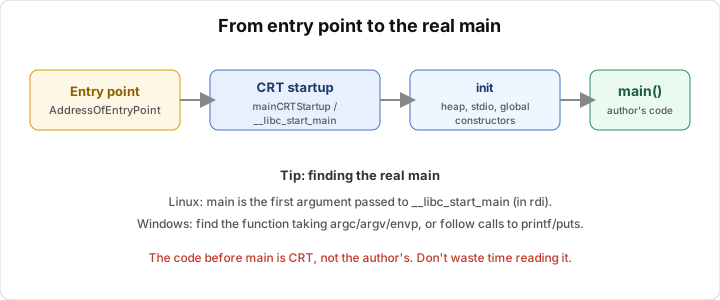
When the operating system loads the program, it doesn’t jump straight into main. It jumps to the entry point recorded in the header (the AddressOfEntryPoint field of the PE, or e_entry of the ELF). This entry point points at the C runtime (CRT) init code, not code you wrote.
CRT startup has groundwork to do before main can run. It sets up the C environment by initializing the heap, threads and locale, and it gets argc, argv and the envp environment variables to pass to main. It runs the global constructors, which are global variables needing initialization, functions marked __attribute__((constructor)), and in C++ the constructors of every global object. Then it calls main, and afterwards takes the value main returns and passes it to exit to finish cleanly.
So main is just a function the CRT calls in the middle. When you see a lot of strange code, you just skim past it to reach main.
On Linux: follow __libc_start_main
Dynamic ELF binaries on Linux follow a recognizable pattern. The entry point _start does a few small things and then calls __libc_start_main, and the pointer to main is passed as the first parameter.
A typical _start on x86-64 (Intel syntax):
_start:
    xor  ebp, ebp
    mov  r9, rdx            ; rtld_fini
    pop  rsi                ; argc
    mov  rdx, rsp           ; argv
    and  rsp, 0FFFFFFFFFFFFFFF0h
    push rax
    push rsp
    lea  r8,  [init]        ; __libc_csu_init (or equivalent)
    lea  rcx, [fini]        ; __libc_csu_fini
    lea  rdi, [main]        ; <-- HERE: the first parameter of __libc_start_main is main
    call __libc_start_main
Find the call to __libc_start_main, then look at rdi (the first parameter on Linux x64). The value loaded into rdi right before, usually a lea rdi, [sub_xxxx], is the address of main. Jump there.
With newer libc (glibc uses __libc_start_call_main) the details change a bit, but main is still a parameter passed to libc’s start function. Ghidra and IDA usually recognize it and name main for you, but when they guess wrong or the binary is stripped, you trace it by hand as above.
On Windows: main takes 3 parameters
PE binaries compiled by MSVC are messier. The entry point is usually mainCRTStartup (for console apps) or wWinMainCRTStartup (for GUI apps), which calls a wrapper like __scrt_common_main_seh that does all sorts of init, sets up SEH, runs constructors, and only then calls main.
There’s no clearly named function like __libc_start_main to latch onto, so you use a few other signs. The fastest is to start from strings. Your “Hello, world” string sits in .rdata, so open the Strings window, click it, and look at the xrefs. The place that uses that string is almost surely main (or a function main calls directly). For hello world, the xref from the string takes you to where printf/puts is called, i.e. the body of main.
The second way is to find the function taking 3 parameters argc/argv/envp. Among the CRT functions, main stands out because it’s called with three parameters (rcx=argc, rdx=argv, r8=envp under Win64), and its return value is used as the exit code. The last wrapper function that calls a function with that shape is where main gets called.
The third way is to follow calls to CRT I/O. printf, puts and std::cout only show up in user code, not in the CRT cleanup part, so finding them narrows down the real code region.
Reading the main of hello world
Once you’ve traced to the spot, the body of main in a minimal hello world looks about like this (MSVC, shortened):
main:
    sub  rsp, 28h              ; set up stack frame + shadow space
    lea  rcx, aHelloWorld      ; rcx = pointer to "Hello, world\n"
    call printf                ; printf("Hello, world\n")
    xor  eax, eax              ; eax = 0  (return 0)
    add  rsp, 28h
    ret
Translated back to C:
1
2
3
4
int main(void) {
    printf("Hello, world\n");   // lea rcx, string; call printf
    return 0;                   // xor eax, eax
}
That’s the three lines you wrote. Everything else in the file is CRT, and once you know it’s CRT you skim past. The skill is knowing what to skip.
Quick recognition tips
IDA Pro has FLIRT signature libraries that recognize CRT and standard library functions and name them automatically, so your code stands out among the labeled functions. Lesson 3.4 covers this in detail. Static binaries make the CRT bigger, since compiling with -static puts all of libc in the file, and the function count shoots up, but the technique for finding main is the same. Stripped binaries lose all function names, but the entry point and the start structure remain, so tracing by parameter still works.
Lab
Build the same hello.c with gcc on Linux and with MSVC on Windows, open the results in Ghidra or IDA Free, and start from the entry point. From there you trace to the real main yourself, in two different ways, on both the Linux and Windows binaries. Finally you compare how much CRT code sits before main in each build.
On Linux, build a normal dynamic binary and a static one. The static one pulls the whole CRT in and makes the difference easy to see.
1
2
gcc -O0 -o hello_gcc hello.c
gcc -O0 -static -o hello_gcc_static hello.c
On Windows with MSVC, run this in an “x64 Native Tools Command Prompt”.
1
cl /Od hello.c /Fe:hello_msvc.exe
With MinGW you can use this instead.
1
x86_64-w64-mingw32-gcc -O0 -o hello_mingw.exe hello.c
Open hello_gcc in Ghidra, find the entry point (_start), find the call to __libc_start_main, and work out which function is loaded into rdi just before it. Check that it really is main by opening it, where you should see a call to printf or puts. Then repeat with hello_msvc.exe, but this time without using function names. Go through the Strings window, find “Hello, world”, look at its xrefs and jump to the function that uses it. Is that main?
Next, still in the MSVC binary, find main the second way. Follow the CRT wrapper functions down to the last function that is called with three arguments (rcx, rdx and r8 holding argc, argv and envp). Do the two approaches land on the same function? After that, compare the number of functions (or the amount of code before main) between hello_gcc and hello_gcc_static, and see how much static linking adds. Open the Strings view of all three files and decide which one shows the most CRT strings, and why.
Two questions to think about afterwards. If the binary is stripped, which of these methods still work and which break? And why is starting from a string faster than reading sequentially from the entry point? Try it yourself before opening the solution.
Show solution
On Linux, follow __libc_start_main. Open hello_gcc and go to _start. The end of _start looks like this (Intel syntax, x64).
lea  rdi, [main]          ; pointer to main loaded into rdi
call __libc_start_main
On Linux x64 the first argument is passed in rdi, so the value loaded into rdi right before call __libc_start_main is the address of main. If Ghidra has already named it you will see main directly. If not (or if the file is stripped), jump to that address. Inside you will find a call to puts or printf with the string “Hello, world” as its argument, which confirms it is main. For a simple hello world gcc usually replaces printf("...\n") with puts("...") as an optimization, so don’t be surprised to see puts instead of printf.
On Windows, start from the string. In hello_msvc.exe, open Strings and look for “Hello, world”. Click it and check the xrefs (the X key in IDA, Ctrl+Shift+F in Ghidra). Only one place uses it, a small function that calls printf and then returns 0 (xor eax, eax). That is main. This method doesn’t need any function names, so it works even when the file is stripped. Starting from a string should be your first reflex.
The other way on Windows is to find the three-parameter function. From the entry mainCRTStartup, go into __scrt_common_main_seh. Near the end of this wrapper there is a call to a function that receives three arguments (rcx = argc, rdx = argv, r8 = envp), and its return value is then passed on to exit. The function being called is main. The result matches the string approach, giving the same function. When two different routes meet at the same place, you’ve probably identified it correctly.
For dynamic versus static linking, hello_gcc (dynamic) has only a handful of functions, which are _start, main and a few PLT stubs for puts and __libc_start_main. The libc code lives outside, in libc.so. hello_gcc_static puts all of libc into the file, so the function count jumps from a few to hundreds or even thousands, and the file size grows from tens of KB to around a megabyte. Even so, main is found exactly as before, by following __libc_start_main or by starting from the string. A larger function count doesn’t make finding main harder, it only makes the file bigger.
As for CRT strings, the static binary and the MSVC binary show more of them (runtime error messages, internal function names, format strings). The dynamic gcc binary has little besides your own strings, because the rest sits in libc.so. A lot of CRT strings is noise, and you should learn to skip past it.
On the stripped question, starting from a string and following the arguments of __libc_start_main still work, because they rely on structure and data rather than on function names. What breaks is expecting Ghidra or IDA to have a ready-made main label. In a stripped file that label is missing and you have to find it yourself.
Starting from a string is faster because the entry point is separated from main by several layers of CRT, so reading sequentially takes a long time and it’s easy to get lost. A string is data that only the user’s own code touches, so the xref from the string jumps into the region you care about and skips the whole CRT.
Key takeaways
The entry point in the header points to CRT startup, not your main. The CRT sets up the environment, gets argc/argv/envp, runs global constructors, and only then calls main. On Linux, find call __libc_start_main and main is the parameter in rdi. On Windows there’s no clearly named function, so start from strings (xref) or find the function taking 3 parameters argc/argv/envp.
printf/puts/cout only exist in user code, so use them to narrow down the region. Recognizing the CRT so you can skip it matters more than reading everything.
Previous: Toolkit · Back to index · Next: 3.2 Variables, pointers, arrays, strings in assembly