Lesson 6.1: Basic SSRF and Reaching Internal Services
After this lesson you understand what SSRF is, why it is dangerous in a cloud environment, and how to make the server itself read internal services and a cloud metadata endpoint. The labs here run on your own machine or on systems you are authorized to test.
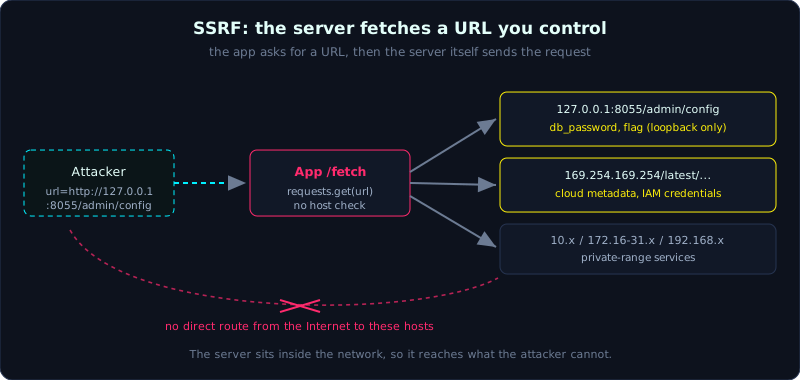 The app only fetches a URL, but the server reaches loopback and cloud metadata the attacker cannot touch directly.
| Part: 6 | Time: about 35 minutes | Difficulty: medium |
Prerequisites: Lesson 5.1 (IDOR), and a working understanding of HTTP and IP addresses.
Tools: Burp Suite, curl, interactsh.
Goals
After this lesson you can explain SSRF (Server-Side Request Forgery) and how it differs from CSRF. You know the internal targets worth hitting: loopback, private ranges, and cloud metadata. You can exploit SSRF to read an internal service and the metadata credentials on a real lab, and you can tell in-band SSRF from blind SSRF apart.
1. Theory
1.1 What SSRF is
SSRF, short for Server-Side Request Forgery, happens when an application takes a URL (or a host, or part of a URL) from the user and then lets the SERVER send a request to that URL. If the destination is not controlled, an attacker forces the server to call a place they cannot reach directly.
A quick comparison with CSRF (Lesson 5.3):
- CSRF forces the victim’s BROWSER to send a request (client-side).
- SSRF forces the SERVER to send a request (server-side). The server usually sits inside the internal network and can reach things the Internet never sees.
Features that often carry SSRF: fetching an image from a URL, webhook testers, document converters (PDF, image), link health checks, importing data from a URL, proxy/preview, and SSO that loads a key from a URL.
1.2 The targets of SSRF
Because the server sits inside the internal network, SSRF lets you reach:
1
2
3
4
http://127.0.0.1:PORT/...        services that listen on loopback only (admin, debug, DB UI)
http://169.254.169.254/...       cloud metadata (AWS/GCP/Azure) - very valuable
http://10.x / 172.16-31.x / 192.168.x    services on the private network
file:///etc/passwd               read a file (if the file scheme is supported)
1.3 Cloud metadata
On a cloud virtual machine there is a special metadata endpoint at the link-local address 169.254.169.254. It returns the instance configuration, and most important of all, the temporary credentials of the IAM role attached to the machine:
1
http://169.254.169.254/latest/meta-data/iam/security-credentials/<role>
The IP 169.254.169.254 does not route to the Internet, so only the server itself can call it, which is exactly what SSRF abuses. Getting these credentials often leads to taking over the whole cloud account. This is why SSRF was promoted a full tier in the OWASP Top 10 (A10:2021 Server-Side Request Forgery). The AWS mitigation is IMDSv2, which requires a token obtained through a PUT before you can read metadata, which makes simple SSRF (GET only) harder to exploit.
1.4 In-band and blind
- In-band SSRF: the response of the internal service is returned to the attacker, so you read it directly.
- Blind SSRF: the server does make the call but does not return the content. In that case you use an out-of-band (OOB) channel. You force the server to call a domain you control (using interactsh or Burp Collaborator) to confirm the SSRF, then exploit it indirectly.
2. Demo
The workflow:
- Find a parameter that takes a URL (url, uri, path, dest, redirect, image, feed, callback, webhook).
- Point it at a domain you control (interactsh) to confirm the server really makes the call.
- Point it at
127.0.0.1on common ports to scan internal services. - Point it at metadata if you suspect a cloud environment.
An example with curl, reading an internal admin service through SSRF:
1
2
3
$ curl -s 'localhost:8054/fetch?url=http://127.0.0.1:8055/admin/config'
{"body":"{\"db_password\":\"sup3r-s3cr3t-db\",\"flag\":\"...\",
 \"service\":\"internal-admin\"}","ok":true,"status":200, ...}
The app is only meant to preview a URL, but because it does not block internal hosts, it reads back the secret config of a service that listens on loopback only.
3. Lab
- Vulnerable app:
labs/6.1/(runs locally). Main app on 127.0.0.1:8054, internal service on 127.0.0.1:8055, simulated metadata on 127.0.0.1:8056. - Components:
app.py(the fetch feature),internal_services.py(internal admin plus the fake metadata),exploit.py. - Task:
- Use
/fetch?url=normally to understand the mechanism. - Use SSRF to read
http://127.0.0.1:8055/admin/configand get the first flag. - Use SSRF to read the simulated metadata (at 127.0.0.1:8056 in the lab, which corresponds to 169.254.169.254 in the real world) and get the credentials and the second flag.
- Use
- Hint:
/fetchcallsrequests.get(url)with an arbitrary URL, with no check on the scheme, host, or internal IP. - Solution:
labs/6.1/exploit.pyandlabs/6.1/transcript.txt.
An excerpt from a real run:
1
2
3
4
[*] Buoc 2: SSRF -> dich vu admin NOI BO 127.0.0.1:8055
    ... "flag":"FLAG{6.1_ssrf_doc_dich_vu_noi_bo}" ...
[*] Buoc 3: SSRF -> metadata cloud (gia lap 127.0.0.1:8056)
    ... "Token":"FLAG{6.1_ssrf_metadata_cloud}" ...
4. Common pitfalls
- Trying only external hosts and forgetting to try
127.0.0.1and internal ports. - Giving up when the response returns no content. That can be blind SSRF, which needs OOB.
- Forgetting that
169.254.169.254is reachable only from the server, so you must exploit it through the SSRF feature itself. - Confusing SSRF with open redirect. They are different, but they often chain together (see Lesson 6.3).
5. Further reading
- PortSwigger Web Security Academy: Server-side request forgery (SSRF).
- OWASP Top 10 A10:2021 Server-Side Request Forgery.
- HackTricks: SSRF, and the metadata documentation for AWS/GCP/Azure.
- Tools: interactsh, Burp Collaborator.
6. Key takeaways
- SSRF forces the server (not the browser) to send a request to a destination you choose.
- The valuable targets are loopback, private ranges, and cloud metadata at 169.254.169.254.
- Always confirm with an OOB channel first (interactsh or Collaborator), especially when the SSRF is blind.
- Defense: allowlist destinations, block internal and link-local ranges, allow only http/https, and enable IMDSv2.