Lesson 3.4: FLIRT and recognizing library functions
You open a tiny C binary in IDA and the Functions table shows over 1500 functions. Don’t panic. The author only wrote a handful of them. The other 1490 are printf, malloc, strlen and the rest of libc, copied straight into the file. This lesson is about separating those two groups quickly, so you only read what someone actually wrote.
Why the binary bloats: static linking
When you run gcc hello.c -o hello, the linker has two ways to attach library code. With dynamic linking, which is the default, the binary only keeps a list of “I need printf from libc.so”, while the printf code lives in the system library and is loaded at runtime. The file is small and the function table is clean. With static linking (gcc -static), all the libc code is copied into the file. The binary runs without external libraries, but it grows to hundreds of KB or a few MB, and the Functions table fills up with thousands of library functions.
Malware and CTF binaries often link statically, partly so they run on any machine, partly because it buries the real code under library code. Telling which code is libc saves the most time at this stage.
FLIRT
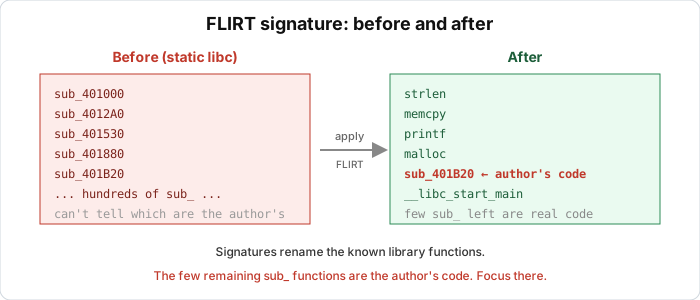
FLIRT (Fast Library Identification and Recognition Technology) is how IDA recognizes a known library function and renames it automatically. Each compiled libc function has a characteristic byte “fingerprint” (the pattern of the first bytes of the function, ignoring the address parts that change on relocation). IDA keeps signatures for many compiler and libc versions. During analysis it compares each function against them, and where one matches it changes sub_401A20 to strlen and colors it differently.
So instead of 1500 anonymous functions, most already have real names, and a small handful of sub_xxxx are the author’s code. That takes a few seconds.
Applying signatures in IDA
IDA auto-loads some signatures when opening a file, but not always the right set. To apply them manually, open View > Open subviews > Signatures (or press Shift+F5), then press Ins (Insert) to open the list of available signatures. Pick the set matching the file’s compiler. GCC libc on Linux is usually the sets named libc_*, and for MSVC it’s vc32* / vc64* / vcseh. IDA rescans and names the matching functions, and the “Applied” column tells you how many matched.
If there are still many sub_ after scanning, try the signature set of a different compiler version. A wrong set matches nothing and does no harm, so just try another.
Making your own signatures with FLAIR
When you meet an unfamiliar static library (a game SDK, a crypto library packaged as .lib / .a), IDA has no ready signatures. Hex-Rays’ FLAIR toolkit lets you generate them yourself:
1
2
pelf / pcf / plb / pmsvc   -> create a pattern file (.pat) from .a / .lib / .obj
sigmake                    -> turn the .pat into a .sig usable in IDA
Run the parser tool (plb for .lib, pelf for .a) to output a .pat, then sigmake name.pat name.sig. If there’s a collision (two functions with the same fingerprint), sigmake outputs an .exc file so you decide which to keep. Copy the .sig into IDA’s sig/ folder and it can be applied. A signature for the exact library the target uses can save you hours.
On the Ghidra side: FunctionID
Ghidra has an equivalent called FunctionID. It also uses a function hash to recognize known libraries. Ghidra ships a few FID sets for common runtimes (Visual Studio, some libc). You turn it on via Tools > Function ID, and you can build your own FID database from a known library binary. The default coverage isn’t as wide as FLIRT, so in Ghidra you rely a bit more on recognizing by eye.
When there’s no signature: recognizing standard functions by eye
Often you have no matching signature set. A few common libc functions still have a recognizable shape.
A hand-rolled strlen is a scan loop to the 0 byte:
    xor  eax, eax           ; i = 0
loop:
    cmp  byte [rdi+rax], 0  ; s[i] == 0 ?
    je   done
    inc  rax                ; i++
    jmp  loop
done:
    ret                     ; returns the length in rax
Translated to C:
1
2
3
4
5
size_t strlen(const char *s) {
    size_t i = 0;
    while (s[i] != 0) i++;
    return i;
}
If you see a loop scanning byte by byte until it hits 0 and then returning the count, it’s almost certainly strlen or a relative.
strcmp walks two pointers in parallel and stops when the bytes differ or it hits 0:
loop:
    mov  al, [rdi]
    cmp  al, [rsi]
    jne  diff
    test al, al          ; reached the end of the string?
    je   equal
    inc  rdi
    inc  rsi
    jmp  loop
Two pointers moving together, comparing byte by byte, with a check for the 0 byte, which is the shape of strcmp/memcmp. memcpy is a loop copying in big blocks (often using wide registers, movups/rep movsb). Knowing these few is enough to not get lost.
The format string is another free clue. A function that takes a string with %d, %s and then calls around is almost certainly related to the printf family.
The working rhythm
When I open a C binary, before reading any function I check whether the file is static or dynamic (DIE, or file size, number of imports). If it’s static, I expect many functions. Then I apply FLIRT (IDA) or FID (Ghidra) and let the tool name the libc part. The functions that stay as sub_ after that are worth reading. Start there, and combine it with going from strings and from main (Lesson 3.1).
Lab
In this lab you look at the many functions in a static binary, then use FLIRT to clear it away so only the author’s code is left. The source is greet.c. The program has only two functions written by the author (make_tag and main), and everything else in a static binary is libc and CRT.
Build two variants on Linux:
1
2
3
gcc -O0 -no-pie greet.c -o greet_dyn
gcc -O0 -no-pie -static greet.c -o greet_static
ls -l greet_dyn greet_static
greet_static is many times larger than greet_dyn. Open greet_dyn in IDA (or Ghidra) and look at how many functions the Functions table has. main and make_tag sit in a fairly tidy list. Then open greet_static and compare the function count. Scroll through it and you’ll see countless unfamiliar sub_ entries, which is libc.
Now apply FLIRT. In IDA, press Shift+F5 (Signatures), press Ins, and pick the libc set matching the GCC on your machine. When the scan finishes, count how many functions got real names (strlen, snprintf, printf, malloc and so on). The “Applied” column gives the number. Filter the Functions table to drop the functions that already have library names. The remaining sub_ entries are the author’s code, so confirm that main and make_tag are in that small group. Optionally, open the same greet_static in Ghidra, try Tools > Function ID, and compare its coverage with IDA’s FLIRT.
Two questions to think about. Why is the static build harder for an analyst even though it’s more convenient to run? And if FLIRT names no function at all, what does that say about the signature set you chose?
Show solution
After building and comparing sizes with ls -l greet_dyn greet_static, a typical result (exact numbers depend on the glibc version) is:
1
2
-rwxr-xr-x  greet_dyn      ~16 KB
-rwxr-xr-x  greet_static   ~900 KB to over 2 MB
The static one is dozens of times larger because the entire libc is inside.
For the function counts, greet_dyn has just a handful of author functions plus a few PLT stubs (printf, snprintf, strlen, __libc_start_main and so on). It’s tidy, usually under 20 rows, and main and make_tag are found immediately. In greet_static the Functions table jumps to thousands of functions (typically 1500 to 2500 depending on glibc). Most are unnamed sub_ entries, and main and make_tag are buried and hard to find by eye. That’s why static linking makes life harder for the analyst. The author’s code isn’t harder, it’s just diluted among the whole libc.
To apply FLIRT in IDA, press Shift+F5 to open the Signatures window, press Ins to see the available signatures, and pick the GCC libc set. The usual names are the entries starting with libc for 64-bit ELF. If you’re unsure, try the newest libc set first and try another if it’s wrong. IDA rescans, and the “Applied” column shows the number of matches. Expect hundreds to over a thousand functions renamed to strlen, snprintf, vfprintf, malloc, memcpy, __libc_start_main and so on, so most of the Functions table now has real names. If “Applied = 0” after the scan, the signature set doesn’t match the glibc version. That does no harm, so choose another set and rescan.
To isolate the author’s code, filter the Functions table (type into the filter box) to hide the known library names. The remaining group of unnamed sub_ entries is very small, and in it you find main, which takes argc and argv, calls make_tag, and then calls printf twice, and make_tag, which calls strlen and then snprintf with the format string "[user:%s len=%zu]". To cross-check, go from the string. Find "Hello, %s" in the Strings window and follow the xref, and it leads to main. FLIRT (clearing libc) plus going from strings (Lessons 3.1 and 2.2) is the fastest way to find the author’s code in a static binary.
For Ghidra, open greet_static, go to Tools > Function ID and enable the bundled FID databases. Ghidra usually recognizes part of it (the CRT and some common glibc functions) but with clearly lower coverage than FLIRT, and many functions stay FUN_. This is where knowing the shapes of strlen, strcmp and memcpy pays off.
So decide whether the binary is static or dynamic and apply signatures before reading. FLIRT turns a table of 2000 functions into a handful worth reading. When the tool can’t help, the familiar shapes of libc functions still do.
Key takeaways
Static linking copies libc code into the file and bloats the function table to thousands, most of which isn’t the author’s code. FLIRT in IDA recognizes and names library functions by byte fingerprint. Apply it via Shift+F5 and pick the set matching the compiler. A wrong set names nothing, which is harmless, so try another. For unfamiliar libraries you can make your own signatures with FLAIR (pelf/plb + sigmake). Ghidra uses FunctionID with narrower coverage, so practice recognizing by eye.
Remember the shapes of strlen (scan to the 0 byte), strcmp (two parallel pointers), memcpy (block copy), and the printf family (has a format string).