Lesson 3.3: Structs in assembly and how to recover them

The first time you apply a struct to a pointer in IDA, a tangled pseudocode function turns into something you can read. *(a1 + 8) becomes player->score, *(a1 + 16) becomes player->name. Recovering structs gives you a lot for little effort when reversing C/C++ code. This lesson shows how to recognize a struct and rebuild it.
What a struct looks like in assembly
The CPU doesn’t know what a struct is. To it, a struct is a block of contiguous bytes, and accessing a field means taking the base address and adding a fixed offset. That’s the pattern to look for.
Say there’s this C struct:
1
2
3
4
5
6
struct Player {
    int   id;        // offset 0, 4 bytes
    int   score;     // offset 4, 4 bytes
    char  name[16];  // offset 8, 16 bytes
    int   level;     // offset 24, 4 bytes
};
A function that takes a Player* pointer and reads the fields comes out as assembly like this:
; rcx = pointer to Player (first parameter on Windows x64)
mov  eax, [rcx]          ; read id      -> offset 0
mov  edx, [rcx+4]        ; read score   -> offset 4
lea  r8,  [rcx+8]        ; get the address of name -> offset 8
mov  r9d, [rcx+18h]      ; read level   -> offset 24 (0x18)
The same base register (rcx) is added to fixed constants +0, +4, +8, +0x18. That’s what a struct looks like. Each offset is a field.
Telling a struct from an array
Beginners often mix these two up, but the address is computed differently.
An array has an index multiplied by the element size, so the offset is a variable. You see [base + index*scale], where index is a register that changes in a loop and scale is 1/2/4/8.
mov eax, [rsi+rcx*4] ; arr[rcx], an int array
A struct has a constant offset, and each field can be a different type. You see [base + constant].
mov eax, [rsi+8] ; some_struct->field_at_8
The quick rule is that multiplication by an index (*4, *8) means array, while adding fixed constants with fields of different types means struct. An array of structs combines both, [base + index*sizeof_struct + field_offset], for example [rsi + rcx*32 + 4] is players[rcx].score when the struct is 32 bytes wide.
Padding and alignment
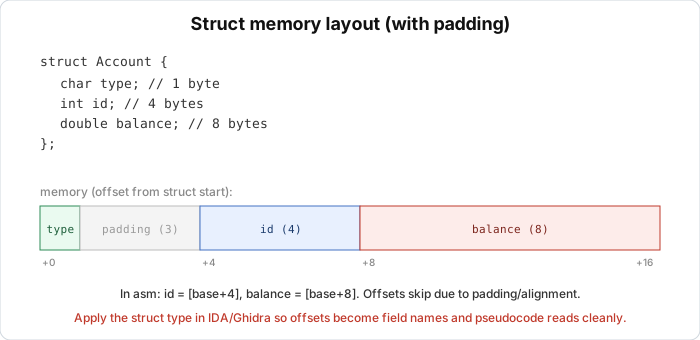
Don’t expect the fields to sit tightly together. The compiler inserts padding bytes so each field sits at an address divisible by its size (alignment). For example:
1
2
3
4
5
6
7
struct Messy {
    char  a;    // offset 0
    int   b;    // offset 4  (NOT 1, because int needs 4-byte alignment)
    char  c;    // offset 8
    // 7 bytes of padding here
    double d;   // offset 16 (double needs 8-byte alignment)
};  // sizeof = 24, not 14
So when the offset jumps from +0 to +4 even though the first field is only 1 byte, that’s padding. When you rebuild the struct in the tool, declare the right type for each field and the tool computes the padding for you. If the offsets are still off, you probably guessed the type of an earlier field wrong.
Recovering a struct in IDA
This is the workflow you’ll repeat all the time. First open the decompiler (F5), where you see the ugly *(a1 + N) pile. Then open Local Types (Shift+F1) or Structures (Shift+F9) and create a new struct. You can type the C declaration directly:
1
struct Player { int id; int score; char name[16]; int level; };
Go back to the pseudocode, right-click the pointer variable (a1), and choose “Convert to struct pointer”, or set the type with the Y key and type Player *. IDA changes every *(a1 + 8) to a1->name. Read it again, and fix the field names as you understand more.
If you don’t know yet what’s in the struct, add fields as you go. Each time you see a new offset being accessed, add a field at that offset. Some IDA versions also have “Create new struct from this access” to gather the offsets you’ve seen.
Recovering a struct in Ghidra
The operations are similar but different. Open the Data Type Manager (the window at the bottom right), right-click the program’s archive, and choose New > Structure. Add each field with a type and name, or use “Auto Create Structure”. In the Decompiler, right-click the pointer variable and choose Auto Fill in Structure / Auto Create Structure, and Ghidra looks at the accesses and builds a draft struct. Then assign the pointer type to the variable (right-click > Retype Variable, or Ctrl+L) and Ghidra updates the pseudocode. Refine the field names in the Data Type Manager, and every place that uses the struct updates.
Auto Create Structure in Ghidra works fairly well on optimized code, while IDA is faster if you type C declarations. Either is fine. Whenever a pointer is accessed at several fixed offsets, build a struct right away.
Before and after
Before assigning the struct, the pseudocode:
1
2
if ( *(a1 + 4) > 100 && *(_BYTE *)(a1 + 8) )
    *(a1 + 24) = *(a1 + 24) + 1;
After assigning Player *:
1
2
if ( player->score > 100 && player->name[0] )
    player->level++;
Same code, but you can read the second one in two seconds. Multiply that by hundreds of functions in a real program and it’s clear why people build structs early.
Lab
The goal is to recognize a struct in a binary and rebuild it in IDA or Ghidra, watching the pseudocode change from *(a1 + N) to player->field. Build inventory.c unoptimized so it stays readable, with one of these commands:
1
2
3
4
5
6
7
8
# Linux
gcc -O0 -g -o inventory inventory.c

# Windows, MSVC (Developer Command Prompt)
cl /Od /Zi inventory.c

# Windows, MinGW
gcc -O0 -g -o inventory.exe inventory.c
Open the binary in your tool and run auto-analysis. Find the two functions update_player and print_player. If the binary is stripped, start from the format string in print_player (the one containing id=, score= and so on) and follow the xref back. Read the pseudocode of update_player before assigning any struct and write down every offset accessed on the first pointer parameter. Then rebuild struct Player in the tool, inferring each field’s type from how it is used. A 4-byte read is an int, a 1-byte access is a char, and use with a double instruction means a double. Assign Player * to the parameter of both update_player and print_player and read the pseudocode again. Finally, check sizeof and the offsets against your layout, paying attention to the padding.
Some questions to think about. Why does score sit at offset 8 and not 5, even though rank takes only 1 byte? Why is sizeof(struct Player) 48 and not the sum of the fields (4+1+4+16+8+4 = 37)? And which field gets the most padding in front of it, and why?
Show solution
Build the struct yourself before reading this. The real layout of struct Player, checked with offsetof and sizeof (gcc x86-64, and the same result with MSVC x64 since the alignment rules are the same), is:
| Field | Type | Offset | Size |
|---|---|---|---|
| id | int | 0 | 4 |
| rank | char | 4 | 1 |
| (padding) | 5 | 3 | |
| score | int | 8 | 4 |
| name | char[16] | 12 | 16 |
| (padding) | 28 | 4 | |
| balance | double | 32 | 8 |
| level | int | 40 | 4 |
| (trailing padding) | 44 | 4 |
sizeof(struct Player) is 48.
On the padding, rank at offset 4 takes only 1 byte (up to offset 5). But score is an int and needs an address divisible by 4, so the compiler inserts 3 padding bytes (offsets 5, 6, 7) to push score to offset 8. That is why the accesses jump from +4 to +8. name[16] ends at offset 28. balance is a double and needs 8-byte alignment, so 4 padding bytes (offsets 28 to 31) put balance at offset 32. The whole struct must have a size divisible by the largest alignment inside it (8, because of the double), so after level (which ends at offset 44) another 4 bytes bring the total to 48. The fields actually in use add up to 37 bytes, but with padding the struct takes 48, which newcomers often miscount when rebuilding a struct. The most padding in front of a field is at score (3 bytes) and balance (4 bytes), and balance gets the largest gap.
The update_player pseudocode before assigning the struct (as IDA might show it, with variable names that can differ) is:
1
2
3
4
5
6
7
8
9
10
void update_player(__int64 a1, int a2)
{
    *(_DWORD *)(a1 + 8) += a2;                         // score += gained
    if ( *(_DWORD *)(a1 + 8) > 100 && *(_BYTE *)(a1 + 12) )  // score > 100 && name[0]
    {
        ++*(_DWORD *)(a1 + 40);                        // level++
        *(_BYTE *)(a1 + 4) = 'A';                      // rank = 'A'
    }
    *(double *)(a1 + 32) = *(double *)(a1 + 32) + (double)a2 * 1.5;  // balance
}
The offsets that appear are 8 (score), 12 (name), 40 (level), 4 (rank), 32 (balance). From them you infer the types. +8 and +40 are read as 4 bytes (DWORD), so they are int. +12 is read as 1 byte (BYTE), so it is a char or the start of a char array. +4 is written as a 1-byte char. +32 is used in a double operation, so it is a double.
After building struct Player and assigning Player *p:
1
2
3
4
5
6
7
8
9
10
void update_player(Player *p, int gained)
{
    p->score += gained;
    if ( p->score > 100 && p->name[0] )
    {
        ++p->level;
        p->rank = 'A';
    }
    p->balance = p->balance + (double)gained * 1.5;
}
It nearly matches the original source, and that’s what recovering the struct gives you.
When you have no source, you recognize each field’s type like this. An offset read or written with 4 bytes (_DWORD, an eXX register) is most likely an int. An offset read or written with 1 byte (_BYTE, an Xl register) is a char, or the first element of a char array if a loop later walks through it. An offset used in a floating point instruction (movsd, addsd, or a double type in the pseudocode) is a double. A continuous range of offsets accessed with a running index is an array. Here name starts at offset 12 and strcpy and printf %s walk through it, so it is a char[16]. If you assign types and the offsets of the later fields come out shifted, you usually guessed the size of an earlier field wrong (for example declaring short instead of int). Fix that field and everything lines up again.
Key takeaways
A struct in assembly is a base address plus a constant offset, and each offset is a field. Arrays use [base + index*scale] with a changing index, while structs use [base + constant] with different types. Padding/alignment makes offsets non-contiguous, which is normal and not an error. In IDA you use Local Types/Structures, type the C declaration, and assign the type with Y, and in Ghidra you use the Data Type Manager, Auto Create Structure, and retype with Ctrl+L.