Lesson 7.1: Python bytecode and .pyc files
After native C++ and managed .NET, Python is a relief. Reversing it is almost like re-reading the source, because Python keeps almost everything, including function names, variable names, constant names and even line numbers. Knowing how Python compiles and what a .pyc file contains explains why it’s so easy, and why it’s sometimes still hard (versions).
Python compiles too
Many people think Python is purely interpreted, running straight from text. Not quite. When you run a .py file, CPython compiles it to bytecode first, and then a virtual machine (the CPython VM) runs that bytecode. This VM is stack-based, like the JVM, so instructions push and pop values on a stack.
The bytecode doesn’t vanish. For imported modules, CPython saves it as a .pyc file in the __pycache__/ folder so it doesn’t recompile next time. .pyc is what you often have to reverse, because many packaged Python programs ship only .pyc and not the .py.
Inside a .pyc file
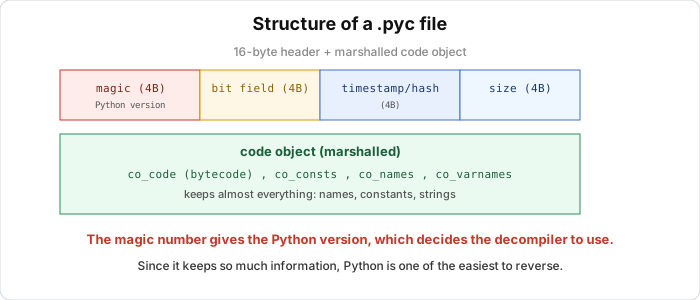
A .pyc file has two parts, a short header and then a marshaled (serialized) code object.
The 16-byte header (from Python 3.7 onward):
1
2
3
4
+0  magic number (4 bytes)   tells the bytecode version
+4  bit field   (4 bytes)    decides whether the next 8 bytes are a timestamp or a hash
+8  timestamp/hash (4 bytes) compile time, or source hash
+12 source size (4 bytes)    size of the original .py file
These are the first 16 bytes of a real .pyc generated by Python 3.11 (taken from the lab below):
1
2
3
a7 0d 0d 0a  00 00 00 00  dc b4 c4 6a  05 01 00 00
\_________/  \_________/  \_________/  \_________/
  magic        bit field    timestamp    source size
The first four bytes a7 0d 0d 0a are the magic number. This is the part you care about most.
Magic number: pick the right decompiler
Every Python version has its own magic number, because bytecode changes between versions (opcodes added, removed or changed). The last two bytes 0d 0a are fixed, the first two tell versions apart. A few values:
| Python | Magic (first 2 bytes, little-endian in the file) |
|---|---|
| 3.8 | 55 0d |
| 3.9 | 61 0d |
| 3.10 | 6f 0d |
| 3.11 | a7 0d |
| 3.12 | cb 0d |
Decompilers like pycdc or uncompyle6 have to know the exact version to translate the bytecode correctly. Run a 3.11 .pyc through a tool that only understands 3.8 and you get garbage or errors. When you get an unknown .pyc, read the magic first to see which Python it belongs to. Lesson 7.2 uses this number.
The code object
After the header is a marshaled code object. Unpacked, it contains co_code, the actual bytecode byte sequence, and co_consts, the constants used in the function (numbers, strings, even the code objects of child functions). It also holds co_names for global variable names and attribute names, co_varnames for local variable names and parameters, and co_filename, co_name and co_firstlineno for the file name, function name and line number.
That list is why Python is easy to reverse, because local variable names are intact, strings are intact, even the original line numbers. Nothing throws the information away the way a C compiler does.
Reading bytecode with dis
Python’s dis module prints bytecode in a readable form. Take this function:
1
2
3
4
5
def check(name):
    total = 0
    for c in name:
        total += ord(c)
    return total == 0x29A
dis.dis(check) gives (real output from Python 3.11.9):
1
2
3
4
5
6
7
8
9
10
11
12
13
14
15
16
17
18
19
20
21
  2     LOAD_CONST    1 (0)
        STORE_FAST    1 (total)      # total = 0

  3     LOAD_FAST     0 (name)
        GET_ITER
    >>  FOR_ITER      20 (to 52)     # the for c in name loop
        STORE_FAST    2 (c)

  4     LOAD_FAST     1 (total)
        LOAD_GLOBAL   1 (NULL + ord)
        LOAD_FAST     2 (c)
        PRECALL       1
        CALL          1              # ord(c)
        BINARY_OP     13 (+=)        # total += ...
        STORE_FAST    1 (total)
        JUMP_BACKWARD 21 (to 10)     # back to the top of the loop

  5 >>  LOAD_FAST     1 (total)
        LOAD_CONST    2 (666)        # 0x29A = 666
        COMPARE_OP    2 (==)
        RETURN_VALUE
It reads almost like the source. The left column is the original Python line number. LOAD_CONST, STORE_FAST, LOAD_FAST push and store values, FOR_ITER is the loop, COMPARE_OP 2 (==) is the comparison, and look at LOAD_CONST 2 (666), where the constant 0x29A is right there. A Python crackme like this leaks its secret in co_consts.
Opcodes change by version. PRECALL and BINARY_OP above are from 3.11. Version 3.8 calls functions with CALL_FUNCTION and adds with INPLACE_ADD. That’s why the magic number matters.
What reversing Python involves
In practice you meet three situations, getting harder. In the first you have the .pyc and can decompile it directly with pycdc or uncompyle6 (Lessons 7.2, 7.3). In the second the program is packaged as an .exe with PyInstaller/py2exe, so you have to extract the .pyc first (Lesson 7.4). In the third it’s been turned into native code or encrypted by Nuitka/Cython/PyArmor, which is much harder and means reversing it like C (Lesson 7.5).
This lesson is the foundation, meaning knowing what a .pyc contains and how to read the magic. The rest of Part 7 builds on it.
Lab
In this lab you check what the lesson describes, using the python3 on your own machine. All you need is Python 3 (python3 --version). The lab was checked on Python 3.11.9. On another version the magic number and a few opcodes will differ, which is what you’re meant to observe.
The program is checker.py, a tiny crackme whose check function adds up the ASCII codes of the characters and compares the sum with 0x29A. In the folder that holds it, run the following to disassemble check and read the bytecode, and find which instruction carries the secret constant 0x29A.
1
python3 -c "import dis, checker; dis.dis(checker.check)"
Then compile the file to a .pyc, which creates __pycache__/checker.cpython-XY.pyc.
1
python3 -c "import py_compile; print(py_compile.compile('checker.py'))"
Read the first 16 bytes of that .pyc, and point out the magic, the bit field, the timestamp and the source size.
1
2
3
4
5
python3 - <<'PY'
import glob, binascii
p = glob.glob('__pycache__/*.pyc')[0]
print(binascii.hexlify(open(p,'rb').read(16)).decode())
PY
Compare the first 4 bytes (the magic) with the table in the lesson to confirm your Python version. For an extra step, use marshal to load the code object from the .pyc (skipping the 16-byte header) and print co_consts and co_varnames. Do you see the secret 666 in co_consts?
Two questions to think about. Why is reading co_consts enough to give away this crackme’s secret, before you even understand the bytecode? And if you switched to Python 3.8, which bytes in the header would change?
Show solution
This was checked on Python 3.11.9. The bytecode of check from dis.dis(checker.check) looks like this (shortened).
1
2
3
4
5
6
7
8
9
10
11
12
13
14
15
16
17
18
  2   LOAD_CONST   1 (0)          # total = 0
      STORE_FAST   1 (total)
  3   LOAD_FAST    0 (name)
      GET_ITER
  >>  FOR_ITER     20 (to 52)     # for c in name
      STORE_FAST   2 (c)
  4   LOAD_FAST    1 (total)
      LOAD_GLOBAL  1 (NULL + ord)
      LOAD_FAST    2 (c)
      PRECALL      1
      CALL         1              # ord(c)
      BINARY_OP    13 (+=)        # total += ord(c)
      STORE_FAST   1 (total)
      JUMP_BACKWARD 21 (to 10)
  5 >> LOAD_FAST    1 (total)
      LOAD_CONST   2 (666)        # compare with 0x29A = 666
      COMPARE_OP   2 (==)
      RETURN_VALUE
The secret constant 0x29A appears at LOAD_CONST 2 (666), right before the comparison.
py_compile.compile('checker.py') creates __pycache__/checker.cpython-311.pyc. The real first 16 bytes are these.
1
a7 0d 0d 0a  00 00 00 00  dc b4 c4 6a  05 01 00 00
Splitting them up, a7 0d 0d 0a is the magic number (Python 3.11). 00 00 00 00 is the bit field, which is 0, meaning the next 8 bytes use a timestamp rather than a hash. dc b4 c4 6a is the compile timestamp (little-endian), and 05 01 00 00 is the source size, 0x105 = 261 bytes for the original .py file. The first two magic bytes, a7 0d, match Python 3.11 in the lesson’s table, which agrees with python3 --version reporting 3.11.9.
To read co_consts through marshal:
1
2
3
4
5
6
7
8
import marshal
with open('__pycache__/checker.cpython-311.pyc','rb') as f:
    f.read(16)                 # skip the header
    code = marshal.load(f)     # the module's code object
# code.co_consts holds the code object of check; open it up:
for c in code.co_consts:
    if hasattr(c, 'co_consts'):
        print(c.co_name, c.co_consts)
It prints check (0, 666), so the secret 666 sits right in co_consts.
Reading co_consts is enough because Python doesn’t encrypt constants. They sit intact in the code object, and without understanding any bytecode you can already tell that the condition is “the sum of the ASCII codes equals 666”. Switching to Python 3.8 changes the 4 magic bytes to 55 0d 0d 0a. The timestamp and size stay in the same positions but have different values. The bytecode inside also changes its opcodes (CALL_FUNCTION instead of PRECALL and CALL).
Key takeaways
Python compiles source to bytecode and then runs it on the CPython VM (stack-based). A .pyc is a 16-byte header (magic, bit field, timestamp/hash, size) plus a marshaled code object. The magic number (first 4 bytes) tells the Python version, so read it before picking a decompiler.
The code object keeps variable names, function names, constants and line numbers, which is why Python is so easy to reverse. Opcodes change between versions, and translating with the wrong version gives garbage.