Lesson 9.1: What Rust binaries look like
Rust is spreading fast, from command-line tools to malware, so sooner or later you’ll run into a Rust binary. Rust is one of the harder things to read at the native level, harder than C++ and much harder than Go. It does leave a few characteristic traces, and the panic strings help you locate code quickly. This lesson shows how to recognize a Rust binary and what to expect from it.
Why Rust is hard to read
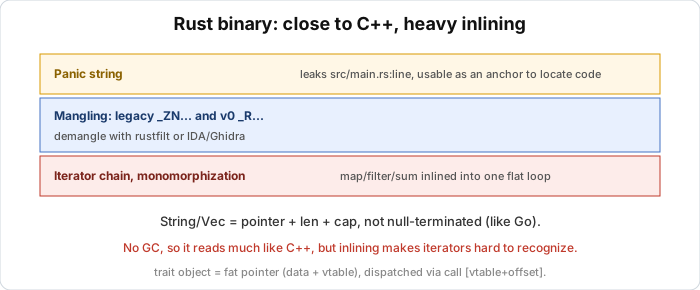
There are three reasons, and knowing them makes opening the decompiler less of a shock. The first is monomorphization. Generics in Rust don’t share a single copy of the code, and each concrete type generates its own copy of the function. A Vec<T> used with five types is five nearly identical copies of the functions, so the binary gets bigger and full of duplicate functions. The second is aggressive inlining. Rust’s optimizer (through LLVM) inlines very heavily, so an iterator chain like .iter().map().filter().collect() turns into a flat loop, with no function boundaries left. The third is static linking by default. Like Go, Rust binaries usually bundle the whole standard library, so the file is big and the author’s code is mixed with a lot of library code.
One important difference from Go is that Rust has no GC runtime and no goroutine scheduler. Structurally it’s closer to C++, so what you learned reading C++ in Part 4 (especially vtables, structs, STL) carries over a lot.
Recognizing a Rust binary
Use DIE or strings and look for a few signs. Source path strings like src/main.rs, library/std/src/... and /rustc/<hash>/... show up because Rust embeds file paths in the panic info. There’s also the version string rustc 1.xx.x, and crate names in symbols such as core::, alloc::, std:: and third-party crates. Mangled symbols start with _ZN (legacy) or _R (v0), see the section below. Finally there are panic strings like called \Option::unwrap()` on a `None` value, index out of bounds and attempt to add with overflow`.
Name mangling: two kinds
Rust has two kinds of mangling, and you’ll meet both depending on the version and build flags. Legacy (the old default) looks like C++ Itanium and starts with _ZN, for example _ZN4core3fmt9Formatter3pad17h...E, with a hash at the end (17h...) to distinguish the monomorphized copies. v0 (new, enabled with -C symbol-mangling-version=v0) starts with _R and can encode generics too, for example _RNvNtCs.... It’s messier to read raw but carries more information.
To read the names, demangle them. rustfilt works with cat symbols.txt | rustfilt or nm binary | rustfilt. Recent IDA/Ghidra can demangle both kinds on their own if you turn it on in the demangler config, and c++filt handles the legacy _ZN part at a basic level since it resembles Itanium.
The h... hash at the end of a legacy name often confuses beginners. It’s only an identifier to avoid name collisions between monomorphized copies, and you can ignore it when reading.
Panic strings
This is the most useful tip in the lesson. When Rust code can panic (unwrapping a None, out-of-bounds array access, division by zero, overflow in a debug build), the compiler inserts a call into the panic machinery together with a string holding the file name and line number of the original source.
So in a Rust binary you’ll often see strings like:
1
2
src/validator.rs
called `Result::unwrap()` on an `Err` value
Going backwards from that string (xref, like the technique in Lesson 0.4) takes you to the right function in the author’s code, skipping the library code. In a heavily optimized Rust binary, the panic string is sometimes the only reliable anchor.
How Option, Result, and enums are represented
Rust uses Option<T> and Result<T, E> everywhere, so recognizing them helps you read the logic. They are enums with a tag (discriminant) that says which variant it is (Some/None, Ok/Err), plus a payload, and in assembly you see code reading a tag and then branching, like a tagged union. With niche optimization, for some types Rust doesn’t need a separate tag. For example Option<&T> uses the value 0 (null) itself to represent None, so it’s as compact as a pointer, and a pointer checked == 0 and then a branch is often an Option being matched. A match on an enum becomes a tag comparison followed by a jump table or a chain of cmp/je, like the switch-case in Lesson 1.5.
Approach
My usual rhythm is to triage with DIE, confirm it’s Rust, and note the rustc version if you see it. Turn on the demangler in IDA/Ghidra, or run rustfilt on the symbol table. Use panic strings to go backwards to the author’s functions, ignoring core/alloc/std. Iterator chains are flattened, so read by logic instead of trying to recover the original function boundaries. Use your C++ experience (Part 4) for structs and parameter passing.
Lab
The task is to see the traits of a Rust binary this lesson describes, namely name mangling, panic strings, and the effect of the optimization level. You need rustc, and optionally rustfilt (install it with cargo install rustfilt). Check with rustc --version. If your machine has no Rust toolchain, read the solution to see the described results and you can still follow the lesson.
Build three variants from main.rs. The debug build is rustc main.rs -o rust_demo_dbg, the release build is rustc -O main.rs -o rust_demo_rel, and the v0 mangling build is rustc -O -C symbol-mangling-version=v0 main.rs -o rust_demo_v0. Compare the sizes of the three files and think about why they are all large even though the program is tiny. Then look for panic strings:
1
strings rust_demo_rel | grep -iE "\.rs|unwrap|panic"
Which string leaks the source file name, and why is that information valuable when reversing? Next demangle the symbols:
1
2
nm rust_demo_dbg | rustfilt | head -40
nm rust_demo_v0 | grep '_R' | rustfilt | head -40
Compare the legacy mangled names (_ZN...) with v0 (_R...), and work out what the h... hash at the end of a legacy name is. Finally compare debug and release in Ghidra or IDA by opening the function transform. In release, does the iterator chain .bytes().enumerate().map().fold() keep its function boundaries, or has it been inlined into one flat loop?
Two questions to think about. If the binary is stripped of all symbols, what anchors do you still have to locate the author’s functions? And why does experience reading C++ (Part 4) carry over to Rust while Go experience (Part 8) carries over less?
Show solution
The results below describe the standard behavior of the Rust toolchain. When you run it yourself, the specific sizes and hashes will differ, but the qualitative signs hold.
Tasks 1 and 2: sizes
All three variants are unusually large for a program that prints a few lines, typically a few hundred KB up to over 1 MB. There are two reasons. Rust’s standard library is statically linked into the binary, and monomorphization makes every generic (here the iterator adapters) emit its own code for the concrete type. Release (-O) is usually slightly smaller than debug and has fewer symbols, but is still large because of the static linking.
Task 3: panic strings
check(...).unwrap() in main can panic if it returns Err, so the compiler inserts panic machinery with a location. In strings you will see lines like:
1
2
3
main.rs
src/main.rs
called `Result::unwrap()` on an `Err` value
along with std’s own panic strings such as index out of bounds and attempt to ... with overflow. This is useful because the string main.rs is referenced right next to the code that calls unwrap. Following that string backward (xref) takes you to the author’s main or check function, skipping the core and std code. In a heavily optimized release Rust binary, this is usually the most reliable anchor.
Task 4: mangling
A debug build (legacy by default) has symbols like:
1
_ZN9rust_demo9transform17h3a9f...E
which rustfilt turns into rust_demo::transform. The part 17h3a9f... is a length plus a hash that distinguishes the monomorphized copies, carries no semantic meaning, and can be ignored when reading. A v0 build has symbols starting with _R, for example _RNvCs..._9rust_demo9transform, which rustfilt also turns into rust_demo::transform but which encodes generics fully and so is longer. Without rustfilt, recent IDA and Ghidra can read both by themselves once the demangler is enabled.
Task 5: debug vs release
In debug, transform stays fairly close to the source and you can see the separate calls to the iterator adapters. In release, the whole chain .bytes().enumerate().map(...).fold(...) is inlined and merged into one flat loop that walks each byte, multiplies by the index, and accumulates into an accumulator initialized to 0x1337. There are no separate map or fold functions left. That’s why release Rust is hard to read, because you have to read by the logic of the loop, not by the original function structure.
Answers to the questions
With a fully stripped binary, the panic strings are still there, because they are data and not symbols, so you can still walk backward from a location string to the author’s code. That’s why panic strings get so much attention. As for why it is closer to C++ than to Go, Rust has no GC runtime or goroutine scheduler, and its object layout and parameter passing are close to C++. Go has the pclntab and a distinctive runtime, so the techniques differ (see Part 8).
Key takeaways
Rust is hard to read because of monomorphization, heavy inlining and static linking, though structurally it’s closer to C++ than Go (no GC runtime). Recognize Rust by src/*.rs paths, rustc strings, core::/alloc::/std:: symbols and panic strings.
There are two mangling kinds, legacy _ZN... (with an h... hash) and v0 _R..., and you demangle with rustfilt or IDA/Ghidra. Panic strings hold the file name and source line, so use them to go backwards to the author’s code. Option/Result are tagged enums, so watch for niche optimization (None becomes null).