Lesson 4.1: Authentication flaws, brute force, and default credentials
Authentication is the login layer, where the application answers the question of whether you really are the person you claim to be. When this layer breaks, an attacker walks straight in as a real user and skips every control behind it. In this lesson I find valid accounts through username enumeration, brute force passwords when the server has no rate limit or account lockout, look for default and weak credentials, and spot logic flaws in the login flow. The lab runs on your own machine.
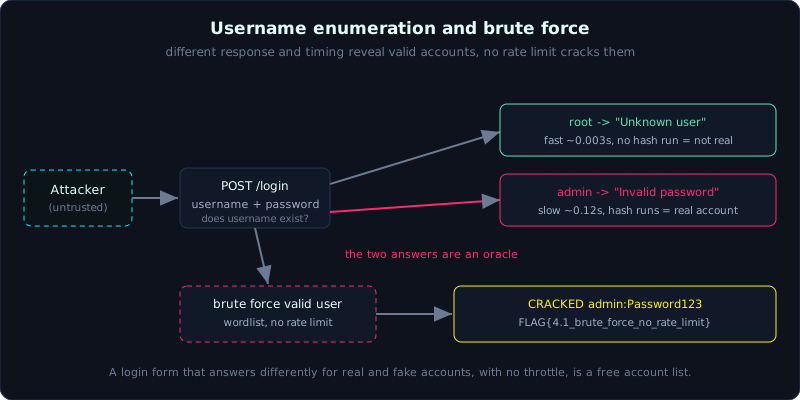 Different responses and different timing turn the login form into an oracle, and with no rate limit the valid accounts fall to a wordlist.
Level: medium, about 45 minutes. Prerequisites: core HTTP, cookies, and inspecting requests with a proxy (Lesson 0.2, 0.3). Tools: curl, Python requests, Burp Intruder, ffuf, Hydra.
Goals
After this lesson you understand how authentication (proving identity) differs from authorization (granting permissions), and why the login layer is the number one target. You can do username enumeration (finding which accounts exist) through error messages and through timing (response time), brute force passwords when the app has no rate limit (request throttling) and no account lockout, and recognize default credentials and logic flaws in the login flow.
Theory
What authentication is and where it breaks
Authentication is the process where an app answers the question of whether you are the person you claim to be. The most common form is a username and password pair, but there are also tokens, certificates, and biometrics. When this layer breaks, an attacker gets in directly as a real user and bypasses every layer behind it. OWASP places this group under A07:2021 Identification and Authentication Failures.
Three questions always come up when testing a login form:
- Does the app leak who exists (username enumeration)?
- Does the app block repeated wrong attempts (rate limit, lockout, CAPTCHA)?
- Does the login flow skip any check at some step (logic flaw)?
Username enumeration
Username enumeration is determining which accounts actually exist on the system without needing a password yet. Knowing for sure that admin exists shrinks brute force from (number of usernames x number of passwords) down to only guessing the password. Common leak channels:
- Different error messages: the server returns “Unknown user” when the account does not exist, but returns “Invalid password” when the account exists and the password is wrong. Two different messages are an oracle (something that answers yes or no).
- Timing (response time): if the server only runs the password check function when the username exists (hashing a password costs tens of milliseconds), then a request to a real account is noticeably slower. Measuring time is enough to tell them apart, even when the error messages have been made identical.
- Other channels: a registration form that says “email already exists”, a forgot-password feature that responds differently, different HTTP status codes (200 versus 401), different response lengths.
Brute force and why missing defenses matter
Brute force is trying many passwords one after another until one hits. Minimum defenses include rate limit (capping requests per minute per IP or per account), account lockout (a temporary lock after N wrong tries), CAPTCHA, and anomaly alerts. Without these layers, an attacker tries thousands of passwords per minute. Combined with a common-password wordlist (rockyou.txt and similar sets), the hit rate is high.
A scarier variant is credential stuffing, taking email and password pairs leaked from other breaches and trying them in bulk, relying on people reusing passwords. And password spraying, trying a few very common passwords (for example Password123) against a large number of accounts, dodging per-account lockout because each account is only tried a few times.
Default and weak credentials
Many systems ship with default accounts (admin/admin, root/toor, admin/password, tomcat/tomcat) that administrators forget to change. A weak credential is a password that is too weak or follows an easy-to-guess pattern (company name plus year, Welcome1, Summer2024). Always try this group before launching a large brute force.
Logic flaws in the login flow
A logic flaw is an error in how the flow is designed, not in a single payload. Common examples:
- The flow has several steps (enter user, then enter pass, then MFA) but you can jump straight to the last step and skip the middle.
- A parameter that decides the result sits on the client side and is trusted blindly (for example
role=usersent up and edited torole=admin). - “Stay logged in” or “remember me” generates a guessable cookie.
- Loose password comparison allows truncation (cutting the string) or a type confusion.
Demo
Lab 4.1 is a Flask login form at 127.0.0.1:8041. It deliberately returns different error messages and only checks the password when the username exists.
Telling accounts apart by error message
1
2
3
4
5
6
7
# account does not exist
$ curl -s -X POST localhost:8041/login -d username=root -d password=x
{"error":"Unknown user","ok":false}

# account exists, wrong password
$ curl -s -X POST localhost:8041/login -d username=admin -d password=x
{"error":"Invalid password","ok":false}
Two different answers tell us that admin is real and root is not. Scanning a username wordlist and filtering by the message produces a list of valid accounts.
Telling accounts apart by timing
Even when the developer fixes both messages to be identical, timing still gives it away. The server only calls the password check function (simulating the cost of hashing with a short delay) when the username is real, so a request to a real account is clearly slower. Measure the median of several samples to filter out noise:
1
2
3
4
5
john.doe       median=0.1249s
alice          median=0.1244s
admin          median=0.1242s
guest          median=0.0044s
root           median=0.0035s
The three accounts slow at around 0.12s are real, and the fast group at around 0.003s does not exist.
Brute force with no rate limit
With a list of valid users, we guess passwords with a small wordlist. The app has no throttling, so we fire continuously:
1
2
3
[+] CRACKED admin:Password123  flag=FLAG{4.1_brute_force_no_rate_limit}
[+] CRACKED john.doe:letmein  flag=FLAG{4.1_brute_force_no_rate_limit}
[+] CRACKED alice:sunshine  flag=FLAG{4.1_brute_force_no_rate_limit}
In real engagements this step is usually done with Burp Intruder (Sniper or Cluster bomb mode), ffuf with -w for the POST parameter, or Hydra for an HTTP form protocol. An important tip is to filter results by status code, by response length, or by a marker string (for example only 200 counts as success).
Lab
- Vulnerable app:
labs/4.1/(build instructions in the lab README, runs locally on port 8041). - Task: with no usernames given, (1) find the valid accounts using both message and timing, (2) brute force the passwords, (3) get the flag on a correct login.
- Hints: compare the
errorfield in the JSON; measure the median time over 5 runs per user; use a common-password wordlist. - Solution: the exploit script
exploit.pyandtranscript.txtinlabs/4.1/. The transcript shows all three accountsadmin,john.doe,alicetaken over.
Common pitfalls
- Looking only at the error message and ignoring timing, since many apps have made the messages identical yet still leak through time.
- Brute forcing too fast creates noise and triggers locks in real environments. In the lab it is fine, but outside your scope you must get permission and throttle.
- Forgetting that a per-IP rate limit can be dodged by rotating IPs, and a per-account lockout can be dodged by password spraying.
- Mistaking a 302 redirect for failure, since many forms return 302 on a successful login, so you need to follow Location and the cookie.
Further reading
- PortSwigger Web Security Academy, the Authentication topic (labs on username enumeration via different responses, via subtly different responses, and via response timing).
- OWASP WSTG, Testing for Credentials Transported over an Encrypted Channel and Testing for Weak Lockout Mechanism.
- OWASP Top 10 A07:2021 Identification and Authentication Failures.
Key takeaways
- Always check whether the error message, status code, response length, and timing tell “user exists” apart from “wrong password”.
- Before a large brute force, try default credentials and a handful of common passwords (password spraying).
- Missing rate limit, lockout, and CAPTCHA are signs that brute force will work.
- Credential stuffing and password spraying are more dangerous than plain brute force because they dodge per-account defenses.
- Watch multi-step flows: can any step be skipped, and which parameters are decided by the client.