Lesson 2.2: A proxy to observe prompts
You cannot attack what you cannot see. For an LLM app, the thing you need to see is the real request the app sends to the model: what the system prompt says, which RAG chunks were pasted in, and where your input lands inside the template. In the lab you can read app.py directly, but against a black box the skill that matters is intercepting the traffic.
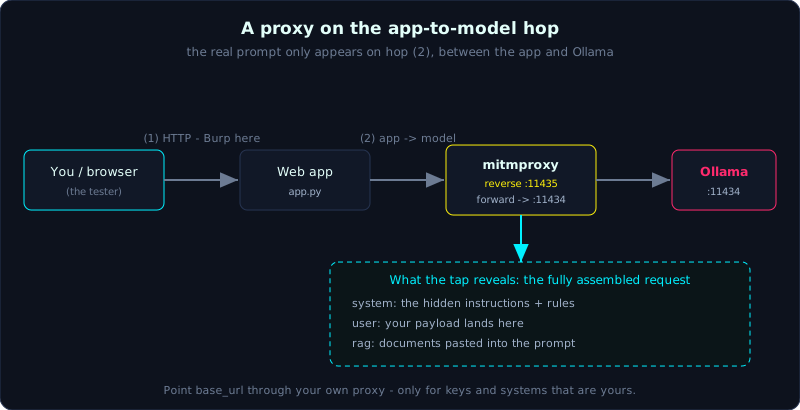 A proxy on the app-to-model hop reveals the fully assembled prompt - system, user and RAG together - that the model actually receives.
Two layers worth watching
An LLM app has at least two network hops:
1
Browser / you  <--(1)-->  Web app  <--(2)-->  Model API (Ollama or a provider)
- Hop (1) is ordinary HTTP between you and the app. You intercept it with Burp or mitmproxy the same way you would any web target.
- Hop (2) is the app’s call out to the model, and it is where the fully assembled prompt appears. This is the valuable one.
The tools
- Burp Suite (the Community edition is enough) is the classic proxy for viewing, editing and replaying requests on hop (1). Use Repeater to repeat a payload and compare responses.
- mitmproxy is light, runs in the terminal, and is easy to script in Python for automation. It is convenient for logging hop (2).
Watching the app -> model hop
For a lab that uses Ollama, hop (2) goes to 127.0.0.1:11434. There are a couple of ways to inspect it:
1
2
3
4
5
6
7
# option 1: read the prompt-assembly code directly
grep -n "messages\|system\|prompt" lab01-prompt-injection/app.py

# option 2: slip mitmproxy between the app and Ollama
#   run mitmproxy listening on 11435, point the app at 11435, forward to 11434
mitmproxy --mode reverse:http://127.0.0.1:11434 -p 11435
#   then set the app's base_url to http://127.0.0.1:11435
Now every real request to the model is laid bare. You see the exact system + user + RAG sequence the model receives. For a cloud API the idea is identical: point the base_url through your own proxy. Do this only with keys and systems that are yours.
What the proxy buys you
- Recover the template. See which delimiter separates data from instructions, and you know where to break it.
- Confirm a leak hypothesis. When you think you have extracted the system prompt, compare it with the real request to be sure it is the actual system prompt and not something the model made up. (Lesson 9 on misinformation makes the same point, because models are very happy to fabricate a plausible-looking system prompt.)
- Replay and fuzz. Resend the same request with variant payloads and measure the rate, which is the foundation of automated red teaming (Lesson 2.3).
A note on streaming output
Many apps stream tokens one at a time. When you intercept, remember to reassemble the SSE chunks so you read the full output, and watch whether the app filters only after streaming. Sometimes a bad token has already reached the client before the filter manages to cut it.
Key takeaways
- There are two hops: you to the app (layer 1) and the app to the model (layer 2). The real prompt is exposed on layer 2.
- Burp and mitmproxy let you view, edit and replay; mitmproxy in reverse mode slots in front of Ollama.
- Use a proxy to recover the template, confirm a real leak, and fuzz payloads.
- Only intercept systems and keys that are your own.