Lesson 2.1: The Ollama lab environment
This lesson is a short reference to the one tool the whole series runs on. There is nothing to attack here. The point is to be fluent with the keyboard before the first real fight, because every later lab assumes you can pull a model, call it, and read its parameters without thinking about it.
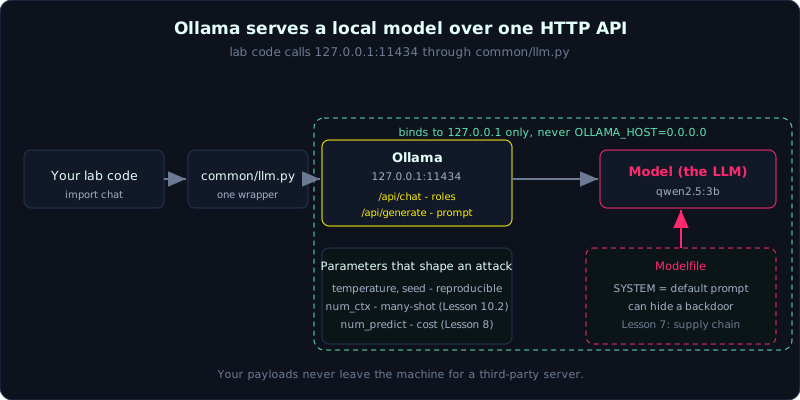 Your lab code calls Ollama’s local HTTP API through
 common/llm.py, and the Modelfile can carry a default system prompt.
What Ollama is
Ollama is a runner that downloads and runs open LLMs directly on your machine and serves them over an HTTP API at 127.0.0.1:11434. It takes care of the parts you do not want to manage by hand: fetching the weights, quantizing them, and exposing an OpenAI-style API that your code can call.
The commands you will reach for most:
1
2
3
4
5
ollama list                 # models you already have
ollama pull qwen2.5:3b      # download a model
ollama run qwen2.5:3b       # chat with it in the terminal
ollama show qwen2.5:3b      # view the Modelfile and parameters
ollama ps                   # models currently loaded in RAM/VRAM
Calling the API directly
Two endpoints cover almost everything:
1
2
3
4
5
6
7
8
9
10
11
12
13
14
15
16
# plain text generation
curl http://127.0.0.1:11434/api/generate -d '{
  "model": "qwen2.5:3b",
  "prompt": "Hello",
  "stream": false
}'

# role-based chat (system/user/assistant)
curl http://127.0.0.1:11434/api/chat -d '{
  "model": "qwen2.5:3b",
  "messages": [
    {"role":"system","content":"You are an assistant."},
    {"role":"user","content":"What is 1+1?"}
  ],
  "stream": false
}'
/api/generate takes a raw prompt string. /api/chat takes a list of messages with roles, which is the shape every chat app uses. The labs wrap this call in common/llm.py, so the code for each lesson only needs from common.llm import chat.
Parameters that matter for attacks
A handful of parameters change how an attack behaves, so it is worth knowing them before you tune a payload:
temperatureis the model’s willingness to take risks (Lesson 1.1). When you compare a target before and after a fix, set it low and keep it fixed so the comparison is fair.seedmakes output repeatable when you pin both the seed and the temperature, which is handy when you need a result you can paste into a report.num_ctxis the length of the context window. Raising it is the groundwork for the many-shot jailbreak (Lesson 10.2), and it is also where you burn resources (Lesson 8).num_predictcaps how many tokens the model generates, which maps directly to cost and consumption.
The Modelfile: a door for the supply-chain lesson
Ollama defines a model with a Modelfile, and that file can embed a default system prompt:
1
2
3
FROM qwen2.5:3b
SYSTEM "You are an assistant. (one innocent-looking line here can be a backdoor)"
PARAMETER temperature 0.7
Lesson 7 (supply chain) abuses exactly this spot. A Modelfile you download from an untrusted source can ship with hidden instructions baked in, and the person running the model never sees them. For now it is enough to know the mechanism exists.
Lab hygiene
- Listen on localhost only. Never set
OLLAMA_HOST=0.0.0.0on a machine with a public IP, or you hand a free inference endpoint to the whole Internet by accident. - Keep one notes file per lesson in
labs/notes/labXX.md. - Compare a large and a small model with
LAB_MODEL. Larger models usually behave better, which is a good way to see that model-level defenses only reduce risk and never remove it.
Key takeaways
- Ollama serves a local model at
127.0.0.1:11434./api/chatuses roles,/api/generatetakes a plain prompt. temperatureandseedmake results reproducible;num_ctxandnum_predicttie into many-shot and consumption.- A Modelfile can embed a default
SYSTEMprompt, which is the basis of the supply-chain lesson. - Keep everything on localhost.