Lesson 2.4: Guardrails for defense
Before we open each vulnerability one by one, it helps to have a map of the defensive layers. Then, every time you fix a lab, you know where you are placing a barrier and whether that barrier belongs to the “reduce” kind or the “remove” kind.
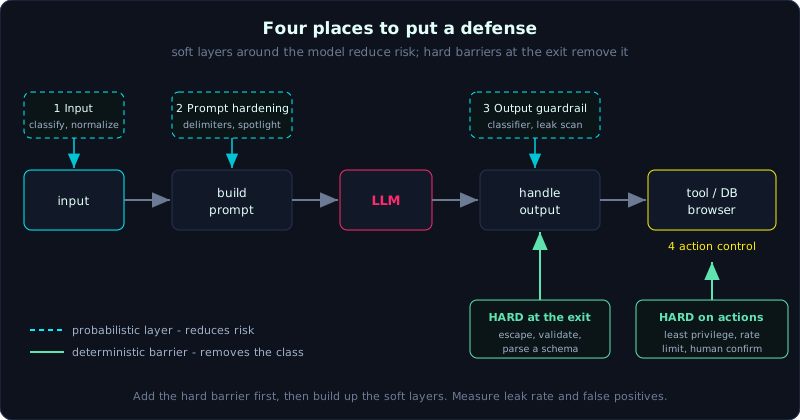 Four places to put a defense on the data flow, and which of them only reduce risk versus the few that remove a class of bug.
Four places to put a defense
Map it back onto the data flow from Lesson 0.4. There are four positions:
1
[input] --1--> [build prompt] --2--> [LLM] --3--> [handle output] --4--> [tool/DB/browser]
- Input guardrail. Detect or normalize malicious input before it reaches the model: classify prompt injection, strip PII, normalize Unicode, block odd encodings.
- Prompt hardening. Clear delimiters, “spotlighting” (marking the data so the model knows which part is not a command), and restating the rules.
- Output guardrail. Scan the output before anything uses it: block leaked secrets, block toxic content, or parse it against a schema.
- Action control. Tool permissions, allowlists, a human in the loop, rate limits and sandboxing.
Guardrails: what each kind can do
- Rule or regex based. Fast, cheap and easy to explain, but easy to bypass with variants (encoding, synonyms). Good for rigid patterns such as an API key or a card number.
- Classifier based. A small model scores “is this input an injection?” or “is this output toxic?”. Stronger than regex, but still probabilistic, and the classifier itself can be attacked (TokenBreak, Lesson 10.3).
- Packaged guardrails. Dedicated libraries and services (for example NeMo Guardrails, Llama Guard, Guardrails AI, Rebuff) bundle several layers for you. Convenient, but do not treat them as magic.
The golden rule: layer, do not trust one layer
No single guardrail blocks 100 percent. Every layer placed around the model is probabilistic. Only deterministic controls at the application layer, such as escaping HTML, prepared statements, tool permissions and rate limits, are hard barriers.
So the strategy is defense in depth: several thin probabilistic layers plus a few deterministic hard barriers at the output and around actions. When a lab asks for a fix, always add the hard barrier first, then build up the soft layers.
Measuring a guardrail properly
Adding a guardrail without measuring it is just a feeling of safety. To measure one:
- Keep the exact set of payloads that already broke
app.py. - Rerun that set against
app_fixed.py, five times per payload, and record how many still get through. - Measure the false positive rate too. Does the guardrail wrongly block benign input and hurt real users?
- Use promptfoo (Lesson 2.3) to turn this into a test you can rerun.
A good fix clearly lowers the leak rate without sharply raising false positives. Report both numbers.
Quick matrix: vulnerability to the hard control
| Vulnerability | Hard control (removes) | Soft control (reduces) |
|---|---|---|
| Prompt injection (LLM01) | limit privileges at the exit | delimiters, input classifier |
| Output handling (LLM05) | escape / validate / parse a schema | output classifier |
| Excessive agency (LLM06) | least privilege, human confirmation | tell the model to be careful |
| Unbounded consumption (LLM10) | rate limit, quota, timeout | - |
| RAG poisoning (LLM04/08) | control the ingest source, separate namespaces | filter chunk content |
Key takeaways
- Four defensive positions: input filtering, prompt hardening, output filtering, action control.
- Every guardrail around the model is probabilistic. Only deterministic hard barriers at the exit and around actions remove the risk.
- Defense in depth means several soft layers plus a few hard barriers, and you add the hard barrier first when you fix.
- Always measure a guardrail by its leak rate and its false positive rate. Do not add one on a hunch.