Lesson 0.1: What Digital Forensics Is
This lesson explains what Digital Forensics and DFIR are, covers the four main branches (disk, memory, network, mobile), describes what an investigator actually does day to day, and sets forensics apart from reverse engineering and penetration testing.
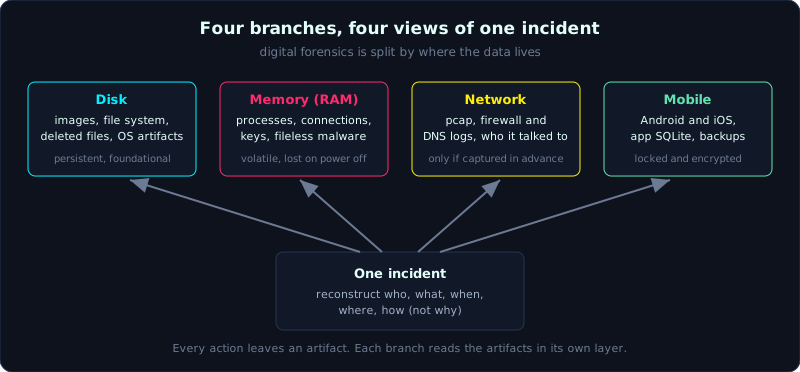 The four branches of forensics are four views of one incident, split by where the data lives.
| Part: 0 (Intro to Forensics) | Time: about 30 minutes | Difficulty: basic |
Prerequisites: none. This is the opening lesson of the whole series, you only need to be comfortable using a computer.
Tools: nothing to install yet. This lesson is mostly reading, and the demo uses commands already present on Linux.
Goals
After this lesson you can state in your own words what Digital Forensics and DFIR are. You can tell the four branches apart (disk, memory, network, mobile) and say which question each one answers. You can describe a day in an investigator’s work and the questions they are required to answer, and you can name three ways forensics differs from reverse engineering and from penetration testing.
1. Theory
What Digital Forensics is, in plain terms
Digital Forensics is the work of finding, preserving and analyzing traces on digital devices to answer a specific question, in a way that the result holds up when someone else re-examines it.
The second half of that sentence is the part that matters. Anyone can open a disk and look at the files on it. But forensics requires you to do it in a way such that, if six months later someone asks “how do you know this file was there, and how do I trust you did not change anything?”, you can answer and prove it. This property is usually called forensically sound, meaning the process does not alter the evidence and can be reproduced.
Another way to remember it: forensics is applied science used to answer a legal or investigative question. The word “forensic” comes from Latin and means “belonging to the forum”, the place of public debate. Even if you never go to court, the mindset of being ready to be questioned is what separates an investigator from someone who is just poking at a machine.
The five questions an investigator always answers
Every case, whether it is an employee machine hit by ransomware or a phone in a criminal matter, comes down to reconstructing a story. And every story turns on five classic questions:
- Who: which account, which person was behind the action.
- What: what happened, which file was taken, which command ran.
- When: the timeline, the order of events. This is the part most often done wrong, because of time zones.
- Where: on which machine, which partition, which IP address.
- How: which way the attacker got in, which technique they used.
Notice there is no “why”. Motive is the job of a criminal investigator or a lawyer, not yours. You provide the technical facts, someone else infers the motive. Mixing the two is a classic beginner mistake. You start telling a story that fits the theory in your head instead of sticking to the traces.
Artifact: the unit of work in forensics
A term you will meet throughout the series is artifact, a piece of data the system itself generates that records an action that happened. For example:
- Windows records every time a program runs into Prefetch and Amcache.
- The browser stores visit history in a SQLite file.
- The operating system records when a file was created, modified and accessed (the timestamp set).
Investigators do not guess. Investigators go find artifacts and read them. Most of this series, from Part 1 onward, is really about learning the map of artifacts: what is created, when, where it lives, and which investigative question it answers. You do not need to memorize all of it now, you only need to get used to the mindset that every action leaves a trace.
DFIR: forensics meets incident response
You will see the term DFIR more often than forensics on its own. DFIR stands for Digital Forensics and Incident Response. It joins two jobs that are already close:
- Digital Forensics leans toward depth, slow and careful, usually serving a legal matter or a final report. Typical question: “exactly what happened on this machine?”.
- Incident Response leans toward speed, serving the fire that is burning right now. Typical question: “which machines are affected, which do we isolate now, is the attacker still in the network?”.
In practice the two are intertwined. When a company is attacked, the IR team needs forensic results to know what to isolate, while the forensic results rest on data the IR team collected in the heat of the moment. A DFIR practitioner has to be both fast and clean: fast enough to stop the damage, clean enough that the evidence still holds up later. That tension between fast and clean is the constant pressure of the job.
The four main branches
Digital Forensics is divided by where the data lives. There are four main branches, and you will meet all four in the series:
1. Disk forensics. Work on data stored on hard drives, SSDs and USB sticks. This is the oldest branch and the foundation of everything else. You create an image (a bit-for-bit copy of the disk), read the file system, recover deleted files, and read operating system artifacts. Strengths: the data is durable and you can redo the work. Weakness: you cannot see things that exist only in memory. The series gives Part 1 through Part 5 to this area.
2. Memory forensics. Work on a dump of RAM. RAM holds what the disk does not: running processes, open network connections, encryption keys, passwords, and malware that only lives in memory (fileless malware). The fatal weakness is that RAM is volatile, power off and it is gone. So the order of volatility matters, collect the things that disappear easily first. Part 6 covers this in detail, the main tool is Volatility.
3. Network forensics. Work on data that travels over the wire: captured packets (pcap), firewall logs, DNS logs, netflow. It answers who the machine talked to, what it sent out, and where the malware’s command and control channel (C2) is. A particular trait: network data usually exists only if you captured it beforehand, you cannot capture the past. Part 7, the main tools are Wireshark and Zeek.
4. Mobile forensics. Android and iOS. Harder than computers because the device is locked, encrypted by default, and the manufacturer restricts access tightly. Often you only get a backup rather than a full image. App data usually sits in SQLite. Part 8 touches this area at a basic level.
In a real case you rarely use just one branch. For an employee machine hit by malware you image the disk (disk), dump RAM before shutting down (memory), request proxy logs to see what it called out to (network), and if you suspect it spread through a phone you take the mobile too. The four branches are four angles on the same event.
What an investigator actually does
Forget the movie scenes of frantic typing that instantly name the culprit. A typical day looks far more boring, and that is a good sign:
- Take the request and define the scope: which question needs answering, on which device, over which time window. A vague scope is the root of work that never finishes.
- Collect evidence correctly: create the image, compute hashes, record chain of custody (the chain of evidence handling, covered in detail in Lesson 0.2).
- Analyze on a copy: build a timeline, filter the relevant artifacts, cut out the noise.
- Document continuously: what you did, when, with which tool, with what result. If it is not written down, it did not happen.
- Write the report: present it so a non-technical reader still understands the conclusion, while a technical reader can re-check every step.
Notice the proportion. The time spent typing analysis commands can be a small fraction. Most of it is preparation, note-taking and writing. This job rewards discipline and care, it does not reward the clever but sloppy.
How it differs from reverse engineering and pentest
These three fields often get lumped together because they all involve deep technical people, but their goals are different. Understanding the difference stops you from carrying the wrong mindset from one field into another.
| Criterion | Digital Forensics | Reverse Engineering | Penetration Testing |
|---|---|---|---|
| Core question | What happened? | How does this work inside? | Can I get in, and how? |
| Time direction | Looking at the past | Not tied to time | Looking forward (exploitation) |
| Subject | A real system that had an incident | A program or a file | A running system |
| Biggest constraint | Must not alter the evidence | Understand the logic correctly | Do not crash the real service |
| Final product | A report answering the question | A description of how it works | A report of vulnerabilities and fixes |
The three differences worth remembering most:
- Forensics looks at the past and forbids damaging the evidence. Pentest looks at the future and is allowed to act on the system, within the agreed scope. A forensic practitioner who “experiments” on the original has committed a foundational error.
- Reverse engineering asks “how does this run”, it does not care who ran it or when. Forensics is the opposite, the context (who, when, where) is the answer. Even so, forensics borrows from RE when it meets unfamiliar malware and needs to understand what it does before knowing where to look for traces. The two fields support each other.
- Forensics lives or dies by the ability to prove and reproduce. For a pentest, reporting the vulnerability is enough, nobody brings a pentest report to court as evidence of guilt. The legal pressure makes forensics far stricter about process.
If you come from the Reverse Engineering series, the good news is that many skills carry over: reading hex, understanding file formats, analyzing binaries. The thing to remember is that here there is a new constraint RE does not have, the discipline of preserving evidence. The habit of poking directly at the original is a bad habit to drop right away.
2. Hands-on (demo)
Nothing special to install. The goal of this demo is to get familiar with two ideas: an artifact is real and you can touch it, and a hash is how we prove something was not changed. Run it on any Linux (or WSL). Always remember the principle: if this were real evidence, you would work on a copy, not the original file.
1
2
3
4
5
6
7
8
9
10
11
12
13
14
15
16
17
18
19
20
21
22
23
# 1. Take any file as "assumed evidence"
$ echo "day la file bang chung" > evidence.txt

# 2. The OS records three timestamps for the file on its own: this is an artifact
$ stat evidence.txt
  File: evidence.txt
  Size: 24   Blocks: 8   IO Block: 4096   regular file
Access: 2026-10-08 09:15:02.000000000 +0700
Modify: 2026-10-08 09:15:02.000000000 +0700
Change: 2026-10-08 09:15:02.000000000 +0700

# 3. Identify the file type by content, not by extension
$ file evidence.txt
evidence.txt: ASCII text

# 4. Compute the hash: this is the file's "fingerprint". Record this number.
$ sha256sum evidence.txt
8b1a9953c4611296a827abf8c47804d7e... evidence.txt

# 5. Change exactly one character and recompute: the hash changes completely
$ echo "." >> evidence.txt
$ sha256sum evidence.txt
2c26b46b68ffc68ff99b453c1d304134... evidence.txt
Two things to take away:
- Step 2 shows that an artifact is real. You did not create those timestamps, the operating system wrote them on its own. The whole series is about learning to read things that are self-recorded like this.
- Steps 4 and 5 show why the hash is the backbone of evidence preservation. Change one character and the hash is completely different. So if you compute the hash at collection and later recompute it to the same number, you prove the evidence was not touched. Lesson 1.7 covers hashing in depth.
Now try mapping an incident onto the four branches to get used to it. Suppose an employee reports that the machine suddenly runs slow and a strange window flashes up. Where would you dig for traces:
1
2
3
4
disk    -> newly created strange files, autorun entries in the registry, prefetch of the strange program
memory  -> suspicious running process, network connections it is holding open, injection into other processes
network -> which strange IP or domain this machine calls out to, when, and how much data it sends out
mobile  -> (if a phone is suspected as the source) which app was just installed, what the latest backup holds
Same incident, four branches looking from four angles. This is exactly the mindset you will use throughout.
3. Lab
- Data: no download needed, use your own machine.
- Task 1: pick any three files on your machine (an image, a document, an executable). For each one, use
stat(Linux) or view Properties (Windows) to record the timestamp set, usefileto determine the real type, and computesha256sum. Build a small four-column table: file name, real type, modify time, hash. - Task 2: rename an image file from
.jpgto.txt. Runfileagain. What does it report? What do you conclude about trusting the extension? - Task 3: write a short paragraph (5 to 7 lines) describing an incident you invent, then assign it to the four branches, one sentence each: what trace that branch would look for to help answer the question.
- Hint: Task 2 is the first lesson in how an attacker hides an executable under a harmless extension. The extension is the easiest thing on a system to lie about.
- Answer: self-check. Task 1 is correct when you have a complete four-column table. Task 2 is correct if you notice that
filestill reports it as a JPEG image even though the extension is.txt, because it reads the content (the magic bytes) and not the extension. Magic bytes are covered in Lesson 1.1.
4. Key takeaways
- Digital Forensics is finding, preserving and analyzing digital traces to answer a question in a way that holds up on re-examination (forensically sound).
- The five questions: who, what, when, where, how. Answering “why” is not your job.
- DFIR = forensics (deep, slow, clean) joined with incident response (fast, firefighting). Fast and clean always pull against each other.
- Four branches: disk (durable, foundational), memory (volatile, rich in live information), network (must be captured in advance), mobile (hard because of locking and encryption).
- An artifact is the unit of work: data the system generates on its own that records an action that happened.
- Different from reverse (asks “how does it run”) and pentest (asks “can I get in”): forensics looks at the past and forbids damaging the evidence.