Lesson 0.4: The Standard Investigation Process
This lesson covers the five backbone steps of any digital investigation, Identify, Preserve, Collect, Analyze, Report. You will learn what each step does and where it tends to break, and most of all how to take notes and document the work so it holds up when someone re-examines it.
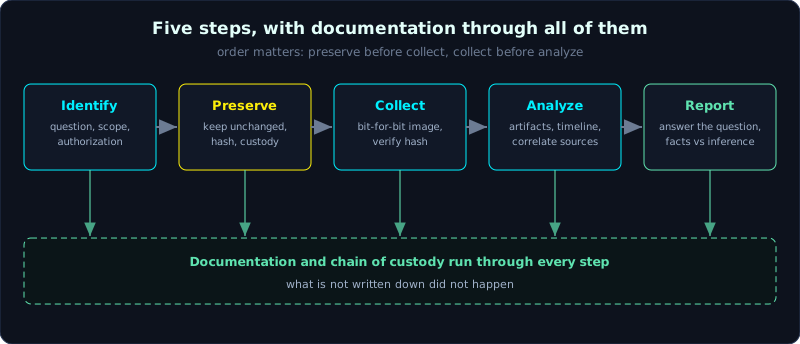 Five steps in order, with documentation and chain of custody running through all of them.
| Part: 0 (Intro to Forensics) | Time: about 40 minutes | Difficulty: intermediate |
Prerequisites: Lesson 0.3 (building a forensics lab).
Tools: the hashing commands already present, a text editor for the journal, and the script command on Linux to record a working session.
Goals
After this lesson you can recount the five steps, Identify, Preserve, Collect, Analyze, Report, and the main work of each. You can explain why the order matters and what happens when you get it wrong, write an investigation journal line good enough for someone else to reproduce, use the session-recording command to automate part of the documentation, and tell working notes apart from the final report and know who each is written for.
1. Theory
Why you need a process
Investigation is not improvised poking, taking whatever you happen to find. A case can run for many weeks, involve many devices, and in the end must produce a conclusion that holds up. Without a process you will forget what you did, miss evidence, or worst of all damage something that cannot be redone. The process is the railing that keeps you from falling.
Many process models exist (from NIST, from various textbooks), and the step names may differ a little, but the core converges on five steps. A short way to remember: Identify, Preserve, Collect, Analyze, Report. The order is not random, each step is the foundation for the next, and getting the order wrong is destroying your own evidence.
Step 1: Identify
Before touching anything, you answer: what is the question to solve, which devices are involved, how far does the scope reach, and do you have authorization yet. This step shapes the whole case. Do it carelessly and every later step is off.
The main work in this step:
- Define the investigative question very specifically. “Investigate this machine” is a bad request. “Determine whether the customer file was copied to a USB stick between the 1st and the 5th” is a request you can act on. The sharper the question, the better you know which artifacts to look for and which noise to skip.
- List the potential evidence sources: computers, phones, USB sticks, server logs, firewall logs, cameras, cloud accounts. Do not look only at the machine in front of you. Remember Locard from Lesson 0.2, traces are scattered across many places.
- Determine what is volatile so you can prioritize: on a running machine the RAM and network connections are lost the moment it powers off, so plan ahead (order of volatility, covered in detail in Part 2).
- Check authorization and scope: what are you permitted to touch, under what written authority. Going out of scope is a legal risk, discussed in Lesson 0.2.
Step 2: Preserve
The goal in one sentence: keep the evidence from changing, from the moment you reach it. This is where what you learned in Lesson 0.2 and Lesson 0.3 is used for real.
The main work:
- Isolate the digital scene: for a running machine, decide whether to pull the network (to stop malware calling home or the attacker wiping traces remotely), and whether to power it off (powering off loses RAM). These decisions must be weighed and the reasons recorded.
- Use a write blocker when reading the original physical disk, and mount read-only when working on an image. Do not let the OS silently write to the evidence.
- Compute hashes immediately (SHA-256, with MD5) as the integrity anchor. The hash computed at this step is the basis for later proving that nothing changed.
- Record chain of custody: time with time zone, person, source, storage location.
An easy point to confuse: Preserve does not mean “copy” (that is the Collect step). Preserve is a mindset and a set of protective measures, starting the moment you reach the scene and lasting through the whole case. You both preserve and collect, and the two steps are intertwined in practice, but they are separated so you remember that preservation always comes first and covers everything.
Step 3: Collect
Now is the time to create a copy to work on. Collecting correctly means producing an image that you can later prove is identical to the original.
The main work:
- Create a bit-for-bit image of the disk, not an ordinary file copy. A file copy misses the important parts: deleted files, slack space, unallocated space. An image takes it all. Tools: dd, dc3dd, FTK Imager, in raw or E01 format (Part 2).
- Collect in order of volatility: the volatile things first. RAM first, then the network state, then the disk.
- Verify right after creating the image: compute the hash of the image and compare it with the hash of the original (or with the hash the tool recorded during the read). Only when they match is the collection a success. A mismatch means doing it again.
- Store the copy in the right place, named by case code, one folder per case (remember the third layer of isolation in Lesson 0.3).
The unbreakable rule, repeated once more because it matters: from here on every analysis is done on a copy, with the original sealed in a locked cabinet.
Step 4: Analyze
This is the part many people think is the whole job, but it is really just one of five steps, and it only runs well if the four around it are done right. Analysis is finding artifacts, reading them, and assembling them into a story that answers the question from the Identify step.
The main work:
- Work on the copy, with a hypothesis but not blindly following the hypothesis. You can start with a suspicion, but you must let the data lead, even when it runs against your idea.
- Build a timeline: stringing events in time order is the strongest technique in forensics. Who did what when, in which order. Part 9 is dedicated to the super timeline.
- Correlate multiple sources: a single artifact is easy to misread, many artifacts pointing the same way are what make it solid. For example, Prefetch says a program ran, the event log says who logged in at that time, the network log says where it called out to. Three pieces assemble into one story.
- Separate fact from inference. “The file creation timestamp is 10:05” is a fact. “So the attacker got in at 10:05” is an inference, and an inference can be wrong (the timestamp may be forged, called timestomp, covered in Part 10). In the journal, always separate clearly what is observed data from what is your interpretation.
Step 5: Report
However good the investigation, if the report is unreadable the effort counts for nothing. The report is the final product, the thing other people actually read and use to make decisions.
The main work:
- Write for two kinds of reader at once: the manager or legal reader who needs a clear conclusion without technical clutter, and the technical expert who needs enough detail to re-check every step. This is usually done with an executive summary at the front and a technical detail section after.
- Answer exactly the question posed in the Identify step, do not wander into things no one asked about.
- Present conclusions with supporting evidence: every claim goes with a specific artifact, no bare assertions.
- Be honest about limits: whatever you cannot conclude, say that you cannot conclude it. Stating with certainty what you are not certain of is the fastest way to lose credibility (and to lose in court).
- Attach the reproducible part: which tool, which version, which hash, which steps. Remember ACPO 3, a third party must redo it and reach the same result.
The thread through everything: notes and documentation
If this lesson is remembered for one idea, remember this one: note-taking is not a step, it runs through all five steps. Whatever is not recorded is treated as not having happened. This is not a scare line, it is legal reality and professional reality.
Tell apart two things that often get merged:
- Working notes (contemporaneous notes, written right at the time): written for yourself and for whoever checks the work. Recorded continuously, in real time, every action however small. Which command, when, on what, with what result, what you think. Written at the moment of doing, not recalled that evening, because memory is not evidence.
- The report: written for the final reader, structured, filtered and arranged. The report is built from the notes, so good notes make the report easy to write.
A good journal line looks like this: time with time zone, action, subject, tool with version, result, and the interpretation kept separate. For example: “2026-10-08 10:12 +07:00, computed SHA-256 of lamviec.img with sha256sum (coreutils 9.1), result 3f8a…c1, matches the original hash saved at collection. [Interpretation: the image is intact, analysis can begin]”. Notice the part in brackets is clearly marked as interpretation, separated from the observed fact.
The order of the five steps and the continuous note-taking line up with the four ACPO principles from Lesson 0.2: Preserve and Collect realize principles 1 and 2, note-taking realizes principle 3, and the person in charge of the case (principle 4) is the one who ensures all five steps are followed. Everything in Part 0 comes back to one point.
2. Hands-on (demo)
This demo drills two real documentation skills: automatically recording the whole working session, and writing a journal to standard. On Linux (it runs in SIFT) the script command records everything shown on the terminal to a file, with --timing to save the time marks too. This is a cheap and strong way to miss no action.
1
2
3
4
5
6
7
8
9
10
11
12
13
14
15
16
17
18
# 1. Start recording the session: everything typed and all output is saved to phien.log
$ script --timing=phien.timing phien.log
Script started, output log file is 'phien.log'

# 2. Work as normal. Every command and result is recorded.
$ date -u +"%Y-%m-%d %H:%M:%S %Z"       # record the time mark in UTC for clarity
2026-10-08 03:15:40 UTC
$ sha256sum lamviec.img
3f8a...c1  lamviec.img
$ fls -r -o 0 lamviec.img | head        # list files in the image (The Sleuth Kit)
...

# 3. Stop recording
$ exit
Script done, output log file is 'phien.log'

# 4. Review the recorded session. This is evidence of what you did.
$ cat phien.log
The script command gives you an objective record that does not depend on memory. Combined with handwritten notes (the interpretation, the thinking), you have a documentation set sufficient to reproduce the work. Note: script also records output that may contain sensitive data, so this log file is itself evidence and must be preserved as evidence.
Now practice writing a short journal page for a hypothetical case, applying all five steps:
1
2
3
4
5
6
7
8
9
10
11
12
13
14
15
16
17
18
19
20
21
22
23
24
25
26
27
=== INVESTIGATION JOURNAL, case VV-2026-014 ===
Investigator: Nguyen Van A   |   All time marks: +07:00 (Vietnam time)

[IDENTIFY]
09:00  Request received: determine whether the file "khachhang.xlsx" was copied to a
       USB stick between the 1st and the 5th of October. Scope: the one accounting
       machine. Written authorization UQ-07 is on file.
09:05  Potential sources: the accounting machine disk, the registry (USB history), LNK
       files, the proxy log. [Interpretation: prioritize the disk, the machine was off so there is no RAM]

[PRESERVE]
09:30  Removed the disk, connected it through a Tableau T8u write blocker (hardware).
09:35  Computed hashes of the original disk: SHA-256 = 3f8a...c1, MD5 = 9ab0...7e. Recorded chain of custody BC-01.

[COLLECT]
09:40  Created the image with FTK Imager 4.7, E01 format, named BC-01.E01.
10:05  Verify: the image hash matches the original disk hash. Collection successful. Original sealed, stored in the locked cabinet.

[ANALYZE]
10:20  Mounted BC-01.E01 read-only. Started with the registry and LNK files.
10:45  Observed: the USBSTOR key records a Kingston USB plugged in on 02/10 at 14:03.
       An LNK points to khachhang.xlsx on drive E: (an external drive) at 02/10 14:05.
       [Interpretation: the file was likely opened from the USB, but the direction of the copy is not clear yet,
       the proxy log or $UsnJrnl needs to be cross-checked before concluding]

[REPORT]
(being drafted, to be assembled once the correlating evidence is in)
This journal page shows all five steps working together, and crucially, every inference is marked [Interpretation] and separated from observation. Reading it, a second person knows exactly what you did, when, and which parts are still unconfirmed hypotheses.
3. Lab
- Data: use the fake image created in Lesson 0.3, or make a new one.
- Task 1: use
script --timingto record a working session in which you compute the hash of an image, mount it read-only, list the files inside, then unmount it. Openphien.logand confirm every action was recorded. - Task 2: write a complete investigation journal page for a case you invent, divided clearly into the five parts Identify, Preserve, Collect, Analyze, Report. At least two lines per part. Required: every time mark has a time zone, and every inference sentence is marked and separated from observation.
- Task 3: take any one conclusion sentence from your journal and rewrite it twice: once for a manager (short, no jargon), once for a technical expert (enough artifact detail and how to re-check). This is a practice exercise for the Report skill.
- Hint: for Task 2, if you find it hard to separate observation from inference, ask yourself for each line: “did I read this directly from the data, or am I inferring it?”. Read directly is observation, inferred is interpretation.
- Answer: self-check criteria. The journal passes when another person can read it and redo the steps exactly and recognize which parts are unconfirmed hypotheses.
4. Key takeaways
- The five steps: Identify (question, scope, authorization), Preserve (keep unchanged, hash, chain of custody), Collect (create a bit-for-bit image, verify), Analyze (artifacts, timeline, correlation), Report (write for two kinds of reader, honest about limits).
- The order is foundation upon foundation: preserve before collect, collect before analyze. Wrong order is destroying your own evidence.
- Analyze is only one of five steps, not the whole job. It runs well only when the other four are done right.
- Note-taking runs through all five steps. Whatever is not recorded is treated as not having happened.
- Always separate observed fact from your inference, both in the journal and in the report.
- The journal (written at the time, for the checker) differs from the report (structured, for the final reader). The report is built from the journal.