Lesson 0.3: Linux Process Memory Layout and Page Permissions
This lesson builds a memory map of a Linux x86-64 process: what sits where, which way each region grows, which pages can be written and which can be executed. You will use this map in your head on every exploit, so learn it before touching overflows.
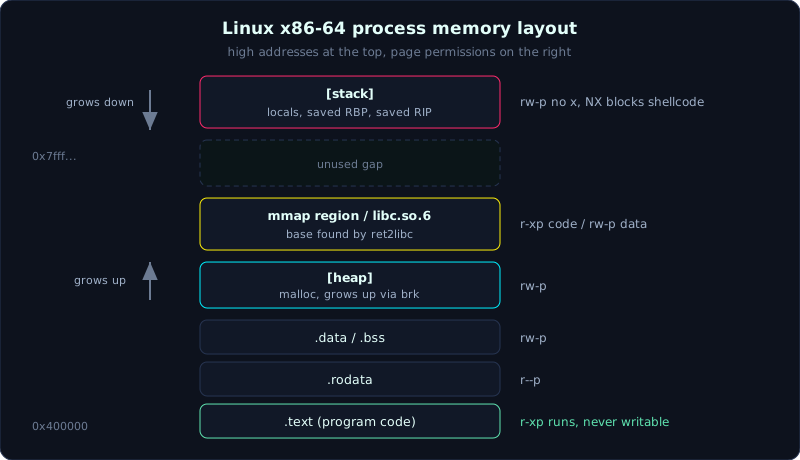 Regions of a process from low to high addresses, with their page permissions.
Part: 0 · Time: about 50 minutes of reading plus lab · Difficulty: easy to medium
Prerequisites: Lessons 0.1 and 0.2. Basic C (globals, malloc, local arrays).
Tools: gcc, cat, gdb with pwndbg (the vmmap command), and sudo to experiment with ASLR.
Goals
After this lesson you should be able to draw the memory layout of a process from low to high addresses, say that the stack grows down, the heap grows up and libc lives in the mmap region, explain rwx page permissions and why NX blocks shellcode on the stack, read each column of /proc/pid/maps, and see ASLR change addresses on every run and turn it off temporarily for debugging.
1. Theory
Each process has its own address space
When you run a program, the kernel gives it a virtual address space, a range of addresses that the process sees and that is isolated from other processes. On x86-64 this range is very large, but only a few regions are actually used. Ordered from low to high addresses, the picture is:
1
2
3
4
5
6
7
8
9
10
11
12
13
14
15
16
17
18
19
20
21
22
23
24
  HIGH address  0x7fff_ffff_ffff
  +-------------------------------+
  |  [stack]                      |  local variables, saved RIP, overflow arguments
  |      |                        |  GROWS DOWN (addresses decrease on push)
  |      v                        |
  |                               |
  |      (unmapped gap)           |
  |                               |
  |      ^                        |
  |      |  (mmap grows down)      |
  |  [mmap region]                |  libc.so, ld.so, file mappings, large malloc
  |  [libc.so.6]  r-xp / rw-p     |  <- foundation for ret2libc
  |                               |
  |      ^                        |
  |      |                        |
  |  [heap]                       |  malloc/free allocate here
  |                               |  GROWS UP (addresses increase via brk)
  +-------------------------------+
  |  [.bss]   rw-   uninitialized globals (zeroed)
  |  [.data]  rw-   initialized globals
  |  [.rodata] r--  constants, string literals
  |  [.text]  r-x   program CODE (read + execute, no write)
  +-------------------------------+
  LOW address  0x0000_0040_0000  (0x5555... if PIE is on)
Going through each region:
.text holds the machine code of the program, the instructions the CPU runs. Its permission is r-x: readable and executable but not writable. The fact that it is not writable matters for pwn, because you cannot edit the original code to insert your own instructions.
.rodata holds read-only data: constants and string literals such as "/bin/sh" if the programmer left it in the code. Permission r--.
.data holds global and static variables that were initialized to a nonzero value (for example int x = 5;). Permission rw-.
.bss holds global and static variables that are uninitialized or initialized to zero (for example a global int buf[100];). The name is historical. All you need to remember is that the kernel fills this region with zeros when the process starts, so it takes no space in the ELF file. Permission rw-.
The heap is the dynamic allocation region: each malloc call takes memory from here. The heap grows toward higher addresses and is extended through the brk/sbrk system calls (which move the program break boundary). The heap is the subject of heap exploitation in Part 9.
The mmap region sits in the high address range, below the stack. mmap is a system call that maps a whole memory region or a file into the address space. Shared libraries (such as libc) are loaded here, and large malloc allocations are also served by their own mmap instead of the main heap. The mmap region usually grows toward lower addresses. For pwn the key point is that libc is here, so every ret2libc technique revolves around finding the base of this region.
The stack is at the top. It holds local variables, the saved return address, the saved RBP, and arguments that overflow the registers when there are too many. The key property is that the stack grows DOWN. Each push, and each entry into a new function, decreases the stack pointer (RSP), moving toward lower addresses. But an array declared inside a function is written from low addresses to high addresses. This opposite direction is what lets a stack buffer overflow overwrite the saved return address, which sits at a higher address than the buffer. Lesson 1.2 covers this in detail.
At the very top there are also vsyscall and vdso, regions the kernel maps in to speed up a few system calls. Beginners can ignore them and only need to know they exist when reading maps.
Section and segment
You will hear both words. A section (such as .text, .data, .bss) is the linker’s view: how the ELF file is divided for linking, used at build time. A segment is the loader’s view: how the parts are grouped and mapped into RAM at runtime, and each segment has one set of rwx permissions. Several sections with the same permissions are usually merged into one segment. Here you only need to connect the two ideas. Lesson 1.3 goes deeper into ELF.
Page permissions: the basis of NX
Virtual memory is divided into pages, each 4KB on x86-64. Each page carries a set of permissions:
- r (read): the content can be read
- w (write): the content can be written
- x (execute): the CPU may run the bytes in this page as machine instructions
The permissions of a healthy process follow this pattern:
1
2
3
4
5
  .text         r-x    read + execute, NO write  (code cannot modify itself)
  .rodata       r--    read only
  .data/.bss    rw-    read + write, NO execute   (data cannot run)
  heap          rw-    read + write, NO execute
  stack         rw-    read + write, NO execute
Notice that no region is both writable (w) and executable (x). Code can run but is read only. Data can be written but cannot run. This rule is called W xor X (writable or executable, never both). The mechanism that enforces it at the hardware and kernel level is NX (No eXecute, a bit that forbids execution on a memory page, called XD by Intel and NX by AMD).
The consequence for pwn: in the past an attacker put shellcode on the stack and jumped to it. NX stops that, because the stack has permission rw- with no x. When the CPU tries to run an instruction located on the stack, it refuses and the process dies. This is why modern pwn has to reuse code that already exists (the .text region and libc still have x), which is ret2libc and ROP in Part 6. When checksec reports NX enabled, read it as a signal to forget shellcode on the stack and prepare ROP.
(Exception: if the binary is built with -z execstack, the stack has permission rwx and shellcode on the stack can run. That is the situation in Part 4, where NX is turned off on purpose for learning.)
ASLR: why addresses keep changing
ASLR (Address Space Layout Randomization) is a kernel mechanism that randomizes the base addresses of the stack, the heap and the mmap region (where libc is) on every run. If the binary is built as PIE (Position Independent Executable, which can run at any address), then .text is randomized as well.
The result is that the addresses you see in one run differ from the next run. You cannot hardcode libc or stack addresses in an exploit. This is why modern pwn almost always has to leak a real address at runtime first and then compute the base from it. This lesson only introduces ASLR so you understand why maps keeps changing. Part 5 is devoted to ASLR and how to defeat it.
/proc/pid/maps: the real map of a live process
Linux exposes the whole memory layout of a process through the virtual file /proc/<pid>/maps. Each line is one region. An example line:
1
2
555555554000-555555555000 r-xp 00001000 08:01 1234567   /home/you/demo
---------- A ----------    B      C       D      E            F
Reading the columns:
- A, address range:
start-end, where the region begins and ends (a half open range, the end is not part of the region). - B, permissions:
rwxp. The first three characters are read/write/execute (a-means that permission is absent). The fourth characterpmeans private (copy-on-write),smeans shared. - C, offset: if the region is mapped from a file, this is the offset inside the file.
- D, dev: the device number (major:minor) holding the file,
00:00if it is not a file. - E, inode: the inode number of the file,
0for anonymous regions (such as heap and stack). - F, pathname: the file path, or a label in square brackets such as
[heap],[stack],[vdso], or empty for an anonymous region.
This is your most important memory reconnaissance tool when debugging locally. Looking at maps tells you where libc is loaded, where the stack is, and which regions can execute.
2. Demo
A program that exposes each region
Save it as maps_demo.c:
1
2
3
4
5
6
7
8
9
10
11
12
13
14
15
16
17
18
19
20
21
22
23
24
25
#include <stdio.h>
#include <stdlib.h>
#include <unistd.h>

int g_init = 5;            // .data  (initialized global)
int g_zero;               // .bss   (uninitialized global)
const char *g_ro = "string constant lives in .rodata";

int main(void) {
    int local = 123;                       // local variable -> stack
    char *h = malloc(100);                 // allocated region -> heap

    printf("pid        = %d\n", getpid());
    printf(".text main = %p\n", (void*)main);     // code region
    printf(".data      = %p\n", (void*)&g_init);  // initialized data
    printf(".bss       = %p\n", (void*)&g_zero);  // uninitialized data
    printf(".rodata    = %p\n", (void*)g_ro);     // read-only constant
    printf("heap       = %p\n", (void*)h);        // malloc
    printf("stack      = %p\n", (void*)&local);   // local variable

    puts("Press Enter to exit (meanwhile, look at /proc/pid/maps)...");
    getchar();                             // pause so there is time to look at the maps
    free(h);
    return 0;
}
Compile it. To keep addresses easy to read and fixed for the first demo, build without PIE:
1
gcc -no-pie -o maps_demo maps_demo.c
Compare the printed addresses with maps
Run the program (it waits for Enter) and open a second terminal:
1
2
3
4
5
6
7
8
9
10
11
12
13
14
15
16
17
18
19
20
21
# Terminal 1:
$ ./maps_demo
pid        = 40321
.text main = 0x401196
.data      = 0x404010
.bss       = 0x404018
.rodata    = 0x402008
heap       = 0x4a1 2a0        (example, inside the [heap] region)
stack      = 0x7ffd1c3f8a1c
Press Enter to exit ...

# Terminal 2:
$ cat /proc/40321/maps
00400000-00401000 r--p ...  /home/you/maps_demo     <- ELF header
00401000-00402000 r-xp ...  /home/you/maps_demo     <- .text  (main at 0x401196)
00402000-00403000 r--p ...  /home/you/maps_demo     <- .rodata
00403000-00404000 r--p ...  /home/you/maps_demo
00404000-00405000 rw-p ...  /home/you/maps_demo     <- .data + .bss
004a1000-004c2000 rw-p ...  [heap]                  <- heap is here
7f...000-7f...000 r-xp ...  /lib/.../libc.so.6       <- libc (mmap region)
7ffd1c3d9000-7ffd1c3fa000 rw-p ... [stack]          <- stack (contains 0x7ffd1c3f8a1c)
Looking closely, the address of main is inside the r-xp region of the binary (code, executable, not writable). .data and .bss are inside the rw-p region (writable, not executable). The heap address falls inside [heap] and the stack address falls inside [stack]. Both are rw-p with no x. Note that the stack (0x7ffd...) is at a very high address and the heap (0x4a1...) is low, as the map shows.
With pwndbg it is shorter, and you do not need to copy the pid:
1
2
3
gdb -q ./maps_demo
pwndbg> start
pwndbg> vmmap        # prints the maps table colorized, marking the code/stack/libc regions
Watching ASLR change addresses
Run the program twice and look only at the stack and heap lines:
1
2
3
4
5
6
$ ./maps_demo | grep -E "heap|stack"   # run 1
heap       = 0x4a12a0
stack      = 0x7ffd1c3f8a1c
$ ./maps_demo | grep -E "heap|stack"   # run 2
heap       = 0x1f8d2a0
stack      = 0x7ffe99b4f12c
The stack and heap addresses change between the two runs. That is ASLR. (With a -no-pie build, the .text and .data addresses stay fixed because that part is not randomized. With a PIE build, even main changes.)
When debugging, you usually want addresses to stay still so breakpoints are easy to place. A few ways to turn ASLR off temporarily:
1
2
3
4
5
6
# Method 1: turn it off system-wide (needs sudo, remember to turn it back on)
echo 0 | sudo tee /proc/sys/kernel/randomize_va_space   # 0 = off, 2 = fully on
# Method 2: turn it off for one run only, without touching the system
setarch -R ./maps_demo
# Method 3: inside gdb, ASLR is already OFF by default while debugging.
#   To turn it back on to match reality: pwndbg> set disable-randomization off
Remember to turn it back on (echo 2 | sudo tee ...) when you finish debugging. Do not leave the machine running without ASLR all day.
3. Lab
- Task: write (or reuse) a program that prints the addresses of different kinds of variables, and guess the result before you look at maps.
- Goal: look at an address and guess which region it belongs to and what permissions it has.
- Hints, in steps:
- Hint 1: before running, write down the order of addresses you expect: which is lowest, which is highest, among .text/.data/heap/stack. Write it on paper, then run and compare.
- Hint 2: build both
-no-pieand PIE (drop-no-pieand add-fPIE -pie). Compare the address ofmainbetween the two builds. Which one changes on every run? - Hint 3: in
/proc/pid/maps, find the lines oflibc.so.6. What is the permission column of the libc code region? And of the libc data region? Why can ret2libc jump into anr-xpregion but not into anrw-pone?
- Self check: can you answer these three questions?
- Is the heap address smaller or larger than the stack address? Why?
- Which regions of the process have permission
x? (think of .text and libc code) - If NX is on, why does placing shellcode in
bufon the stack and jumping to it fail?
4. Key takeaways
- Layout from low to high: .text, .rodata, .data, .bss, heap, (gap), mmap/libc, stack.
- The stack grows down (RSP decreases), the heap grows up (through brk), and libc is in the mmap region.
- Each 4KB page carries rwx permissions. The W xor X rule means no region is both w and x.
- NX means stack, heap and data have no x, so shellcode on the stack cannot run.
- ASLR randomizes stack, heap and mmap on each run, so you must leak an address.
- /proc/pid/maps: column 1 is the address range, column 2 is the rwxp permissions, the last column is the region name ([heap], [stack], libc).
5. Common pitfalls
- Thinking the stack grows toward higher addresses. It is the opposite: the stack grows down (addresses decrease). Arrays are still written from low to high, and this combination is what causes the overflow into saved RIP.
- Mixing up “addresses in the ELF file” with “addresses at runtime”. With PIE and ASLR, the runtime address is a random base plus a static offset. Do not hardcode it.
- Forgetting NX when planning an exploit, putting shellcode on the stack and not understanding why it crashes. Look at
checksecfirst. If NX is enabled, switch to ROP or ret2libc. - Debugging for a long time because ASLR is still on and breakpoints by address drift. Inside gdb, ASLR is off by default. When you run outside gdb, use
setarch -Ror turn it off system-wide for a while. - Forgetting to turn ASLR back on after debugging. Running a machine without ASLR for long lowers your own defenses.
- Misreading the permission column in maps: the fourth character (
p/s) is not an execute permission. It means private or shared. The x permission is the third character.
6. Further reading
man 5 proc: the description of/proc/[pid]/maps, to learn all the columns and region labels.- The mmap documentation:
man 2 mmap, to understand why libc and large allocations live in the mmap region. - “Anatomy of a Program in Memory” (Gustavo Duarte): a classic blog post with clear layout diagrams (the original covers 32-bit, but the ideas carry over to 64-bit almost unchanged).
- pwndbg: try the commands
vmmap,telescope $rsp, andxinfo <address>to explore live memory.