Lesson 1.1: Reading a hexdump like text
Before assembly you need to be comfortable with how a computer represents numbers. Boring, I know. But once you open a hex editor, see 48 65 6C 6C 6F and read “Hello” in your head, number bases have become instinct. This lesson gets you there.
Why base 16 (hex)
Computers work in bits, just 0s and 1s. Binary is hard on the eyes, and a byte is 8 bits, 01001000, and you can stare at it forever. Base 16 is the short way to write it. Every 4 bits become one hex digit, so a byte always fits in exactly 2 hex digits.
The 4-bit conversion table, the sooner you memorize it the better:
1
2
3
4
0000=0  0001=1  0010=2  0011=3
0100=4  0101=5  0110=6  0111=7
1000=8  1001=9  1010=A  1011=B
1100=C  1101=D  1110=E  1111=F
So 0100 1000 = 48 hex = 72 decimal. Hex is usually written 0x48 or 48h.
A few values are worth memorizing. One byte is 8 bits, which is 2 hex digits, with values from 0x00 to 0xFF (0 to 255). 0xFF is 255, 0xFFFF is 65535, and 0xFFFFFFFF is just over 4 billion (the 32-bit limit). 0x10 is 16, 0x100 is 256, 0x1000 is 4096. A round number in hex usually means something, like a size or an alignment.
Byte, word, and the confusing names
In the x86 world, sizes have their own names that you’ll keep seeing in IDA:
| Name | Bits | Bytes | Assembly suffix |
|---|---|---|---|
| byte | 8 | 1 | db |
| word | 16 | 2 | dw |
| dword (double word) | 32 | 4 | dd |
| qword (quad word) | 64 | 8 | dq |
“Word” is fixed at 16 bits here for historical reasons, don’t mix it up with register size. When you see dword_401000 in IDA, it means a 4-byte variable at address 0x401000.
ASCII: when a byte is a character
Every byte can be a character in the ASCII table. You don’t need the whole table, just a few landmarks. 0x41 is ‘A’, so ‘B’ is 0x42, and so on up to ‘Z’ at 0x5A. 0x61 is ‘a’ and ‘z’ is 0x7A, and lowercase is exactly 0x20 higher than uppercase. 0x30 is ‘0’, up to ‘9’ at 0x39. 0x20 is a space, and 0x00 is NUL, which ends a string in C (null-terminated string).
Because of that 0x20 difference, many case-flipping algorithms are just xor 0x20 or or 0x20. When you see that pattern in code you can guess what it does.
Reading a real hexdump
This is the format you get in HxD, ImHex, or the xxd command:
1
2
Offset    Hex bytes                                         ASCII
00000000  48 65 6C 6C 6F 2C 20 52 45 21 00 00 00 00 00 00   Hello, RE!......
There are three columns, the offset (position from the start of the file), the bytes in hex, and the same bytes decoded as ASCII (non-printable bytes show as dots). The ASCII column on the right is the fastest way to spot strings in a file. 48 65 6C 6C 6F is “Hello”, and the 00 after it is the string terminator.
Endianness
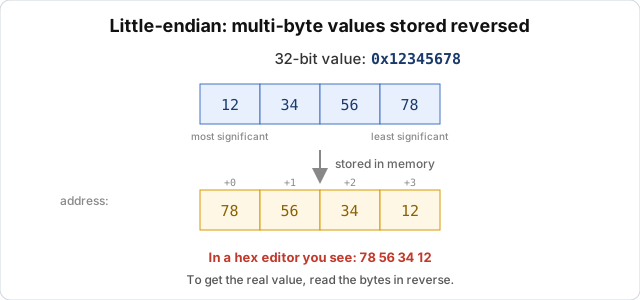
Most beginners trip here. The question is in what byte order the 32-bit number 0x12345678 is stored in memory.
There are two ways. Big-endian puts the most significant byte first, 12 34 56 78, like how we normally write numbers. Little-endian puts the most significant byte last, 78 56 34 12. It looks backwards, but x86, x64 and ARM (usually) all use it.
So if you see the four bytes 78 56 34 12 in a hex editor, the value is 0x12345678. You read it backwards.
A common example is searching a file for the address 0x00401000. If you search for 00 40 10 00 you find nothing, because on disk it’s 00 10 40 00. Scrambled bytes usually mean you forgot little-endian.
The rule I use is that on x86/x64, multi-byte numbers are stored reversed. Strings are not, because a string is a sequence of separate bytes, not one number.
Bitwise operations
Reversing crypto and obfuscation means running into bit operations all the time. There are four core ones. AND (&) gives 1 when both bits are 1, and it’s used to mask out some bits, so x & 0xFF takes the lowest byte. OR (|) gives 1 when either bit is 1, and it’s used to set bits. XOR (^) gives 1 when the two bits differ. You’ll see XOR the most. XOR a value twice with the same key and you get the original back, so it’s the simplest and most common encryption in malware and crackmes, A ^ key ^ key == A. NOT (~) flips every bit.
Then there are shifts. Shift left (<<) doubles the value each step and shift right (>>) halves it. Compilers often replace multiplication/division by powers of 2 with shifts because it’s faster, so shl eax, 3 means multiply by 8.
Since XOR is everywhere, remember this. If you see a loop going through data and xoring each byte with a constant or a key, 90% of the time it’s a string encryption/decryption routine. Lesson 16.2 goes deeper.
Practice
No tools needed, do these in your head, then check with a programmer calculator (or Python). First, which two ASCII characters is 0x4D5A? (It’s the magic number at the start of every Windows PE file, “MZ”.) Second, in a hex editor you see 90 1F 00 00, a 32-bit little-endian number, so what’s the decimal value? Third, what character is 'a' ^ 0x20, and what about 'A' ^ 0x20? Fourth, to get the low 4 bits of a byte, which hex value do you AND with?
The answers are 1) “MZ”. 2) 0x00001F90 = 8080. 3) ‘a’^0x20=’A’, ‘A’^0x20=’a’ (XOR 0x20 flips the case). 4) & 0x0F.
Key takeaways
One byte is 2 hex digits, 0x00 to 0xFF, and byte/word/dword/qword are 1/2/4/8 bytes. x86/x64 is little-endian, so multi-byte numbers are stored with reversed byte order and you read them backwards. Strings are not reversed. XOR is the operation you’ll see most in crypto and obfuscation.