Lesson 5.1: .NET internals
After several parts of working with native assembly, this part is a lot easier. Open a .NET file in dnSpy or ILSpy and you usually get C# that reads almost exactly like what the author wrote, with the right class names, method names and variable names. Comments are gone but the structure is intact. Why is native such a mess while .NET is so readable? The answer explains the approach for this whole part.
A .NET program doesn’t contain machine code
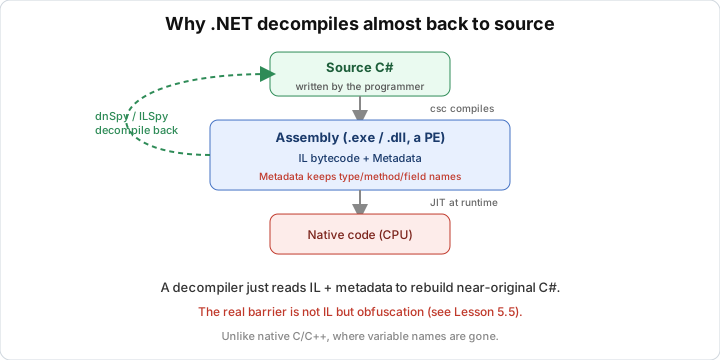
When you build a C# project, the compiler (Roslyn) doesn’t produce x86 instructions. It produces IL (Common Intermediate Language, also called MSIL or CIL), a CPU-independent bytecode. Real machine code is only created at runtime, by the CLR’s JIT compiler, right before a method is called for the first time.
The flow:
1
2
3
4
5
C# source  --Roslyn-->  IL + metadata  (sits in the .exe/.dll file)
                              |
                         CLR loads, JIT
                              v
                        x86/x64 machine code  (exists only in RAM at runtime)
What’s on disk is IL, not machine code, and IL is at a much higher level than assembly. So translating IL back to C# is much easier than translating machine code back to C++.
CLR, IL, metadata
The CLR (Common Language Runtime) is the virtual machine that runs .NET programs, like the JVM for Java. It loads assemblies, JITs, manages memory (the garbage collector), and does type safety checks. Code running on the CLR is called managed code.
An assembly is the unit of deployment, an .exe or .dll file. It’s still a valid PE file (see Lesson 1.7 again), but the code isn’t in a .text section holding x86. There’s a CLI header pointing to the IL and metadata streams. That’s why DIE opening a .NET file still reports PE, but adds “.NET”.
IL is stack-based bytecode. Instead of operating on registers like x86, it pushes operands onto an evaluation stack and pops them off. For example a + b becomes “push a, push b, add”. This abstract, information-rich form is what lets the decompiler rebuild the original expressions.
Metadata matters most here. Alongside the IL is a set of tables describing every type, method, field and parameter, with their real names. The CLR needs metadata for reflection, binding, and type checking, so the names can’t be stripped like symbols in native code. The decompiler reads the metadata directly and immediately has class and method names. This is the biggest difference from native, where variable names are gone after compiling.
Looking at IL
A small C# method:
1
2
3
4
public static int Add(int a, int b)
{
    return a + b;
}
The matching IL (as shown by ildasm/ILSpy):
1
2
3
4
5
6
7
.method public hidebysig static int32 Add(int32 a, int32 b) cil managed
{
    ldarg.0      // push argument 0 (a) onto the stack
    ldarg.1      // push argument 1 (b) onto the stack
    add          // take the top two, add, push the result
    ret          // return the value on top of the stack
}
The method name Add, the type int32, and the parameter names a and b are all intact. In native code this function becomes sub_401000 taking two numbers in rcx/rdx. Here it’s almost source, and the decompiler just has to put it back together as return a + b;.
Why managed is easier than native
| Native (C/C++) | Managed (.NET) | |
|---|---|---|
| What’s on disk | x86/x64 machine code | IL bytecode |
| Function/variable names | gone (unless there are symbols) | intact in the metadata |
| Abstraction level | low, close to the CPU | high, close to the language |
| Decompile result | approximate pseudocode | C# nearly like the original |
| Main obstacle | compiler optimization | obfuscation (see Lesson 5.5) |
The last row matters. What stands between you and .NET source is usually not the format but an obfuscator that renames and distorts things on purpose. So most of this part is about removing obfuscation, not reading IL.
Tools
ILSpy and dnSpy are both free portable downloads. ILSpy is for decompiling and viewing IL, while dnSpy can also debug and edit assemblies. Lessons 5.2 and 5.3 go deeper. ildasm (comes with the Windows SDK) outputs IL as text and ilasm assembles it back. ilspycmd is the command-line version of ILSpy and is handy for automation, and JetBrains’ dotPeek is another free decompiler.
They all read the same thing, the IL and metadata in the assembly. They differ in interface and in whether you can edit.
Lab
The goal is to confirm by hand what this lesson says, which is that a .NET file contains IL and metadata that keeps names, so it decompiles to something very close to the source. You don’t strictly need the dotnet SDK. If you don’t have it, use any .NET files you already have as samples. The tools are DIE (Detect It Easy), ILSpy and dnSpy.
First recognize .NET with DIE. Drag ILSpy.dll (or dnSpy.exe) into DIE and confirm it reports a PE with an extra .NET / CLR label, and note which runtime it names (.NET Framework or modern .NET). Why is it still a PE, yet the code isn’t in the .text section the way it would be in a plain C exe?
Then open a .NET DLL in ILSpy. Open ILSpy.exe, choose File > Open and point it at any .NET DLL in the ILSpy folder (for example ICSharpCode.Decompiler.dll). Browse the tree of namespaces, classes and methods on the left and notice the names are intact. Pick any method and look at the decompiled C# on the right. Next switch the language box in the top corner from C# to IL and compare the IL with the C# of the same method. Look for ldarg, ldloc, call and ret. A small method (a getter or an addition function) shows the IL to C# mapping best.
If you have the dotnet SDK, build a program of your own. Create a project with this command:
1
mkdir hello5x && cd hello5x && dotnet new console
Replace Program.cs with the file Program.cs that comes with this lab, then build:
1
dotnet build -c Debug
Open the resulting DLL (in bin/Debug/netX/Hello5x.dll) in ILSpy, find the method Calculator.Add, look at its IL and compare. Switch SumTo to IL and see how the for loop turns into a conditional jump.
Two questions to think about. If an assembly is obfuscated so that every name becomes a, b, c, which part of the file is touched, the IL or the metadata (the hint is that both kinds of names live in the metadata)? And why can dnSpy edit code while ILSpy can’t (see Lessons 5.2 and 5.4)?
Show solution
DIE reports the file is a PE, and it also recognizes the CLI header and attaches a label like .NET with the runtime version (for example .NET Framework(v4.0...) or .NET(v8...)). It can do that because the Optional header of a PE has a Data Directory called COM Descriptor (IMAGE_DIRECTORY_ENTRY_COM_DESCRIPTOR, the 14th entry) that points to the CLI header, and native files normally leave this entry empty.
As for why it’s a PE and yet the code isn’t in the normal .text, the answer is that the Windows loader still loads the file as an ordinary PE, but the entry point is only a small stub that jumps into the CLR. The real code is IL, living in the streams (#~, #Strings, #US, #Blob) that the CLI header points to, and only the CLR understands it. The section holding them is usually named .text, but its content is IL plus metadata, not x86.
When you open ICSharpCode.Decompiler.dll (or any .NET DLL), the tree on the left shows namespaces, classes and methods with their original names. That’s direct evidence that metadata keeps names. Switch to IL mode and a simple property getter looks like this:
1
2
3
4
5
6
.method public hidebysig specialname instance int32 get_Count() cil managed
{
    ldarg.0
    ldfld int32 SomeClass::_count
    ret
}
The mapping is easy to see. ldarg.0 loads this (hidden argument number 0), ldfld reads a field (the field name is in the metadata too) and ret returns.
For your own build, the method in this lab’s Program.cs:
1
2
3
4
public static int Add(int a, int b)
{
    return a + b;
}
gives IL roughly like this in a Debug build:
1
2
3
4
5
6
7
8
.method public hidebysig static int32 Add(int32 a, int32 b) cil managed
{
    .maxstack 2
    ldarg.0    // a
    ldarg.1    // b
    add
    ret
}
In a Debug build Roslyn may insert extra nops and use a temporary local for the return value, so you may see stloc.0 and ldloc.0 mixed in. A Release build is as compact as above. Then SumTo with its for loop:
1
2
3
4
5
6
7
public int SumTo(int n)
{
    int total = 0;
    for (int i = 1; i <= n; i++)
        total += i;
    return total;
}
Its IL has two locals (total, i), a label at the top of the loop, a body that accumulates, and a blt or ble (branch if less than or less or equal) that goes back to the top of the loop. A for loop in IL is also just compare plus jump, like assembly, but it keeps the variable names, so a decompiler can rebuild a clean for loop.
On the questions, a renaming obfuscator acts on the metadata (the #Strings table holds the names). IL refers to names through tokens that point into the metadata, so when the original names are replaced with a, b, c or unreadable characters, the decompiler still produces code with the right logic but meaningless names. The logic (IL) isn’t lost, only the names. dnSpy can edit because it can recompile a method from C# or edit the IL directly and write the assembly back (using dnlib), while ILSpy is mostly for reading and decompiling and doesn’t write back. The details are in Lessons 5.2 and 5.4.
Key takeaways
A .NET file on disk contains IL bytecode plus metadata, not machine code, and machine code is only produced at runtime by the JIT. A .NET assembly is still a PE, but the code sits behind the CLI header and not in the usual .text section. Metadata keeps type/method/field names intact, so decompiling gives nearly the original source.
IL is stack-based bytecode, at a much higher level than assembly, so it’s easy to translate back. The real obstacle when reversing .NET is usually obfuscation, not the format itself.