Lesson 1.2: DevTools, curl and httpie
By the end of this lesson you use the browser’s DevTools to observe requests, turn any request into a curl command with “Copy as cURL”, and build requests from scratch with both curl and httpie. Once you can craft requests by hand, you no longer depend on the interface and can call the API directly.
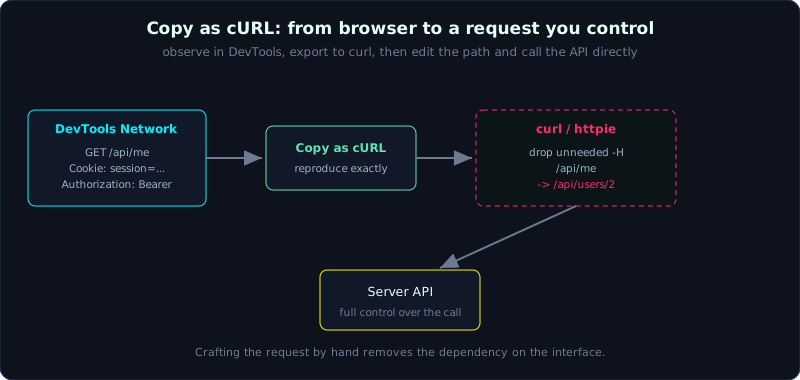 “Copy as cURL” turns a browser request into a terminal command you fully control, down to each header, cookie and path.
Part 1, about 45 minutes, medium difficulty. Prerequisite: Lesson 1.1 (Burp Suite core modules). Tools: a browser with DevTools, curl, and httpie (optional).
Goals
After this lesson you can use the DevTools Network, Console and Application panels to observe a web app, use “Copy as cURL” to reproduce a browser request, build GET and POST requests and send headers, body and cookies with curl, and know the equivalent httpie syntax and when it is handier.
Theory
DevTools: the three most used panels
DevTools is the developer toolset built into the browser (the F12 key). When testing web, three panels matter:
- Network: lists every request the page sends (resources, APIs, XHR/fetch). Click a request to see its full headers, payload, response and timing. This is the fastest way to see which API the frontend calls and with what parameters. Remember to tick “Preserve log” so you do not lose data when the page navigates.
- Console: runs JavaScript right in the page context. Useful for reading global variables, trying
document.cookie, calling the page’s functions, and it is where you verify DOM XSS (Lesson 3.3). - Application: shows cookies (with the HttpOnly, Secure and SameSite flags), localStorage, sessionStorage and service workers. This is where you inspect where the app stores tokens and state.
DevTools is for observing and understanding. To attack, you need to build a request on your own, and that is curl’s job.
curl: a general-purpose command-line client
curl sends HTTP requests from the terminal. A few core flags, enough for 90 percent of the time:
| Flag | Effect |
|---|---|
-X METHOD | set the method (GET, POST, PUT…). Often inferred when -d is present |
-H "Name: Value" | add a header, can repeat many times |
-d "data" | send a body; defaults to a POST form |
--data-raw, --json | send a raw body, or JSON (sets Content-Type automatically) |
-b "k=v" / -c file | send a cookie / save received cookies to a file (cookie jar) |
-i / -I | include response headers / fetch only headers (HEAD) |
-v | verbose, prints both request and response headers |
-L | follow 3xx redirects automatically |
-s / -o file | silent (hide the progress bar) / write the body to a file |
-w "format" | print information such as status code, time and size when done |
httpie: a more readable curl
httpie (the http command) is a command-line client that is friendlier for people: short syntax, automatic JSON formatting and colouring, and JSON by default. For the same task, httpie is shorter to type than curl. It does not replace curl (curl is everywhere and scripts well), but it is handy for manual work with JSON APIs. Install it with pip install httpie or your OS package manager.
Copy as cURL: from browser to terminal
This is the most important technique in the lesson. When the frontend sends a complex request (many headers, a token, cookies), you do not need to retype it by hand. In the DevTools Network panel, right-click the request, choose Copy, “Copy as cURL”. Paste it into the terminal and you have a curl command that reproduces that request exactly, with all its headers and cookies. From there you change parameters, drop headers to find which ones are actually required, and move it into a script. Burp has a similar function (“Copy as curl command”).
Demo
The commands below run for real against the lab app labs/0.2/ (port 8010). The output is real.
Fetch only headers with HEAD, and use -w to print a few metrics quickly:
1
2
3
4
5
6
7
8
9
10
$ curl -I http://127.0.0.1:8010/
HTTP/1.1 200 OK
Server: Werkzeug/3.1.8 Python/3.11.9
Content-Type: text/html; charset=utf-8
Content-Length: 679
Server: Lab0.2/Flask
Connection: close

$ curl -s -o /dev/null -w "code=%{http_code} time=%{time_total}s size=%{size_download}B\n" http://127.0.0.1:8010/
code=200 time=0.002324s size=679B
Send a JSON body (set Content-Type so the server reads it correctly):
1
2
3
4
5
6
7
8
9
10
11
12
13
14
15
16
17
$ curl -s http://127.0.0.1:8010/echo -H "Content-Type: application/json" -d '{"user":"admin"}'
{
  "method": "POST",
  "path": "/echo",
  "query": {},
  "headers": {
    "Host": "127.0.0.1:8010",
    "User-Agent": "curl/7.81.0",
    "Accept": "*/*",
    "Content-Type": "application/json",
    "Content-Length": "16"
  },
  "cookies": {},
  "body_raw": "{\"user\":\"admin\"}",
  "form": {},
  "remote_addr": "127.0.0.1"
}
Note: because -d is present, curl uses POST automatically, and the raw body {"user":"admin"} reaches the server as sent.
Use a cookie jar to simulate a session: save the cookie on login, then reuse it for a later request:
1
2
3
4
5
6
7
8
9
10
11
$ curl -s -c jar.txt -X POST -d "user=admin&pass=admin" http://127.0.0.1:8010/login >/dev/null

$ cat jar.txt
# Netscape HTTP Cookie File
# https://curl.se/docs/http-cookies.html
# This file was generated by libcurl! Edit at your own risk.

#HttpOnly_127.0.0.1	FALSE	/	FALSE	0	session	s3ss10n-demo-abc123

$ curl -s -b jar.txt http://127.0.0.1:8010/whoami
{"user":"admin","via":"cookie session"}
The -c jar.txt flag saves every cookie the server sets into a file, and -b jar.txt reads it back and sends it along. Notice the #HttpOnly_127.0.0.1 line; curl respects the HttpOnly flag when saving. Thanks to the cookie jar, the later /whoami request is recognised by the server as “admin” without entering anything again.
Equivalent httpie syntax
The same tasks written in httpie are shorter (the lines below are reference syntax):
1
2
3
4
5
6
7
8
9
10
# GET with a query string
http GET 127.0.0.1:8010/echo q==hello lang==vi

# POST JSON (httpie defaults to JSON and sets Content-Type)
http POST 127.0.0.1:8010/echo user=admin

# Add a header, send a cookie, save and reuse a session
http GET 127.0.0.1:8010/secret Authorization:"Bearer demo-token"
http --session=s1 POST 127.0.0.1:8010/login user=admin pass=admin --form
http --session=s1 GET 127.0.0.1:8010/whoami
The httpie conventions are easy to remember: key==value is a query string, key=value is a JSON field, Header:value is a header. The --session flag takes the place of curl’s cookie jar.
From DevTools to curl
In the DevTools Network panel of a real app, select an API request, right-click, Copy, “Copy as cURL”. The pasted command looks like this (shortened for illustration):
1
2
3
4
5
curl 'https://app.example.com/api/me' \
  -H 'Cookie: session=...' \
  -H 'Authorization: Bearer ...' \
  -H 'User-Agent: ...' \
  --compressed
From here you strip each -H one by one to find which header is actually required, change the path /api/me to /api/users/2 to test for IDOR (Lesson 5.1), or move it into a script. This is how you turn an interface action into a request you fully control.
Lab
- App:
labs/0.2/(port 8010), or the Juice Shop from Lesson 0.4. - Tasks:
- Open the app in the browser, go to DevTools Network, log in, find the
/loginrequest and inspect its payload. - “Copy as cURL” that request, paste it into the terminal, run it again and confirm you get the same result.
- Write a curl command by hand that sends JSON to
/echoand read backbody_rawin the response. - Use a cookie jar (
-cthen-b) to log in once and call/whoamiin a later command without re-entering credentials. - If you have httpie, redo tasks 3 and 4 with httpie and compare how compact it is.
- Open the app in the browser, go to DevTools Network, log in, find the
- Hint:
-w "%{http_code}\n"prints the status code quickly for batch testing in a shell loop. - Answer: the real commands and output are in
labs/0.2/transcript.txt.
Common pitfalls
- Sending JSON with
-dbut forgetting-H "Content-Type: application/json", so the server misreads it as a form. - Forgetting to tick “Preserve log” in Network, losing all requests when the page navigates or reloads.
- Pasting a “Copy as cURL” from Windows (which uses
^for line breaks) into a Linux shell (which uses\), which breaks the syntax. - Mixing up
==(query) with=(JSON field) in httpie, sending to the wrong place. - Using
-dwith data that has special characters without encoding it, which breaks the parameter structure.
Further reading
- Chrome DevTools Network: https://developer.chrome.com/docs/devtools/network
- curl manual: https://curl.se/docs/manpage.html
- httpie docs: https://httpie.io/docs/cli
Key takeaways
- DevTools Network shows which API the frontend calls; Console runs JS; Application inspects cookies and storage.
- “Copy as cURL” turns a browser request into a curl command that reproduces it exactly.
- curl: knowing
-H,-d,-b/-c,-i/-I,-v,-Land-wis enough. - httpie is compact and auto-formats JSON, handy for manual work with APIs.
- Building a request by hand means you no longer depend on the interface and can call the API directly.