Lesson 1.1: Burp Suite core modules

By the end of this lesson you can work the core toolset of Burp: capture and edit a request with Proxy, send it over and over and tune it with Repeater, run an automated attack with Intruder (and pick the right attack type), encode and decode with Decoder, compare responses with Comparer, and set up scope and match/replace to keep your work tidy.
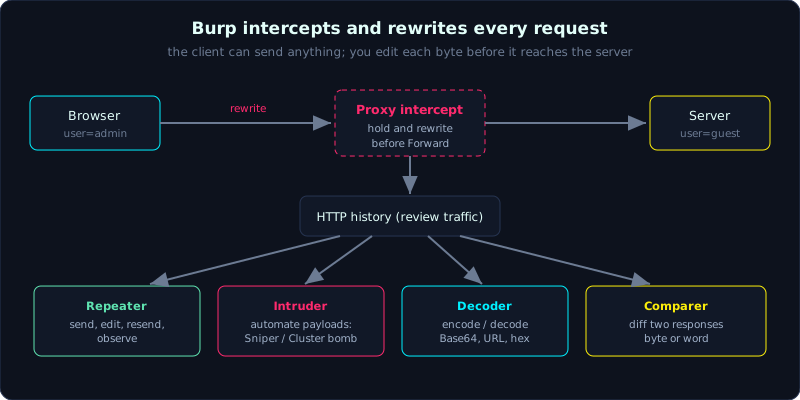 Burp sits between browser and server, intercepts a request, and lets you rewrite it before it reaches the target.
Part 1, about 60 minutes, medium difficulty. Prerequisite: Lesson 0.4 (setting up the Burp and Docker lab). Tools: Burp Suite Community and a lab app (Juice Shop or labs/0.2/).
Goals
After this lesson you can capture, edit, forward or drop a request with Proxy intercept, move a request into Repeater and replay it with changed parameters, understand the four Intruder attack types and choose the right one for each situation, use Decoder and Comparer when analysing data and responses, and set a scope and use match/replace to adjust requests automatically.
Theory
Burp Suite is the central toolset for almost everyone who tests web applications. The free Community Edition is enough for this whole series. It only lacks the automated scanner, and Intruder runs at a throttled speed. The modules that matter:
Proxy
The central module of Burp. It captures every request the browser sends (configured in Lesson 0.4). It has two modes:
- HTTP history: records every request and response that passed through, even when you are not intercepting. This is where you review traffic and pick a request to send to another module.
- Intercept: when enabled, Burp holds a request so you can view and edit it before you “Forward” it or “Drop” it. This is where you act directly on every byte.
Repeater
Where you spend the most time during manual testing. Send a request, read the response, change one thing, send it again, read the new response. Repeat until you understand how the endpoint reacts. Repeater keeps many tabs, one request per tab, which is handy for trying several variants side by side.
Intruder and the attack types
Intruder automates sending many requests with changing payloads, used for brute force, fuzzing and enumeration. You mark the payload positions with the § character, then pick one of four attack types:
- Sniper: one payload set, inserted into exactly one position at a time while the other positions stay fixed. It sweeps each position in turn. Good for fuzzing one parameter at a time.
- Battering ram: one payload set, inserting the same value into all positions at once. Good when the same value has to appear in several places.
- Pitchfork: multiple payload sets, one per position, running in parallel by index (the nth payload of each set goes together). Good for pairing, for example username[n] with password[n] when they are already known.
- Cluster bomb: multiple payload sets, trying every combination of the sets. Good for brute forcing username x password (every user against every pass).
Choosing the wrong attack type is a common mistake. A quick rule: one variable means Sniper, several paired variables mean Pitchfork, several variables with every combination mean Cluster bomb.
Decoder and Comparer
- Decoder: quick encode and decode: URL-encode, Base64, HTML entity, hex, hash. Use it when you meet an unfamiliar string (for example a Base64 cookie value) or need to encode a payload for the right context.
- Comparer: compares two blocks of data byte by byte or word by word and highlights the differences. Very useful in blind injection when you need to tell apart two responses that are nearly identical (Lesson 2.2).
Scope and match/replace
- Scope: declare exactly the hosts you are allowed to and want to test. Then enable “show only in-scope items” so Burp filters out noise from CDNs, ads and telemetry. Setting scope is also an ethical discipline: you only work within the permitted range (Lesson 0.1).
- Match and replace: rules that replace content automatically in a request or response. For example, add a header, change the
User-Agent, or force a flag. These live in Proxy settings.
Demo: capturing and editing a request
This is the typical flow, described as steps in Burp (Community). Use the lab app labs/0.2/ or the Juice Shop you set up in Lesson 0.4.
Step 1, capture a request with Proxy intercept. Switch FoxyProxy to Burp, go to Proxy in Burp, and turn on “Intercept is on”. In the browser, log in to the lab app. Burp holds the request, which looks like this:
1
2
3
4
5
6
POST /login HTTP/1.1
Host: 127.0.0.1:8010
Content-Type: application/x-www-form-urlencoded
Content-Length: 23

user=admin&pass=admin
Step 2, edit it in place and Forward. Say you want to try a different username. Change user=admin to user=guest and click Forward. The edited request is the one that reaches the server, not the browser’s original. This is the basic idea. The client can send anything, and Burp gives you full control to rewrite it.
Step 3, move it into Repeater to try it many times. Turn off intercept, go to HTTP history, right-click the /login request and choose “Send to Repeater” (shortcut Ctrl+R). On the Repeater tab, click Send and read the response:
1
2
3
4
HTTP/1.1 200 OK
Set-Cookie: session=s3ss10n-demo-abc123; HttpOnly; Path=/; SameSite=Lax

{"msg":"dang nhap thanh cong","status":"ok"}
Now change pass=admin to pass=sai and Send again:
1
2
3
HTTP/1.1 401 UNAUTHORIZED

{"msg":"sai thong tin","status":"fail"}
Just by changing one parameter and comparing status 200 against 401, you have learned how the endpoint tells right from wrong. This is the basic rhythm of every testing session.
Step 4, brute force with Intruder. Right-click the /login request, “Send to Intruder”. On the Positions tab, clear all the automatic § markers, then wrap the password value: pass=§admin§. That is one position, so choose the Sniper attack type. On the Payloads tab, load a list of passwords to try and click “Start attack”. Burp sends them one by one. Sort by the Status or Length column to find the response that stands out (usually the successful login). Note that the Community Edition throttles Intruder’s speed.
To brute force both username and password, use two positions user=§x§&pass=§y§ and choose Cluster bomb to try every combination. If you already have leaked user/pass pairs and want to try the exact pairs, choose Pitchfork.
Step 5, Decoder for an unfamiliar string. Say a cookie has the value YWRtaW46MTIz. Paste it into Decoder, choose “Decode as Base64”, and you get admin:123. Now you know this cookie embeds easily guessed credentials directly, a sign of a vulnerability.
Step 6, Comparer when responses are nearly identical. In blind injection, two responses differ by only a few bytes. Send both to Comparer (right-click, “Send to Comparer”), choose “Words” or “Bytes”, and Burp highlights the difference, which helps you decide the true/false condition.
Lab
- App: use
labs/0.2/(simple, easy to observe) or the Juice Shop you set up in Lesson 0.4. - Tasks:
- Turn on intercept, capture the login request, change the username before Forward and observe the difference.
- Send that request to Repeater, try a correct and an incorrect password in turn, and compare the status codes.
- Send it to Intruder, configure Sniper on the password field with a short list, and find the response that stands out.
- Take a session cookie value and try to decode it in Decoder to see if anything is readable.
- Set the scope to the lab app host only, enable “show only in-scope items”, and confirm the HTTP history gets much cleaner.
- Hints: Ctrl+R sends to Repeater; in Intruder, sorting by the Length column spots an unusual response faster than Status.
- Answer: there is no automated script; the goal is fluent operation. The sample response output can be checked against
labs/0.2/transcript.txt.
Common pitfalls
- Leaving intercept on and forgetting it, which makes the browser seem to freeze because Burp holds every request. Turn off intercept when you do not need it.
- Choosing the wrong Intruder attack type, for example using Sniper when you need every combination of user x pass (that must be Cluster bomb).
- Forgetting to URL-encode a payload with special characters (
&,=, space), which makes the server split the parameters wrong. - Not setting scope, so HTTP history floods with third-party requests and you miss the important ones.
- Trusting the Community Edition Intruder speed; it is throttled, so for large brute force use ffuf (Lesson 1.3).
Further reading
- Burp documentation: https://portswigger.net/burp/documentation
- Intruder attack types: https://portswigger.net/burp/documentation/desktop/tools/intruder/configure-attack/attack-types
- PortSwigger Web Security Academy (labs that use Burp): https://portswigger.net/web-security
Key takeaways
- Proxy has two sides: HTTP history (review) and Intercept (hold and edit).
- Repeater is where manual exploitation happens: send, edit, resend, observe.
- The four Intruder attack types: Sniper (one variable), Battering ram (one value in many positions), Pitchfork (paired), Cluster bomb (every combination).
- Decoder is for quick encode and decode, Comparer is for telling apart nearly identical responses.
- Setting scope correctly both tidies your work and is an ethical discipline.