Lesson 1.4: Fingerprinting web technologies

By the end of this lesson you can tell what technology a web app runs on from its headers, cookie names, error pages and favicon hash. Knowing the underlying technology helps you pick the right line of attack and look up the CVEs of a vulnerable version right away. The header-reading demo is real, done with curl.
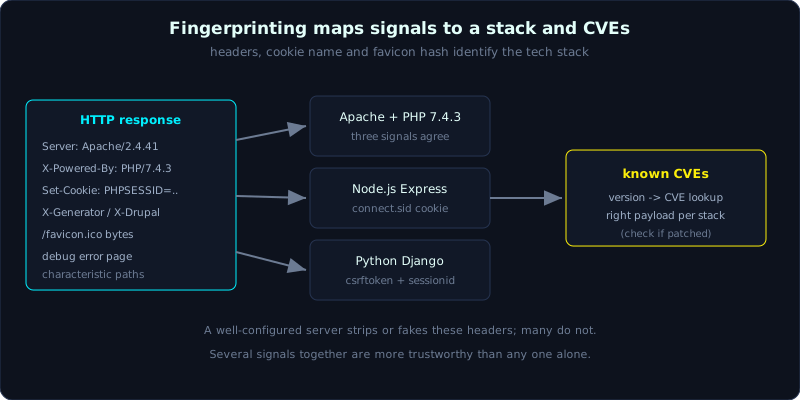 Response headers, the session cookie name and the favicon hash point to a tech stack, which maps to known CVEs.
Part 1, about 40 minutes, medium difficulty. Prerequisite: Lesson 1.3 (recon and content discovery). Tools: curl, Wappalyzer (browser extension), httpx, favicon hash.
Goals
After this lesson you can read headers to identify the web server, language and framework, infer the framework from the session cookie name, understand the favicon hash and how it identifies technology, and recognise a leaked version to look up the matching CVE.
Theory
Why fingerprinting matters
Fingerprinting is identifying the target’s tech stack: web server, language, framework, CMS, libraries and versions. Knowing this changes the whole approach:
- Pick the right class of vulnerability: a PHP app brings LFI and PHP deserialization to mind, a Node app brings prototype pollution, a Java app brings deserialization and SSTI with its own syntax.
- Look up CVEs: knowing “nginx 1.18” or “Struts 2.3.15” lets you immediately look up the known vulnerabilities of that exact version (the A06 group in OWASP Top 10, Lesson 0.1).
- Pick the right payload: the SSTI syntax of Jinja2 differs from Twig and from Freemarker (Lesson 8.1), so knowing the framework means knowing which payload to try first.
In short, fingerprinting turns guesswork into a directed attack.
Signals in the headers
Response headers leak technology more than anything else:
Server: the web server and sometimes the version, for examplenginx/1.18.0,Apache/2.4.41 (Ubuntu),Werkzeug/3.1.8 Python/3.11.9.X-Powered-By: the language or framework, for examplePHP/7.4.3,Express,ASP.NET.X-AspNet-Version,X-Generator,X-Drupal-Cache: reveal a specific framework or CMS.Set-Cookie: the session cookie name is a very strong signal (see 1.3 below).- The order and capitalisation of headers is sometimes characteristic of a particular server too.
A well-configured system strips or fakes these headers. But many systems do not, so this is always the first thing to try.
The session cookie name gives away the framework
Each framework has its own default session cookie name. Looking at the cookie name lets you guess the framework even when the headers have been stripped:
| Cookie name | Framework/language |
|---|---|
PHPSESSID | PHP |
JSESSIONID | Java (Servlet, Spring, Tomcat) |
ASP.NET_SessionId | ASP.NET |
connect.sid | Node.js Express (express-session) |
session + csrftoken | Python Django |
laravel_session | PHP Laravel |
_session_id | Ruby on Rails |
Favicon hash
Many products and frameworks ship with a default favicon (the small icon on the browser tab). This favicon is identical across every install of the same product. By computing the hash of the favicon file (usually mmh3, MurmurHash3) and looking it up in a database such as Shodan, we recognise the product even when the interface has been changed. This is a strong technique for identifying devices and software at scale. The method: download /favicon.ico, base64-encode it, then compute the mmh3 hash.
Error pages and other traces
- Error pages: leaving debug mode on gives away a lot. The error pages of Flask (Werkzeug debugger), Django (DEBUG=True), Rails and Laravel each have a distinctive look and leak the stack trace, file paths, environment variables, and sometimes even DB connection details (the A05 Security Misconfiguration group).
- HTML comments, JS/CSS file names: sometimes reveal the framework name and version.
- Characteristic paths:
/wp-login.phpis WordPress,/administrator/is Joomla,/.envleaks Laravel config.
Automated tools
- Wappalyzer: a browser extension (and CLI) that identifies technology from a signature set, shown as soon as you open the page.
- httpx: a command-line tool from ProjectDiscovery that probes many URLs and prints the headers, technology, status and title.
- whatweb, nuclei (with technology templates): add more coverage.
Tools are handy, but do not depend on them. Understanding the signals above by hand lets you fingerprint even when a tool gives up or the target deliberately adds noise.
Demo
The header-reading demo is real, done with curl. To illustrate several different stacks, we run a small demo app (Flask, port 8014) with endpoints that deliberately return headers characteristic of PHP/Apache, Node/Express and Python/Django. Use curl -I (the HEAD method, headers only) then look at the notable headers.
A PHP on Apache stack:
1
2
3
4
5
$ curl -sI http://127.0.0.1:8014/php
Server: Werkzeug/3.1.8 Python/3.11.9
Server: Apache/2.4.41 (Ubuntu)
X-Powered-By: PHP/7.4.3
Set-Cookie: PHPSESSID=a1b2c3d4e5; Path=/
Read it: Server: Apache/2.4.41 (Ubuntu) plus X-Powered-By: PHP/7.4.3 plus the PHPSESSID cookie. Three signals all point to one PHP/Apache stack, and we also have the version to look up CVEs. (The first Server: Werkzeug/... line belongs to the dev server hosting the demo and would not be present in reality.)
A Node.js Express stack behind nginx:
1
2
3
4
5
$ curl -sI http://127.0.0.1:8014/express
Server: Werkzeug/3.1.8 Python/3.11.9
Server: nginx/1.18.0
X-Powered-By: Express
Set-Cookie: connect.sid=s%3Aabc.def; Path=/
X-Powered-By: Express and the connect.sid cookie give away Node.js with express-session right away, even though Server only says nginx (the reverse proxy in front).
A Python Django stack on gunicorn:
1
2
3
4
5
$ curl -sI http://127.0.0.1:8014/django
Server: Werkzeug/3.1.8 Python/3.11.9
Server: gunicorn/20.1.0
Set-Cookie: csrftoken=xyz; Path=/
Set-Cookie: sessionid=123; Path=/
Here there is no X-Powered-By, but the csrftoken plus sessionid cookie pair is a very clear signature of Django, and Server: gunicorn confirms this is a Python app.
In practice, against any target, you only need:
1
2
curl -sI https://target/           # look at Server, X-Powered-By, Set-Cookie
curl -s  https://target/ | grep -iE "generator|powered|framework"   # inspect meta in the HTML
Computing the favicon hash (reference)
1
2
3
# download the favicon, base64, then mmh3 hash (Python with the mmh3 library)
curl -s https://target/favicon.ico | base64 | python3 -c "import mmh3,sys; print(mmh3.hash(sys.stdin.read()))"
# look the hash up on Shodan: http.favicon.hash:<value>
Lab
- App: reuse
labs/0.2/(headersServer: Lab0.2/FlaskandWerkzeug/... Python/...) and the Juice Shop from Lesson 0.4. - Tasks:
- Run
labs/0.2/app.py, usecurl -Ito read the headers and determine what it runs on (hint: Werkzeug means Flask, Python). - Set up Juice Shop, use
curl -sIandcurl -s | grepto guess what kind of app it is (Node.js). - For any session cookie you meet, look it up in the table in section 1.3 to guess the framework.
- Install Wappalyzer, open the two apps above and compare it against your manual reasoning.
- Advanced: compute the favicon hash of an app and try to look it up on Shodan.
- Run
- Hint: if
Serveris stripped, the session cookie and error pages still often reveal the framework. - Answer: there is no fixed script; compare
curl -Iagainstlabs/0.2/with the headers inlabs/0.2/transcript.txt(theServer: Werkzeug/... Python/...line).
Common pitfalls
- Trusting the
Serverheader absolutely; it can be faked or belong only to the reverse proxy in front. - Ignoring cookies when the headers are stripped, while the cookie name often still reveals the framework.
- Forgetting that several signals together are what makes it trustworthy; a single signal is easy to misread.
- Relying only on Wappalyzer without verifying by hand, missing cases where it identifies wrong.
- Seeing a version and rushing into an exploit without checking whether the app is patched; an old version may no longer be vulnerable if the fix was backported.
Further reading
- Wappalyzer: https://www.wappalyzer.com/
- httpx (ProjectDiscovery): https://github.com/projectdiscovery/httpx
- OWASP WSTG, Fingerprint Web Server: https://owasp.org/www-project-web-security-testing-guide/
- Favicon hashing and Shodan: https://www.shodan.io/
Key takeaways
- Fingerprinting turns guesswork into a directed attack, and opens the way to CVE lookup.
- The
Server,X-Powered-ByandX-*headers often leak technology and version. - Session cookie names (PHPSESSID, JSESSIONID, connect.sid, csrftoken…) give away the framework.
- A favicon hash identifies a product even when the interface has been changed.
- Debug error pages and characteristic paths (
/wp-login.php,/.env) are strong leads.