Lesson 11.1: Solving PortSwigger Web Security Academy Labs by Topic
PortSwigger Web Security Academy is a free platform for learning web security, run by the company that makes Burp Suite. This lesson shows how to use it well, by studying one topic at a time, working from apprentice up to expert, and carrying a repeatable method into every lab. It ends with four worked walkthroughs on apprentice labs, one each for SQL injection, reflected XSS, access control, and SSRF.
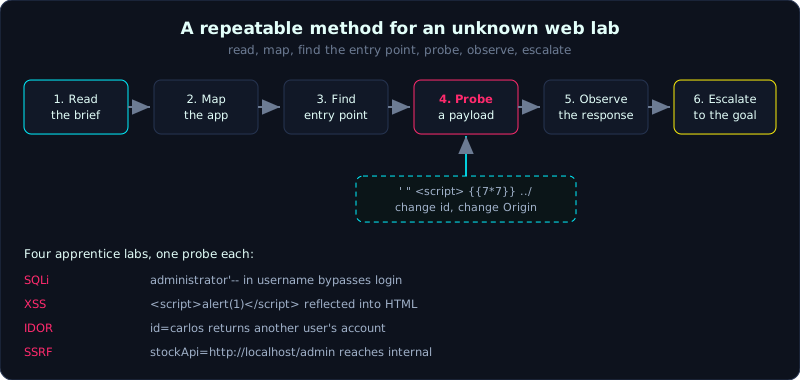 The six-step method, with the probe payloads that feed step four and the four apprentice labs they map to.
Part: 11 · Reading time: ~60 minutes · Difficulty: medium
Prerequisites: Parts 2 through 8 of this series, and familiarity with Burp Repeater.
Tools: Burp Suite Community, a browser, and a free PortSwigger account.
Goals
By the end of this lesson you know what Web Security Academy is and why it is a good place to train, you have a path for studying by topic and by difficulty, you have a general method for an unfamiliar lab, and you can solve four representative apprentice labs through detailed walkthroughs.
Theory
PortSwigger Web Security Academy (WSA for short, at portswigger.net/web-security) is a free web security training platform built by the company behind Burp Suite. It stands out for a few reasons. The theory is well written and kept current. Each topic comes with a set of labs that run on their real infrastructure, not a virtual machine you have to build yourself. And it grades labs as “solved” automatically. Labs are split by difficulty into Apprentice (introductory), Practitioner (hands-on), and Expert (hard).
How to study effectively:
- Study by topic, do not skip around: read all the theory for one topic (for example SQL injection), then work the labs in order from apprentice up. Each lab teaches one variant.
- Use the mystery labs once you are solid: WSA has a random lab mode that does not tell you the vulnerability in advance, which trains your ability to recognise it.
- Keep Burp open: nearly every lab needs you to intercept and edit a request. Proxy to capture, Repeater to retry, Intruder to loop.
- Record payloads: each lab gives you a sample payload worth saving into your own cheatsheet.
The general method for an unfamiliar lab:
- Read the brief. The lab states the goal to reach (delete a user, read carlos’s data, get an API key, and so on).
- Map the app. Click around with Burp on and see which pages, parameters, and cookies exist.
- Find the entry point. Which parameter reflects into output (XSS), goes into a query (SQLi), references an object (IDOR), or takes a URL (SSRF).
- Try a probe payload.
',",<script>,../,{{7*7}}, changeid, changeOrigin. - Observe the response. An error, a timing difference, or changed content.
- Escalate to exactly the goal the lab asks for.
Demo: four representative walkthroughs
Below are four classic apprentice labs, described step by step. The exact URLs change per session, so follow the idea.
SQL injection login bypass
Lab: “SQL injection vulnerability allowing login bypass”. The login form builds a query of the form SELECT * FROM users WHERE username='<u>' AND password='<p>'.
- In the username field enter
administrator'--, and put anything in the password field. - The query becomes
... WHERE username='administrator'--' AND password='x'. The--turns the password check into a comment. - You are logged in as the administrator account. Lab solved.
The core idea here is that the quote breaks the syntax and the comment cuts off the rest. This is the foundation of Part 2.
Reflected XSS into an HTML context
Lab: “Reflected XSS into HTML context with nothing encoded”. The search box reflects the keyword straight into the HTML.
- Search for
testand check whether the response containstestverbatim in the HTML body. It does. - Enter
<script>alert(1)</script>. Because the server does not encode it, the script is embedded and runs. - A popup appears. Lab solved.
The core idea here is that user data going straight into HTML with no encoding is reflected XSS. This is the foundation of Part 3.
Access control, IDOR through a parameter
Lab: “User ID controlled by request parameter”. The page /my-account?id=wiener shows your own account based on the id parameter.
- Log in with the account you are given (
wiener). Notice the URL hasid=wiener. - Change
id=wienertoid=carlos. The server returns the account page for carlos directly, including his API key. - Submit carlos’s API key. Lab solved.
The core idea here is that the server trusts the id parameter to select the object but does not check that the object belongs to you. This is BOLA/IDOR, as in Part 5 and Lesson 9.1.
Basic SSRF against the local server
Lab: “Basic SSRF against the local server”. A stock check feature sends a URL to the server, which then fetches it.
- Intercept the request
stockApi=http://stock.weliketoshop.net:8080/product/stock/check?...in Burp. - Change the value of
stockApitohttp://localhost/admin. The server fetches the internal admin page and returns its content. - The admin interface has a delete-user link, so change
stockApitohttp://localhost/admin/delete?username=carlos. - User carlos is deleted. Lab solved.
The core idea here is that the server takes a user-supplied URL and fetches it itself, which lets you reach internal services. This is SSRF, as in Part 6.
Lab
- The official labs run on WSA (nothing to deploy, you only need a free account). A suggested route:
- Do the whole apprentice group for SQL injection, XSS, Access control, and SSRF.
- For each lab, before looking at the solution, run the six-step method from the Theory section yourself.
- Save good payloads into your own cheatsheet.
- Link to this series: each WSA topic maps to a part of this series. Use the self-hosted labs in
labs/to understand the mechanism, then use WSA to drill speed and variants. - There is no “answer in the repo” for this lesson, because the labs run on PortSwigger infrastructure. The walkthroughs in the Demo section are the reference solutions.
Common pitfalls
- Looking at the solution the moment you are stuck, which wastes the chance to train your thinking. Set a time limit before you open a hint.
- Solving a lab without understanding why, so the next variant stops you. Always summarise the root cause after each lab.
- Forgetting that Burp Community rate-limits Intruder. Many labs can still be done by hand, so do not depend on the Pro version.
- Doing only apprentice labs and assuming you are skilled. Practitioner and expert are closer to real work.
Further reading
- PortSwigger Web Security Academy, for the full set of topics and the official learning path.
- Other lab and CTF sources for more practice.
- Lesson 11.2 (writing a writeup), to turn each solved lab into a note worth keeping.
Key takeaways
- Study by topic, work from apprentice up, and read the theory before solving.
- Keep Burp on, and use Repeater to retry quickly.
- The six steps: read the brief, map the app, find the entry point, probe with a payload, observe, escalate.
- Each lab is a variant, so collect payloads into your own cheatsheet.
- Once you are solid, practise the mystery labs to train your ability to recognise a vulnerability on your own.