Lesson 11.3: Auditing a Web App and Writing the Report
A complete audit of a web application goes through a checklist, scores each vulnerability, and ends in a report a client can act on. This final lesson walks through one full audit using the OWASP WSTG checklist, scoring findings with CVSS, and writing a pentest report with a proper scope, findings, PoC, and remediation. It includes a sample report outline and a self-scoring rubric.
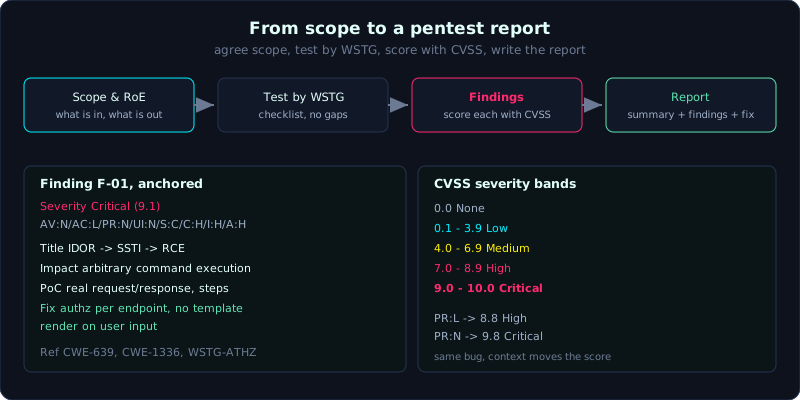 The pipeline from scope to report, with one finding anchored to a CVSS vector and the severity bands beside it.
Part: 11 · Reading time: ~90 minutes (a multi-session project) · Difficulty: advanced
Prerequisites: the whole series, especially Lesson 11.1 and Lesson 11.2.
Tools: Burp Suite, ffuf, nuclei, sqlmap, OWASP ZAP, and a CVSS calculator.
Goals
By the end of this lesson you can define a scope and rules of engagement before testing, use the WSTG checklist to test systematically without gaps, score severity consistently with CVSS, and write a complete pentest report, with a rubric to grade your own project.
Theory
Before testing: scope and rules of engagement
A professional audit starts with an agreement, not with firing payloads. You need to settle:
- Scope: which domains, subdomains, and IPs may be tested, and which are off limits. Whether the API and the mobile backend are in scope.
- Rules of engagement: when you may test, whether DoS is allowed, whether you may create junk data, and who is the point of contact during an incident.
- Test accounts: usually you need at least two accounts per role (to test cross-account access control).
- Environment: staging or production, real data or fake.
For a study project, you build the target yourself (for example by combining the labs in labs/ into one app, or using DVWA or Juice Shop) and write your own scope. The ethical principle running through this whole series is to test only systems you own or are authorized to test.
Testing systematically with WSTG
WSTG (OWASP Web Security Testing Guide) is the OWASP manual for testing web applications. It splits tests into coded groups (for example WSTG-ATHN for authentication). Use it as a checklist so you miss nothing. The main groups:
| Group code | What it covers | Matching part of this series |
|---|---|---|
| WSTG-INFO | Information gathering, recon, fingerprint | Part 1 |
| WSTG-CONF | Configuration and deployment (headers, CORS, exposed files) | Lesson 1.4, 9.3 |
| WSTG-IDNT / ATHN | Identity management, authentication | Part 4 |
| WSTG-ATHZ | Authorization, access control, IDOR | Part 5, Lesson 9.1 |
| WSTG-SESS | Session management | Lesson 4.2 |
| WSTG-INPV | Input validation: SQLi, XSS, command, SSTI, XXE | Parts 2, 3, 8 |
| WSTG-BUSL | Business logic | scattered |
| WSTG-CLNT | Client side: DOM XSS, CORS, postMessage | Lesson 3.3, 9.3, 10.2 |
| WSTG-APIT | API testing | Part 9 |
How to use it: go through each group in turn, and for each item record a status (pass / finding / not applicable) and the evidence. The checklist keeps your testing even rather than only hunting for the bugs you know best.
Scoring severity with CVSS
CVSS (Common Vulnerability Scoring System) gives a score from 0.0 to 10.0 based on several factors: Attack Vector, Attack Complexity, Privileges Required, User Interaction, Scope, and the impact on Confidentiality, Integrity, and Availability. The agreed scale:
| CVSS score | Band |
|---|---|
| 0.0 | None |
| 0.1 - 3.9 | Low |
| 4.0 - 6.9 | Medium |
| 7.0 - 8.9 | High |
| 9.0 - 10.0 | Critical |
An example score for an SSTI to RCE bug (like lab 10.1): attack over the network (AV:N), low complexity (AC:L), one low privilege needed after leaking the key (PR:L), no user interaction (UI:N), scope unchanged (S:U), and high impact on C, I, and A (C:H/I:H/A:H). The vector CVSS:3.1/AV:N/AC:L/PR:L/UI:N/S:U/C:H/I:H/A:H gives about 8.8, which is High. If the endpoint needs no privilege (PR:N) it rises to 9.8 Critical.
The important part is to score consistently, record the vector so others can check it, and adjust for the real context (how sensitive the data is, whether there are compensating controls).
The structure of a pentest report
A standard report has:
- Executive summary: for management, no jargon. State what was tested, the overall state, the number of findings by band, and the biggest risk.
- Scope and method: what was tested, over what time, against which standard (WSTG/OWASP), with which tools.
- Findings: the core of the report. Each finding has its own structure (see below).
- Appendix: the list of tools, raw requests, logs, and the information needed to reproduce.
Each finding should have:
- Title, short, for example “SSTI leading to RCE at /admin/template/preview”.
- Severity with the CVSS score and vector.
- Description: what the bug is, and where it is.
- Impact: what the attacker can do, and the damage.
- PoC: request/response, payload, screenshots, and the steps to reproduce.
- Remediation: a specific fix, not a vague one.
- References: the related CWE, OWASP, and WSTG.
Demo: a sample report outline
Below is the frame of a report for a target made of the series labs combined. You fill in the real content when you do the project.
1
2
3
4
5
6
7
8
9
10
11
12
13
14
15
16
17
18
19
20
21
22
23
24
25
26
27
28
29
30
31
32
33
34
35
WEB APPLICATION SECURITY TEST REPORT
Target: Shop App (internal, lab)      Date: 2026-10-18
Tester: <name>                        Report version: 1.0

1. EXECUTIVE SUMMARY
   - Tested the Shop App application against OWASP WSTG over <time>.
   - Findings: 1 Critical, 2 High, 1 Medium, 1 Low.
   - Biggest risk: an IDOR -> SSTI -> RCE chain that allows taking over the server.

2. SCOPE AND METHOD
   - In scope: http://127.0.0.1:8071-8077 (the lab modules).
   - Out of scope: network infrastructure, DoS.
   - Standard: OWASP WSTG. Tools: Burp, ffuf, nuclei, sqlmap.

3. FINDINGS

   [F-01] IDOR -> SSTI -> RCE chain           Severity: Critical (9.1)
     CVSS: CVSS:3.1/AV:N/AC:L/PR:N/UI:N/S:C/C:H/I:H/A:H
     Desc:    The internal endpoint /api/v2/users/<id>/keys has an IDOR that
              leaks admin_api_key; this key opens /admin/template/preview which
              has an SSTI (Jinja2) -> RCE.
     Impact:  Arbitrary command execution on the server, read any file.
     PoC:     (paste the real request/response from the transcript, step by step)
     Fix:     Authenticate and check authorization on every endpoint; do not
              render templates on user input; separate data from the template.
     Ref:     CWE-639, CWE-1336, WSTG-ATHZ, WSTG-INPV.

   [F-02] BOLA/BFLA on the REST API            Severity: High (8.2)
   [F-03] CORS reflects Origin + credentials   Severity: High (7.1)
   [F-04] GraphQL introspection + field leak   Severity: Medium (5.3)
   [F-05] Missing rate limit on /api/login     Severity: Low (3.7)

4. APPENDIX
   - List of tools and versions.
   - Raw requests, payloads, how to use the lab to reproduce.
Each finding in practice is written in full like F-01, not abbreviated.
Lab
- Suggested target: combine the apps in
labs/(9.1, 9.2, 9.3, 10.1, 10.2) into one “Shop App” to audit, or use OWASP Juice Shop. - Task:
- Write the scope and rules of engagement.
- Go through the WSTG checklist for all the main groups, recording the status of each item.
- For each vulnerability found, score it with CVSS (record the vector) and write a full finding.
- Assemble the report following the outline in the Demo section, with an executive summary.
- Hint: prefer describing a chain (like F-01), because that is the real risk, not just a list of isolated bugs.
Self-scoring rubric (out of 100)
| Criterion | Points | What earns the points |
|---|---|---|
| Scope and method | 10 | A clear scope, states the standard and tools |
| WSTG coverage | 20 | Covers all the main groups, records the status of each item |
| Finding quality | 25 | Each finding has a description, impact, and a reproducible PoC |
| Consistent CVSS | 10 | Has a vector, with a level that fits the context |
| Remediation | 15 | Specific, feasible, addresses the root cause |
| Executive summary | 10 | No jargon, names the biggest risk correctly |
| Presentation and ethics | 10 | Clear, tests only within scope, redacts sensitive data |
Grade yourself honestly, and where you fall short, note the reason and a plan to improve.
Common pitfalls
- Hunting bugs by inspiration and skipping the checklist, so you miss a whole group (for example forgetting business logic entirely).
- Scoring CVSS by feel without recording the vector, so no one can check it.
- Writing vague remediation (“improve security”), which is useless to a developer.
- An executive summary full of jargon that leadership cannot understand, so they cannot decide.
- A report that only lists isolated bugs without building the chain, which makes the reader underrate the risk.
Further reading
- The latest OWASP Web Security Testing Guide (WSTG).
- The CVSS v3.1 specification and the official FIRST calculator.
- Public pentest report samples (for example from some security firms) for style reference.
- A vulnerability map to the OWASP Top 10, to use when writing findings.
Key takeaways
- Start with a scope and rules of engagement, not with payloads.
- Test systematically with the WSTG checklist so you do not miss a group.
- Score every finding with CVSS and record the vector so others can check it.
- Each finding needs a description, impact, a reproducible PoC, and specific remediation.
- Prefer describing an attack chain over listing isolated bugs, because the chain is the real risk.
- Write the executive summary in plain language so leadership can act on it.
- Test only systems you own or are authorized to test, and redact sensitive data.