Lesson 3.3: DOM-based XSS from Source to Sink
By the end of this lesson you understand how DOM XSS differs from the other two because the flaw lives entirely in client-side JavaScript, you can trace the flow from source to sink, and you can recognize the dangerous sinks.
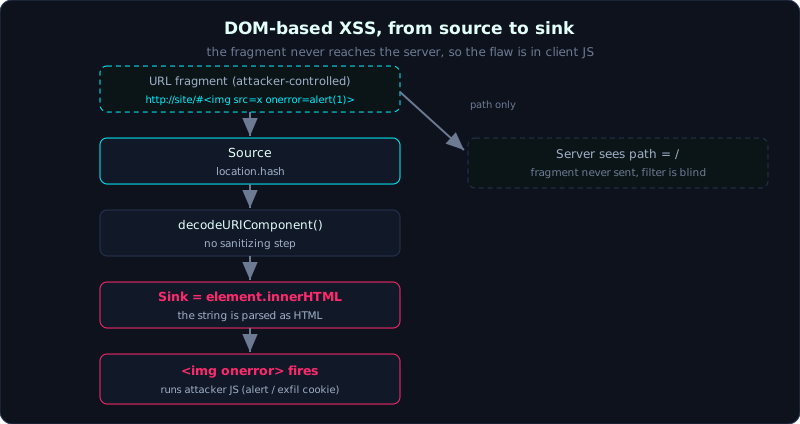 The payload in the URL fragment never reaches the server; it flows from location.hash straight into innerHTML.
| Part: 3 (Cross-Site Scripting) | Time: about 45 minutes | Difficulty: medium |
Prerequisites: Lesson 3.1 (Reflected XSS).
Tools: a browser with DevTools (Sources, Debugger), reading JS, and Node to run the lab’s emulator.
Goals
After this lesson you understand why DOM XSS has nothing to do with how the server handles input. You grasp the concepts of source and sink, and the data flow that connects them. You know the common list of dangerous sources and sinks. You can exploit a page whose sink is innerHTML reading from location.hash.
1. Theory
Where DOM XSS lives
The DOM (Document Object Model) is the object tree the browser builds from the page, and JS operates on it. DOM-based XSS is the kind of XSS where the whole story happens in client-side JavaScript: the server can return a completely harmless static page, but the JS in the page takes attacker-controlled data and puts it somewhere that turns it into running code.
The thing that sets DOM XSS apart from reflected and stored: the server often never sees the payload at all. The clearest example is a payload after the # in a URL (the fragment). A fragment is never sent to the server, it only lives in the browser. That means every server-side filter, WAF (Web Application Firewall), or escaping logic is blind to this kind. To find and fix DOM XSS, you have to read JavaScript, not read server logs.
Source and sink
Two concepts you have to know:
- Source: where attacker-controlled data enters JS. Common ones:
location.hash,location.search,location.href,document.URL,document.referrer,window.name, data frompostMessage, values read fromlocalStorage. - Sink: where data gets interpreted as code or markup. Common ones:
element.innerHTML,element.outerHTML,document.write(),eval(),setTimeout("string"),insertAdjacentHTML(),location = ..., and for jQuery,$(...).html().
The vulnerability appears when there is a data path from a source to a sink with no sanitizing step in between. The job of the attacker (and of the code reviewer) is to trace that path.
A detail that is often misread: innerHTML does not run script tags
If you assign a string containing <script>...</script> to innerHTML, the browser builds that script element but does NOT run it. This is per the HTML standard. So the classic DOM XSS payload does not use a script tag, it uses an event handler on an element that fails to load:
1
<img src=x onerror=alert(document.domain)>
src=x is an image path that does not exist, so it fails to load, the browser calls onerror, and the JS inside runs. <svg onload=...> is another familiar choice. Remembering this detail saves you the time spent on “why does innerHTML not run my script”.
Defense
Prefer not using dangerous sinks: to display text, use textContent or innerText, not innerHTML. If you must build HTML from data, sanitize with a vetted library such as DOMPurify. And treat every source above as tainted data until proven otherwise.
2. Demo
The lab labs/3.3/ is a static page (port 8034) with JS that reads location.hash and assigns it to innerHTML:
1
2
3
4
5
<div id="out">...</div>
<script>
  var name = decodeURIComponent(location.hash.slice(1));   // source: location.hash
  document.getElementById('out').innerHTML = "Xin chao " + name;  // sink: innerHTML
</script>
The flow is clear: location.hash (source) flows straight into innerHTML (sink), with no sanitizing step between them. The payload simply goes in the hash:
1
http://127.0.0.1:8034/#<img src=x onerror=alert(document.domain)>
Two things to see with your own eyes. First, the server returns the same page no matter what comes after #, and the part after # is not in the request path (open the DevTools Network tab and watch). Second, it is the JS that is the culprit. Because this environment has no GUI, the lab ships a “mini browser” written in Node (dom-emulate.js) that loads the page’s real JS, sets location.hash to the payload, runs it, and emulates the key browser behavior when assigning to innerHTML (parse the HTML and trigger onerror):
1
2
3
4
5
$ node labs/3.3/dom-emulate.js "<img src=x onerror=alert(document.domain)>"
...
[3] Chay doan script client voi location.hash = payload:
    >>> alert() CHAY voi gia tri: 127.0.0.1
[4] KET QUA: DOM XSS THANH CONG. Code ke tan cong da chay: alert(127.0.0.1)
Change the payload to onerror="exfil(document.cookie)" and you see the cookie sent away, exactly as in the real scenario.
3. Lab
- Vulnerable app:
labs/3.3/(the lab README explains the setup, runs locally on port 8034). - Task: point out the source and the sink in the JS, write a payload that runs through
innerHTML, and explain why a server-side filter cannot save this page. - Hint: do not use
<script>in the payload (innerHTML will not run it). Use<img src=x onerror=...>or<svg onload=...>. - How to verify without a GUI (the lab does this): (a) analyze the flow with
exploit.py, confirm the sourcelocation.hashreaches the sinkinnerHTMLwith no sanitizing, and prove the fragment is not sent to the server (the real path is just/); (b) run it for real withdom-emulate.jsto see the page’s JS trigger the attacker’s code. - Solution and real output:
labs/3.3/exploit.py,labs/3.3/dom-emulate.js,labs/3.3/transcript.txt. In the transcript theonerrorhandler runs for real:alert(127.0.0.1)andexfil(session=dom-victim-9b1c).
4. Common pitfalls
- Grepping the response and concluding “no XSS” because you do not see the payload. DOM XSS means reading the JS and following the flow, not just looking at the HTML the server returns.
- Forgetting
decodeURIComponentorunescapeon the path from source to sink: many holes only fire after the data is decoded. - Using
<script>withinnerHTMLand thinking it cannot be exploited. Switch to an event handler and it runs. - Ignoring
postMessageandlocalStorage: these are underrated sources that cause very real DOM XSS in modern apps.
5. Further reading
- PortSwigger Web Security Academy, the DOM-based vulnerabilities and DOM XSS sections.
- Google/DOMPurify, the DOMPurify project documentation.
- OWASP DOM based XSS Prevention Cheat Sheet, the full source/sink list.
6. Key takeaways
- DOM XSS is a flaw in client JS; the server can be entirely uninvolved.
- A payload in the fragment (
#...) does not reach the server, so server-side filtering is useless. - Common sources:
location.hash/search/href,document.URL/referrer,postMessage,localStorage. - Common sinks:
innerHTML,outerHTML,document.write,eval,setTimeout(string),insertAdjacentHTML, jQuery.html(). innerHTMLdoes not run<script>; use<img onerror>or<svg onload>.- Defense:
textContentinstead ofinnerHTML, or DOMPurify.