Lesson 3.4: Bypassing Filters and CSP
By the end of this lesson you know why a blacklist almost always leaks, you have a few classic filter-bypass techniques (nested injection, case switching, dropping the script tag, polyglots), you understand what CSP is, and you know the common ways it is bypassed.
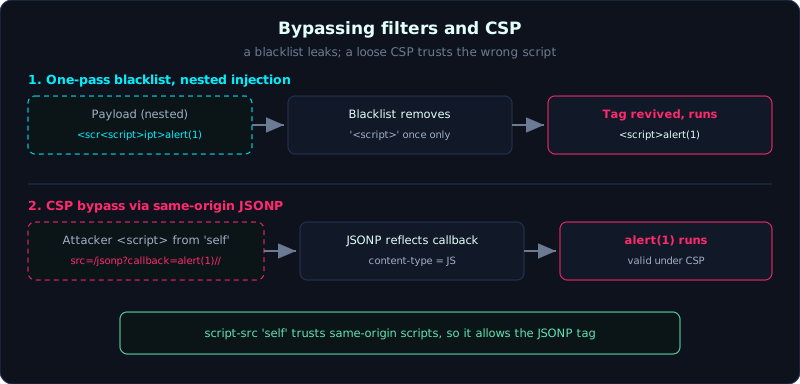 A one-pass blacklist rebuilds the tag it just removed, and a same-origin JSONP endpoint loads attacker code under script-src ‘self’.
| Part: 3 (Cross-Site Scripting) | Time: about 50 minutes | Difficulty: advanced |
Prerequisites: Lesson 3.1 (Reflected XSS), Lesson 3.3 (DOM-based XSS).
Tools: curl, Python requests, a browser with DevTools (the Network tab to read the CSP header).
Goals
After this lesson you understand why blacklist-style filtering loses on principle. You can bypass a naive filter with nested injection, case switching, and dropping the script tag. You understand how CSP (Content-Security-Policy) protects a page. You can recognize CSP configurations that are useless or bypassable: unsafe-inline, JSONP, nonce reuse.
1. Theory
Why a blacklist loses
A blacklist is a style of filtering that lists bad strings and then blocks or removes them. The problem is that HTML and JavaScript are too flexible: there are countless ways to write the same thing. Block <script> and there is still <img onerror>, <svg onload>, <iframe srcdoc>; block lowercase and there is still UPPERCASE; filter once and you can still nest. The defender has to plug every variant, the attacker only has to find one. That is an uneven game, so the rule is to use an allowlist (only permit what is known to be safe) or context-aware escaping, and not rely on a blacklist.
A few classic filter-bypass techniques:
- Nested injection: the filter removes the string
<script>, but only in one pass, without re-scanning the result. Send<scr<script>ipt>, the filter removes the inner<script>, and the two remaining pieces<scrandipt>join into a real<script>. The same applies to the closing tag. - Case switching: if the filter matches case-sensitively, then
<SCRIPT>or<ScRiPt>slips through, because HTML is case-insensitive while the filter is not. - Dropping the script tag: if the filter only targets
<script>, switch to an event handler<img src=x onerror=...>. No script tag needed. - Encoding: insert characters as HTML entities, URL-encoded, or using
String.fromCharCodeor\uto dodge literal string matching. - Polyglot: a payload built to run in several contexts at once (in an attribute, in href, in JS), useful when you are not sure where the input lands. They look messy, but the idea is to cover several possibilities in one string.
What CSP is
CSP (Content-Security-Policy) is an HTTP header that tells the browser “this page may load and run scripts from here”. It is a defense-in-depth layer: even when there is an XSS, a good CSP can stop the foreign script from actually running. For example script-src 'self' means only scripts loaded from the same origin may run, and inline script (written directly in the page) and event handlers are blocked.
But CSP is only good when it is configured tightly. Common broken configurations:
unsafe-inline: allows inline script and event handlers to run. With this keyword, CSP barely blocks XSS at all, because most payloads are inline. Many sites turn onunsafe-inlineso old code keeps working, and then CSP becomes a formality.unsafe-eval: allowsevaland equivalents, opening the way for many payloads.- JSONP on an allowed domain: if
script-srcallows an origin (including'self') and that origin has a JSONP endpoint that reflects acallbackparameter, the attacker loads<script src="//origin/jsonp?callback=payload//">. This script is “valid” under CSP because it comes from an allowed origin, but the content is attacker-controlled. Many large CDNs have been hit because they had JSONP available. - Nonce reuse: CSP uses a nonce (a random string generated each page load, attached to valid scripts). If the nonce does not change between loads, or is leaked in the page, the attacker can guess or reuse it, and then they are through.
- Allow-list too broad, missing
object-src 'none'andbase-uri: opens other injection paths.
2. Demo
The lab labs/3.4/ (port 8035) has a naive blacklist filter at /search (it only removes the literals <script> and </script>, in one pass, case-sensitively) and two endpoints that demonstrate CSP.
1
2
3
4
5
6
7
8
9
10
11
12
13
14
15
python3 labs/3.4/app.py       # port 8035

# A naive payload: the filter strips the script tag clean
curl -s "http://127.0.0.1:8035/search?q=<script>alert(1)</script>"
# ...<div id=out>Tim: alert(1)</div>...      (the script tag is gone)

# Bypass with nested injection: the two pieces join into a real <script>
curl -s --data-urlencode "q=<scr<script>ipt>alert(1)</scr</script>ipt>" -G http://127.0.0.1:8035/search
# ...<div id=out>Tim: <script>alert(1)</script></div>...   (the script tag is revived)

# CSP strict: the header is tight, but same-origin JSONP breaks it
curl -si "http://127.0.0.1:8035/csp-strict?q=x" | grep -i content-security
# Content-Security-Policy: default-src 'self'; script-src 'self'
curl -s "http://127.0.0.1:8035/jsonp?callback=alert(document.domain)//"
# alert(document.domain)//({"user":"admin","id":1});
The JSONP endpoint reflects the callback verbatim into JavaScript content, with content-type application/javascript. Because script-src 'self' allows loading a script from the site itself, the attacker sets <script src="/jsonp?callback=alert(document.domain)//"></script>: the script comes from 'self' so it is valid under CSP, but the content is the attacker’s. The // comments out the trailing JSON so there is no syntax error.
3. Lab
- Vulnerable app:
labs/3.4/(the lab README explains the setup, runs locally on port 8035). - Task: (1) find at least three ways to bypass the
/searchfilter; (2) explain why the CSP at/csp-inlineis useless; (3) build a flow that loads script past the CSP at/csp-strictthrough JSONP. - Hint: look closely at exactly what string the filter removes, whether it is case-sensitive, and how many passes it runs. For CSP, read each keyword in the header and ask “what does this keyword allow to run”.
- How to verify without a GUI (the lab does this in
exploit.py): grep the response, the naive payload is removed while the bypass payloads stay verbatim in the HTML (so they will run in the browser). For CSP, read the real header, analyze why it is bypassed, and confirm/jsonpreflects the callback verbatim with a JavaScript content-type. - Solution and real output:
labs/3.4/exploit.py,labs/3.4/transcript.txt. In the transcript, all four filter bypasses and the CSP bypass flow succeed.
4. Common pitfalls
- Believing that having a CSP means you are safe. You have to read the policy; a loosely configured CSP is worse than none because it creates a false sense of safety.
- Testing one payload and concluding “it is filtered well”. Always try several variants: case, nesting, encoding, a different context.
- Forgetting that DOM XSS (Lesson 3.3) usually skips the server filter entirely, so bypassing the filter often needs no clever trick.
- A filter that uses a home-made regex to “fix” a string usually creates new holes (for example a one-pass replacement that produces a new dangerous string).
5. Further reading
- PortSwigger Web Security Academy, the Content Security Policy and XSS context/filter bypass sections.
- Google CSP Evaluator, a tool that grades how tight a policy is.
- PayloadsAllTheThings, the XSS Filter Bypass section and the polyglot list.
6. Key takeaways
- A blacklist loses on principle; use an allowlist or context-aware escaping.
- Nested injection when the filter runs one pass; case switching when the filter is case-sensitive; drop the script tag with an event handler.
- CSP is an extra defense layer, not a replacement for escaping.
unsafe-inlinemakes CSP nearly useless against XSS.- JSONP and a broad allow-list can break even
script-src 'self'. - A nonce must be random on every load and must not be leaked.