Lesson 6.4: HTTP Request Smuggling with CL.TE and TE.CL
After this lesson you understand where request smuggling comes from, you can tell CL.TE and TE.CL apart, you know how to detect it safely with timing, and you can run a self-contained desync demo. The labs here run on your own machine or on systems you are authorized to test.
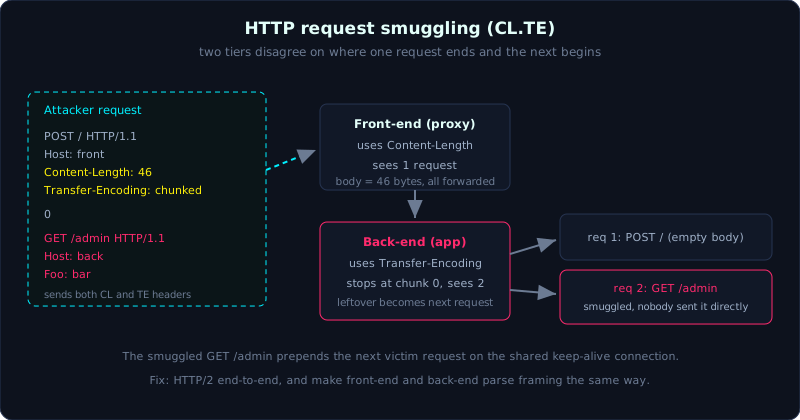 The front-end frames by Content-Length and the back-end frames by Transfer-Encoding, so the back-end sees a GET /admin nobody sent.
| Part: 6 | Time: about 40 minutes | Difficulty: advanced |
Prerequisites: Lesson 0.2 (HTTP core), Lesson 6.1 (Basic SSRF).
Tools: Burp Suite (HTTP Request Smuggler), smuggler.py.
Goals
After this lesson you understand why request smuggling is a flaw of a multi-tier system rather than a single app, you can tell CL.TE and TE.CL apart, you know how to detect it safely with timing, and you understand the impact and the defense.
1. Theory
1.1 The setting: two HTTP tiers
A real system usually has several HTTP tiers chained on the same TCP connection: a front-end (a reverse proxy, load balancer, or CDN such as nginx, haproxy, or Cloudflare) receives requests from the Internet and forwards them down to a back-end (the application server). To save resources, the front-end often reuses one keep-alive TCP connection to push many requests from many users down to the back-end.
1
2
3
4
5
   Many clients            front-end (proxy)          back-end (app)
   -----------             -----------------          --------------
   req A  --------\
   req B  ---------\-----> [merged into 1 connection] -> processes A, B, C in order
   req C  --------/             keep-alive
The problem appears when the two tiers DISAGREE about where one request ends and the next one begins.
1.2 Two ways to determine body length
HTTP/1.1 has two ways to report the length of the body:
- Content-Length (CL): a header that states how many bytes the body is.
- Transfer-Encoding: chunked (TE): the body is split into chunks, each chunk has its size at the front, and a chunk of size 0 ends the body.
If one request carries BOTH headers, the standard (RFC 7230) says Transfer-Encoding must win and Content-Length must be ignored. But in practice many products do this wrong or do it differently from one another. When the front-end uses one method and the back-end uses the other, the request boundary shifts, and the attacker smuggles a request onto the front of the connection.
1.3 CL.TE and TE.CL
- CL.TE: the front-end uses Content-Length, the back-end uses Transfer-Encoding.
- TE.CL: the front-end uses Transfer-Encoding, the back-end uses Content-Length.
Here is a CL.TE example. The attacker sends:
1
2
3
4
5
6
7
8
9
10
POST / HTTP/1.1
Host: front
Content-Length: 46
Transfer-Encoding: chunked

0

GET /admin HTTP/1.1
Host: back
Foo: bar
- The front-end uses Content-Length = 46, so it treats everything after the headers (including
GET /admin...) as the body of a single request and forwards all of it to the back-end. - The back-end uses Transfer-Encoding: chunked, reads up to the
0chunk, and treats the body as finished. The remainingGET /admin HTTP/1.1...stays in the buffer and becomes the FRONT of the next request on that shared connection.
1
2
3
4
5
6
         Front sees 1 request:            Back sees 2 requests:
         +-------------------+            +-------------------+
         | POST / (body 46)  |            | POST / (empty body)|
         +-------------------+            +-------------------+
                                          | GET /admin  <--- smuggled
                                          +-------------------+
When another victim’s request comes through the same connection, it is APPENDED after the GET /admin... piece, which makes the back-end process a request the victim never sent, while the victim’s real request is mangled.
1.4 Header obfuscation variants
The attacker forces the two tiers to disagree by obfuscating Transfer-Encoding so one tier recognizes it and the other ignores it:
1
2
3
4
5
6
7
Transfer-Encoding: chunked        (standard)
Transfer-Encoding:  chunked       (an odd extra space)
Transfer-Encoding: xchunked
Transfer-Encoding
 : chunked                        (an odd line break)
Transfer-Encoding: chunked, identity
Transfer_Encoding: chunked        (underscore instead of hyphen)
1.5 Impact
- Taking over someone else’s request/response (the front of a victim’s request is replaced, or the victim receives the response of the smuggled request: response queue poisoning).
- Bypassing the front-end’s access control (the front blocks /admin, but the smuggled request goes straight to the back-end).
- Web cache poisoning, and harvesting other users’ cookies/credentials.
2. Detection (safe)
You should not fire test payloads blindly at a real system, because it is easy to break other users’ requests. PortSwigger’s safe detection technique is based on timing:
- Send an “open” TE.CL or CL.TE payload that makes the back-end sit and wait for bytes that never arrive. If the response is unusually late (several seconds), there is likely a desync.
- Use the Burp Suite extension HTTP Request Smuggler (which has an automatic, safe probing mode), or the tool
smuggler.py.
3. Lab
- Self-contained demo:
labs/6.4/(runs locally). Runpython3 demo.py. - Because smuggling is a flaw of a multi-tier system, the demo builds both the front-end (127.0.0.1:8050, framing by CL) and the back-end (127.0.0.1:8051, framing by TE) in one process, sharing one keep-alive connection, to reproduce the CL.TE mechanism faithfully.
- The demo has two parts:
- Part A (deterministic): parse the same byte stream in two ways, showing that the front sees 1 request while the back sees 2.
- Part B (live): send the attacker’s CL.TE request followed by the victim’s normal request, and watch the back-end process the smuggled
GET /admin.
- Note: this is a simulation for learning the mechanism and does NOT replace a real multi-tier proxy environment. To reproduce it fully and test the impact (hijacking requests, bypassing the front-end, cache poisoning) you need a real front-end (nginx/haproxy/CDN) paired with a back-end that disagrees on CL/TE. The PortSwigger Web Security Academy labs are the best place to practice.
- Solution:
labs/6.4/demo.pyandlabs/6.4/transcript.txt.
An excerpt from a real run:
1
2
3
4
5
6
7
[back-end frame theo Transfer-Encoding] -> thay 2 request:
   req: POST / HTTP/1.1 | body 0 byte
   req: GET /admin HTTP/1.1 | body 0 byte
...
[2] Nan nhan gui request binh thuong 'GET /home' qua front-end...
    back-end log sau buoc 2: ['POST / HTTP/1.1', 'GET /admin HTTP/1.1']
=> Back-end da xu ly request 'GET /admin' KHONG ai gui truc tiep: CO (smuggling thanh cong)
4. Common pitfalls
- Firing smuggling payloads straight at production, breaking other users’ requests.
- Concluding there is a bug just because a response looked odd once. You need to repeat it and use a controlled timing technique.
- Forgetting that the same payload gives different results depending on the specific front/back pair.
- Thinking this is a back-end-only bug. It is a bug of the pair of tiers, so you must look at the whole system.
5. Further reading
- PortSwigger Web Security Academy: HTTP request smuggling (the CL.TE, TE.CL, TE.TE, and HTTP/2 downgrade labs).
- James Kettle, HTTP Desync Attacks (PortSwigger’s original research).
- RFC 7230 section 3.3.3 (Message Body Length).
- Tools: Burp Suite with HTTP Request Smuggler, smuggler.py.
6. Key takeaways
- Request smuggling is a framing disagreement between the front-end and the back-end on a shared connection.
- CL.TE: front uses Content-Length, back uses Transfer-Encoding. TE.CL is the reverse.
- A request with both CL and TE is a dangerous sign. The standard says to prefer TE, but many systems get it wrong.
- Detect safely with timing, using HTTP Request Smuggler.
- The strongest defense: HTTP/2 end-to-end, and a front-end and back-end that parse framing the same way.