Lesson 7.1: Path Traversal and LFI
After this lesson you know why a harmless-looking “filename” parameter can read /etc/passwd, how to recognize traversal, and why homemade ../ filters are almost always bypassed. The labs here run on your own machine or on systems you are authorized to test.
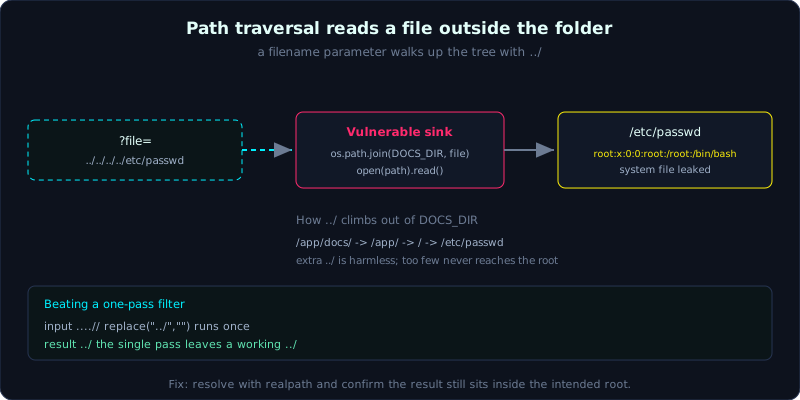 A filename parameter walks up the tree with
 ../ until it reaches a file outside the intended folder.
| Part: 7 | Time: about 45 minutes | Difficulty: medium |
Prerequisites: HTTP core, and how to intercept and edit requests with a proxy.
Tools: curl, Burp Suite, ffuf.
Goals
After this lesson you understand how path traversal (walking back up the directory tree) differs from LFI (Local File Inclusion), you can read a file outside the intended folder with ../, you know the common filters and why they fail (encoding, a single strip, the historic null byte, absolute path), and you can build the lab yourself and exploit it to get /etc/passwd.
1. Theory
Many web apps take a “filename” parameter and then open that file and return it: document download pages, image viewers, template readers, invoice downloads. The code usually looks like this:
1
2
path = os.path.join(DOCS_DIR, request.args["file"])
return open(path).read()
The developer assumes file is always welcome.txt or report.pdf. But a filename is a string the client sends, and a filename can contain one very useful sequence: .. (the parent directory). Send ../../../../etc/passwd and the operating system walks back up the tree and then turns toward /etc/passwd. This is path traversal (also called directory traversal, walking through directories).
Two concepts are often merged, so separate them:
- Path traversal / LFR (Local File Read): the app only READS the file content and returns it. The result is exposed source code, config files, keys,
/etc/passwd, and logs. - LFI (Local File Inclusion): the app
includes/requires that file as part of the program (common in PHP). If the file contains code (PHP), that code is EXECUTED. LFI can therefore escalate straight to RCE (Remote Code Execution, running commands remotely), see Lesson 7.3.
This lesson focuses on traversal and reading files. The key point is that the target file sits deep in the tree, so to get out to / you need enough ../. Too many is fine (going past the root just leaves the OS stuck at /), too few never reaches the destination. In the lab the docs/ folder is 7 levels deep, so I just scatter a dozen ../ to be safe.
How to recognize it
- A parameter that smells of a path:
?file=,?page=,?path=,?doc=,?template=,?lang=vi.php,?download=report.pdf. - A response that changes content with the filename, or an error like “No such file or directory” that includes the full absolute path (which leaks the directory structure too).
2. Demo
The first target is always /etc/passwd on Linux (anyone can read it, it is everywhere, and it confirms right away that you can read system files). On Windows aim for C:\Windows\win.ini or C:\Windows\System32\drivers\etc\hosts.
1
2
3
4
5
6
7
# raw request
GET /view?file=../../../../../../../../etc/passwd HTTP/1.1
Host: target

# response (excerpt)
root:x:0:0:root:/root:/bin/bash
daemon:x:1:1:daemon:/usr/sbin:/usr/sbin/nologin
A few common filter-bypass techniques (demonstrated in detail in the lab):
- URL-encode
../to%2e%2e%2f, or double-encode to%252e%252e%252fwhen there is a layer that decodes twice. - Single strip (bypass with
....//): many filters runreplace("../", "")exactly once, not recursively. The string....//, after the middle../is removed, leaves exactly../. It goes right through. - Null byte (
%00), historic: on old PHP (before 5.3.4),?file=../../etc/passwd%00.pngcut off the.pngthat the app appended itself. It is patched now, but you still see it on old apps or in other languages, so it is worth trying. - Absolute path: if the app concatenates like
include($dir . $file)and you send/etc/passwddirectly, you sometimes escape$direntirely (depending on how it concatenates), or you use it to tell whether the app normalizes the path.
3. Lab
- Vulnerable app:
labs/7.1/(a Flask “DocViewer”, runpython3 app.py, listening on127.0.0.1:8061). - Task: read
/etc/passwd, read the sourceapp.py, then bypass the../filter on the/safeendpoint. - Hint: the
/viewendpoint filters nothing, so use../freely. The/safeendpoint strips../once, so think about what....//turns into. - Solution:
labs/7.1/exploit.shandlabs/7.1/transcript.txt.
An excerpt from a real run (run with bash exploit.sh):
1
2
3
4
5
6
7
=== [1] Path traversal doc /etc/passwd qua ../ ===
root:x:0:0:root:/root:/bin/bash
daemon:x:1:1:daemon:/usr/sbin:/usr/sbin/nologin

=== [4] Bypass bo loc bang '....//' (strip 1 lan con lai '../') ===
root:x:0:0:root:/root:/bin/bash
daemon:x:1:1:daemon:/usr/sbin:/usr/sbin/nologin
Environment note: if you keep the repo on a Windows drive mounted into WSL (drvfs) and bash exploit.sh reports “Invalid argument”, run cat exploit.sh | bash instead.
4. Common pitfalls
- Filtering with a string blacklist of
../instead of normalizing the path and checking the root folder. It is almost always bypassable. - Blocking
../but forgetting the encoded form, or forgetting the Windows separator..\. - Assuming a file in a subfolder is safe without calling
realpathto check that the result still sits inside the root. - Hitting traversal on the WRITE side too (an upload with a
../in the name), not just on reads.
5. Further reading
- PortSwigger Web Security Academy: Path traversal.
- OWASP WSTG: Testing for Path Traversal / LFI.
- PayloadsAllTheThings: Directory Traversal.
6. Key takeaways
- When you see a path-smelling parameter, try
../right away, and try the URL-encoded form too. - Always aim for
/etc/passwd(Linux) orwin.ini(Windows) to confirm. - Too few
../never reaches the root, so scatter extra ones to be safe. - A single-pass
replace("../","")filter always fails against....//. - Reading the app source is a lead: trace from there to config, DB creds, and other endpoints.