Lesson 9.3: CORS Misconfiguration and Its Consequences
By the end of this lesson you understand what CORS actually does (and does not do), recognize the common misconfigurations, and can show that a server which reflects the Origin together with credentials lets a foreign web page read the data of a logged-in user. A misconfigured CORS policy does not break the server, it tricks the victim’s browser into handing over data.
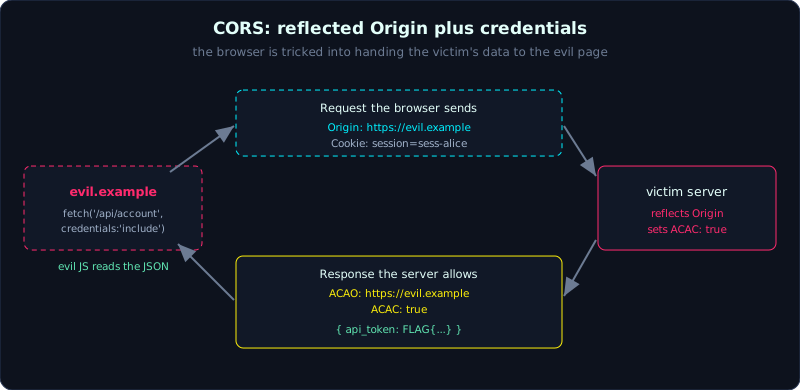 When the server reflects the attacker’s Origin and sets credentials true, the browser lets the evil page read the private response.
| Part: 9 (API and Modern Web) | Time: about 40 minutes | Difficulty: medium |
Prerequisites: Lesson 9.1 (REST API security), and a grasp of the same-origin policy and cookies (see Lesson 0.3).
Tools: curl, Python requests, Burp Suite, a browser with DevTools.
Goals
After this lesson you can tell the same-origin policy (SOP) apart from CORS, understand the header pair Access-Control-Allow-Origin and Access-Control-Allow-Credentials, recognize the misconfigurations (reflected Origin, null origin, loose regex, * with credentials), and demonstrate cross-origin data reading on a lab.
1. Theory
Same-origin policy (SOP) is the base rule of the browser: JavaScript at origin A cannot read a response from origin B. An origin is scheme + host + port (https://shop.local:443). SOP is what stops the page evil.example from reading the contents of the bank account you have open in another tab.
CORS (Cross-Origin Resource Sharing) is a mechanism for a server to relax SOP in a controlled way: the server says “I allow this origin to read my response” through headers. CORS is not a shield that protects the server, it is how the server grants permission to another origin. In short, a misconfigured CORS policy does not get the server attacked directly, it gets the victim’s browser tricked into handing data to the attacker.
Two core headers:
Access-Control-Allow-Origin(ACAO): which origin is allowed to read the response. It can be a specific origin or*(any origin).Access-Control-Allow-Credentials(ACAC): whether the response may be read when the request carries credentials (cookies, HTTP auth).
An important browser rule: if ACAC is true then ACAO cannot be *, it must be a specific origin. That constraint is exactly what gives rise to the most dangerous antipattern:
The server reads the request’s
Originheader and then reflects that value straight into ACAO, while also setting ACACtrue.
Do that, and for any origin, including https://evil.example, the server replies “I allow exactly this origin plus cookies”. The victim’s browser sees that and lets the JavaScript of evil.example read the response that contains the victim’s private data.
Common misconfigurations:
- Reflected Origin + credentials (as above): the most dangerous.
- Accepting
Origin: null: the browser sendsnullin some contexts (sandboxed iframe, redirect,file://). An attacker can produce anullorigin with a sandboxed iframe, and if the server allowsnull+ credentials, it can be read too. - Loose regex matching: a whitelist like “contains
shop.local” also matchesshop.local.evil.com; or one that is not anchored soevilshop.localpasses too. *with sensitive data but no credentials needed: if an API returns private data based on a token in a header while leaving ACAO at*, the attacker does not get the cookie but can read it if they trick the victim into sending the token.
2. Demo
The lab in labs/9.3/ builds the victim app: /api/account returns sensitive data, authenticates with a session cookie, and its CORS handler reflects every Origin and enables credentials.
To show the bug you do not need a GUI browser: send the request exactly as the browser would, then look at the CORS headers that come back. Step 1, the victim logs in and gets a cookie. Step 2, simulate the evil page sending a request with Origin: https://evil.example and the victim’s cookie:
1
2
3
4
5
6
7
8
9
GET /api/account
Origin: https://evil.example
Cookie: session=sess-alice-abc123

-> HTTP 200
Access-Control-Allow-Origin: https://evil.example   <- reflects the attacker's origin
Access-Control-Allow-Credentials: true
{"username":"alice","email":"alice@bank.local","balance":"120,000,000 VND",
 "api_token":"FLAG{9.3_cors_reflect_origin_with_credentials}"}
Because ACAO reflects https://evil.example and ACAC is true, the browser lets the JavaScript of evil.example read the whole JSON block above. Step 3, try Origin: null, and it is accepted exactly the same way.
The file labs/9.3/attacker.html is a real evil page: it calls fetch('http://127.0.0.1:8073/api/account', {credentials:'include'}) and displays the data. To see it in a browser, run the victim on port 8073, serve attacker.html on a different port (for example 8074), then open it while logged in to the victim. The exploit.py version does the core proof without a GUI.
3. Lab
- Vulnerable app:
labs/9.3/(Flask victim, binds127.0.0.1:8073, run locally per the lab README). - Task:
- Log in to the victim to get a cookie.
- Send a request to
/api/accountwith differentOriginvalues, and observe the ACAO/ACAC response. - Confirm the server reflects every origin and accepts
null.
- Hint: in Burp, change the
Originheader in Repeater and compare the returned headers. In a browser, openattacker.htmland watch the Console/Network tab. - Solution:
exploit.py,attacker.htmlandtranscript.txtinlabs/9.3/.
4. Common pitfalls
- Using a CORS library and enabling “allow all origins” for convenience during development, then forgetting to remove it in production.
- Writing a whitelist with
origin.contains("mydomain.com")or a regex that is not anchored at the start and end. - Thinking that having
Access-Control-Allow-Credentials: trueis safe, when the real mistake is the reflected ACAO. - Forgetting that a
SameSite=Nonecookie is what gets sent along when fetching from another origin. A correct SameSite setting (Lax/Strict) blocks many scenarios.
5. Further reading
- MDN: CORS, the ACAO/ACAC header pair, and the credentials rule.
- PortSwigger Web Security Academy: the CORS topic.
- Lesson 5.3 (CSRF) and Lesson 0.3 (same-origin policy, cookies) to connect the origin-policy thread.
6. Key takeaways
- CORS is a permission mechanism, not a firewall. A misconfiguration leaks data, it does not crash the server.
- Always try changing
Originto a foreign origin and see whether ACAO reflects it back. - ACAC
true+ reflected ACAO = the data can be read with the victim’s cookie. This is a red flag. - Try
Origin: null. Try subdomain/suffix variants to probe a loose regex. - Remember:
*and credentials cannot go together, so the attacker usually forces the server to reflect a specific origin.